Applying for jobs is a numbers game, and numbers get messy fast. By application number fifteen, most people can’t remember who they followed up with, which resume they sent, or when that recruiter said she’d call back. A simple job application tracker fixes that. This free one goes a step further: it tells you when to follow up and when to let a silent application go.
Grab the free Excel and Google Sheets template below, then read on for a simple system to run your search with it.

Free Job Application Tracker (Hirebound Free Sample)
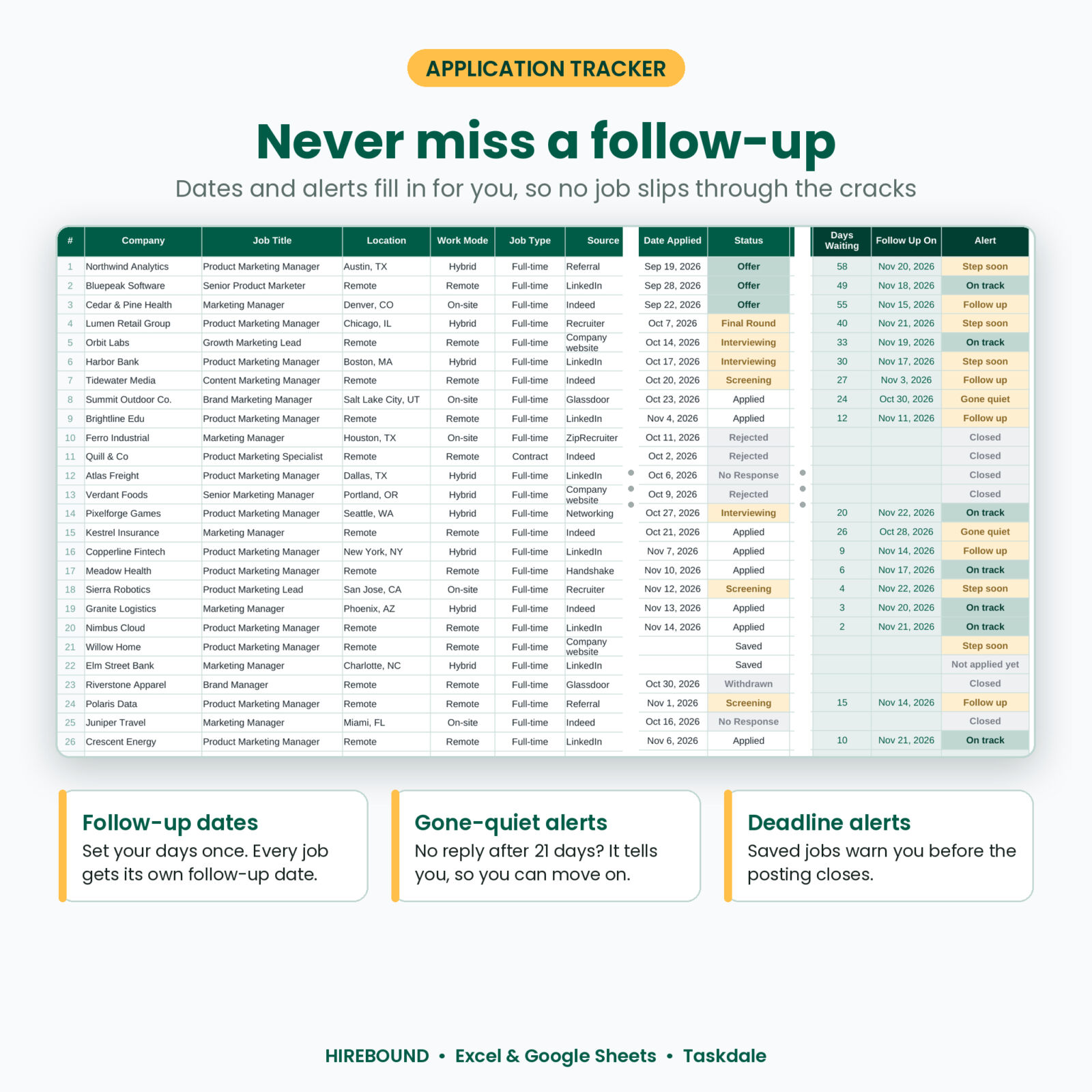
Free job application tracker spreadsheet for Excel and Google Sheets: 40-row tracker with automatic follow-up dates, gone-quiet and deadline alerts, a mini dashboard with reply rate and funnel, and 5 STAR story slots.
Want everything unlocked?
The free file is a sample. The full version has every page, tab and feature, plus the user guide.
See the full versionWhat’s in the free job application tracker
The free sample is a cut-down version of Hirebound, our full job search tracker and interview prep spreadsheet. It’s small, but every part works:
- Applications tab (40 rows): company, title, location, work mode, source, link, resume version, date applied, status, reply date, salary range, contact, next step and notes.
- Automatic follow-up dates: set your number of days once (7 is the default) and every job gets its own follow-up date.
- Smart alerts: Follow up, Gone quiet, Step soon, Step overdue, Apply soon and Deadline passed.
- Mini dashboard: applications sent, active jobs, reply rate, interview rate, offers, a pipeline funnel, replies by job board and a status board.
- 5 STAR story slots with word count, speak time and a “Ready” check.
- Settings: your currency, follow-up timing and editable dropdown lists.
How to set up your job search tracker in 10 minutes
1. Add your settings
Open the Settings tab. Type your name, your search start date and your currency symbol. Then decide two numbers: how many days to wait before following up (7 works for most roles) and how many days of silence before you call an application “gone quiet” (21 is a good default).
2. Catch up on jobs you already applied to
Spend ten minutes adding every job you have already applied to. Company, title, date applied and status are enough. The dashboard only tells the truth if the list is complete.
3. Log every new job the moment you apply
It takes 30 seconds. Paste the link, pick the source and the resume version you used, and set the status to Applied. If you find a job but are not ready to apply, set it to Saved and add the closing date in Apply By. You will get an “Apply soon” alert three days before it closes.
4. Work the Alert column every morning
Sort your day by the alerts. “Step overdue” first, then “Follow up”, then “Step soon”. This is the single habit that separates a busy search from a productive one.
5. Review your numbers every two weeks
Look at the reply rate by source. If referrals reply 60% of the time and a job board replies 5% of the time, you know where your next hour should go.
When should you follow up on a job application?
A good rule: follow up once about a week after applying, and once more around day 14 if you have a contact name. Keep it short:
- One line on the role and when you applied.
- One line on why you are a strong fit, with a number if you have one.
- One line asking about next steps.
After two follow-ups and three weeks of silence, the tracker flags the job as “Gone quiet”. That’s your cue to move it to No Response and put your energy elsewhere. Some will still come back, and when they do, you’ll have every detail ready.
Prepare for interviews with the STAR method
Most interviews include “tell me about a time when” questions. The STAR method keeps your answer tight:
- Situation: the background in one or two sentences.
- Task: what you were responsible for.
- Action: what you did. Say “I”, not “we”.
- Result: what changed, ideally with a number.
Write each story once in the STAR tab, tag the skill it proves, and rate how strong it is. Aim for answers of about 90 seconds to 2 minutes when spoken. The free sample gives you 5 story slots, enough for leadership, conflict, failure, problem solving and a big win.
Free tracker vs the full Hirebound
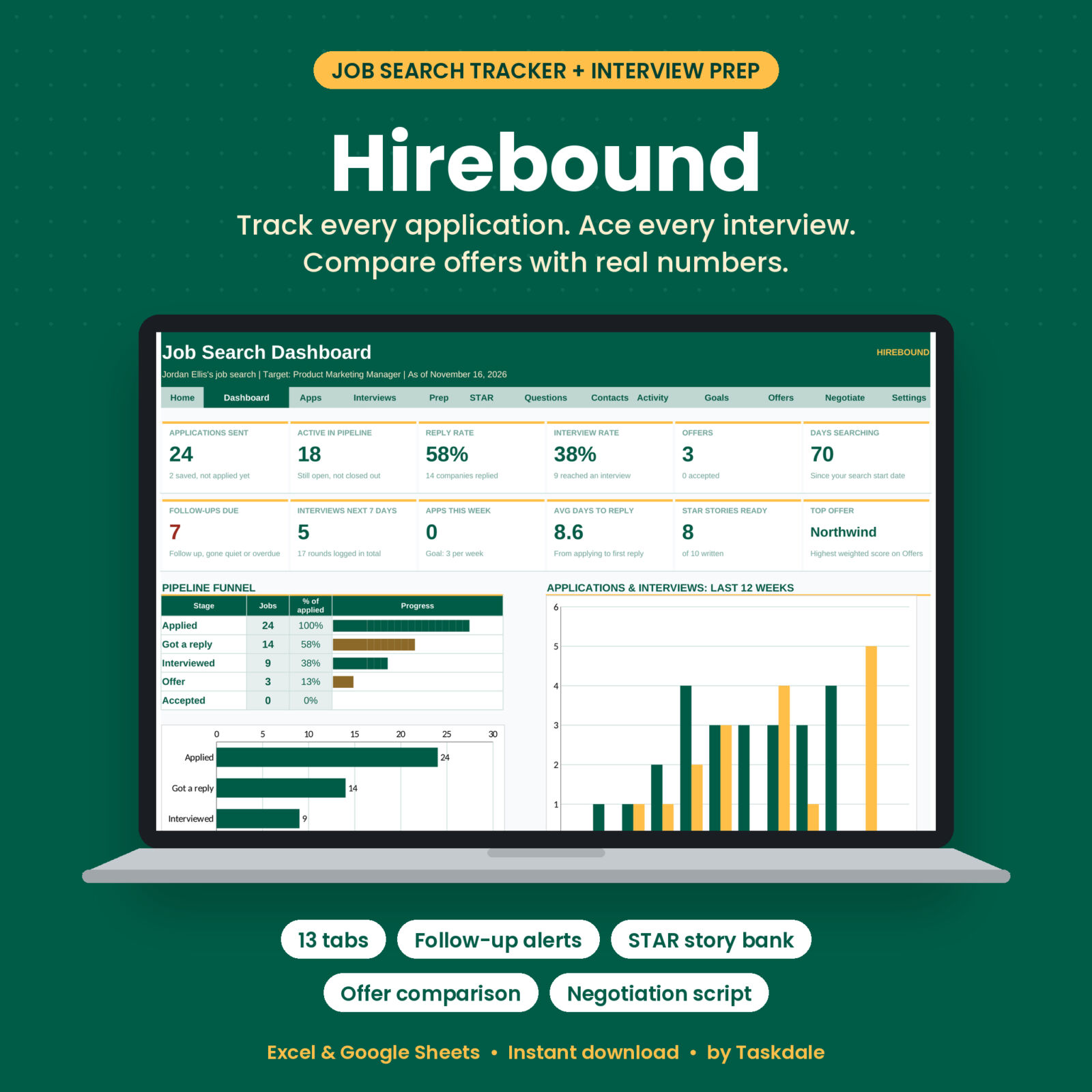
The free version handles the basics well. If you are juggling interviews, recruiters and offers, the full Hirebound job search tracker adds the rest:
| Feature | Free sample | Full Hirebound |
|---|---|---|
| Application tracker | 40 rows | 300 rows |
| Follow-up, gone-quiet and deadline alerts | Yes | Yes |
| Dashboard | Key numbers, funnel, sources | 12 numbers, charts, upcoming interviews, follow-ups due list |
| Interview log with countdowns and thank-you reminders | No | 200 rounds |
| Interview Prep sheet that pulls your best stories | No | Yes |
| STAR story bank | 5 stories | 50 stories + skill coverage check |
| Interview question bank | No | 60 questions + 20 to ask them |
| Networking contacts with reach-out alerts | No | 200 contacts |
| Weekly goals scoreboard | No | 52 weeks + chart |
| Offer comparison and value per hour | No | Up to 4 offers vs current job |
| Salary negotiation calculator and script | No | Yes |
| User guide | No | Yes |
Compare job offers on real numbers
Two offers can look close on salary and be far apart in real life. A long commute, a pricey health plan and fewer days off all eat into what a job is worth. The full Hirebound works out year-one value, ongoing yearly value and value per hour after commute time, then scores each offer on what matters to you: growth, the work itself, your manager, flexibility and more.
When you are ready to ask for more, the Negotiation tab shows where the offer sits in the market range, suggests a counteroffer, shows what the difference is worth per paycheck and over five years, and writes a short script you can say out loud.
Job search tracker tips that make a difference
- Use two resume versions and track which one gets more replies.
- Log the source for every job. You’ll quickly see where your interviews really come from.
- Write the contact name for every application, even if it’s only the recruiter from the posting.
- Send a thank-you note within 24 hours of every interview.
- Set a weekly rhythm (for example 8 applications, 4 follow-ups and 4 networking messages) and stick to it.
Ready to run your whole search in one place?
Start with the free tracker above, then upgrade when interviews and offers start rolling in. Hirebound adds interview tracking, an Interview Prep sheet, 50 STAR stories, 80 questions, networking contacts, weekly goals, offer comparison and a negotiation script.
Download the free tracker | Get the full Hirebound job search tracker
FAQ
Is this job application tracker really free?
Yes. Enter your email in the download box above to get the Excel file.
Does it work in Google Sheets?
Yes. Upload the .xlsx to Google Drive and open it with Google Sheets.
Which Excel version do I need?
Excel 2019, Excel 2021 or Microsoft 365, or Google Sheets.
Can I use my own currency?
Yes. Change the currency symbol on the Settings tab.