



A College Dorm Checklist That Adds It All Up
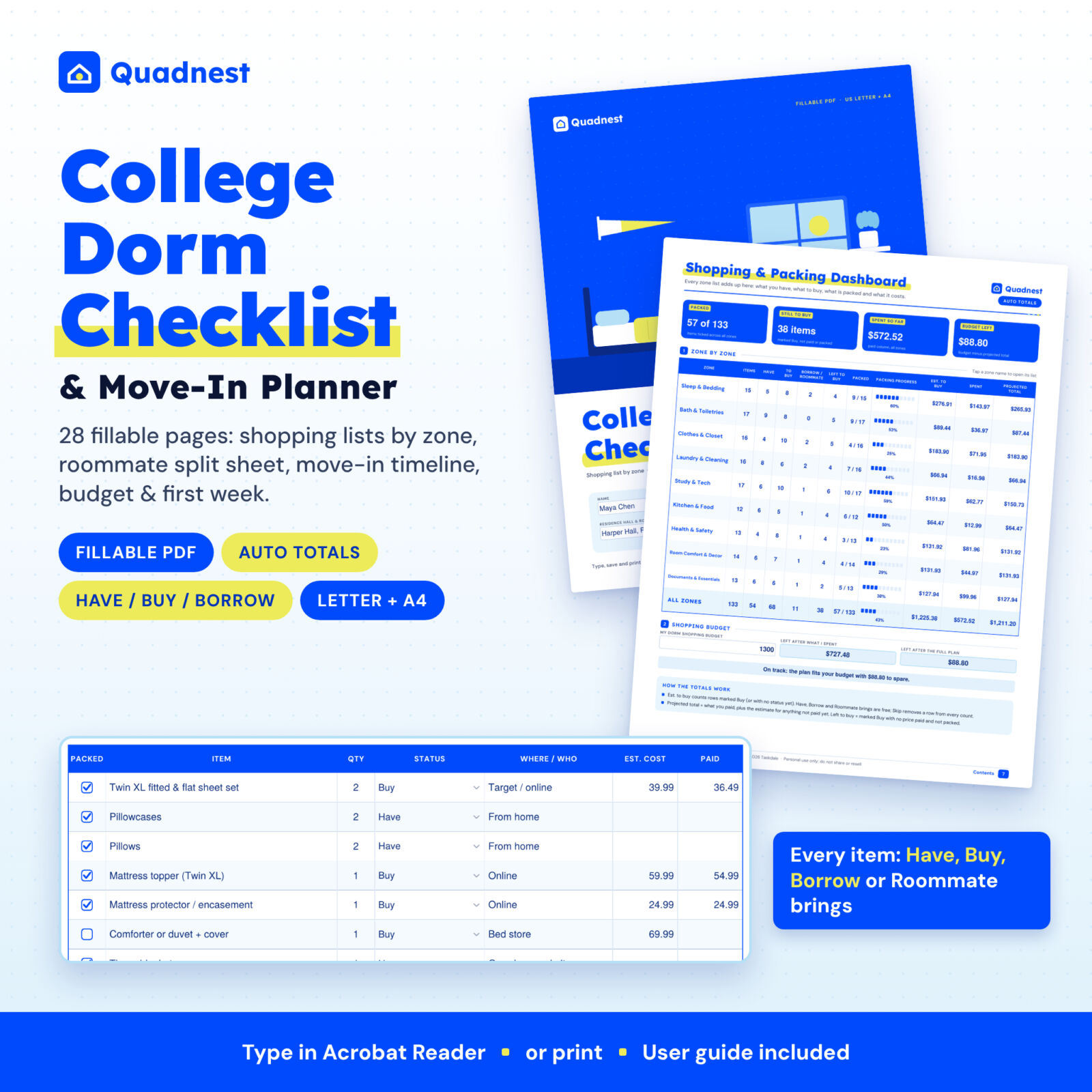
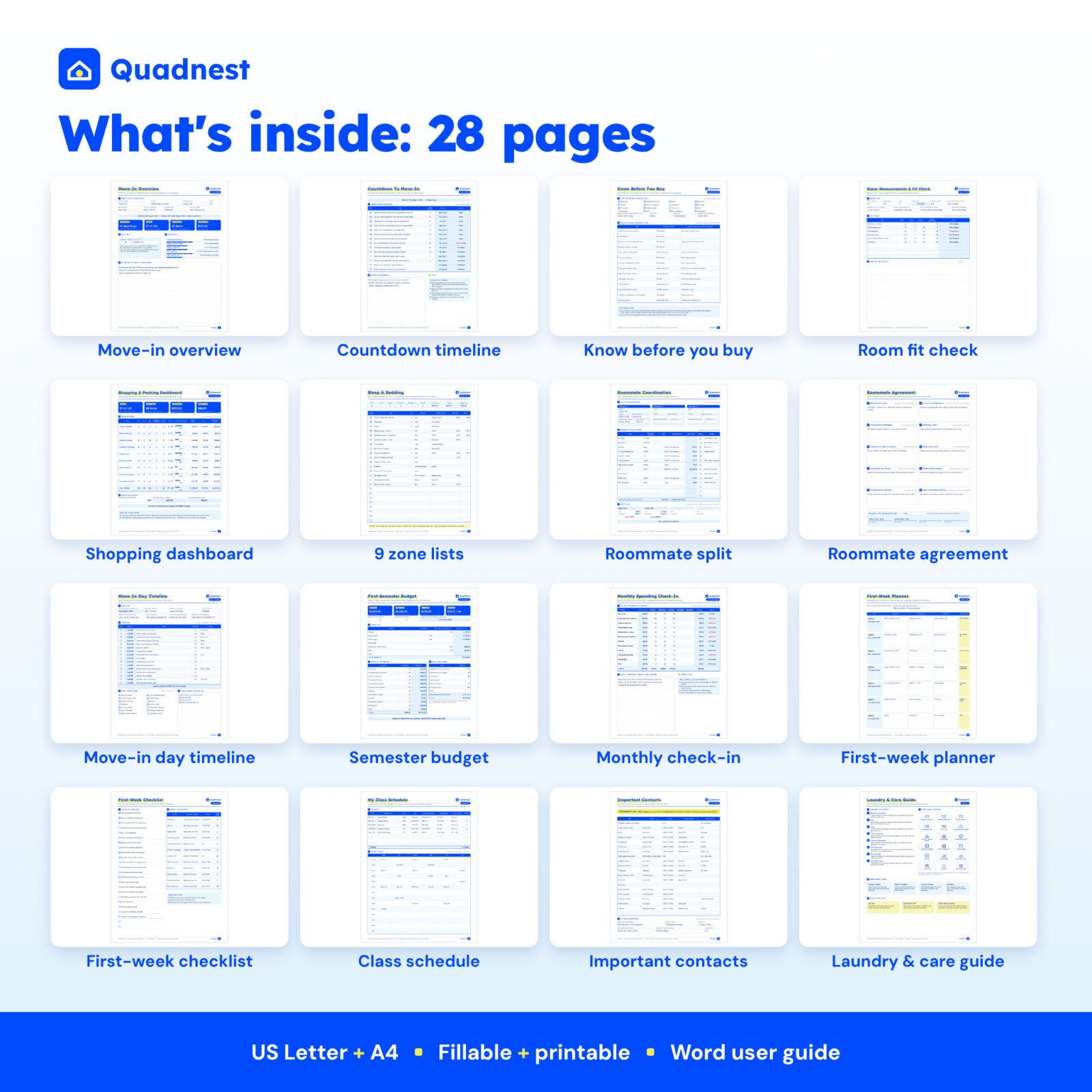
Most dorm lists stop at a column of checkboxes. The Quadnest college dorm checklist and move-in planner goes further: it is a 28-page fillable PDF that tells you what you already have, what you still need to buy, what is packed and what the whole move will cost. Type in free Adobe Acrobat Reader or print and write by hand.
It is built for incoming freshmen, the parents helping them, and returning students moving into a new hall, suite or apartment. One file covers the summer before college, move-in day and the first weeks on campus.
What It Does
Dorm shopping list by zone, with have / buy / borrow
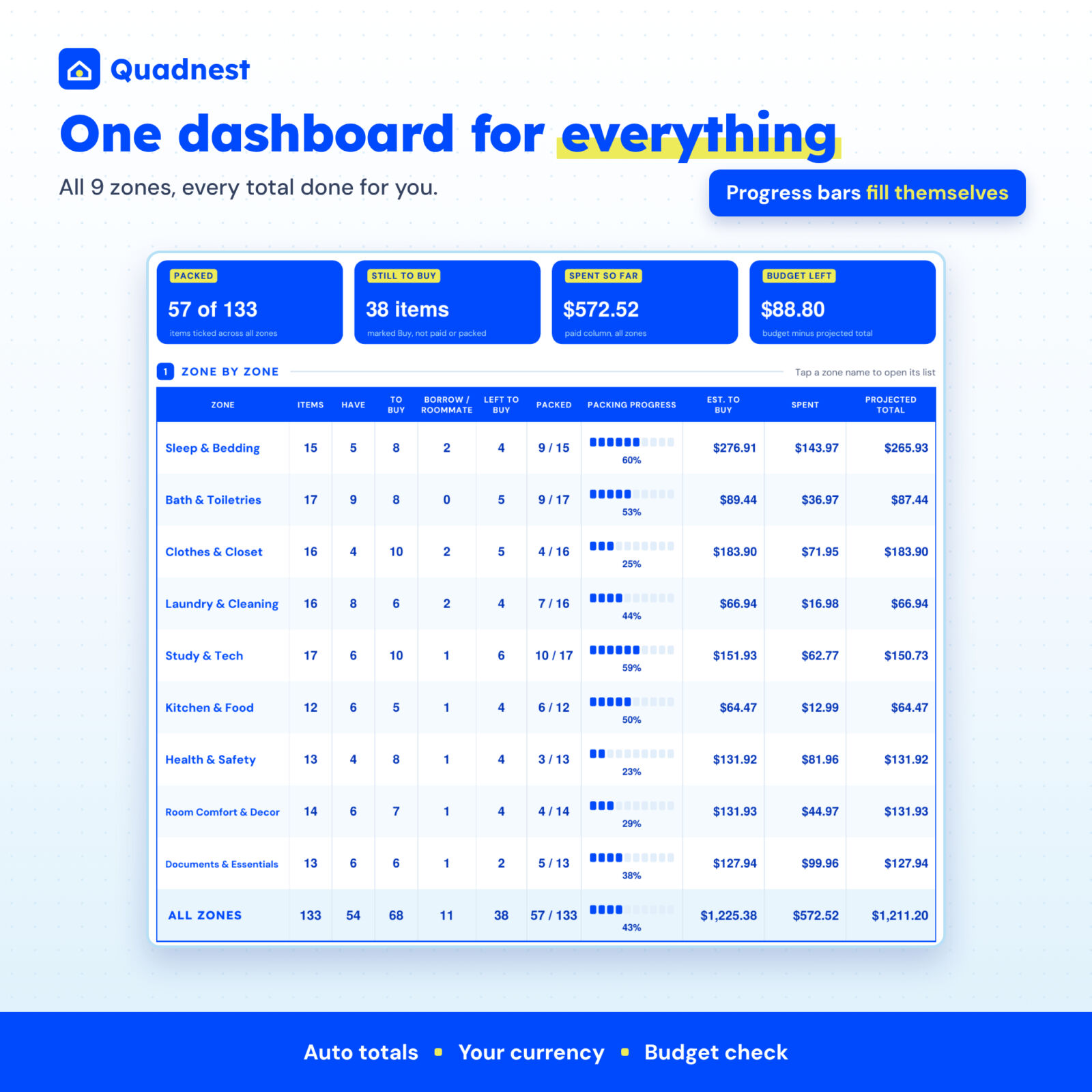
Nine ready-made lists hold more than 140 editable items: Sleep & Bedding, Bath & Toiletries, Clothes & Closet, Laundry & Cleaning, Study & Tech, Kitchen & Food, Health & Safety, Room Comfort & Decor, and Documents & Essentials. For every item you choose Have, Buy, Buy on campus, Borrow, Roommate brings or Skip, then type a quantity, where it comes from, the estimated cost and what you paid. A summary strip on each list counts items, have, to buy, left to buy, borrowed and packed, and totals the estimate, the spend and the projected cost.
Shopping & packing dashboard
One page brings all nine zones together with packing progress bars, money columns and four headline tiles: items packed, items still to buy, spent so far and budget left. Type your dorm shopping budget and the planner tells you whether the plan fits, or how much to trim.
Countdown and “know before you buy”
- A countdown to move-in with 14 editable milestones. Due dates count back from your move-in date and turn red when they are close or overdue.
- A page to record what your room already provides and your school’s rule on 14 commonly restricted items, such as candles, space heaters, extension cords and hot plates.
- Room measurements with automatic floor area, a “will it fit?” checker for rugs, shelves and bins, and a dot-grid layout sketch.
Roommate coordination sheet
List up to three roommates, decide who brings the rug, the TV and the cleaning supplies, and log the cost of shared items. The planner splits each shared cost evenly and shows who owes whom. A separate roommate agreement page covers ten topics to talk through in week one, from quiet hours to guests.
Move-in day timeline
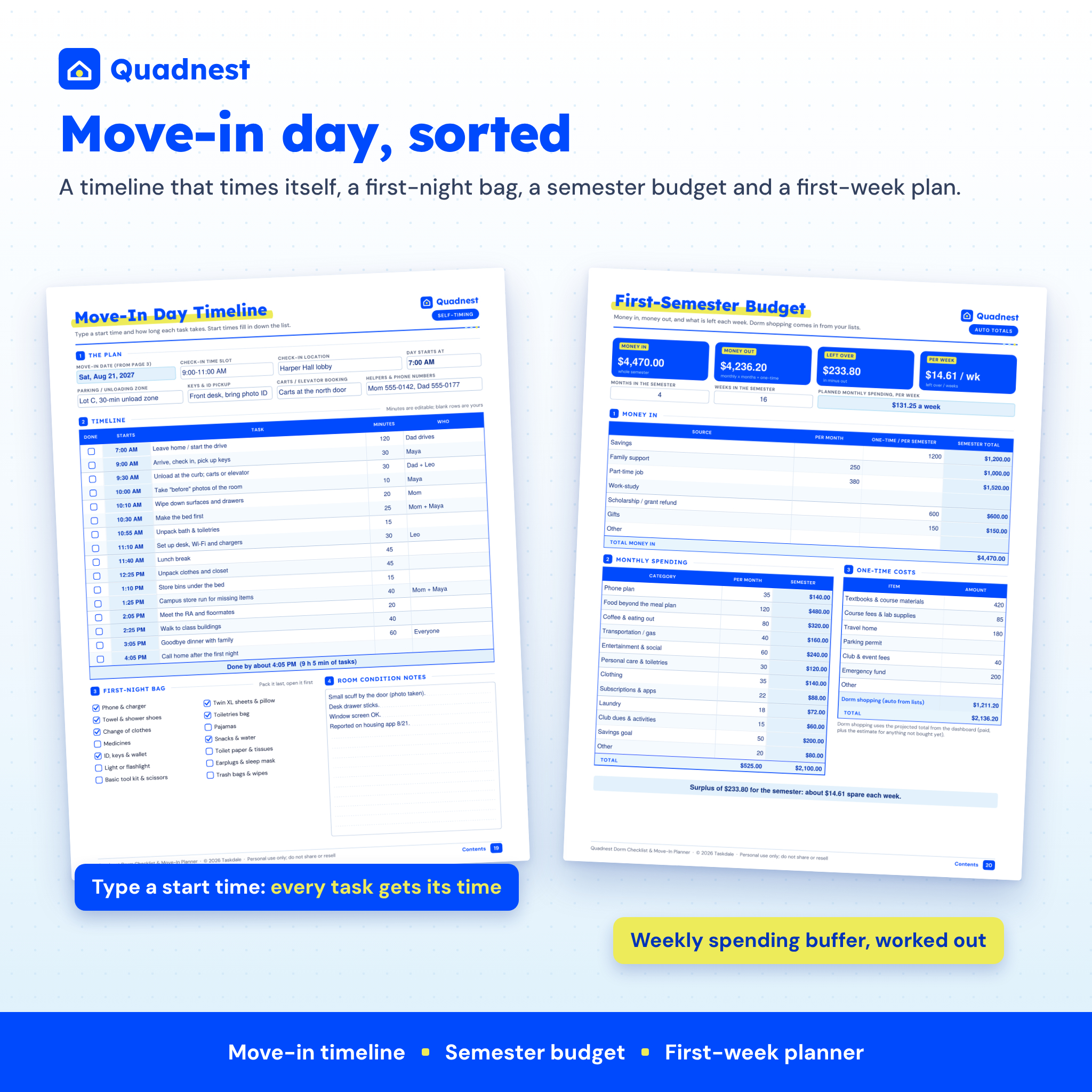
Type the time your day starts and how long each task takes. Every task gets its own start time and the page shows when you will be done. It includes a first-night bag checklist and space to note any damage in the room for your housing report.
First-semester budget and monthly check-in
Enter money in (savings, family support, a campus job, refunds) and money out (monthly spending and one-time costs like textbooks). Your dorm shopping total flows in from the lists. You see the semester surplus or shortfall and a weekly spending buffer. The monthly check-in compares what you really spent with the plan and flags categories that run over.
First week, classes, contacts and laundry
- First-week planner with dates that fill in from move-in day, plus a 20-item checklist and a “find it on campus” table.
- Class schedule with a credit total and a weekly grid.
- Important contacts page, starting with 911 and the 988 Suicide & Crisis Lifeline.
- Laundry & care guide: eight simple steps, a care-label symbol decoder, how to sort loads and stain first aid. Plus a laundry cost calculator for the semester.
Why Buyers Choose Quadnest
- Spend less. Marking items Have, Borrow or Roommate brings before you shop stops double buying.
- Avoid banned items. The policy page reminds you to check your school’s list before you buy.
- Real automation. Totals, due dates, start times, roommate balances and budget results update as you type.
- Beyond move-in. Budget, first week, classes and laundry help after the boxes are unpacked.
- Your currency, your dates. Set any currency symbol and US or day-first dates.
What Is Included
- Quadnest College Dorm Checklist & Move-In Planner, US Letter fillable PDF (28 pages)
- The same planner in A4 (28 pages, day-first dates preset)
- User guide in Word (.docx) with screenshots, tips, troubleshooting and FAQ
How It Works
- Download the files and open the PDF in free Adobe Acrobat Reader.
- On page 3, type your name, school, move-in date and classes start date, and check the currency symbol.
- Work through the zone lists: rename, add or skip items and set each status and cost.
- Use the dashboard, roommate sheet, move-in timeline and budget as move-in day gets closer. Save as you go.
File Formats and Software
Fillable PDF in US Letter (8.5 x 11 in) and A4, with fonts embedded, clickable contents and bookmarks. Automatic calculations work in free Adobe Acrobat Reader on Windows, Mac, iPad, iPhone and Android. Browser viewers and basic preview apps can show and print the pages but may not calculate. The user guide is a Word document that also opens in Google Docs, Pages and LibreOffice.
Customization
Every item, quantity, milestone, budget category and contact label is editable. Blank rows on every list hold your own items. The status dropdown also accepts your own words. Print any page or page range for a paper copy.
Digital Download
This is a digital product: nothing ships. Your files are available to download right after purchase. Personal use only. You may not resell, share or redistribute the files.
Real Situations Where It Helps
- A freshman and a parent split the dorm shopping list and keep the total inside a set budget.
- Two new roommates agree who brings the rug and the coffee maker, then settle up after move-in.
- A family plans a move-in day with an early check-in slot and a long drive.
- A student builds a first-semester budget around a campus job and a refund check.
- A returning student moving into a suite re-uses the lists and skips what they already own.
FAQ
What should be on a college dorm checklist?
Bedding (usually Twin XL), bath items, clothes, laundry and cleaning supplies, study and tech gear, a few kitchen basics, health and safety items, decor and important documents. All nine zones are included and fully editable.
Is this a printable or fillable dorm checklist?
Both. Type into it in Adobe Acrobat Reader or print the pages and write by hand.
Does it work on an iPad or phone?
Yes, in the free Adobe Acrobat Reader app. Some other apps can fill the fields but may not run the calculations.
Is it a spreadsheet?
No. It is a fillable PDF with built-in calculations, so you do not need Excel or Google Sheets.
Does it know my school’s rules?
No planner can. The Know Before You Buy page helps you record your school’s official answers so you do not buy items that are not allowed.
Can I change the currency?
Yes. Type any currency symbol on the settings page and every total uses it.
Is there a free version?
Yes. A free lite edition with the bedding list, the move-in day timeline and the laundry guide is available on the Taskdale blog.
Reviews
There are no reviews yet.