


Money talks between partners go better with numbers both of you trust. Pairbloom is a couples budget spreadsheet that keeps those numbers in one place. It splits every shared cost by the rule you choose, tracks who paid, and at the end of the month it tells you, in plain words, who owes whom and how much. No more mental math over dinner, and no more “I think I paid for the last three grocery runs.”
Fair, not just equal
A 50 / 50 split feels fair until one of you earns a lot more than the other. Pairbloom gives you three options: 50 / 50, by income (each of you pays the same share of your take-home pay), or a custom share. You can also set a default split per category, so rent follows your income split, date nights stay 50 / 50, and each partner’s personal spending stays theirs.
Features
Shared expense log
Up to 500 entries. Whoever pays logs it with the date, category, amount and who paid: either partner or the joint account. Pairbloom calculates each partner’s share, what each paid and the running balance. Joint account payments are split by your rule and never create a debt between you. Choose a different split on any single row when you need to.
Settle up
Month by month, see each partner’s fair share and what they actually paid, plus the transfer that makes it even, for example “Alex sends Sam $105.12”. Log repayments in the transfer table and the balance resets.
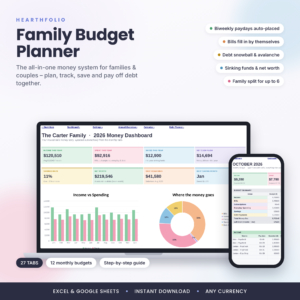
Couples dashboard
- Who owes whom right now
- Household income and your effective split
- Shared spending this year
- A month in focus: fair share vs paid for each partner, personal money left, top categories, goal progress and a bills check-in
- A chart of fair share vs paid for every month
Household budget
Budget vs actual for up to 30 categories across all 12 months, filled in automatically from the log, with over-budget cells highlighted and a monthly spending chart.
Shared bills
Up to 25 bills with who pays, the split, each partner’s share and a paid tick for every month.
Our goals
Eight shared goals with each partner’s contributions, progress bars and a fair monthly amount for each of you based on your split.
Personal money
Set a monthly allowance for each partner. Rows split as “only” that partner count against it, so personal spending stays personal.
Who it is for
- Couples with separate accounts, a joint account, or both
- Partners with different incomes who want a split that feels fair
- Families who want one household budget and a monthly money check-in
- Roommates or co-parents sharing costs
What’s included
- Pairbloom Couples Budget Spreadsheet (.xlsx) with Start Here, Dashboard, Settings, Shared Log, Monthly Budget, Settle Up, Bills and Goals
- Pairbloom User Guide (.docx) with setup steps, how splitting works, tips, troubleshooting and FAQ
How it works
- Type both names and take-home pay on Settings, then choose how you split costs.
- Set a default split and monthly budget for each category.
- Log shared costs as they happen, whoever pays.
- Once a month, send the transfer Settle Up suggests and log it.
File format and software
One .xlsx workbook for Microsoft Excel 2016 or newer (Windows and Mac, Microsoft 365) and Google Sheets. In Google Sheets you can share the file with your partner and both edit it. No macros or scripts.
Customization
Any currency symbol, your own names, your own categories and split rules. Formula cells are locked to prevent accidents; sheets have no password if you want to change the design.
Why couples stick with it
Most money friction between partners is not about big decisions. It is about the small stuff nobody keeps track of: who bought groceries, who covered the electric bill, whether the takeout last Friday was a “we” or a “you”. Pairbloom answers those questions with a log both of you can see, and it does the splitting math so neither of you has to. A five-minute check-in once a month, one transfer, and you start the next month even.
Setup takes about ten minutes together. Agree on the split method, set a default for each category, decide on personal spending money for each of you, and you are ready. The Start Here tab walks you through it and the user guide covers every feature with examples.
Instant digital download
Download right after checkout. Licensed for personal use only.
FAQ
How does the split by income work?
Each partner pays the same percentage of their income. If one earns 5,200 and the other 3,600 a month, shared costs split about 59% / 41%.
Can we both use it at the same time?
Yes, in Google Sheets. Share your copy with your partner and edit together.
What if we pay from a joint account?
Choose “Joint account” as the payer. The cost is split by your rule and no debt is created.
Can roommates use it?
Yes. Enter the two names and the split you agree on.
Does it work in Excel on a Mac?
Yes, Excel 2016 or newer on Mac, and Google Sheets in any browser.
Can I change the currency?
Yes, type any symbol on Settings.

Reviews
There are no reviews yet.