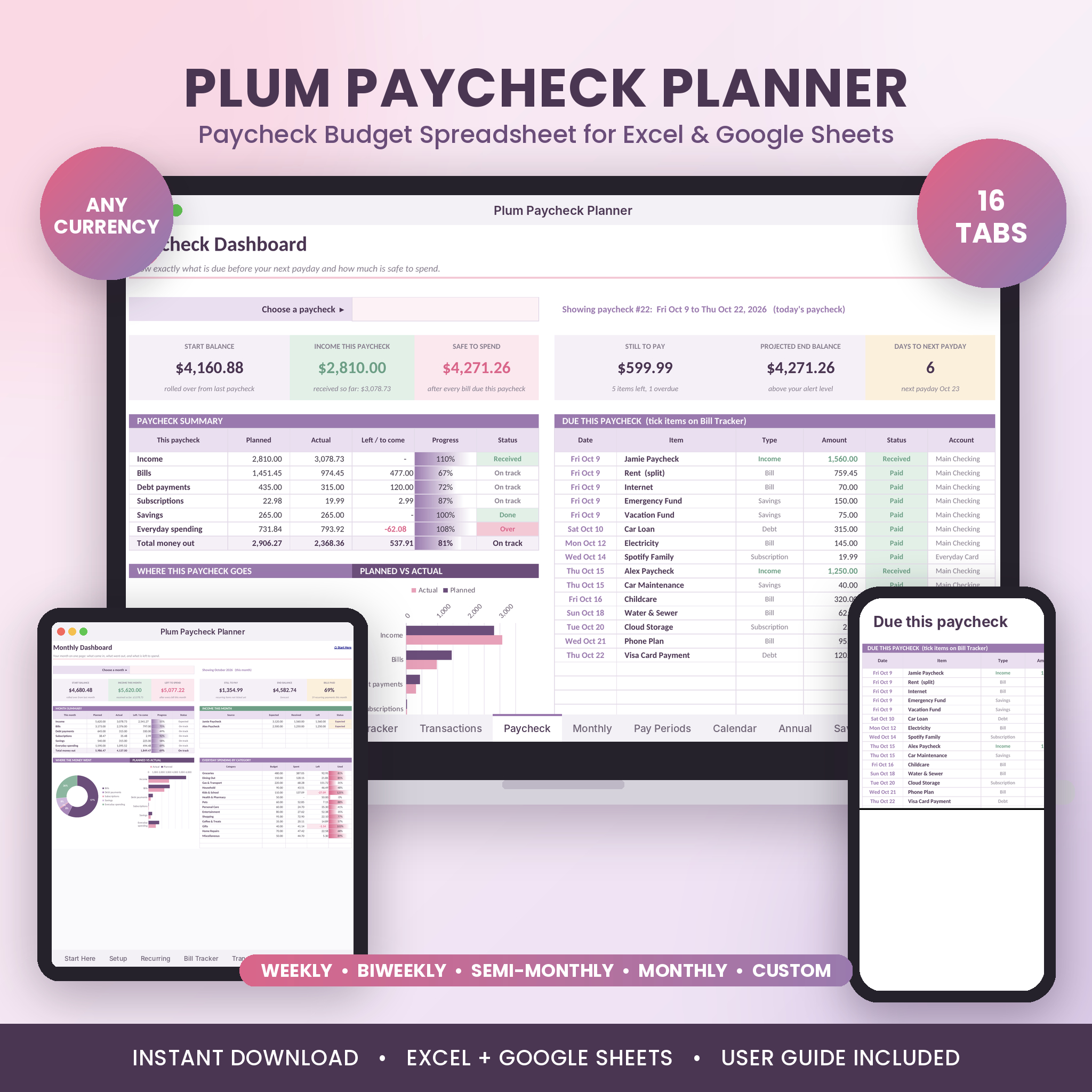
Plum Paycheck Planner is a paycheck budget spreadsheet for Excel and Google Sheets. It shows what lands in each paycheck, which bills fall before your next payday, and how much is left to spend. Set up your money once. The planner maps every due date for the year and keeps your balance rolling from one paycheck to the next.
Monthly budgets miss the problem most people actually have. Rent is due on the 1st, payday is the 5th, and the month view says everything is fine. This planner looks at each paycheck on its own, so you see the tight spots before they happen.
What the Paycheck Budget Spreadsheet Does
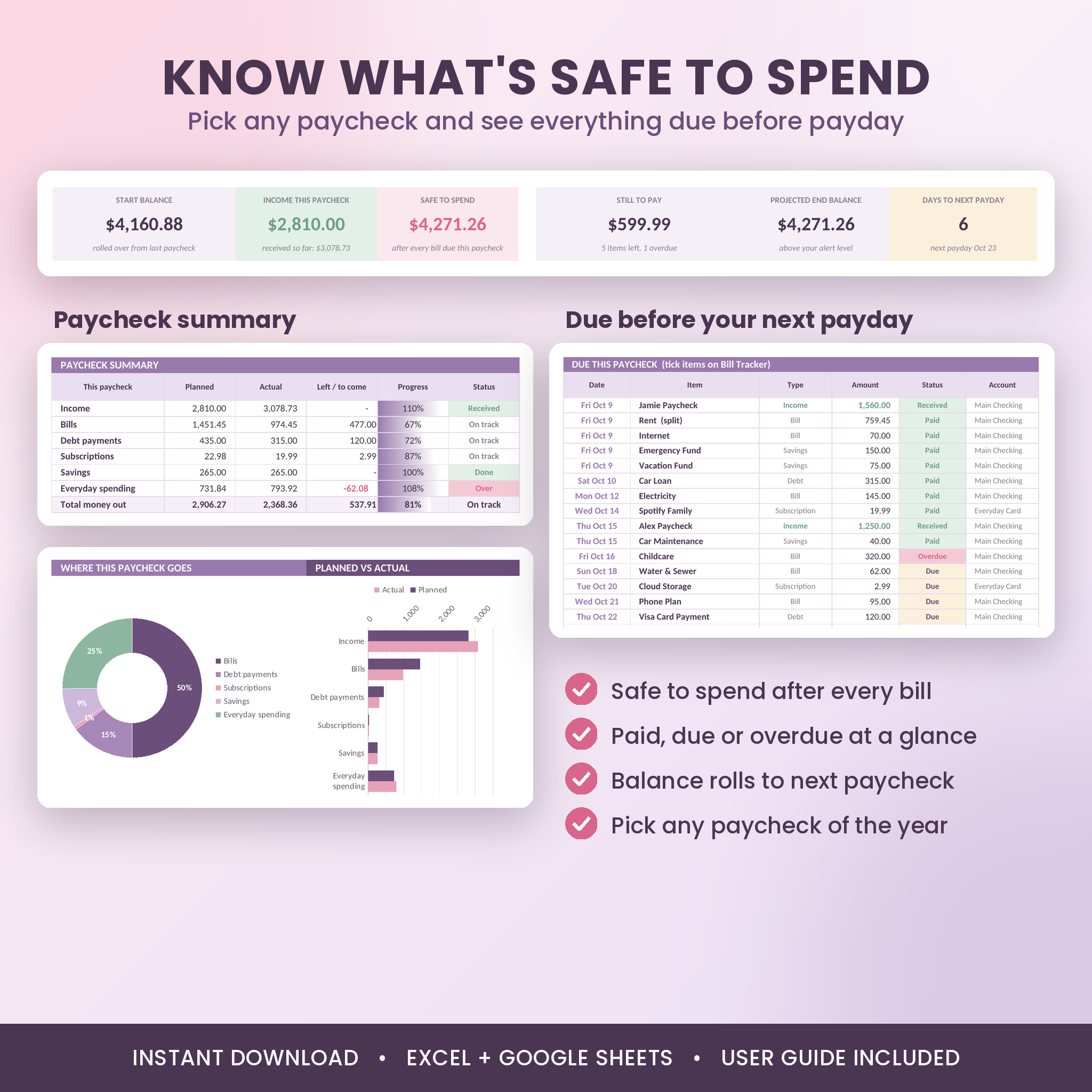
- Safe to spend, every paycheck. Start balance plus pay, minus every bill due before payday, minus what you already spent.
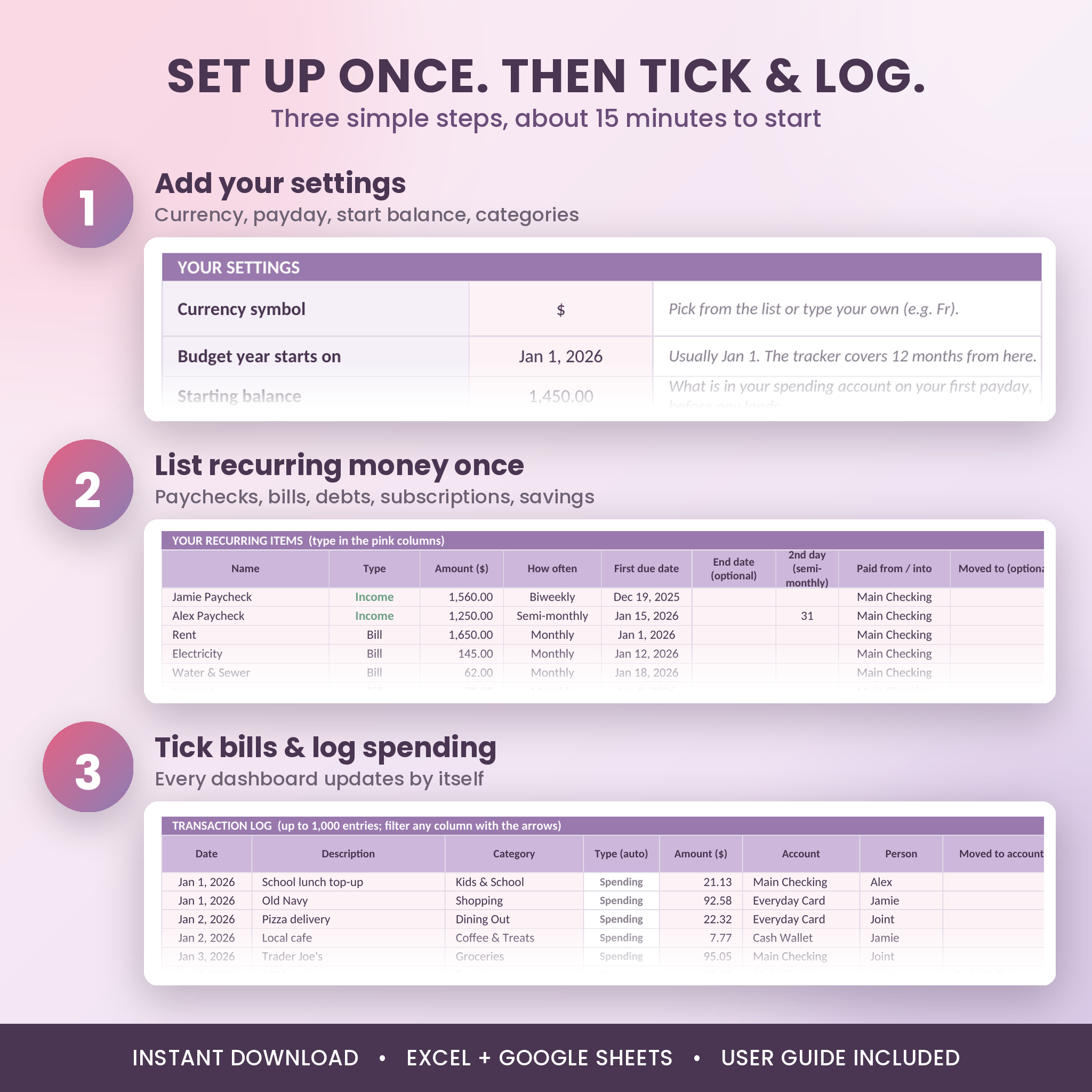
- Set it up once. List paychecks, bills, debt payments, subscriptions and savings transfers one time. Weekly, biweekly, semi-monthly, monthly, quarterly and yearly items all land on the right dates.
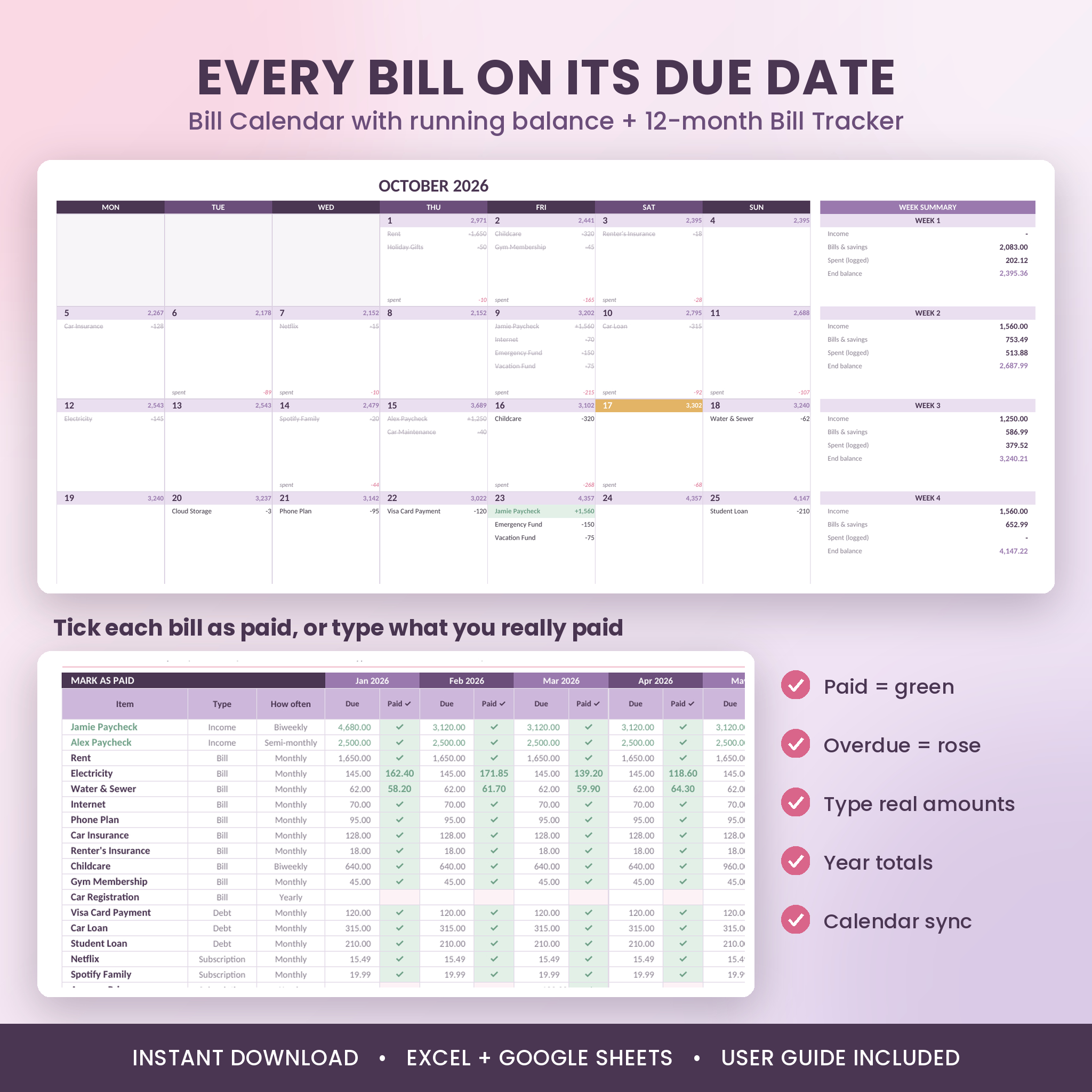
- Tick bills as you pay them. A 12-month Bill Tracker turns green when paid and rose when overdue. Paid a different amount? Type the real figure.
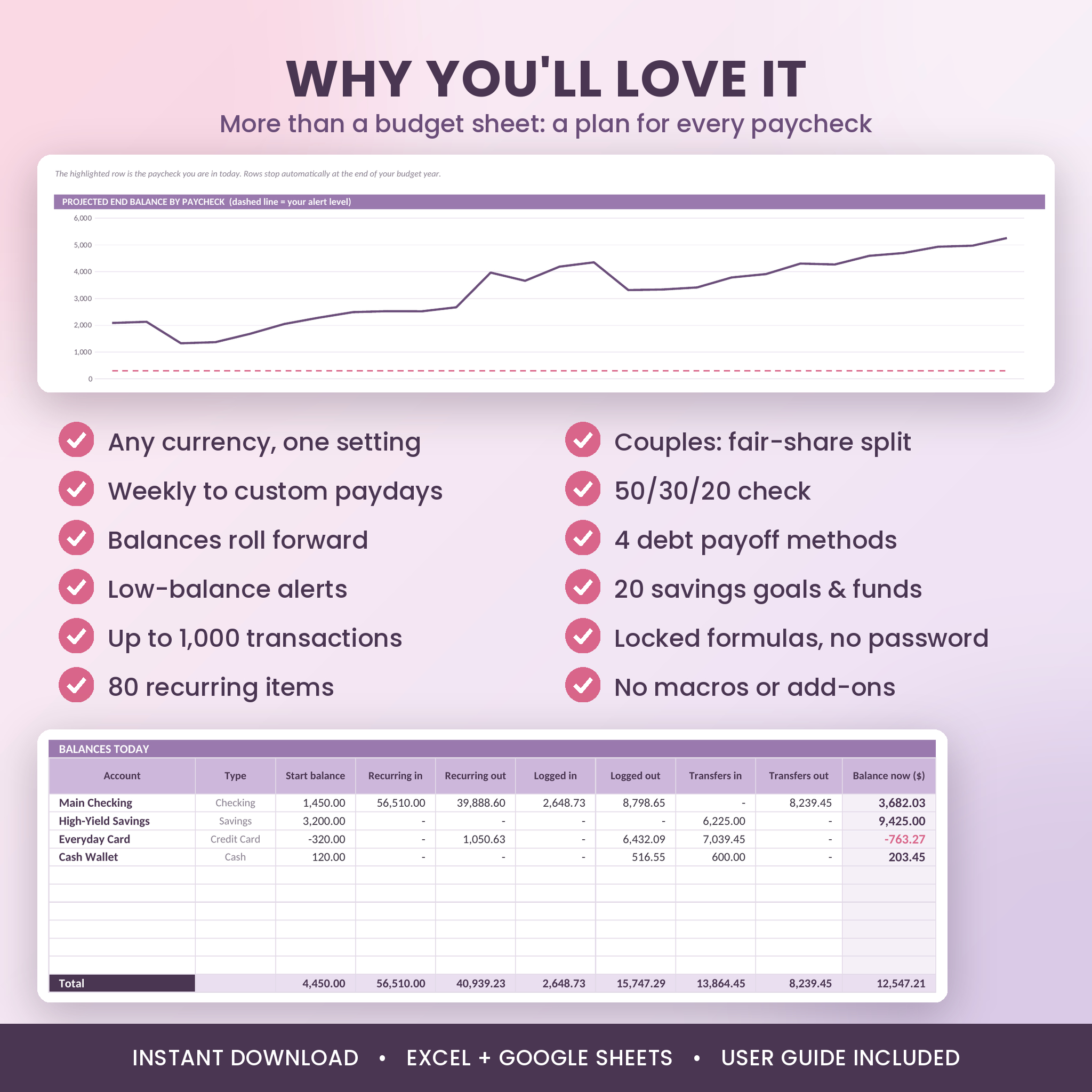
- See the whole year. Every paycheck in one table with rolling balances and a low-balance alert you set yourself.
Who It Is For
It suits anyone who budgets around payday: people paid weekly, every two weeks, twice a month, monthly, every four weeks, or on uneven dates. It works for one person or two. Couples can mark items as theirs or joint and see a fair share of shared costs, split by income or 50/50.
No spreadsheet skills needed. You type in the pink cells. Everything else works itself out, and the formulas are locked so they cannot break by accident.
Features
Dashboards
- Paycheck Dashboard: pick any paycheck. See start balance, income, safe to spend, still to pay, projected end balance and days to payday. Up to 20 items due, sorted by date, each marked Paid, Due or Overdue.
- Money moves by account: how much each bank account needs this paycheck, so bills never bounce.
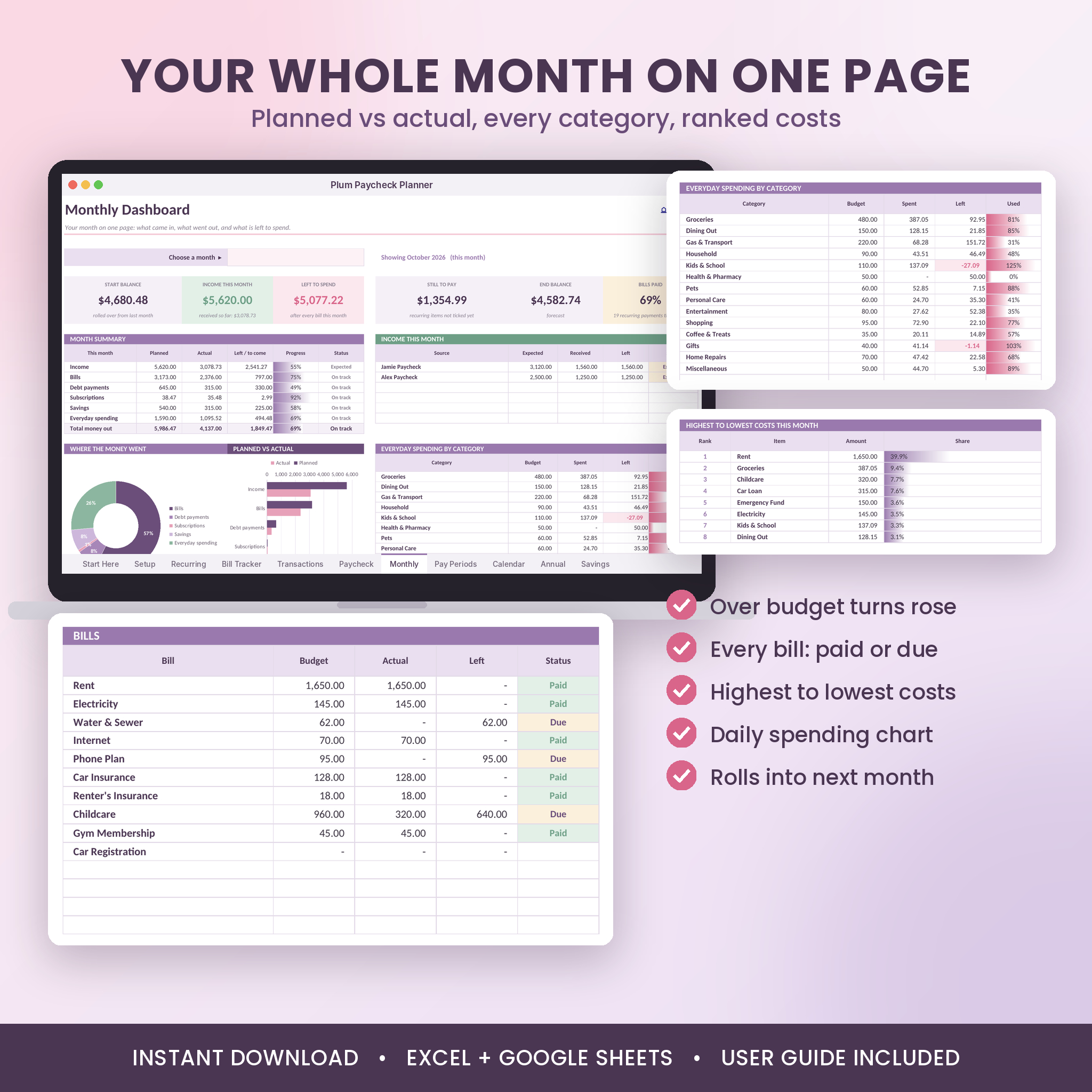
- Monthly Dashboard: income, bills, debt, subscriptions, savings and everyday spending, planned against actual. Spending by category with over-budget cells in rose. Your eight biggest costs ranked. Daily spending chart.
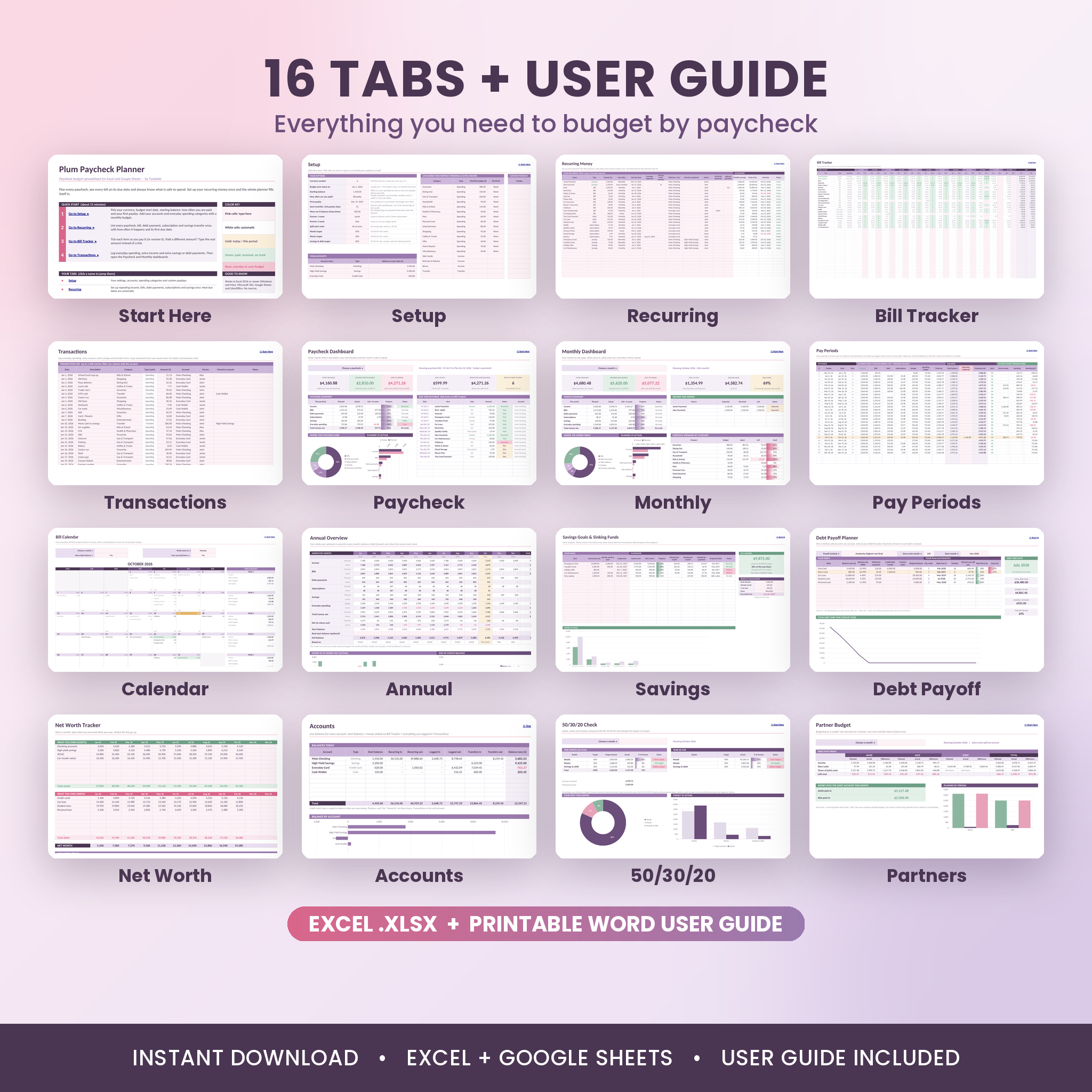
- Annual Overview: 12 months side by side, money in vs money out, end-of-month balance chart, category totals and monthly averages.
Planning and tracking
- Recurring list: 80 items with next due date and yearly total worked out for you. Optional end dates and a “split per paycheck” switch for big bills like rent.
- Bill Calendar: every item on its day with a projected daily balance and a weekly summary. Week starts on Monday or Sunday. Paid items grey out.
- Pay Periods: up to 60 paychecks a year. Past paychecks use what you logged, future ones use your plan. Type your real bank balance any time to re-anchor.
- Transactions: up to 1,000 entries with drop-down categories, accounts, person and transfers.
Debt, savings and more
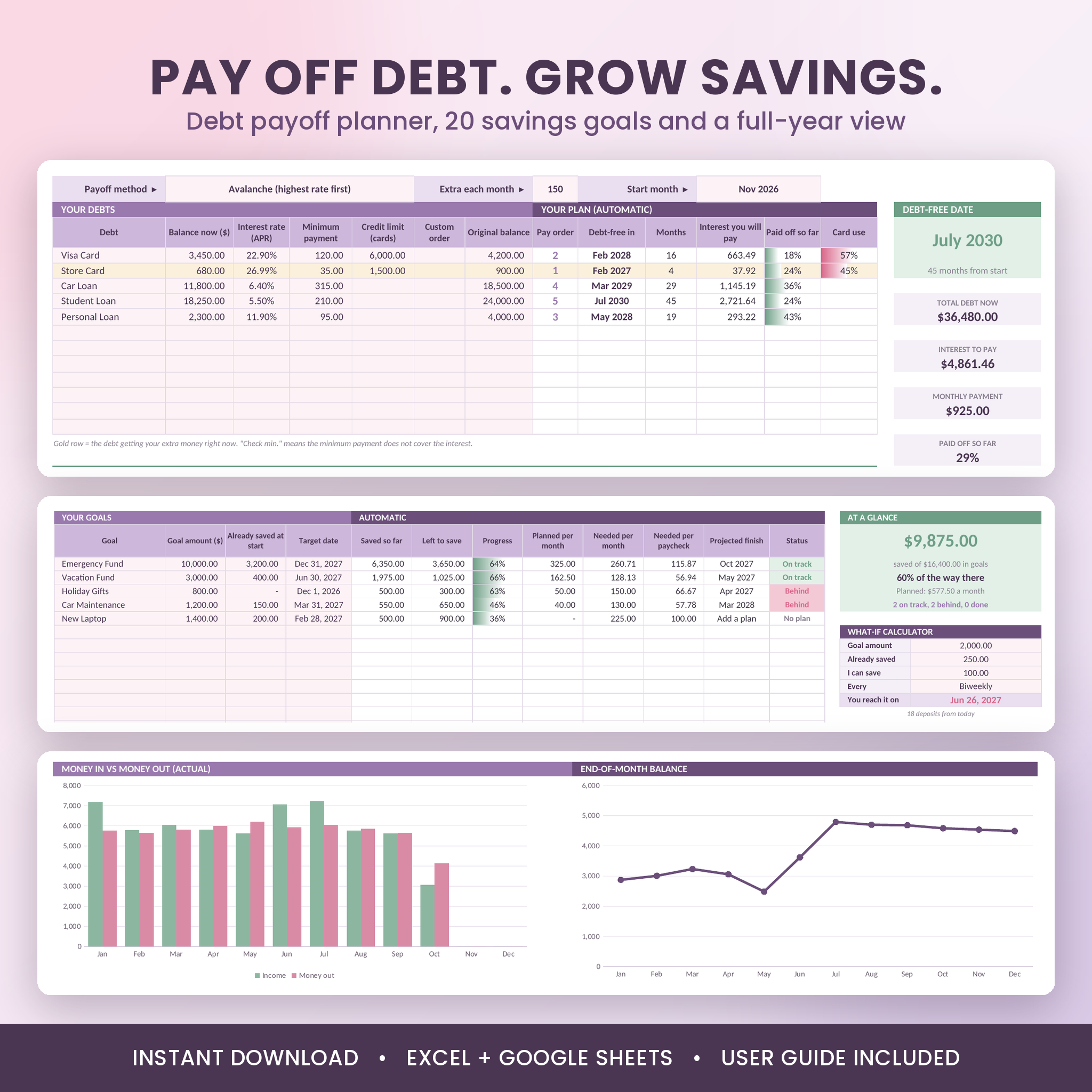
- Debt Payoff Planner: 12 debts, four methods (snowball, avalanche, highest card utilization, your own order) and an extra-payment box. See your debt-free date, interest per debt and total balance year by year.
- Savings Goals and Sinking Funds: 20 goals with needed per month, needed per paycheck, projected finish date, status and a what-if calculator.
- Net Worth Tracker: monthly snapshot of assets and debts with a trend chart.
- Accounts: live balance for checking, savings, cards and cash.
- 50/30/20 Check: needs, wants and savings against targets you can change.
- Partner Budget: income, own costs and share of joint costs for two people.
What Is Included
- Plum-Paycheck-Planner.xlsx: the planner with 16 tabs, blank and ready for your numbers
- Plum-Paycheck-Planner-User-Guide.docx: a 20-page illustrated guide with setup steps, tips, troubleshooting and FAQ
How It Works
- Setup (about 10 minutes). Pick your currency, budget start date, starting balance, pay schedule and first payday. Add accounts and spending categories with a monthly budget.
- Recurring. List each paycheck, bill, debt payment, subscription and savings transfer once.
- Tick and log. Tick bills on payday, log everyday spending, then open the Paycheck or Monthly dashboard.
File Formats and Software
- Format: Excel workbook (.xlsx) plus Word user guide (.docx)
- Works in Microsoft Excel (2016 or newer, Windows and Mac, and Microsoft 365) and free Google Sheets. Tested in Google Sheets and LibreOffice Calc.
- No macros, add-ons or scripts. A computer is best for setup. You can view and tick bills in the Excel or Google Sheets phone apps.
- Google Sheets users: upload the file to Google Drive, open it, then choose File > Save as Google Sheets. In Sheets the progress columns show percentages without shaded bars.
Customization
- Any currency. One setting changes the symbol on every money heading and total: $, £, €, R, ₹, A$, C$ or type your own. Dollars are the default.
- Rename or add up to 50 spending categories and tag each as a need or a want.
- Change colors and fonts freely. Hide tabs you do not need.
- Formula cells are locked with no password, so you can unlock them if you want to tinker.
Real-Life Ways to Use It
- Paid every other Friday with rent due on the 1st? See which paycheck has to cover it, or split rent across both.
- Paid on the 15th and the last day of the month? Choose semi-monthly and every bill lines up.
- Freelancer with uneven paydays? List your own pay dates.
- Paying off three credit cards? Compare snowball and avalanche and watch the debt-free date move.
- Saving for a holiday, car repairs and Christmas? Track each sinking fund and see what to set aside per paycheck.
- Sharing a home? Mark costs as yours, theirs or joint, and see what each person puts into the joint account.
Digital Download
This is an instant digital download. No physical item ships. Your files are ready right after checkout and stay in your account downloads.
Paycheck Budget Spreadsheet FAQ
Do I need Microsoft 365?
No. Excel 2016 or newer works, and free Google Sheets works too.
Does it work for biweekly pay?
Yes. Biweekly is the default. Weekly, semi-monthly, monthly, every four weeks and custom dates are all built in.
Can I use my own currency?
Yes. Change one setting on the Setup tab and every money heading updates.
Is it good for couples?
Yes. Add both names, mark items as yours, theirs or joint, and the Partners tab shows each person’s fair share.
Can I use it again next year?
Yes. Save a copy, clear the pink cells on Bill Tracker and Transactions, and change the start date.
Does it connect to my bank?
No. Your numbers stay in your file. You can paste dates and amounts from your bank into Transactions.
Can I print it?
Yes. Every tab is set up to print landscape, one page wide.
License: personal use only. Please do not resell, share or redistribute the files. This planner is a budgeting tool and not financial advice.
Reviews
There are no reviews yet.