
A subscription tracker spreadsheet that tells you what is coming before it charges
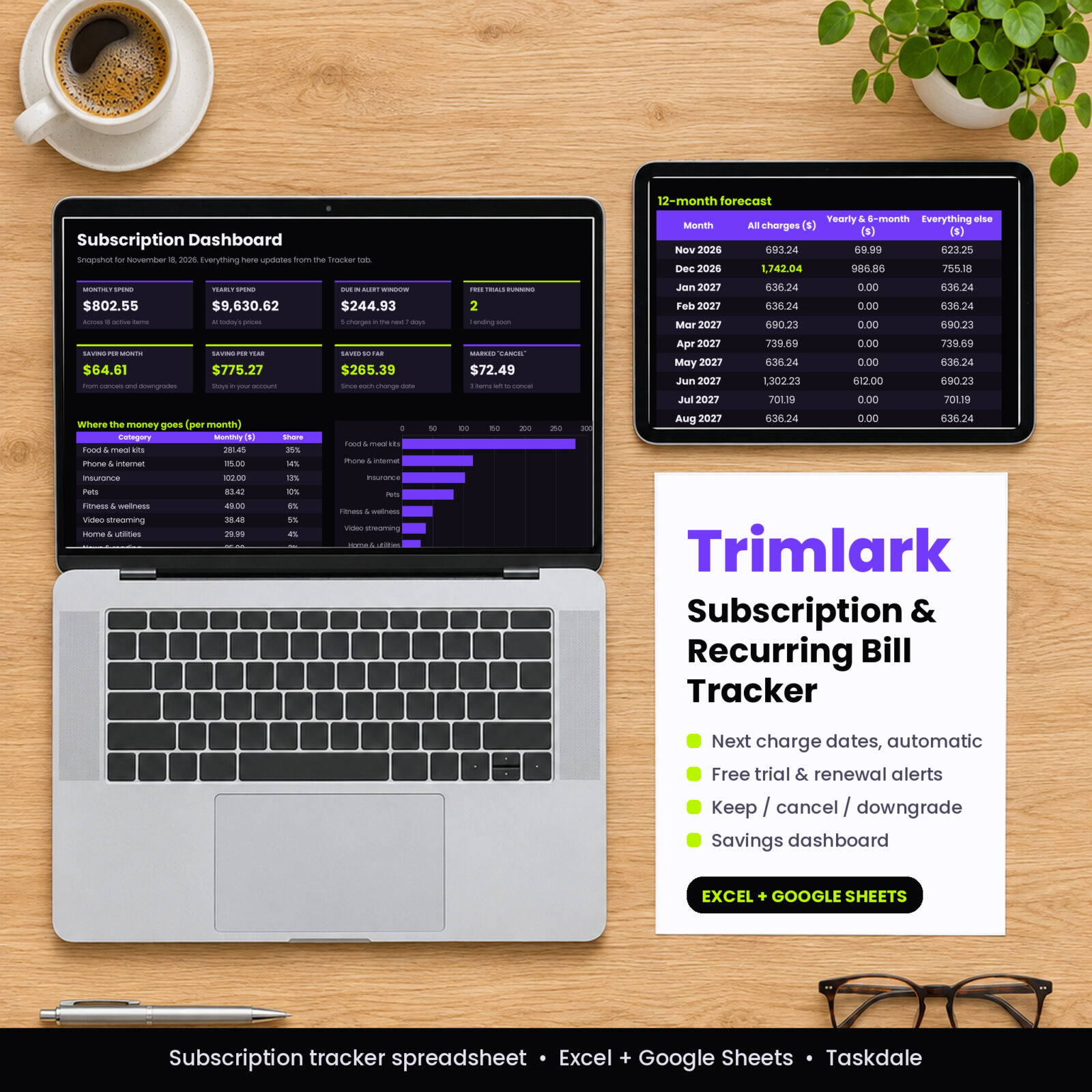
Trimlark is a subscription tracker spreadsheet for Excel and Google Sheets. Add each subscription or recurring bill once, with its price, billing cycle and a past charge date. The workbook works out the next charge date, counts down the days, and flags anything that needs your attention: a free trial about to convert, a yearly renewal three weeks out, a payment due tomorrow.
Most people who sit down with two months of statements find two or three charges they had forgotten about. Trimlark is built to catch those, then help you decide what stays and what goes, and show you the money you kept.
Who it is for
- Anyone who has paid for a free trial they meant to cancel
- Households doing a yearly subscription audit to cut monthly costs
- Couples and families paying for services on several cards
- Freelancers who want software and service costs in one list
- Budgeters who want recurring bills separate from day-to-day spending
What makes this recurring bill tracker different
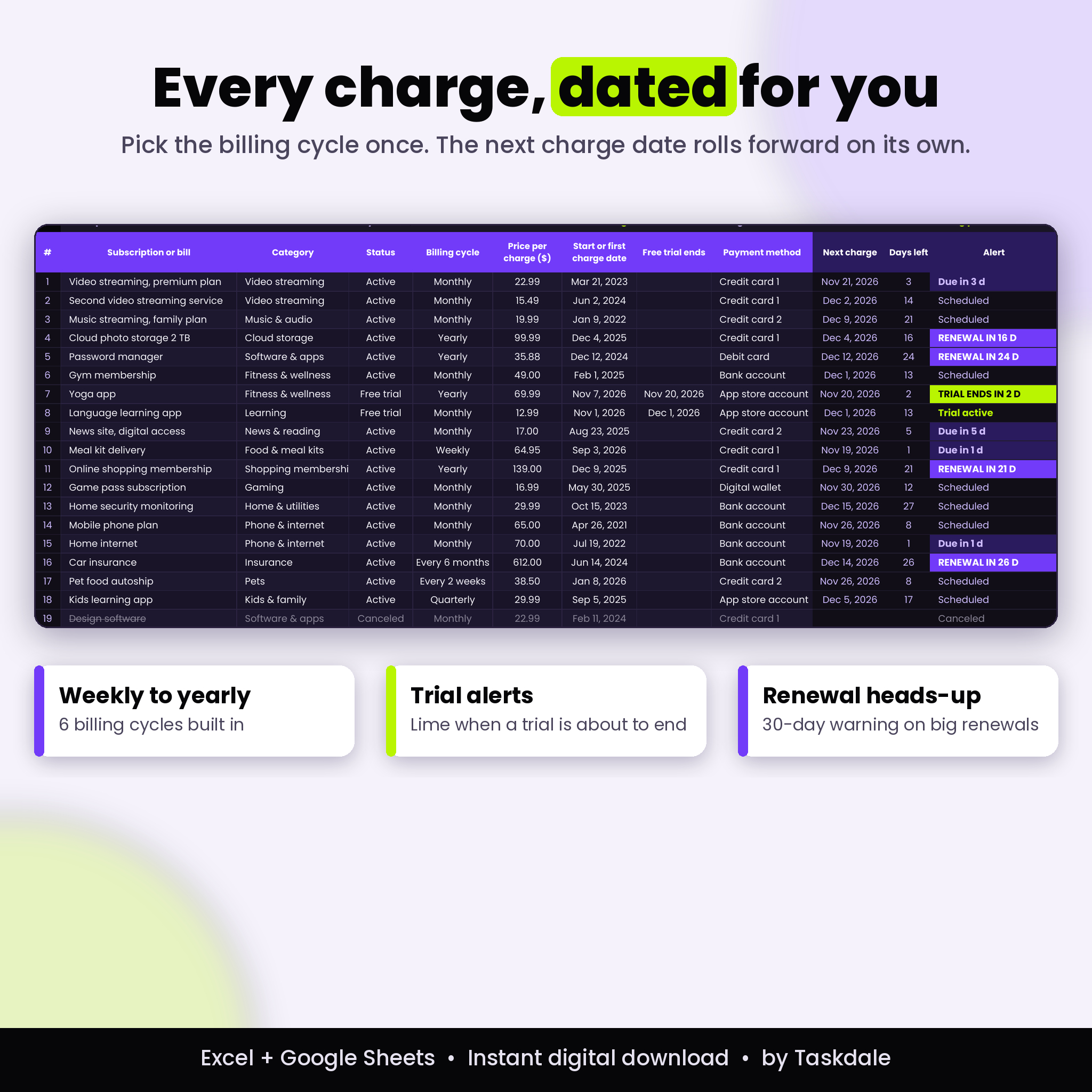
Next charge dates that roll forward on their own
Pick one of six billing cycles: weekly, every 2 weeks, monthly, quarterly, every 6 months or yearly. Enter any past charge date and the tracker finds the next one, every day, with no editing. A charge on the 31st moves to the last day of shorter months. A yearly plan that started on February 29 lands on February 28 in normal years.
Free trial and renewal alerts
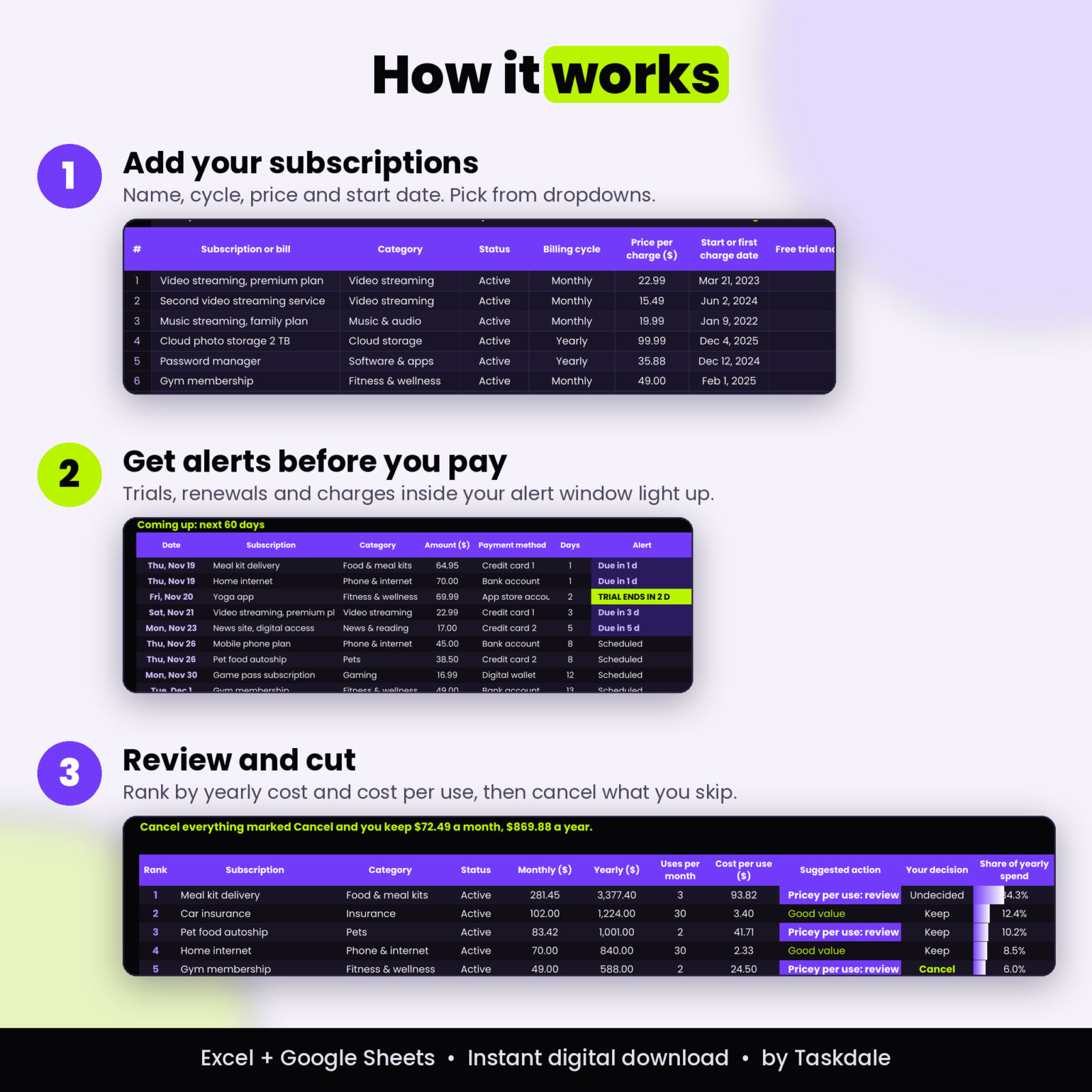
Set a status of Free trial and type the end date. When the end is close, the row turns lime and says TRIAL ENDS IN 2 D. Yearly and 6-month renewals get a longer heads-up (30 days by default) so you can shop around before the big charge. Regular charges inside your alert window show Due in X d. You set all three windows on the Settings tab.
Keep, cancel or downgrade review
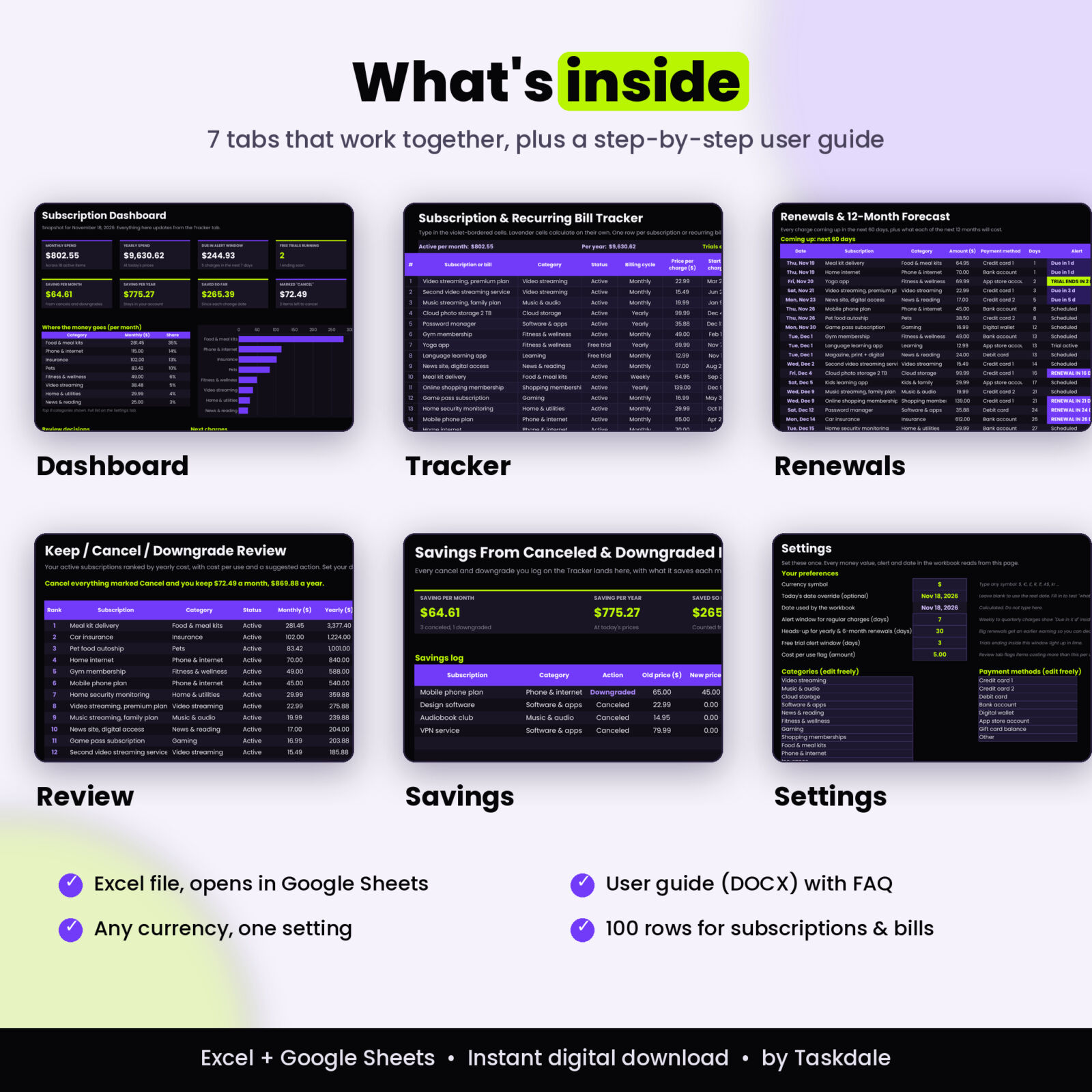
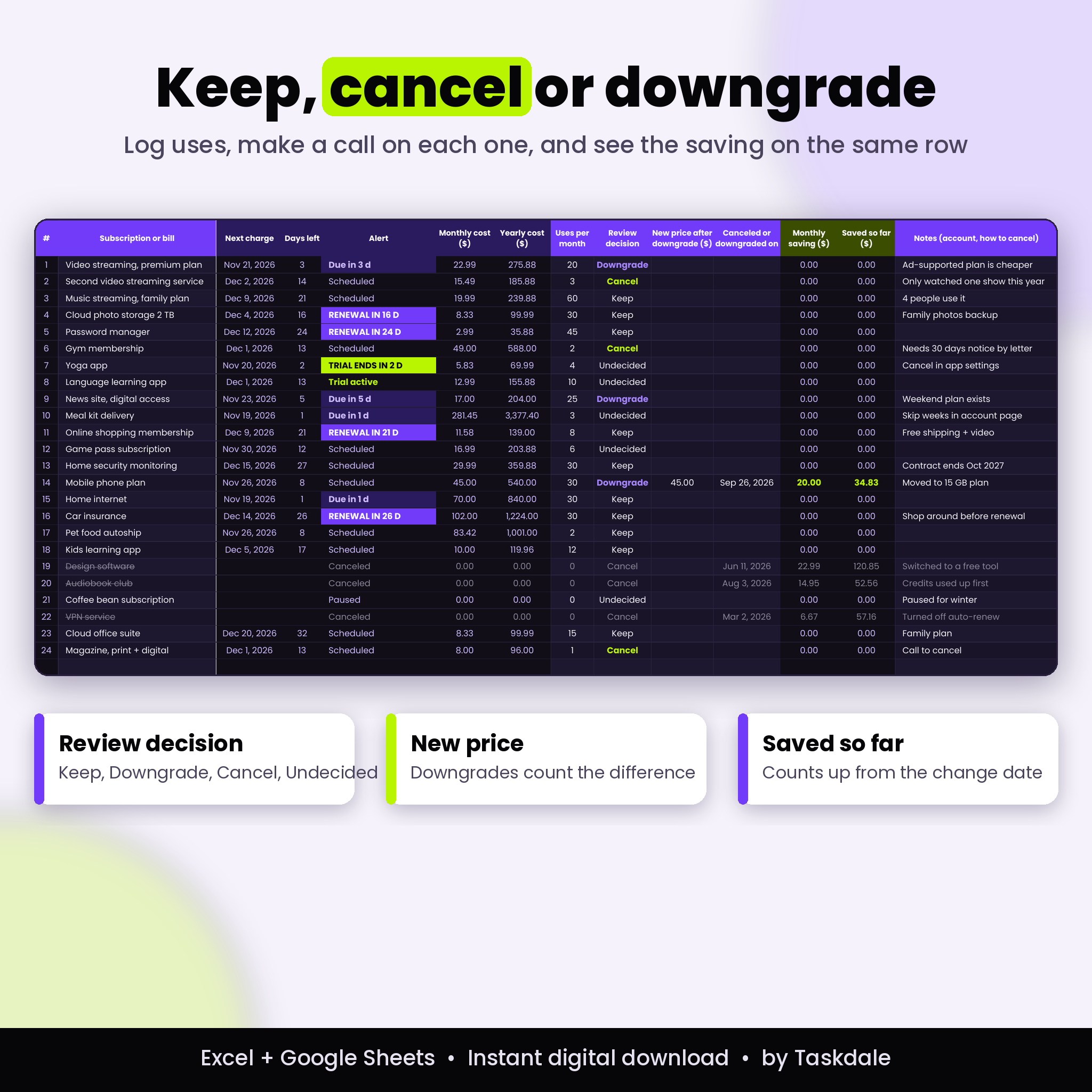
Add a rough count of how often you use each service. The Review tab ranks everything by yearly cost, shows the cost per use, and suggests an action: Cancel candidate, Pricey per use, or Good value. You make the final call in the Review decision column on the Tracker.
A savings dashboard that counts what you kept
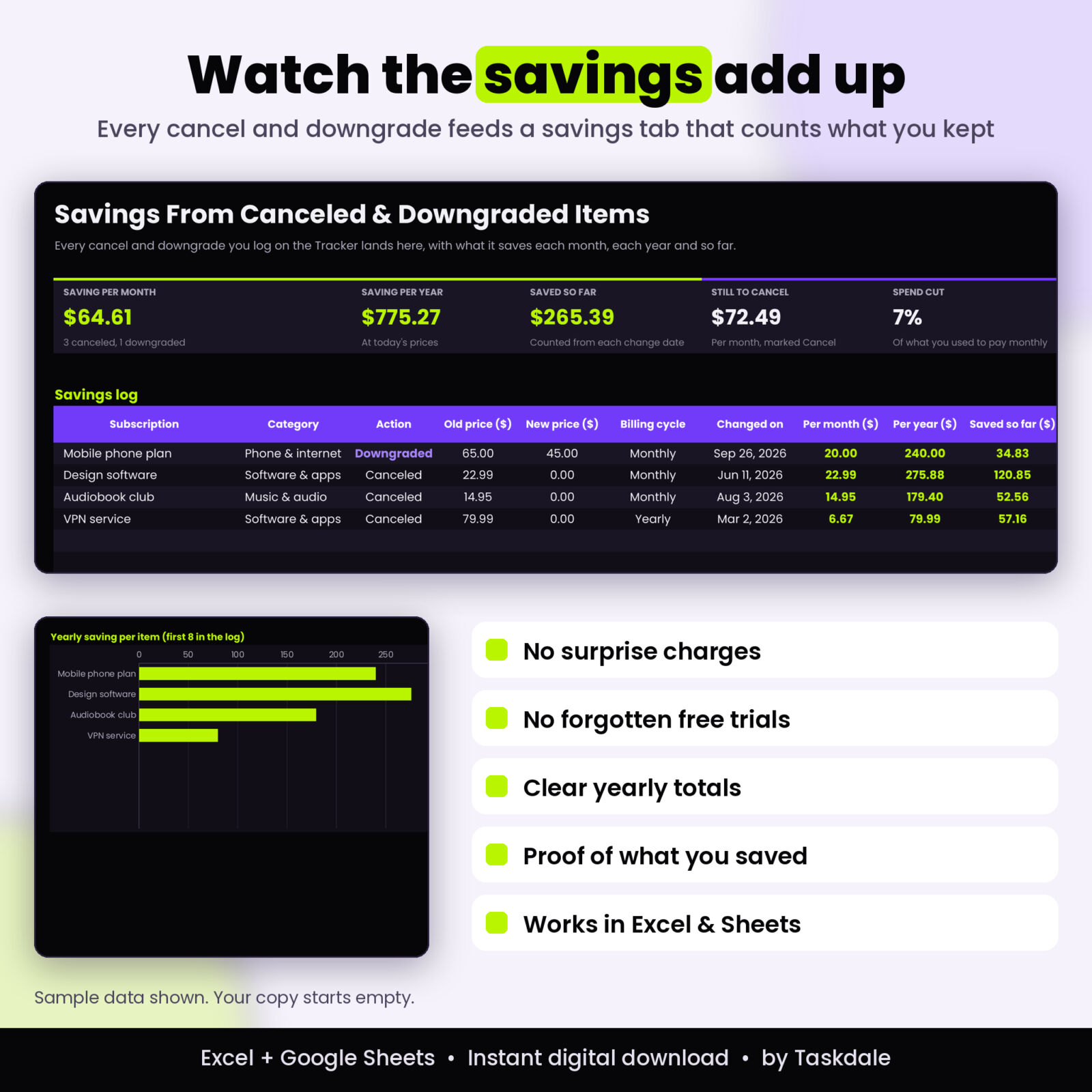
When you cancel, change the status and add the date. When you downgrade, type the new price. The Savings tab logs every change with the saving per month, per year and the total saved so far, counting up from the date you made the change.
Features
- Tracker: 100 rows with dropdowns for category, status, billing cycle, payment method and decision
- Automatic columns: next charge, days left, alert, monthly cost, yearly cost, monthly saving and saved so far
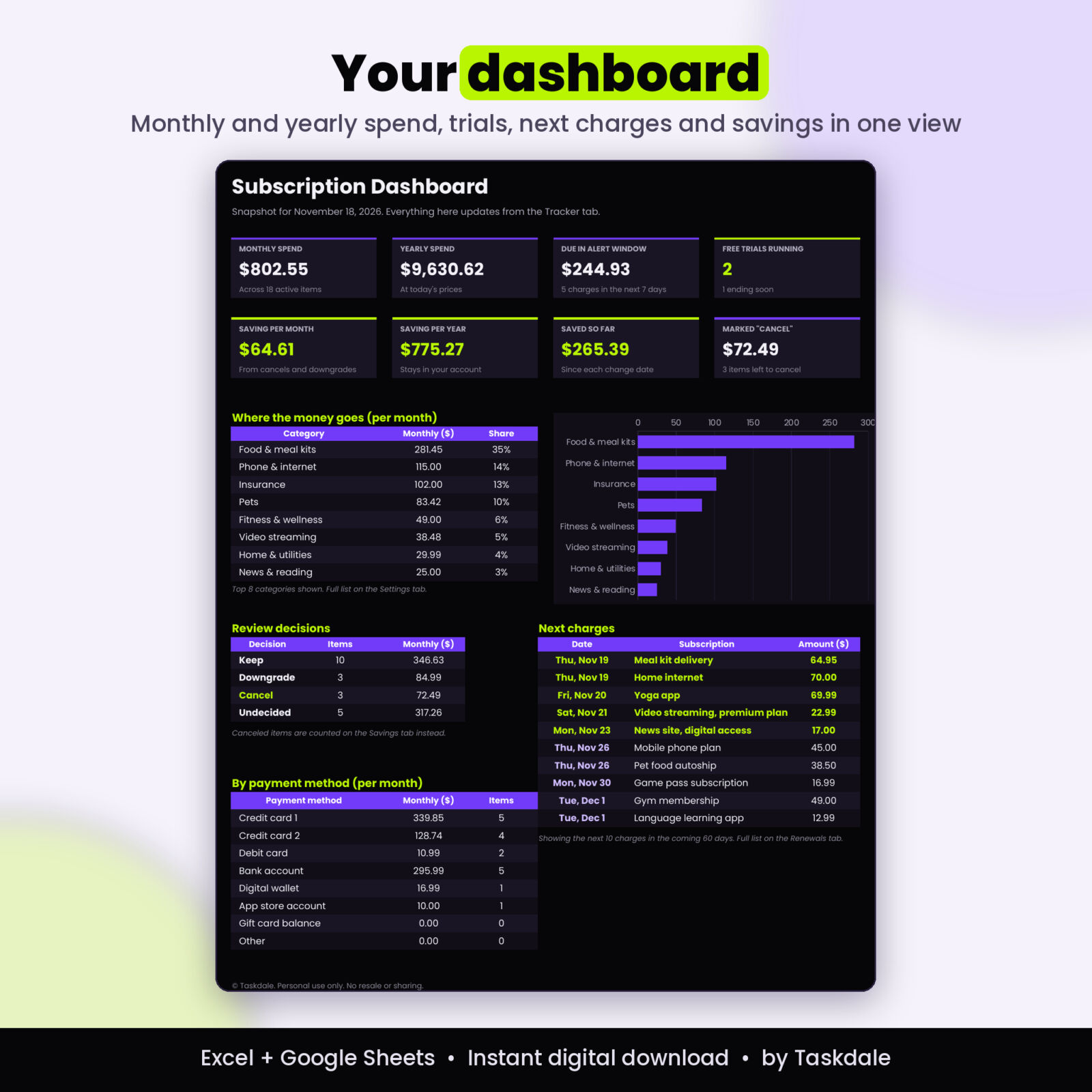
- Dashboard: eight tiles for monthly spend, yearly spend, money due soon, free trials, savings and items still to cancel
- Top categories chart with share of monthly spend
- Next 10 charges list on the dashboard, with charges inside your alert window highlighted
- Renewals tab: every charge in the next 60 days, soonest first
- 12-month forecast with yearly and 6-month renewals split out, a stacked chart and your priciest month highlighted
- Spend by payment method so you know which card carries which charges
- Conditional formatting: lime for trials, violet for renewals, gray strikethrough for canceled rows, red for missing trial dates
- One currency setting that every header and total reads from
- Editable lists: 16 categories and 8 payment methods you can rename
- Locked formulas (no password) so a stray keystroke cannot break the math
- Start Here tab with a 5-step setup and a color key
What is included
- Trimlark Subscription Tracker workbook (.xlsx) with 7 tabs: Start Here, Settings, Tracker, Dashboard, Renewals, Review and Savings
- Trimlark User Guide (.docx) covering setup in Excel and Google Sheets, every column, the alerts, customizing, troubleshooting and FAQ
The listing images show sample data. Your copy starts empty, ready for your own subscriptions.
How it works
- Open Settings and type your currency symbol. Adjust the alert windows if you like.
- On the Tracker, add one row per subscription or bill: name, category, status, billing cycle, price per charge and a start or first charge date.
- For free trials, choose Free trial and enter the end date.
- Check the Dashboard and Renewals tabs for your totals and what is due next.
- Fill in uses per month, open the Review tab and mark each item Keep, Downgrade or Cancel.
- Log each cancel or downgrade with its date and watch the Savings tab grow.
File formats and software
- Format: Excel workbook (.xlsx) plus a Word user guide (.docx)
- Works in Microsoft Excel (Windows, Mac and Excel for the web) and Google Sheets
- Google Sheets: upload the file to Drive and open it with Sheets. The tab buttons on the Start Here page may only work in Excel; use the sheet tabs at the bottom instead
- No macros, no add-ins and no account sign-in
Customizing
Change the currency symbol once and every column header and dashboard total follows. Rename categories and payment methods on the Settings tab to match your life. Shorten or lengthen the alert windows. A date override lets you look ahead and see the workbook as it will be on any day.
Real ways people use it
- The January audit: list everything, rank by yearly cost, cancel the bottom three you never open.
- Trial juggling: try three apps in a month and get a lime warning before each one bills.
- Insurance and annual plans: see the 6-month and yearly renewals a month ahead so you can compare quotes.
- Card switch: filter by payment method before you replace a card so nothing fails to charge.
- Family plans: track which streaming and music plans the household shares and what each costs per use.
Digital download
This is a digital product. No physical item ships. Your files are ready to download right after checkout and stay in your Taskdale account.
FAQ
Does this subscription tracker work in Google Sheets?
Yes. Every formula uses functions Google Sheets supports. Upload the .xlsx to Google Drive and open it with Sheets.
Can I use it with my own currency?
Yes. Type your currency symbol on the Settings tab and every money header and total updates.
How many subscriptions can I track?
100 rows. Canceled items can stay in the list so their savings keep counting.
Does it connect to my bank?
No. You add each item once by hand. Your data stays in your own file.
How does it know when the next charge is?
From the billing cycle and any past charge date you enter. It steps forward by days or whole months until it reaches the next date after today.
Will it remind me before a free trial ends?
The row lights up in lime inside your trial alert window, and the dashboard counts trials ending soon. It does not send emails or phone notifications.
Can I print it?
Yes. Each tab has a landscape print area set to fit the page width.
Can I share it with a friend?
The license is for personal use by the buyer only. Please do not resell, share or redistribute the files.
Reviews
There are no reviews yet.