A free contractor bid comparison spreadsheet with a room-by-room renovation budget is the easiest way to stop a remodel from quietly running over. This guide shows you how to set a realistic budget with a contingency reserve, split it room by room, and compare contractor quotes fairly, with a free Excel and Google Sheets template you can download below.
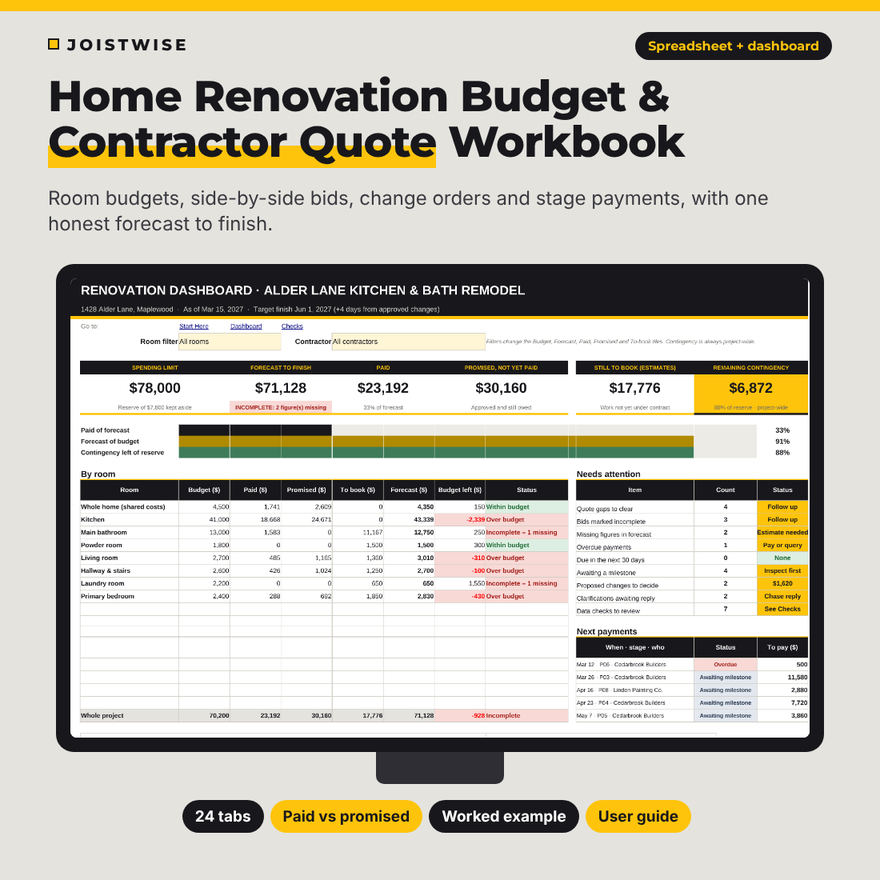
Free Contractor Bid Comparison Spreadsheet + Renovation Budget
A room-by-room renovation budget with a contingency reserve, plus a side-by-side comparison of three contractor quotes on 25 tasks that flags unpriced lines as gaps. Excel and Google Sheets.
Want everything unlocked?
The free file is a sample. The full version has every page, tab and feature, plus the user guide.
See the full versionThe download is free. You enter your email address to get the file, and free downloads are limited to 3 per day.
What is in the free contractor bid comparison spreadsheet
The free Joistwise Lite file has three tabs:
- Start & Upgrade: how to use the file and what the full version adds.
- Room Budget: enter your spending limit and reserve percentage, then split what is left between up to nine rooms plus a whole-home row for shared costs. A status line tells you if you have money left to allocate or have over-allocated.
- 3-Bid Compare: put three contractor quotes side by side on the same 25 tasks. Each line is marked Priced, Included elsewhere, Excluded or Not stated, and any required line without a price is flagged as a gap.
It works in Excel and Google Sheets, and every money label follows one currency setting.
Step 1: Set a spending limit, not just a budget
Start with the most you can spend on the whole project, including a reserve for surprises. That number is your spending limit. A renovation budget that starts from “what the kitchen should cost” tends to grow; one that starts from “what we can afford in total” keeps every decision honest.
Include everything that will leave your account because of the project: contractor work, materials you buy yourself, permits, dumpster rental, design fees, temporary living costs and any appliances or fixtures.
Step 2: Keep a contingency reserve outside the room budgets
Older homes hide rotted subfloors, out-of-date wiring and plumbing that has to move. A contingency reserve pays for those surprises without forcing you to cut the finishes you planned. Many homeowners set aside around 10 to 20 percent of the spending limit, more for older houses or projects that open up walls.
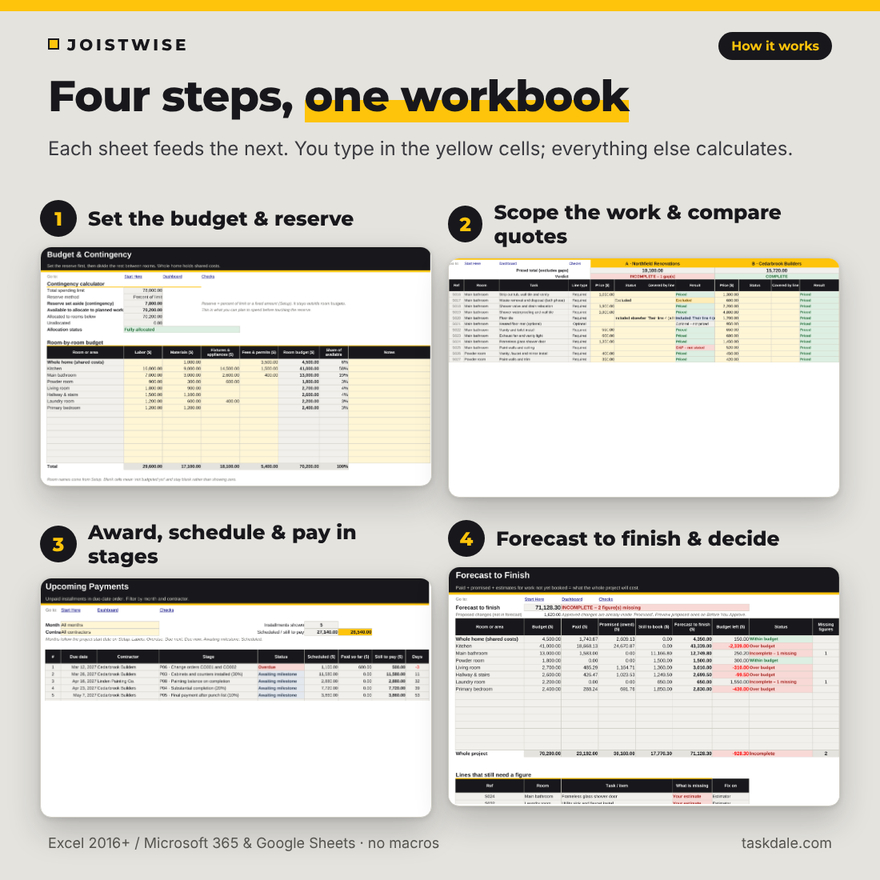
The key is to set the reserve aside first and give rooms only what is left. In the free spreadsheet, the Room Budget tab does this for you: enter your limit and reserve percentage, and it shows the amount available for rooms.
The full Joistwise renovation budget workbook goes further with a contingency reconciliation that starts with your original reserve and shows how each room’s overrun or saving changes it, so you always know what is really left.
Step 3: Budget room by room, plus a whole-home row
Give each room its own budget and put shared costs, such as permits, protection, waste removal and design fees, in a separate whole-home row. That way you never count the same dumpster in the kitchen and the bathroom.
- List every room or area that will be touched.
- Estimate labor, materials, fixtures and fees for each one.
- Compare the total with the amount available after your reserve.
- Adjust until the total fits, before you ask for quotes.
Step 4: Write one scope of work for every contractor
Quotes are only comparable when every contractor prices the same list. Write the job as separate tasks, for example: strip out the tub and tile, relocate the shower valve, waterproof and tile the shower, install the vanity you supply, paint, and remove waste. Add a quantity and say who supplies each item.
Send the same list to every bidder and ask them to price each line, say which line covers anything they include elsewhere, and mark anything they exclude. The full workbook includes a printable bid request form and a library of 52 common renovation tasks to start from.
Step 5: Compare contractor quotes line by line
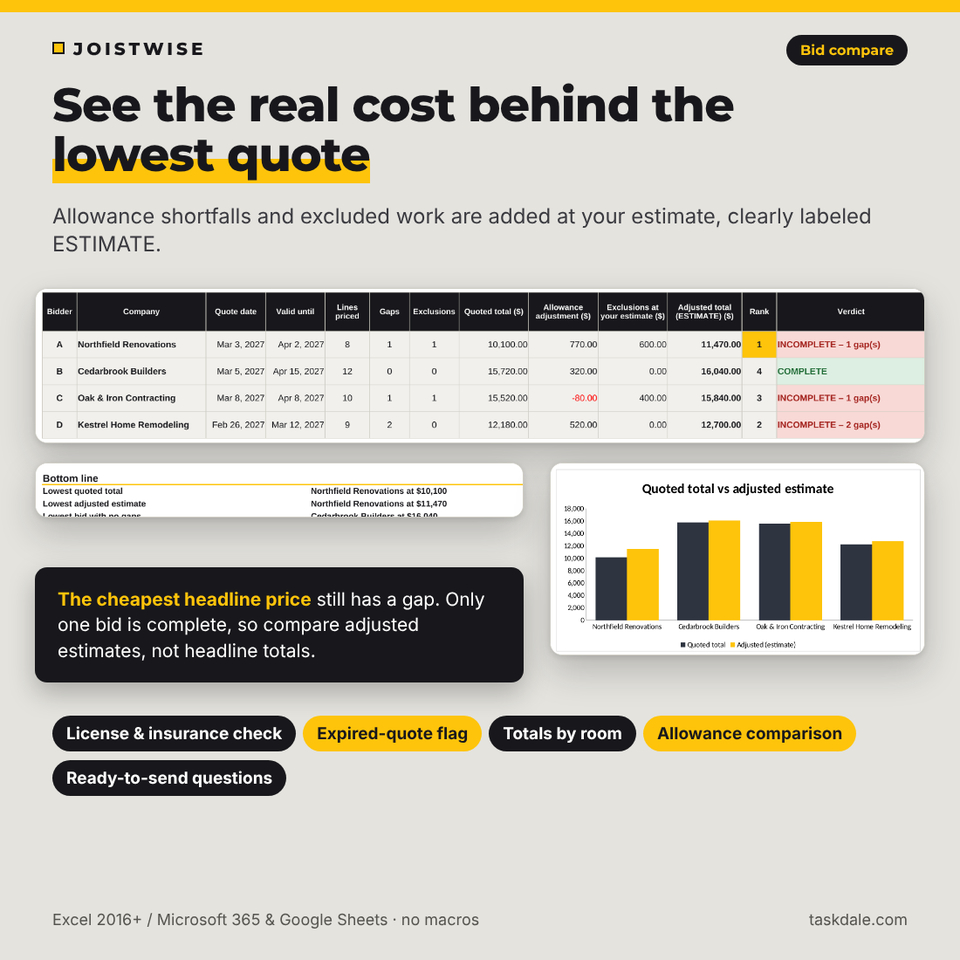
The lowest quote can be hard to judge when one builder includes waste removal and another leaves the line blank. Treat a blank price as an open question, not as free work. In the free 3-Bid Compare tab:
- Priced means the line has a price.
- Included elsewhere means the bidder says another price covers it.
- Excluded means the bidder won’t do it, so you’ll pay someone else.
- GAP means a required line has no price and no explanation. The bid is marked INCOMPLETE until you get an answer.
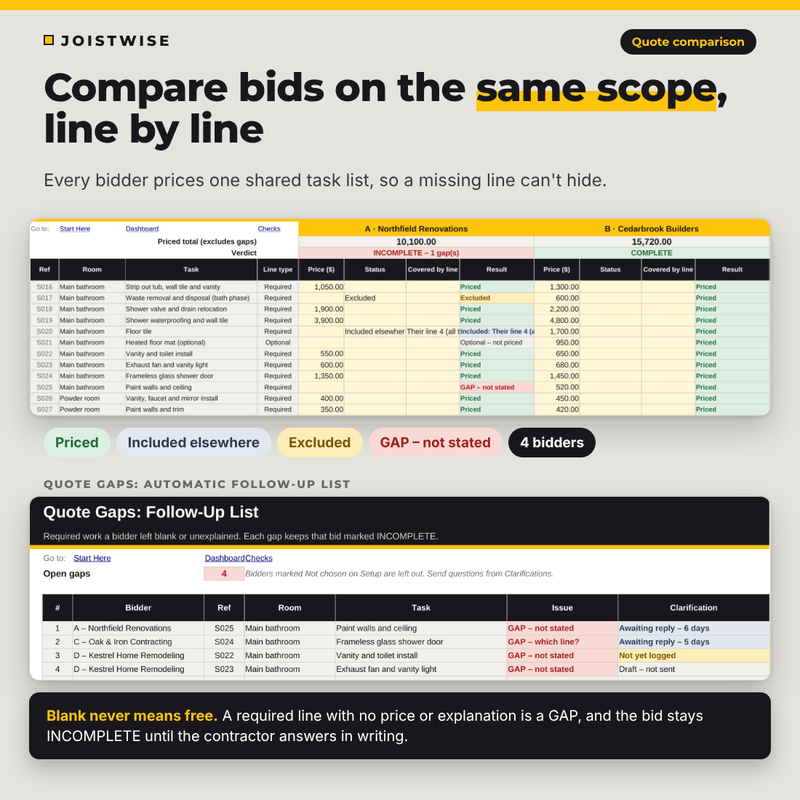
Ask every gap in writing before you compare totals. A useful question is specific: “Does your price for the bathroom strip-out include removal and disposal of the waste?” The Joistwise workbook writes questions like this for you and logs the reply, revised price and quote date.
Step 6: Adjust for allowances and exclusions
An allowance is an amount a contractor sets aside for something you haven’t chosen yet, such as tile or a light fixture. A low allowance makes a quote look cheaper than it will be. Compare each allowance with your own estimate, and add excluded work at your estimate, to get an adjusted total. Label it as your estimate, because it is not a price the contractor offered.
Step 7: Track paid vs promised once work starts
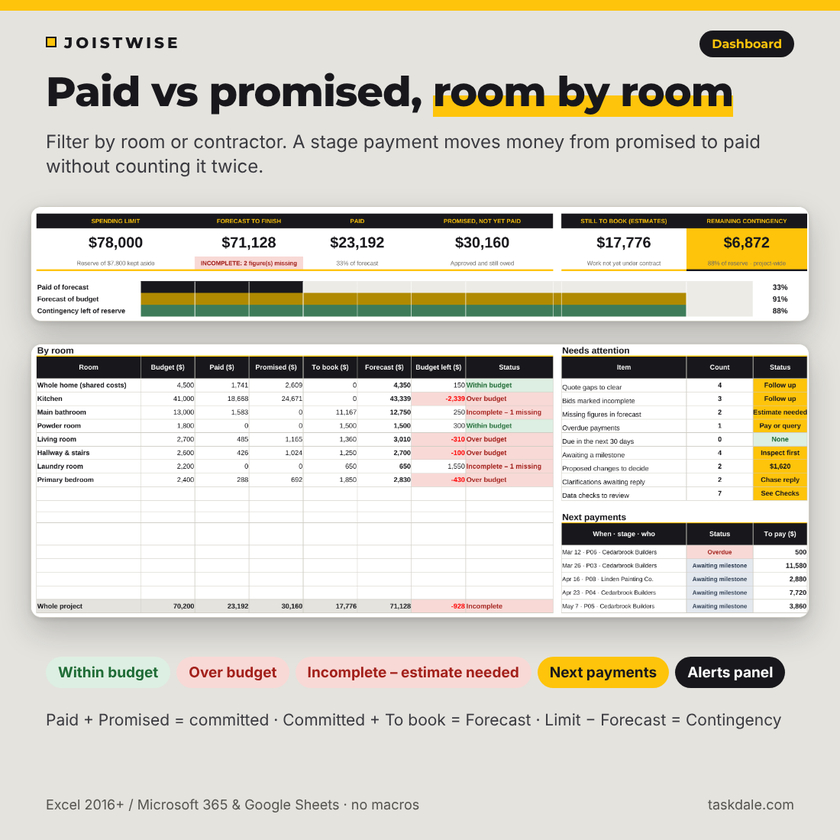
Once you sign, three numbers matter: what you have paid, what you have promised (approved work not yet paid), and what is still to book (estimates for work not yet under contract). Your forecast to finish is the sum of all three. Your remaining contingency is your spending limit minus that forecast.
That is why cash in the bank can be misleading: part of it is already promised to a contractor whose next stage payment isn’t due yet. The full version includes a stage-payment calendar, an invoice and payment ledger with partial payments, and a dashboard that filters paid and promised by room and contractor.
Step 8: Check the contingency before you approve a change
Change orders are where budgets slip. Before you say yes, check three things: the new forecast to finish, the contingency left afterwards, and the effect on your next stage payment. If the change would push you over your limit, decide what you will save elsewhere or how much you will add to the budget.
For background on choosing and paying contractors, the FTC’s consumer advice on home improvement (consumer.ftc.gov) is worth reading, and your state contractor licensing board can confirm a contractor’s license.
Get the full Joistwise Renovation Budget & Quote Workbook
- 4 bidders and 150 scope lines, with a printable bid request and quote gaps follow-up list
- Ready-to-send clarification questions, allowance comparison and adjusted ESTIMATE totals
- Contracts, change orders, stage payments, ledger and upcoming payments
- Paid-vs-promised dashboard with room and contractor filters
- Forecast to finish, contingency reconciliation and a Before You Approve calculator
- Worked kitchen and bath example and a user guide
$34.99, instant download for Excel and Google Sheets.
Frequently asked questions
Is this renovation budget spreadsheet really free?
Yes. Enter your email to download the Lite file. It includes the room budget and a three-bid comparison.
Does it work in Google Sheets?
Yes. Upload the .xlsx to Google Drive and open it with Google Sheets.
How much contingency should I keep for a renovation?
Many homeowners keep 10 to 20 percent of the spending limit, more for older homes. Choose a figure you can live with and keep it outside the room budgets.
What if a contractor leaves a line blank?
Treat it as a gap, not as free work. Ask in writing whether it is included, and if so in which line.
Download your free contractor bid comparison spreadsheet
Get the free room budget and three-bid comparison below. When you’re ready to track contracts, change orders, payments and contingency in one place, upgrade to the full Joistwise workbook.
For planning and education only; not financial, legal or construction advice.