A home renovation budget spreadsheet that tells you what is really left
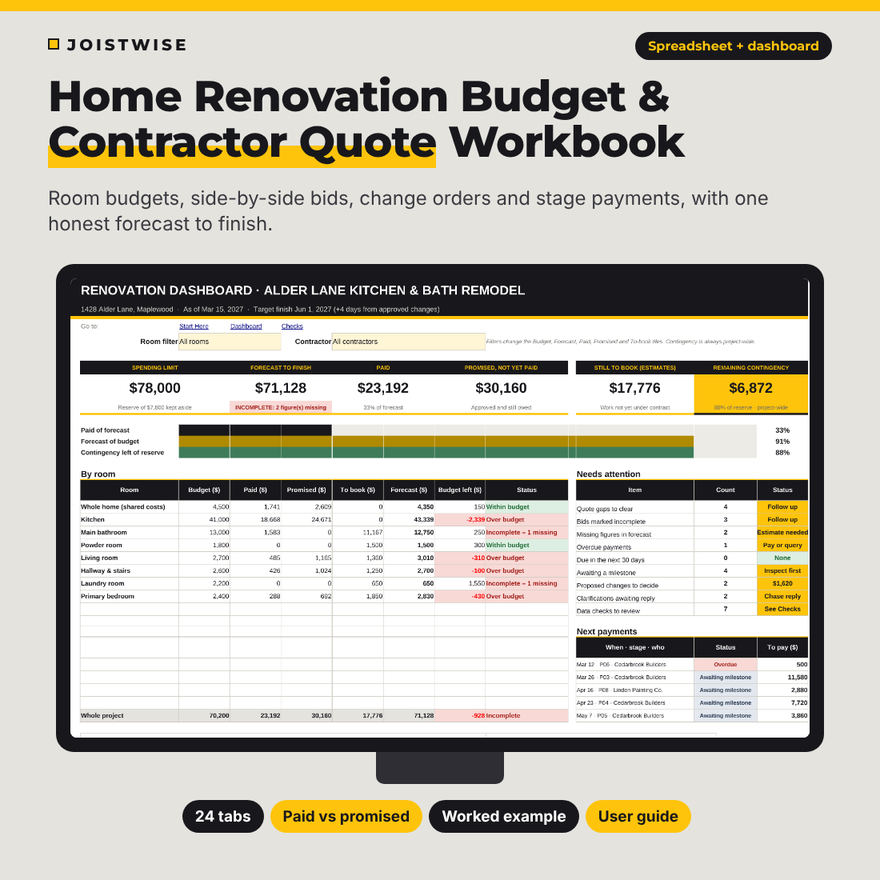
Joistwise is a home renovation budget spreadsheet and contractor quote dashboard in one workbook. It helps you set a room-by-room budget, compare bids on the same scope of work, track change orders and stage payments, and check your remaining contingency before you approve the next extra. Your bank balance can be misleading when a stage payment is agreed but not yet due. Joistwise keeps paid, promised and still to book apart, so the number you plan with is the right one.
It works in Microsoft Excel (2016 or later, including Microsoft 365) and Google Sheets, with no macros.
Who it is for
- Homeowners planning a kitchen, bathroom or whole-house remodel
- Anyone collecting two to four contractor quotes and wanting a fair, line-by-line comparison
- People paying a contractor in stages (deposit, progress payments, final balance)
- Owner-builders who buy some materials themselves and hire trades to install them
Main benefits
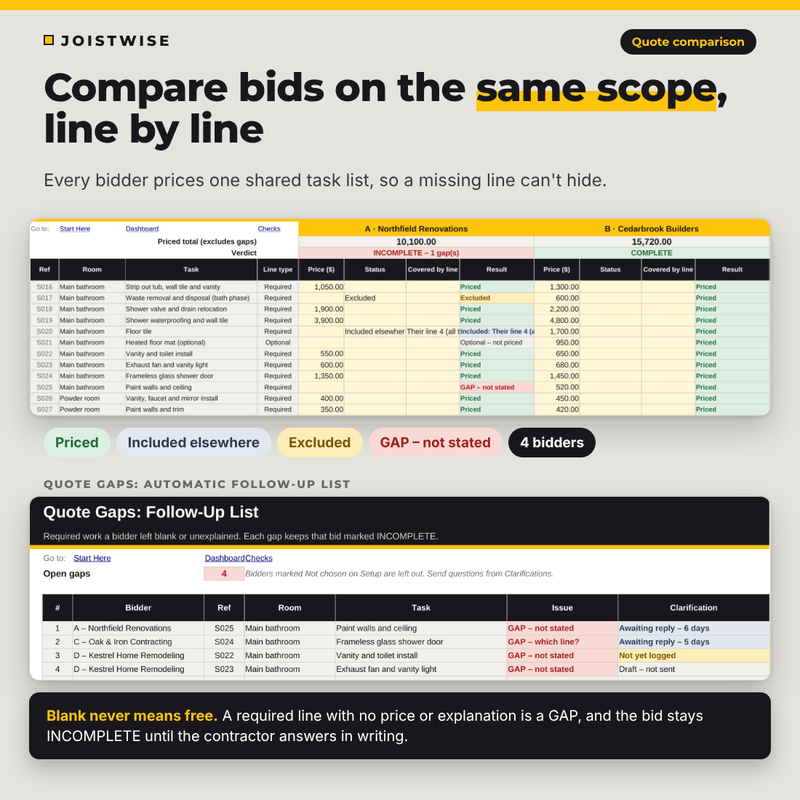
- No hidden gaps. A required line with no price or explanation is marked GAP and keeps that bid INCOMPLETE. Blank never means free.
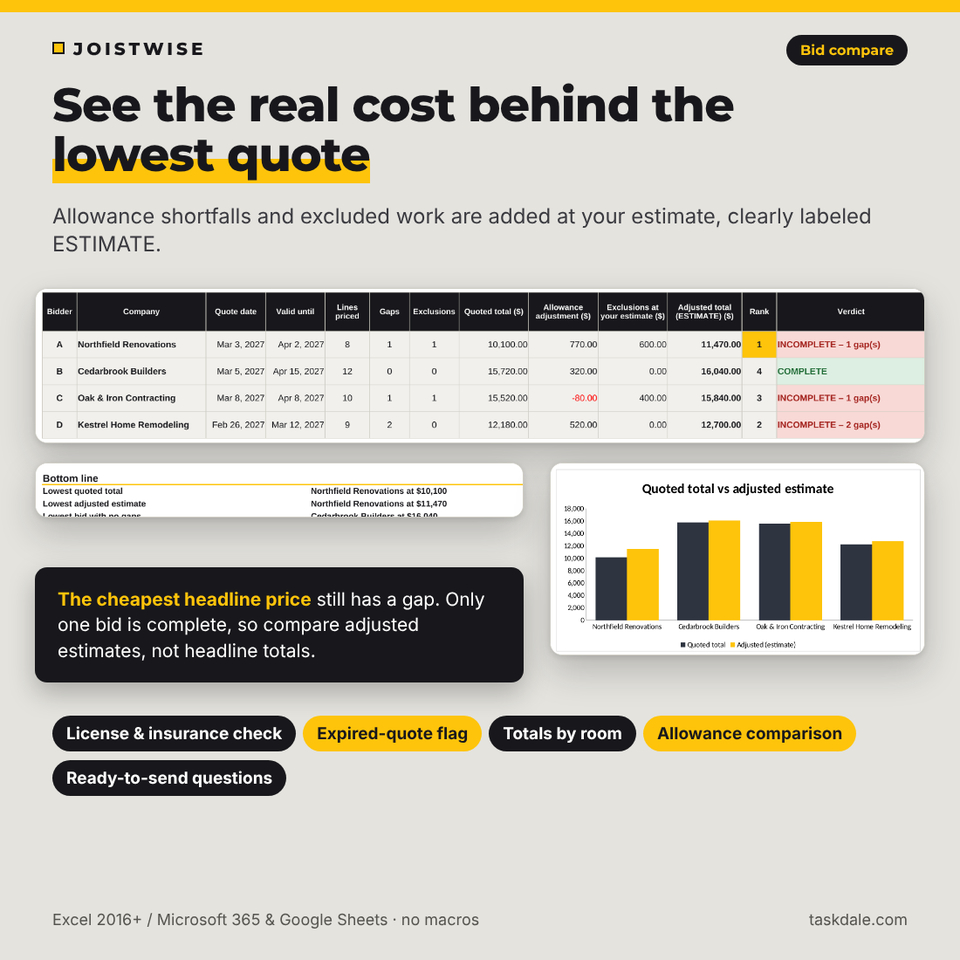
- Honest comparisons. Adjusted bid totals add allowance shortfalls and excluded work at your own estimate, clearly labeled ESTIMATE.
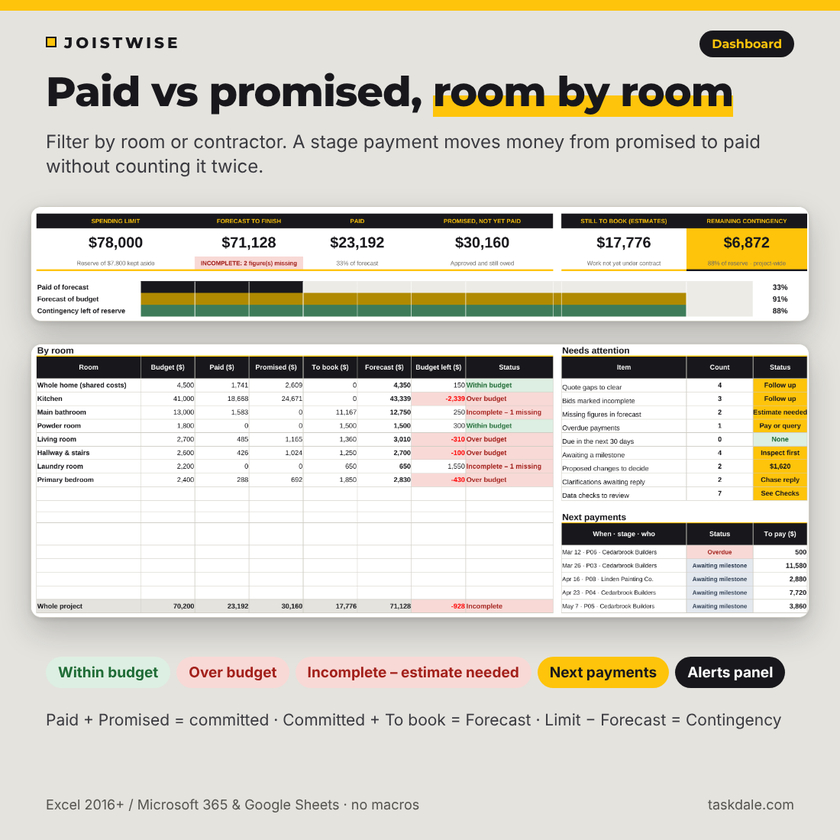
- No double counting. When you log a payment, the amount moves from promised to paid without increasing the project cost.
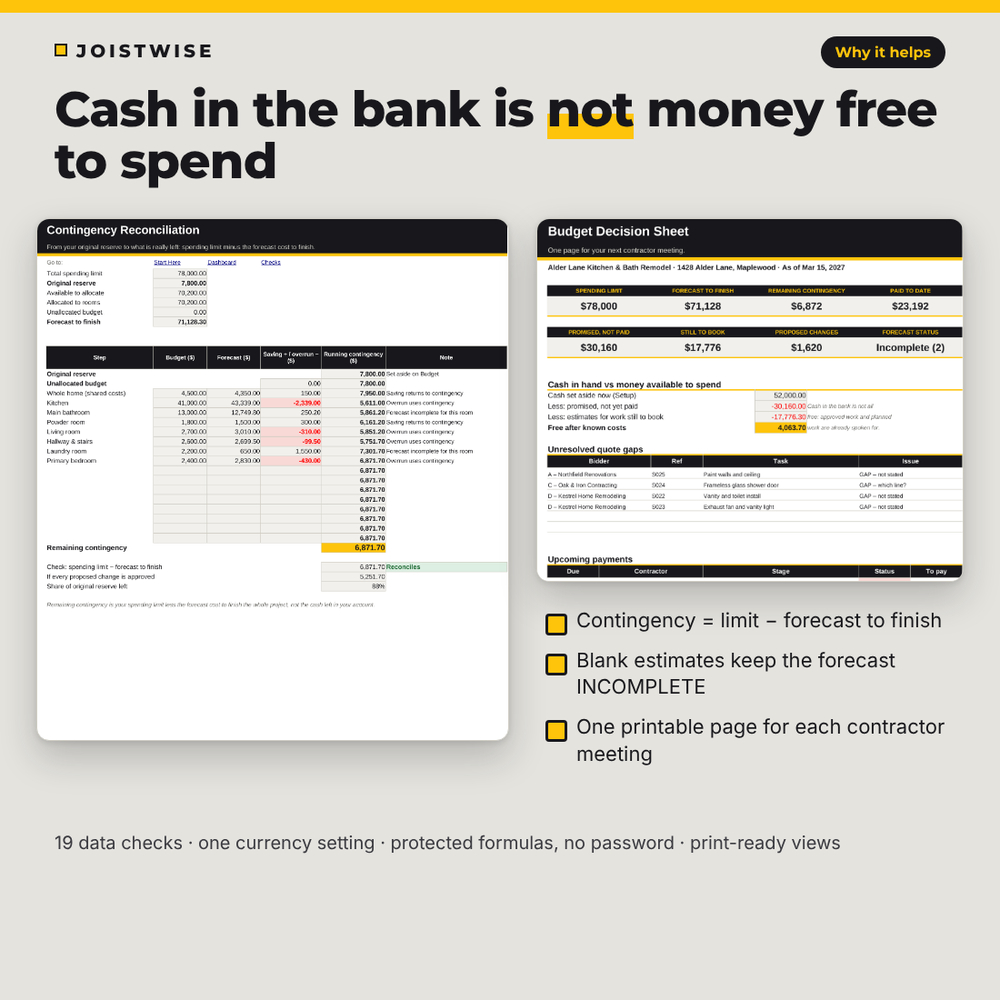
- Real contingency. Remaining contingency is your spending limit minus the forecast cost to finish, not the cash in your account.
Features
Renovation budget and estimates
- Setup sheet with project name, address, currency symbol, dates, spending limit, rooms and bidders
- Contingency calculator: reserve as a percent of your limit or a fixed amount
- Room-by-room budget split into labor, materials, fixtures and fees, plus a whole-home row for shared costs such as permits and dumpsters
- Quantity and unit-cost estimator with a waste allowance, linked to scope lines so an agreed price replaces your estimate instead of adding to it
- Owner-purchase tracker with estimate, order value, amount paid and delivery date, and a check that owner-supplied items are scoped as install only
Contractor quote comparison
- Scope-of-work checklist (150 lines) with a 52-task library and a printable bid request form
- Side-by-side quotes for up to 4 bidders: Priced, Included elsewhere (with the line that carries the charge), Excluded or Not stated
- Quote gaps follow-up list and a clarification log that writes the question for you, then records the written reply, revised price and quote date
- Allowance comparison and a Bid Compare sheet with quoted totals, adjusted estimates, rank, quote validity and license/insurance checks
- Price-spread check that flags lines where quotes are more than 30% apart
Contracts, change orders and payments
- Contract award register: only accepted contracts count as committed
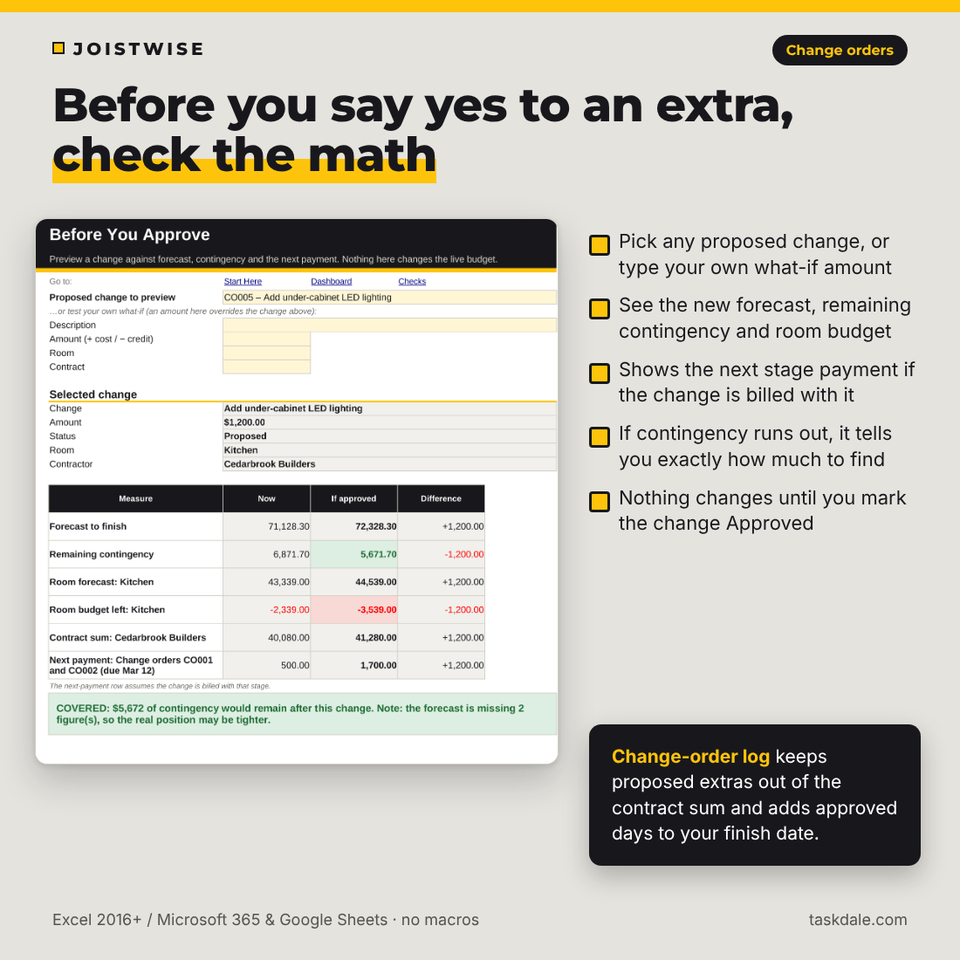
- Change-order log with reason, price increase or credit, schedule impact and decision date; proposed changes stay outside the contract sum
- Stage-payment calendar with milestones, work to inspect before paying, and labels for Paid, Overdue, Due next and Awaiting milestone
- Invoice and payment ledger with partial payments, plus an upcoming-payments view filtered by month and contractor
- A check that flags installments that don’t add up to the current contract sum
Dashboard and decisions
- Paid-vs-promised dashboard with KPI tiles, progress bars, a room table, an alerts panel, next payments and two charts, filtered by room and contractor
- Forecast to finish with an explicit “estimate needed” flag: a blank estimate keeps the forecast marked INCOMPLETE
- Contingency reconciliation from your original reserve to what is left
- Before You Approve calculator: preview a change against the forecast, contingency, room budget and next stage payment
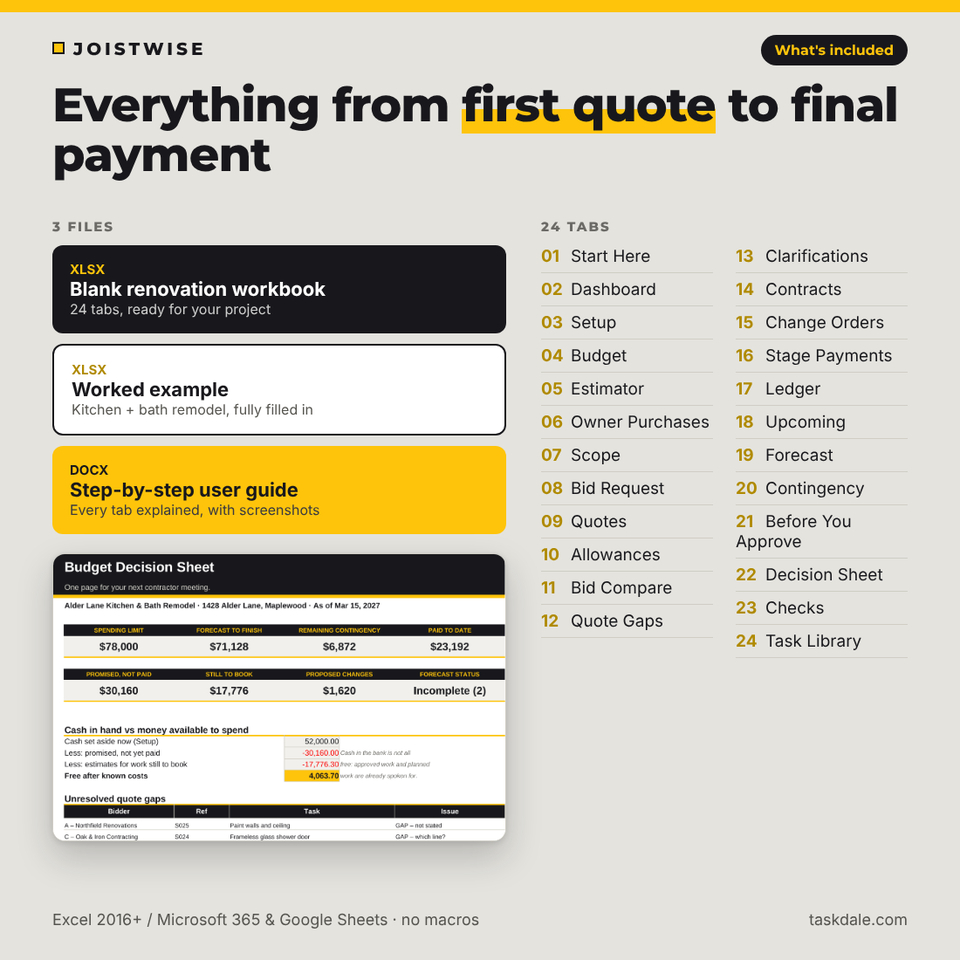
- One-page printable decision sheet for your next contractor meeting, and 19 automatic data checks
What’s included
- Joistwise Renovation Budget & Quote Workbook (.xlsx, 24 tabs, blank)
- Worked example workbook: a fictional kitchen and bath remodel with every feature filled in (.xlsx)
- User guide (.docx) with screenshots, troubleshooting and FAQ
How it works
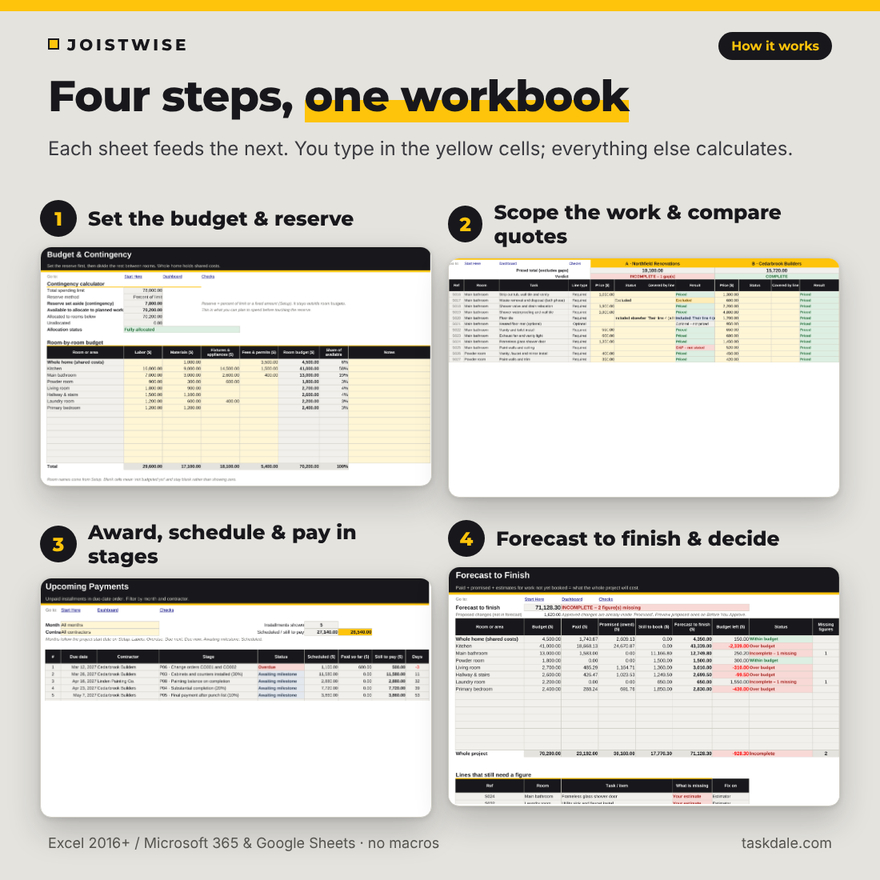
- Enter your spending limit, reserve and rooms, then split the budget by room.
- List the work once on the Scope sheet and print the bid request for each contractor.
- Enter each quote line by line, clear the gaps in writing, and compare adjusted totals.
- Record the accepted contract, schedule stage payments and log each payment.
- Log change orders, preview them on Before You Approve, and print the decision sheet before each meeting.
File formats and software
Two .xlsx workbooks and one .docx guide. Use Microsoft Excel 2016 or later (Windows or Mac, including Microsoft 365) or Google Sheets (free with a Google account). Formulas are protected without a password; you type only in the yellow-tint cells. Capacity: 15 rooms plus whole home, 4 bidders per bid round, 150 scope lines, 200 estimates, 100 owner purchases, 12 contracts, 100 change orders, 60 stage payments and 300 ledger rows.
Customization
Change the currency symbol once and every money header follows it. Rename rooms and bidders on Setup, adjust the due-soon window, and unprotect any sheet to change colors or columns. Print areas are set for every working sheet.
Digital download
This is a digital product. You download the files right after purchase; nothing is shipped. Personal use only (or use within your own business for business templates); you may not resell, share or redistribute the files. For planning and education only; not financial, tax, legal or construction advice.
Use cases
- Comparing three bathroom remodel quotes when one builder leaves waste removal blank
- Checking whether an extra lighting circuit fits the remaining contingency before you sign the change order
- Preparing a one-page summary of payments due and open questions for a contractor meeting
- Tracking appliance and tile orders you buy yourself alongside the contractor’s stage payments
FAQ
Does this renovation budget spreadsheet work in Google Sheets?
Yes. Upload the .xlsx to Google Drive and open it with Google Sheets. It uses standard functions only and no macros. Internal navigation links work in Excel; in Google Sheets, use the tabs.
How many contractor quotes can I compare?
Up to four bidders per bid round on up to 150 scope lines. For a second package (for example flooring), start a new round after you award the first.
What is the difference between paid and promised?
Paid is money that has left your account. Promised is approved work and orders that are not yet paid. Together they are your committed cost.
Is the adjusted bid total a real price?
No. It is your estimate of a like-for-like total, labeled ESTIMATE. Always confirm prices with the contractor in writing.
Can I use my own currency?
Yes. Type your currency symbol on the Setup sheet; $ is the default.
Is there an example to follow?
Yes. A fully worked kitchen and bath remodel example is included, plus a user guide.
Does it give legal or financial advice?
No. It is a planning tool. Check contracts, permits and licensing with your local building department and state contractor licensing board.
Reviews
There are no reviews yet.