
A subscription tracker spreadsheet that shows when the money leaves
Most subscription lists stop at one number: the monthly total. That number is useful, but it hides the months when several annual plans renew at once. SubTrack Renewal Audit is a subscription tracker spreadsheet for Excel that keeps two numbers side by side: the monthly equivalent (what each plan costs on average) and the actual cash due in each month. It supports monthly, quarterly and annual billing, and it keeps planned cancellations separate from completed ones so your savings are never counted early.
It’s built for households, couples, students and freelancers who want to audit their streaming, software, cloud storage, memberships and other recurring charges once a year, then keep the list current in a few minutes a month.
What it does: a worked example from the sample workbook
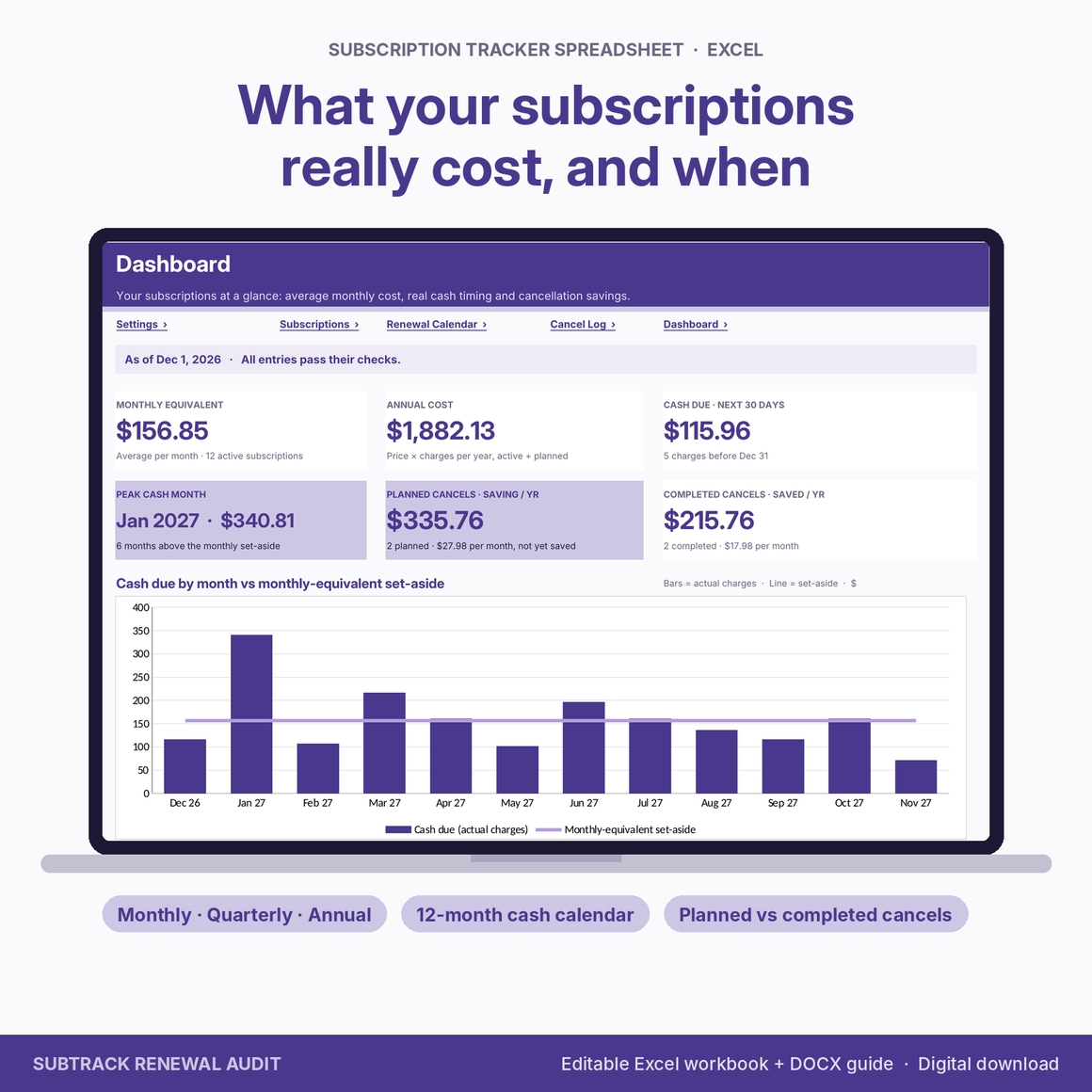
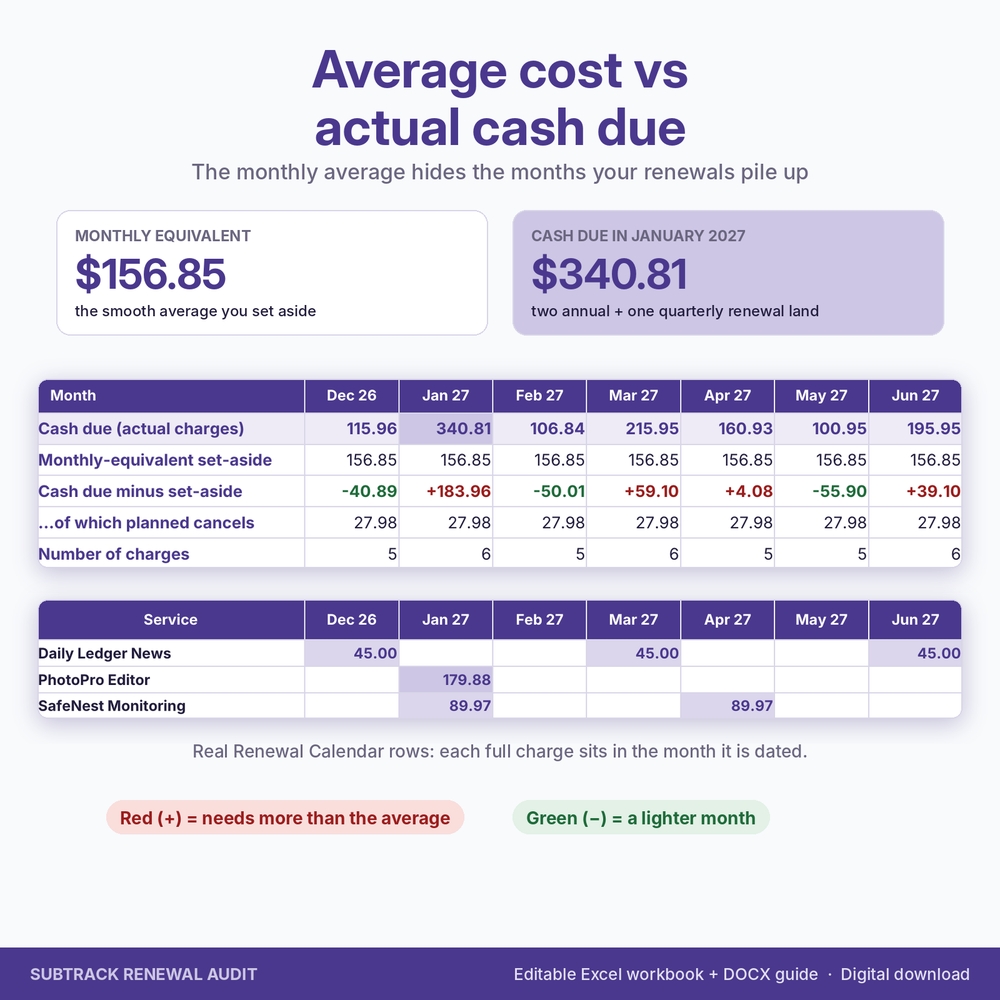
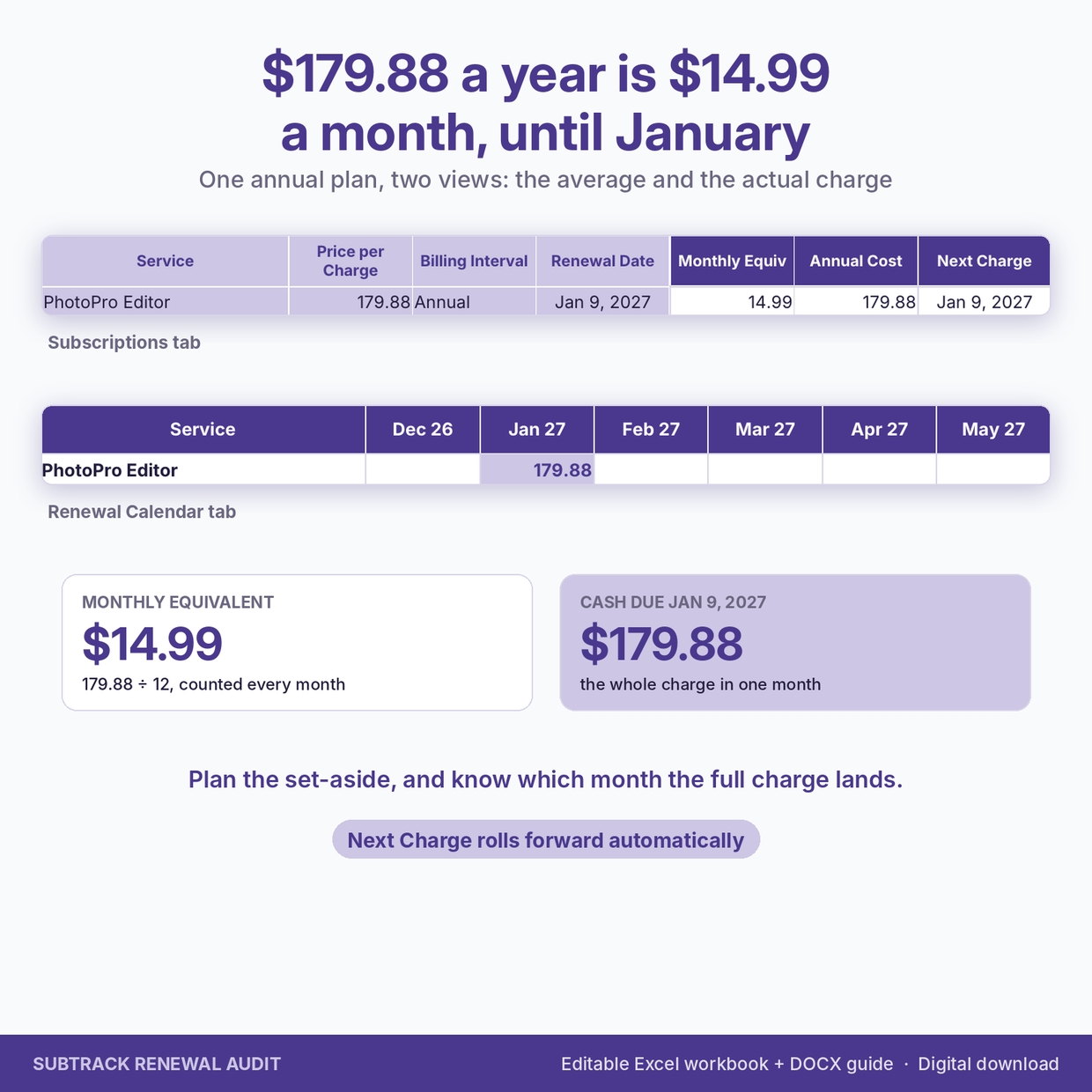
In the filled sample shown in the images, 12 active subscriptions add up to a monthly equivalent of $156.85 and an annual cost of $1,882.13. That looks like an even $156.85 every month. The Renewal Calendar shows otherwise: $340.81 is due in January 2027 because a $179.88 annual photo-editing plan and an $89.97 quarterly alarm plan land in the same month as the regular monthly charges. February needs only $106.84.
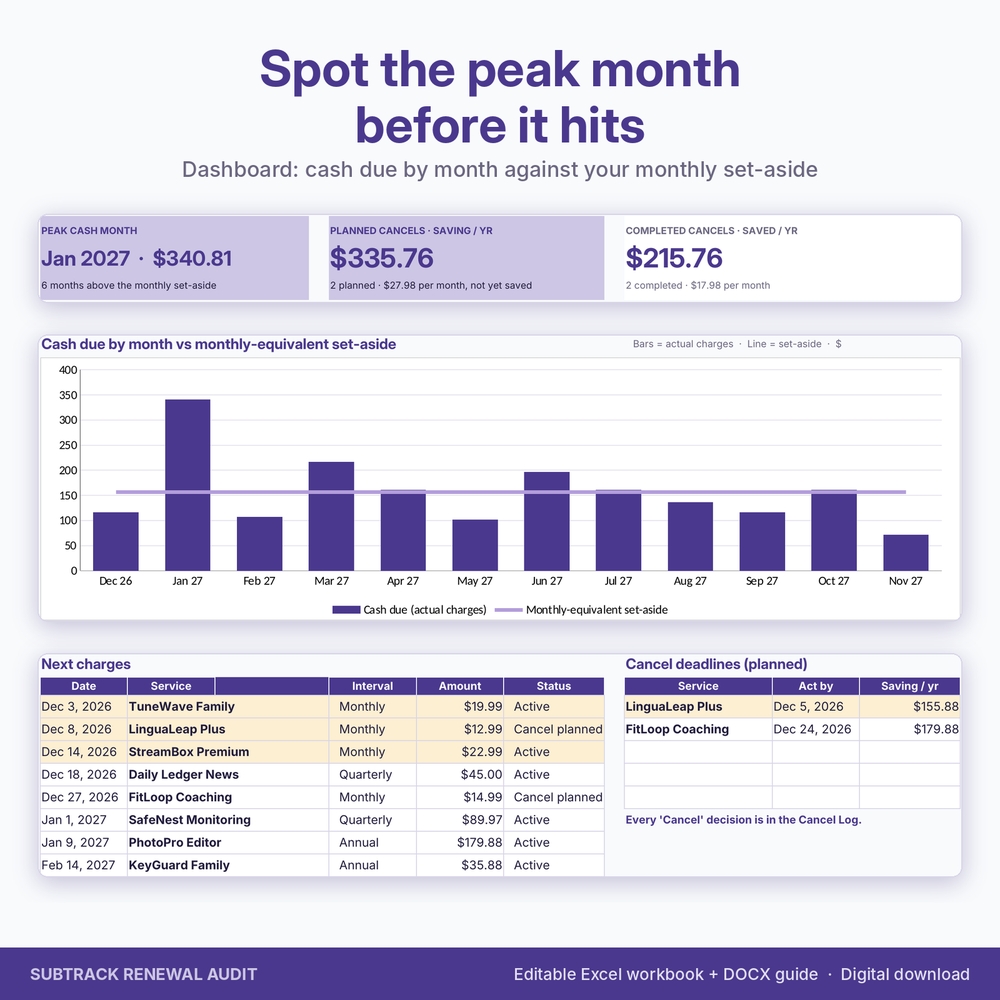
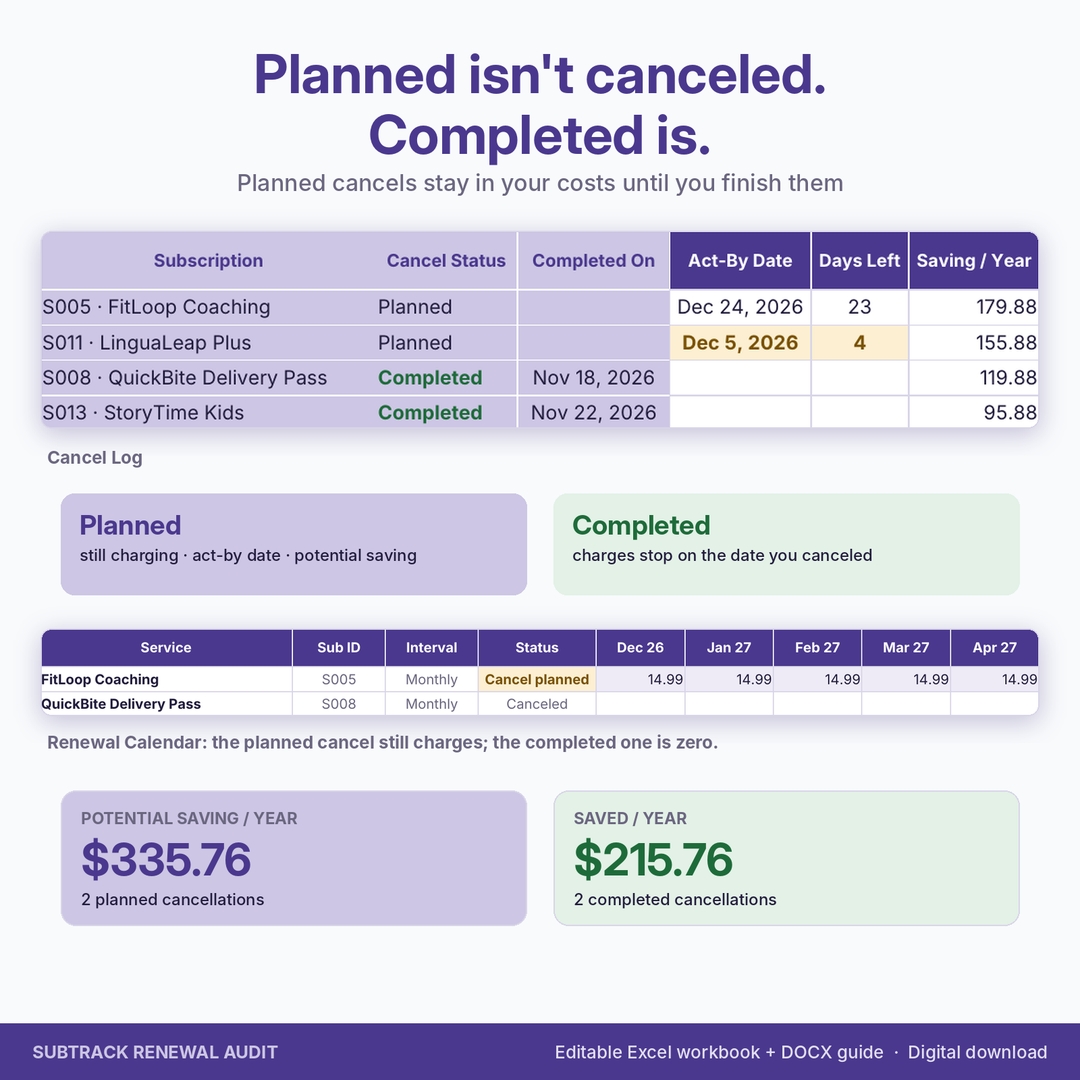
The same sample has two planned cancellations worth $335.76 a year that are still being charged, and two completed cancellations worth $215.76 a year that are already saved. A planned cancellation stays in your costs and in the calendar until you mark it Completed with the date you canceled; from that date the charges drop out.
What’s included
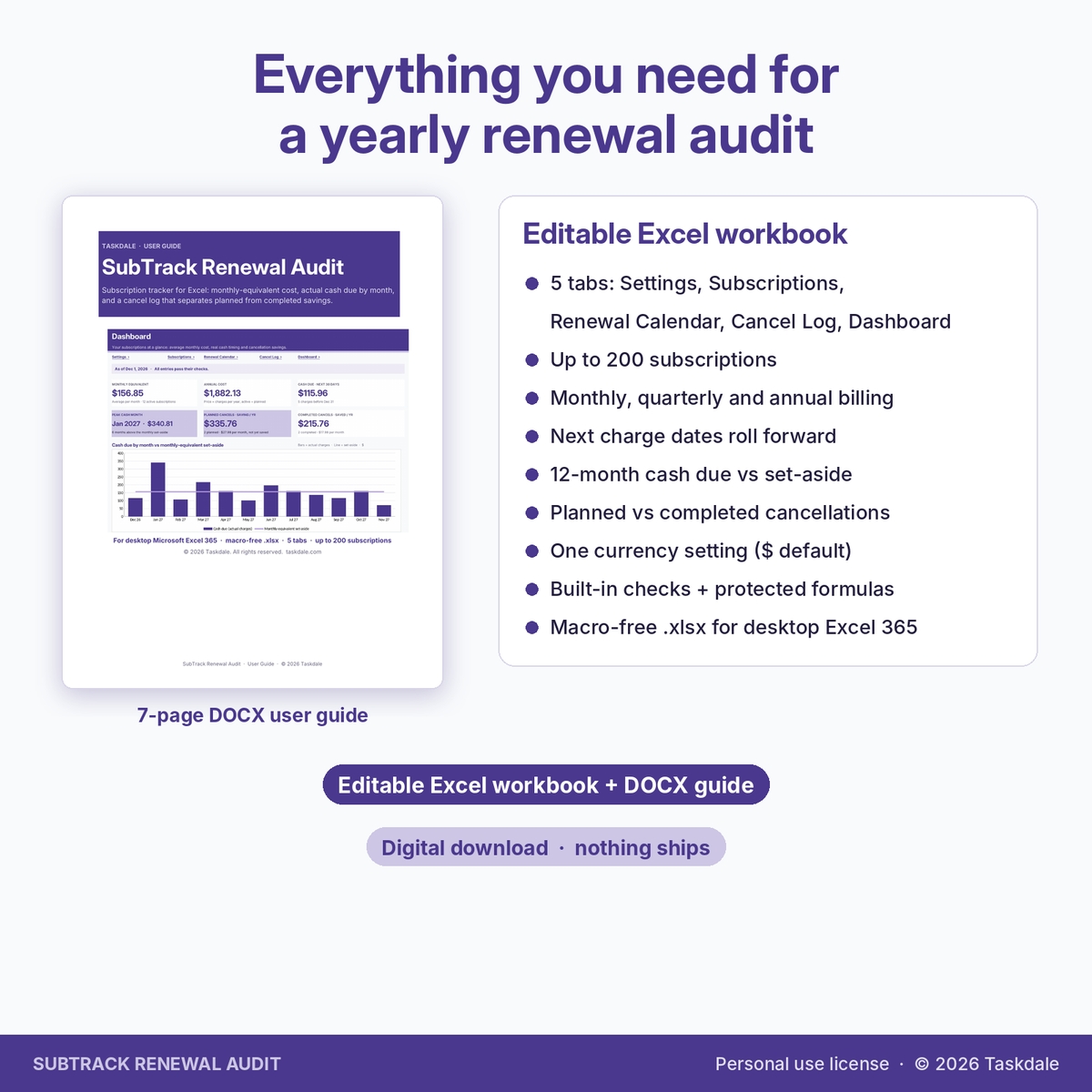
An editable, macro-free Excel workbook with five tabs:
- Settings: three start-here steps, one currency label used by every amount (default $), an optional today’s-date override, the calendar start month, a renewing-soon window, a cancel buffer, 12 editable categories, a cell legend and links to every tab.
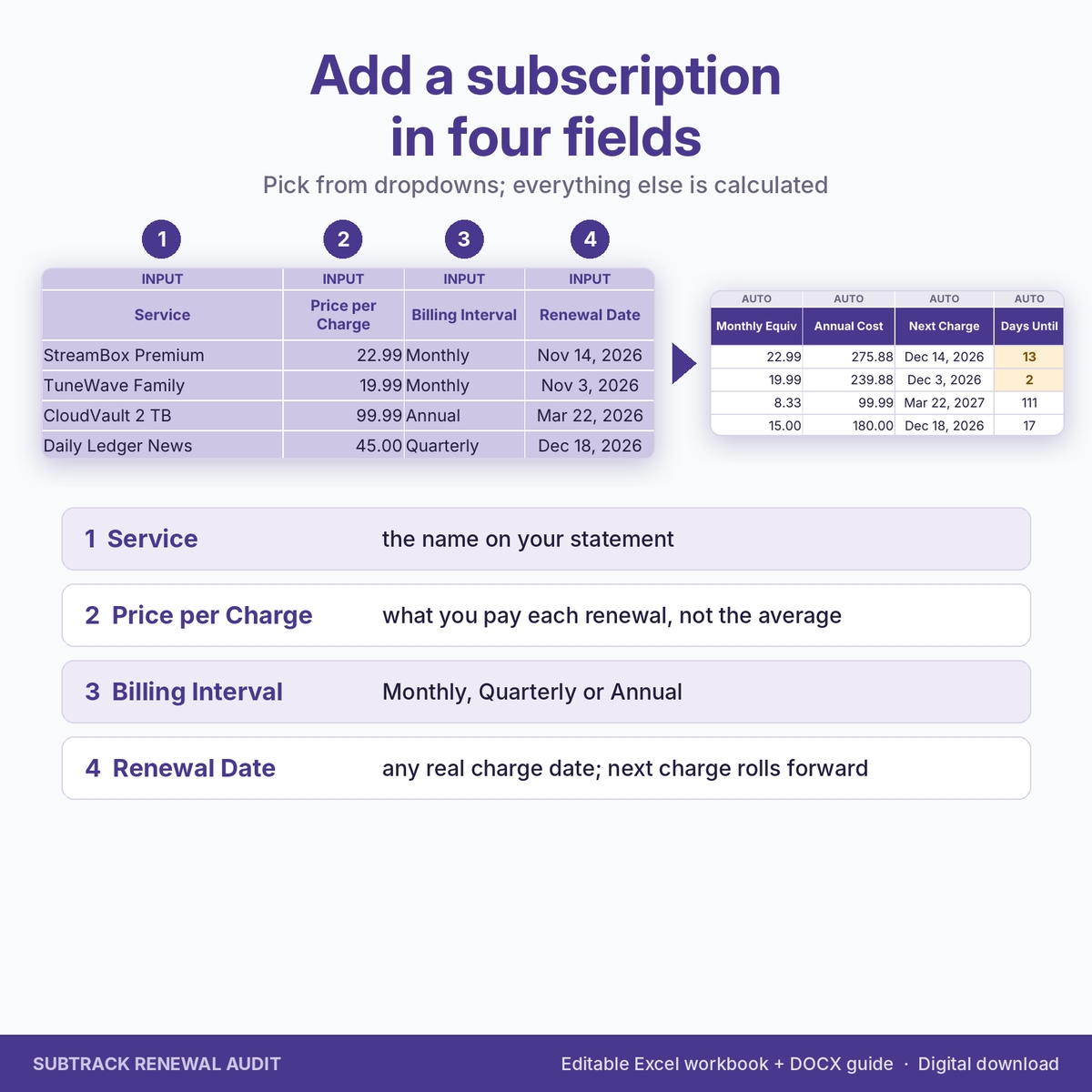
- Subscriptions: up to 200 subscriptions. Enter the service, price per charge, billing interval (Monthly, Quarterly or Annual) and any real charge date. The sheet calculates monthly equivalent, annual cost, next charge, days until, status and a Check column that flags incomplete or invalid rows.
- Renewal Calendar: 12 months of actual charges per subscription, with monthly totals, the monthly-equivalent set-aside, the difference, the part that planned cancellations would remove, and the number of charges per month.
- Cancel Log: one row per subscription you plan to cancel. Planned or Completed status, reason, optional cancel-by date, completed date, access end date, confirmation number, an automatic act-by date, days left, and potential versus realized savings.
- Dashboard: six KPI cards (monthly equivalent, annual cost, cash due in the next 30 days, peak cash month, planned savings, completed savings), a cash-due-versus-set-aside chart, the next eight charges, the next five cancel deadlines, a category breakdown and your Keep / Review / Cancel audit decisions.
You also get a seven-page DOCX user guide with screenshots, a settings table, check messages and troubleshooting. The workbook you download is clean; the filled workbook in the images is a demonstration.
How to use your subscription tracker
1. Set your currency and dates
Type your currency symbol or code on Settings. Leave the date cells blank to use today’s date and start the calendar this month, or enter a date to plan ahead.
2. List each subscription once
Enter the price you are charged each time it renews, pick the interval and type one real charge date, last month’s or the next one. Next Charge rolls forward on its own, so you don’t need to update dates every month.
3. Read the calendar, then decide
Check which months need more than your average and mark each subscription Keep, Review or Cancel. The Dashboard warns you when something is marked Cancel but isn’t in the Cancel Log yet.
4. Plan and complete cancellations
Add a Planned row with an optional cancel-by date. The workbook suggests an act-by date a few days before the next renewal. When you cancel, switch the row to Completed and enter the date; the savings move from potential to realized.
Built-in checks
Formula cells are locked (no password) and entry cells use dropdowns and validation. Independent Check columns catch pasted mistakes, such as a negative price, a misspelled interval, a text date, a duplicate cancel row, a completed cancellation without a date, or a completed date in the future. A row that fails its check is excluded and clearly flagged instead of quietly skewing your totals.
Format, customization and download details
- For desktop Microsoft Excel 365 (Windows or Mac). Macro-free .xlsx with standard functions and Excel tables. Other spreadsheet apps are not supported.
- The user guide is a .docx file that opens in Microsoft Word or a compatible reader.
- Rename services and categories, change the currency label (it does not convert amounts) and print any tab: each is set to landscape, one page wide.
- Capacity: 200 subscriptions, 200 cancel-log rows and a 12-month calendar.
- Digital download. Nothing ships.
- License: personal use only (or use within your own business for business templates). You may not resell, share or redistribute the files.
Use cases
- A yearly subscription audit before the holidays or tax season.
- Couples merging accounts who want one shared list with a “Paid From” nickname for each card.
- Freelancers separating software renewals from personal streaming with categories.
- Anyone building a sinking fund for annual renewals using the monthly set-aside.
Frequently asked questions
Does it handle annual and quarterly subscriptions?
Yes. Monthly, quarterly and annual intervals are supported. Each charge appears in the month it’s dated, and the monthly equivalent spreads it evenly.
Can I track weekly or every-six-months billing?
No. Only monthly, quarterly and annual intervals are supported.
Does it connect to my bank or import statements?
No. You enter each subscription yourself. Nothing is linked or imported, and you should never enter card numbers.
Why is a planned cancellation still in my costs?
Because you’re still paying for it. It counts as a saving only when you mark it Completed with the date you canceled.
Why can the monthly total × 12 differ by a few cents from the annual cost?
Each monthly equivalent is rounded to the cent (for example, $99.99 ÷ 12 = $8.33). The cash calendar uses exact charges.
Can I use Google Sheets or Excel on a phone?
This workbook is supported for desktop Microsoft Excel 365 only.
Can I change the currency?
Yes. One currency label on Settings appears beside every amount. It changes the label, not the values.
Known limitations
Three billing intervals only, one 12-month calendar window at a time, no bank import, no automatic price-change history and no reminders outside Excel. It is a planning tool, not financial advice; confirm renewal dates and cancellation terms with each provider.
Want to try the idea first? The free subscription list in our article totals up to 10 subscriptions by monthly equivalent. SubTrack Renewal Audit adds the renewal calendar, cancel log and dashboard.
Reviews
There are no reviews yet.