A free family reunion planner spreadsheet is the easiest way to get out of the group text and into one clear list. This one, Kinvene Lite, tracks up to 25 households with their RSVP, headcount, fee, payments and balance, plus a 20-dish potluck sign-up and a simple budget. It opens in Excel and Google Sheets, and you can download it free below.
Further down you will find a step-by-step reunion timeline, a fair way to split costs between families, and what the full Kinvene Family Reunion Planner adds when your reunion outgrows the free version.
Download the Free Family Reunion Planner
Enter your email to get the file. It is one .xlsx workbook with 5 tabs: Start Here, Households, Potluck, Budget and a Lite vs Full comparison.

Free Family Reunion Planner Spreadsheet (Kinvene Lite, Excel + Google Sheets)
A 5-tab sample: 25-household RSVP and fee tracker with balances, a 20-dish potluck sign-up and an 8-category budget. Upgrade to the full Kinvene planner for cost split by age, name tags and a dashboard.

Want everything unlocked?
The free file is a sample. The full version has every page, tab and feature, plus the user guide.
See the full versionWhat Is Inside Kinvene Lite
- Start Here: type your reunion name, currency symbol, a price per adult and a price per child. A small summary shows households coming, people coming, fees due, fees paid and what is still owed.
- Households: 25 rows for family name, contact, phone, RSVP (Yes, Maybe, Pending or No), adults and children. A family of 2 adults and 2 kids at 50 and 25 shows a fee of 150 the moment you mark them Yes.
- Potluck: 20 lines for meal, dish, who is bringing it and a status. “Still needed” turns red, so gaps jump out.
- Budget: 8 categories with planned, spent and left, plus totals.
It is undated, so you can use it for a reunion next summer or five years from now.
How to Plan a Family Reunion, Step by Step
9 to 12 months out
Pick two or three people to share the work, then survey families for dates and places. Collect a phone number and email for every household now. It is the job everyone puts off, and it gets harder the closer you get.
6 to 9 months out
Book the venue and reserve a hotel block if people are traveling. Send a save-the-date with the city and weekend. A rough budget helps here: venue, food, drinks, T-shirts, decorations, activities and supplies cover most reunions.
3 to 6 months out
Set the fee, send invitations with an RSVP and payment deadline, and open the potluck sign-up. This is when a reunion planner spreadsheet earns its keep, because RSVPs and payments start arriving from every direction.
The final month
Chase the Pending households, confirm the headcount with your caterer or grill crew, and print name tags and the day’s schedule. Assign day-of jobs like the welcome table, the grill and clean-up.
How to Split Family Reunion Costs Fairly
The most common question organizers ask is how much to charge. A flat price per family feels simple, but a couple and a family of seven do not cost the same to feed. Most families settle on a price per person, with a lower price for kids.
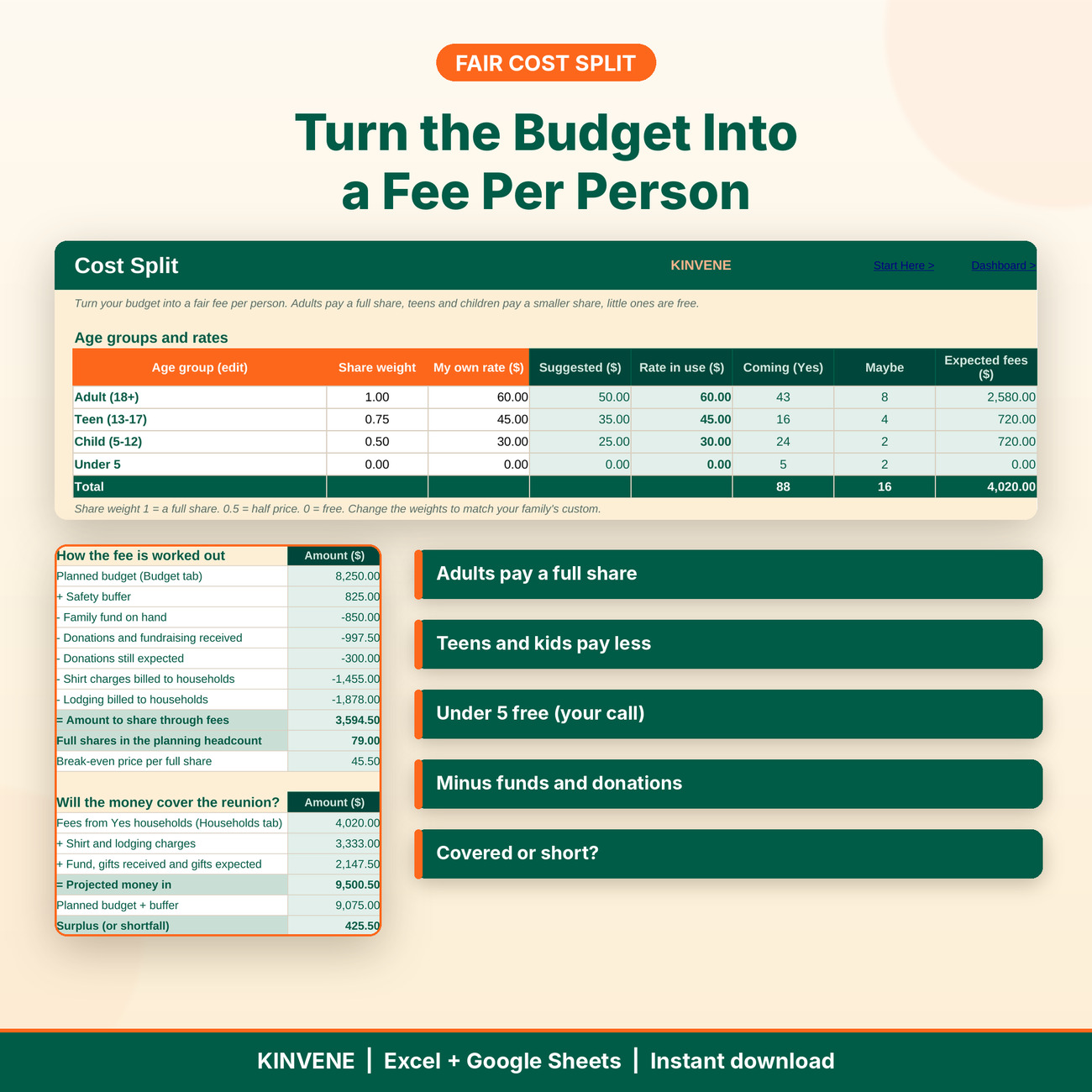
A fair method works like this. Add up the planned budget and a 10% buffer. Subtract money you already have, such as a family fund or donations. Then share what is left by “full shares”: an adult counts as 1, a teen as 0.75, a child as 0.5 and a toddler as 0. If 3,600 needs covering and 80 full shares are coming, each full share is 45, a teen pays about 34 and a child about 23.
Kinvene Lite uses two simple prices you set yourself. The full planner does the whole calculation above for you on its Cost Split tab, then tells you whether the reunion is covered or short.
When to Upgrade to the Full Family Reunion Planner
Kinvene Lite is plenty for a one-day backyard reunion. Once you have more than 25 households, hotel rooms, T-shirts or a committee sharing the work, the full Kinvene Family Reunion Planner saves a lot of evenings. It has 15 tabs:
- Cost Split: a suggested fee by age group from your budget, fund on hand and donations, with a covered-or-short check.
- Households: 150 families with four age groups, shirts and hotel rooms billed automatically, payments, balance and status.
- Payments, Budget and Expenses: 500 payments including donations and fundraisers, 400 expenses, cash on hand, and a list of helpers who paid out of pocket and still need paying back.
- Potluck & Food: 80 sign-ups, coverage by category and a food quantity calculator. For 104 people it suggests 136 burger patties for one cookout.
- Guests, Name Tags and Contact List: printable name tags 8 per page with each person’s family branch, a shirt order by size, and a family directory.
- Lodging, Schedule and Tasks: room blocks and cabins, a day-by-day program, and 43 ready-made reunion tasks with owners and due dates.
- Dashboard: a countdown, 8 live cards and 4 charts for RSVPs, headcount, budget and fees.
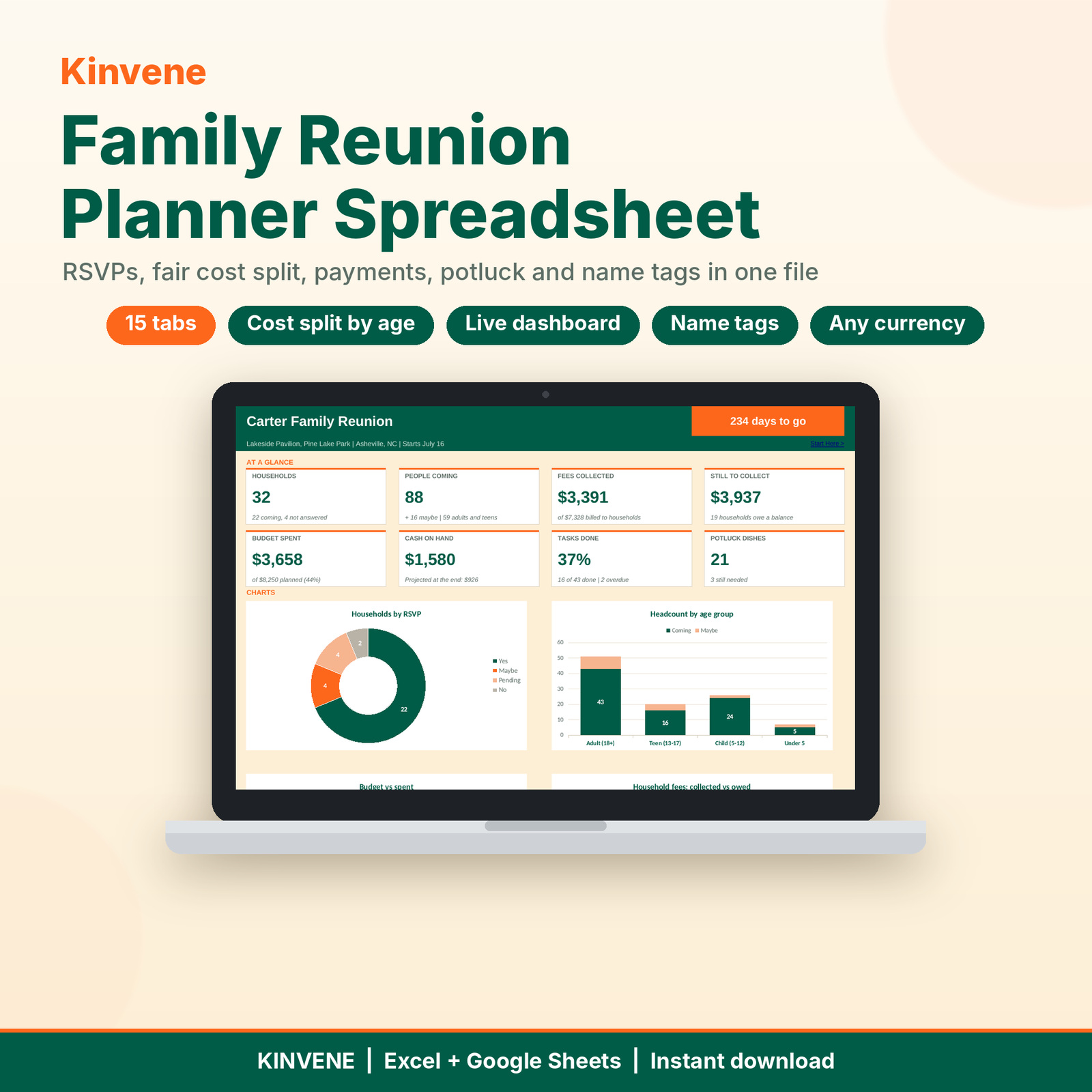
See the full Kinvene Family Reunion Planner on Taskdale. It comes with a 10-page user guide and works in Excel and Google Sheets.
Tips for a Smoother Reunion
- Let one person log every payment. Two people logging the same check is how balances go wrong.
- Use a family branch or a grandparent’s name on name tags. Cousins who have never met work out the connection in seconds.
- Ask the oldest relatives to share stories at a set time, such as a 30-minute memory circle after lunch.
- Take the group photo early in the day, before anyone leaves for a nap or the lake.
Family Reunion Planner FAQ
Does the free reunion planner work in Google Sheets?
It is built to. Upload the .xlsx to Google Drive and open it with Google Sheets. It has no macros and uses only standard formulas, though colors can shift slightly after the upload.
Can I change the currency?
Yes. Type your symbol in the currency cell on the Start Here tab and every money header follows.
How many families does the free version hold?
25 households. The full planner holds 150 households and 600 named guests.
Is there a limit on downloads?
You can download the free file up to 3 times a day with your email.