



Coffee Brew Log Spreadsheet with an Espresso Dial-In Tracker
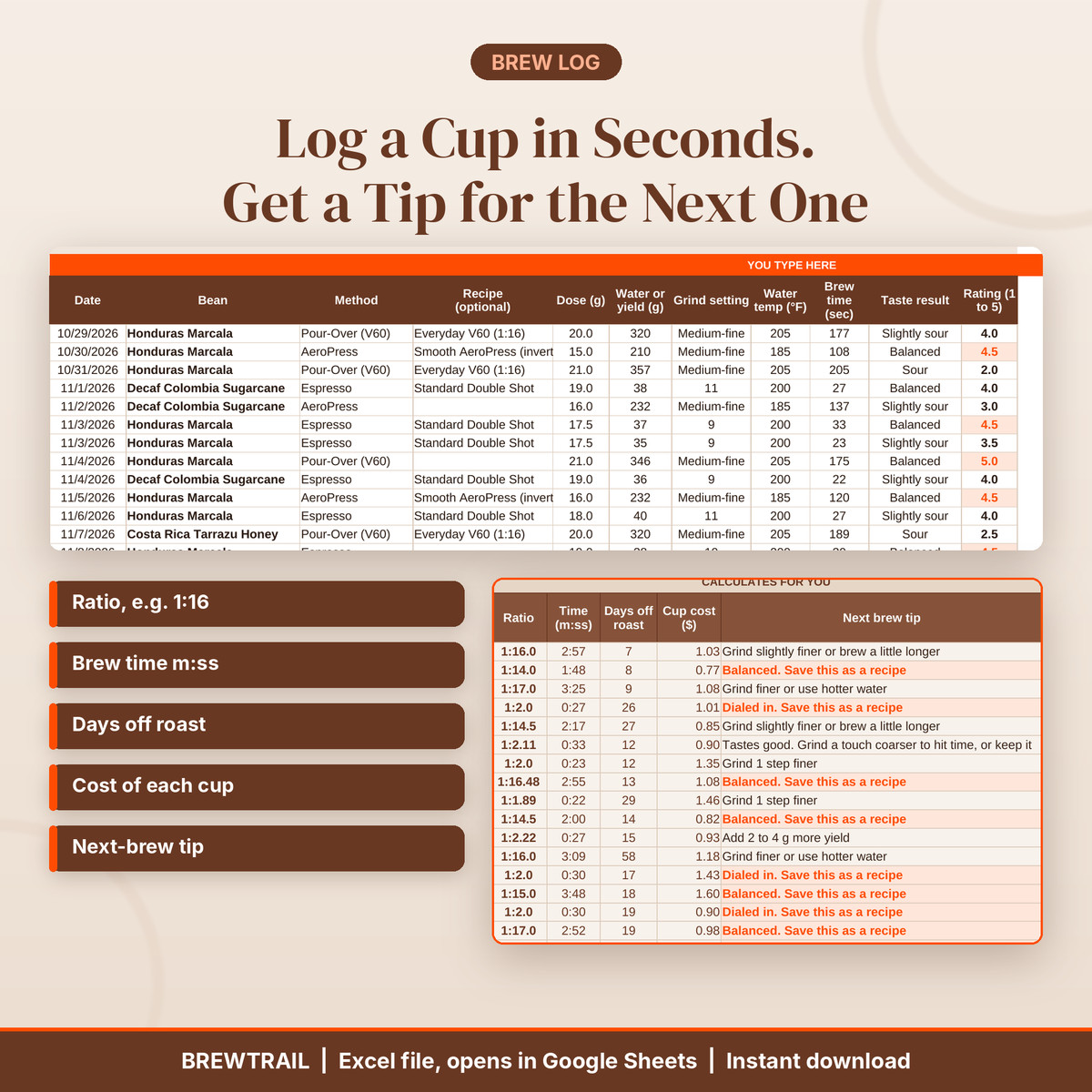
Brewtrail is a coffee brew log spreadsheet for people who want every cup to be as good as their best one. Add a bag of beans once, then log each brew in a single row: dose, water or yield, grind, temperature, time, taste and a rating. The file works out the brew ratio, days off roast, the cost of the cup and a tip for your next brew. It is one Excel workbook with 9 connected tabs, and it also opens in Google Sheets.
The espresso dial-in tracker is the part most coffee journals leave out. Pull a shot, type the numbers, pick how it tasted, and Brewtrail tells you what to change. Fast and sour? Grind 1 step finer. Slow and bitter? Grind coarser. Sour and bitter in the same sip? Fix your puck prep first.
Who This Coffee Tracker Is For
- Home espresso owners who want to dial in a new bag in a handful of shots instead of half the bag
- Pour-over, AeroPress, French press, Chemex and cold brew fans who want recipes they can repeat
- Specialty coffee buyers who want to know which roasters, origins and processes they really enjoy
- Anyone curious about what their coffee habit costs per cup, and how much they save by brewing at home
What Is Included
- Brewtrail Coffee Brew Log (.xlsx), 9 tabs, made for Microsoft Excel and ready to upload to Google Sheets
- Brewtrail User Guide (.docx), 13 pages with screenshots, tips, troubleshooting and FAQ
Features, Tab by Tab
Coffee Dashboard
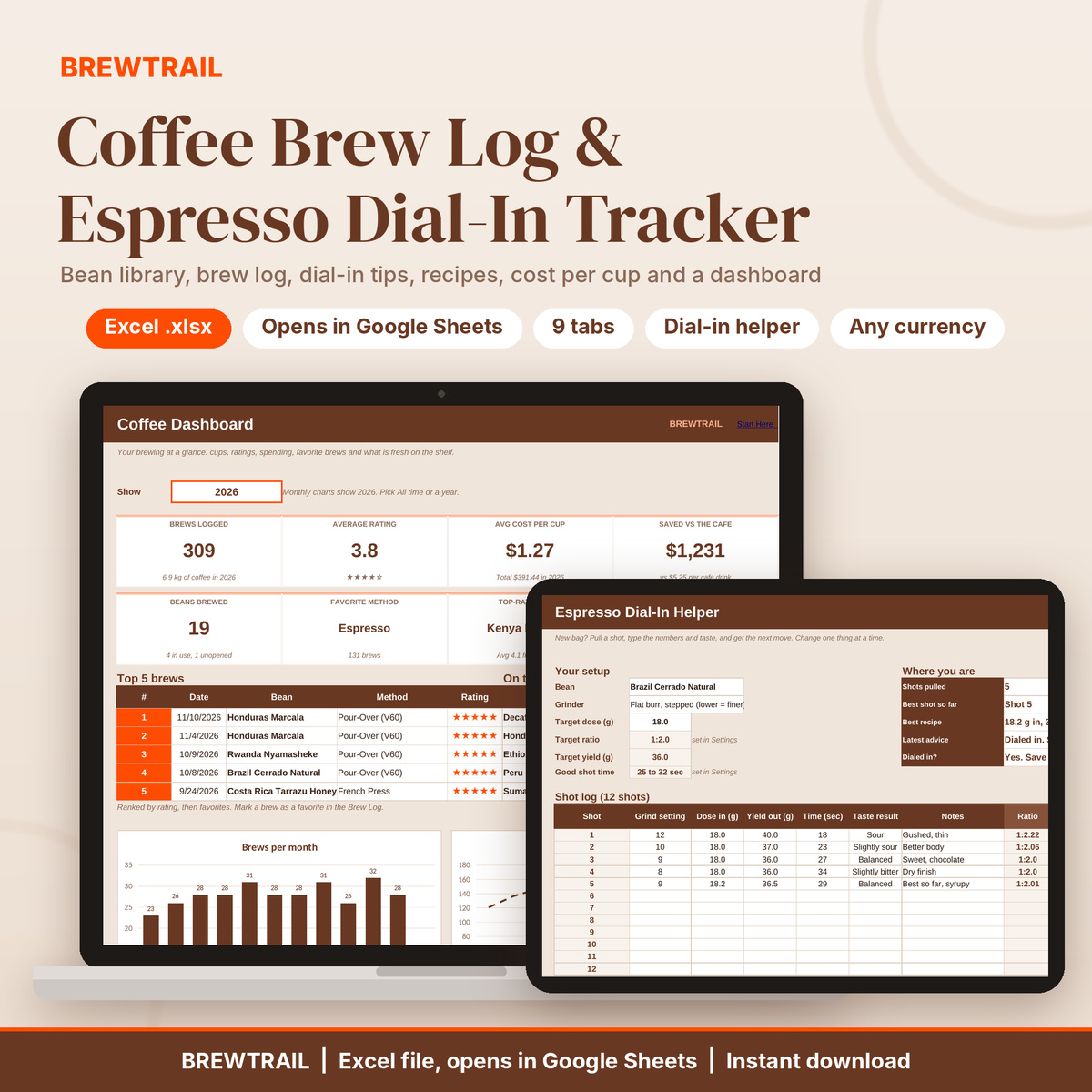
Eight live cards show brews logged, average rating, average cost per cup, money saved vs the cafe, beans brewed, your favorite method, your top-rated bean and your dialed-in rate. Below them sit your Top 5 brews, a list of beans on the shelf with freshness and cups left, and 4 charts: brews per month, home vs cafe spending, brews by method and top beans by average rating. Pick All time or any year from one dropdown.
Brew Log
Room for 1,500 brews, which is about 4 years at one cup a day. Each row calculates the ratio (for example 1:16), brew time as m:ss, days off roast, cup cost including milk or syrup, and a next-brew tip. Optional 1 to 5 scores for acidity, sweetness, body and bitterness build a flavor profile for every bean. Mark a brew as a favorite and it moves up your Top 5.
Bean Library
200 bean slots for roaster, origin, region or farm, variety, process, roast level, roast date, bag size and price. Brewtrail shows days off roast and a freshness status (Resting, Peak, Fading or Past best), cost per 100 g, grams used, grams left, cups left, average rating and average cup cost. A check column flags duplicate names.
Espresso Dial-In Helper
A 12-shot worksheet for each new bag. Type grind setting, dose, yield, time and taste, and the Next step column gives advice for the next shot. The panel at the top finds your best shot so far and writes out its recipe, such as 18.2 g in, 36.5 g out, 29 s, grind 9. A shot time chart shows each shot against your target window, and a cheat sheet covers 9 taste results in 4 situations.
Recipe and Ratio Calculator
Start from your coffee dose or from the cup size you want in fl oz or ml. The brew ratio calculator gives coffee, water, the drink you end up with, level tablespoons, temperature in °F and °C, grind and time. Pour-over methods get a bloom and pour plan. A ratio ladder shows the same dose from 1:12 to 1:18, and quick converters handle ounces, grams, ml and temperature.
Recipes and Bean Profile
Save up to 60 recipes, with 8 starter recipes included: a 1:16 V60, a light roast V60, Chemex for two, French press, inverted AeroPress, a standard double shot, a light roast long shot and overnight cold brew. Each recipe shows how often you brewed it and its average rating. Bean Profile turns any bean into a one-page summary with a flavor radar chart, its best brew and its last 12 brews.
Settings
One currency setting drives every money value, with $ as the default, so you can switch to £, €, R or any symbol. Choose °F or °C, your cafe drink price, espresso targets (1:2 in 25 to 32 seconds by default), freshness days and 10 brew methods you can rename.
How It Works
- Open Settings and set your currency, temperature unit and cafe price.
- Add the beans you are drinking to the Bean Library.
- Log each cup in the Brew Log.
- Follow the tips, save the recipes that work, and watch the dashboard fill in.
File Format and Software
- Format: .xlsx workbook for Microsoft Excel 2010 or newer on Windows or Mac
- Google Sheets: upload the file and save it as a Google Sheet. All formulas use standard functions that Google Sheets supports. Charts are redrawn in Google’s own style, and the Start Here tab links work best in Excel.
- No macros and no add-ins. Formula cells are locked with no password, so you can unlock them to customize.
- Coffee is weighed in grams; water counts 1 g = 1 ml
Customize It
Rename brew methods to match your gear, add processes or roast levels to the dropdown lists, change the freshness windows, and set your own espresso target ratio. Light roast fans often move the target to 1:2.5, and every tip follows the new number.
Real Ways People Use It
- Opening a new 12 oz bag and getting it tasting right by the third or fourth shot
- Scaling a V60 recipe from one cup to a 4-cup Chemex for guests
- Seeing that a home flat white costs about a quarter of the cafe price
Digital Download
This is an instant digital download. No physical item ships. You get the .xlsx tracker and the .docx guide right after checkout, with unlimited downloads. Personal use license: please do not resell or share the files.
FAQ
Is this a coffee journal or a spreadsheet?
It is a spreadsheet that works like a coffee journal. You type your brews and tasting notes, and the formulas do the math and the summaries.
Does it work in Google Sheets?
Yes, you can upload the .xlsx to Google Sheets. The formulas use standard functions. Charts may look a little different there.
Can I use it for pour-over only, without espresso?
Yes. Filter, immersion and cold brew tips are based on taste, and the Dial-In Helper is optional.
What does days off roast mean?
The number of days since the beans were roasted. Many beans taste best from about day 5 to day 30, and the freshness column tracks that for you.
Can I change the currency?
Yes. Type any symbol in Settings and every money header and dashboard card follows.
Is it dated?
No. It is undated, so you can keep using it year after year.
Do I need to fill in every column?
No. A brew only needs a date and a bean to count. Add more detail when you want sharper tips.
Reviews
There are no reviews yet.