

Perfume Collection Tracker Spreadsheet for Excel and Google Sheets
Spritzly is a perfume collection tracker that does more than list your bottles. Log each wear in about ten seconds, and the spreadsheet works out how often you reach for every fragrance, what each wear really costs and roughly how many sprays are left. Then, each morning, the Scent Picker answers the big question: what should I wear today?
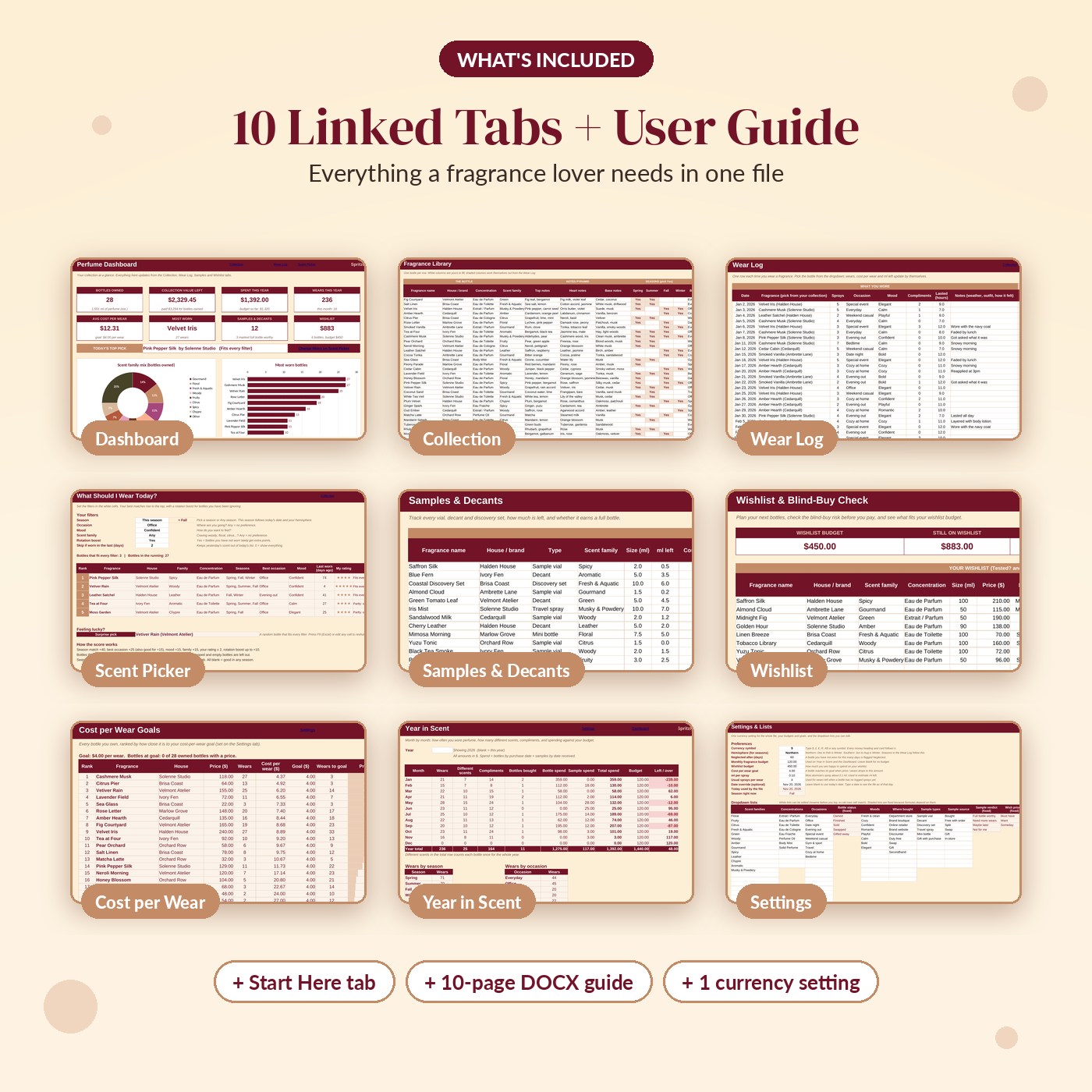
It has 10 linked tabs, room for 300 bottles and 2,000 wears, and a 10-page user guide. Everything opens in Microsoft Excel and Google Sheets, with no add-ons or scripts.
What This Fragrance Tracker Does
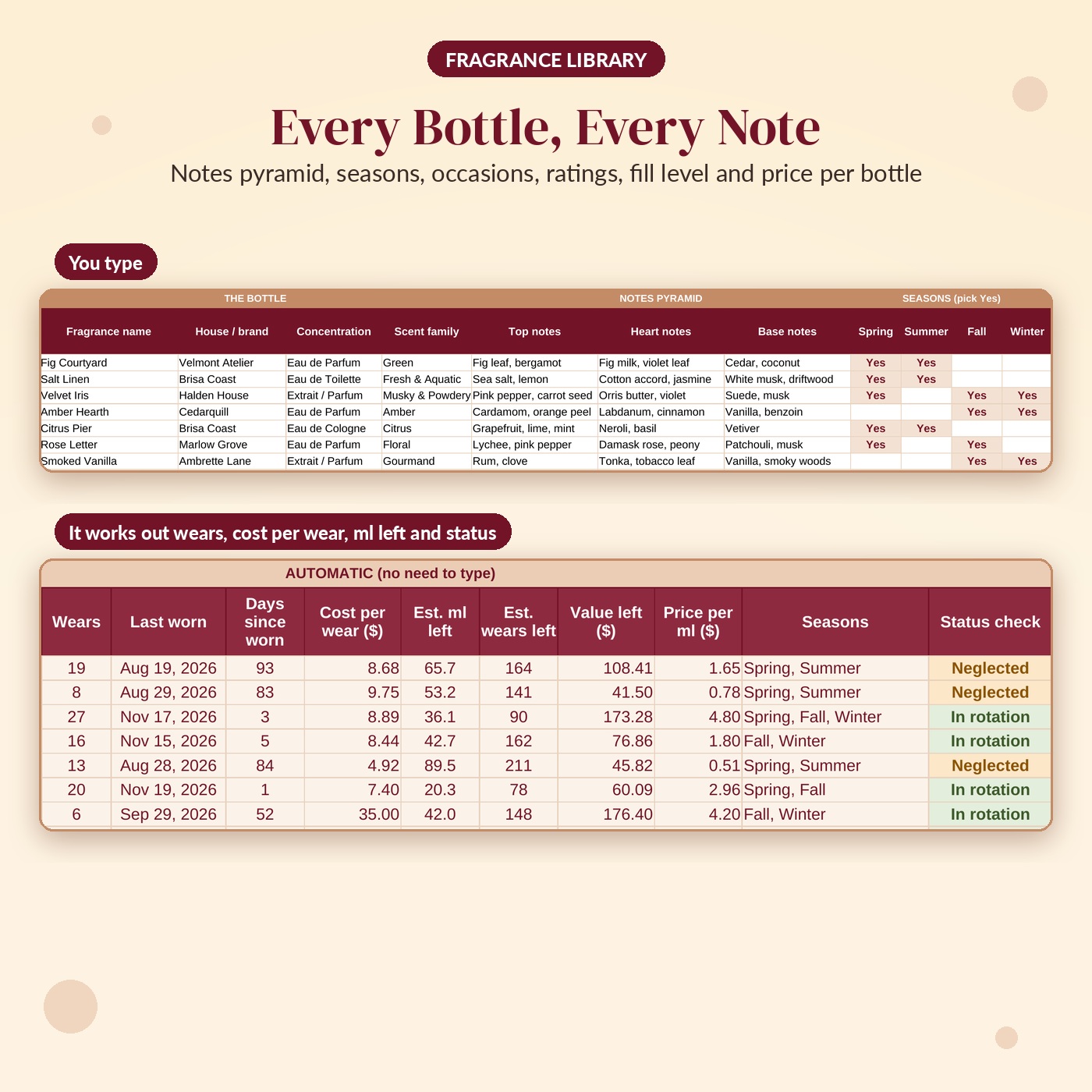
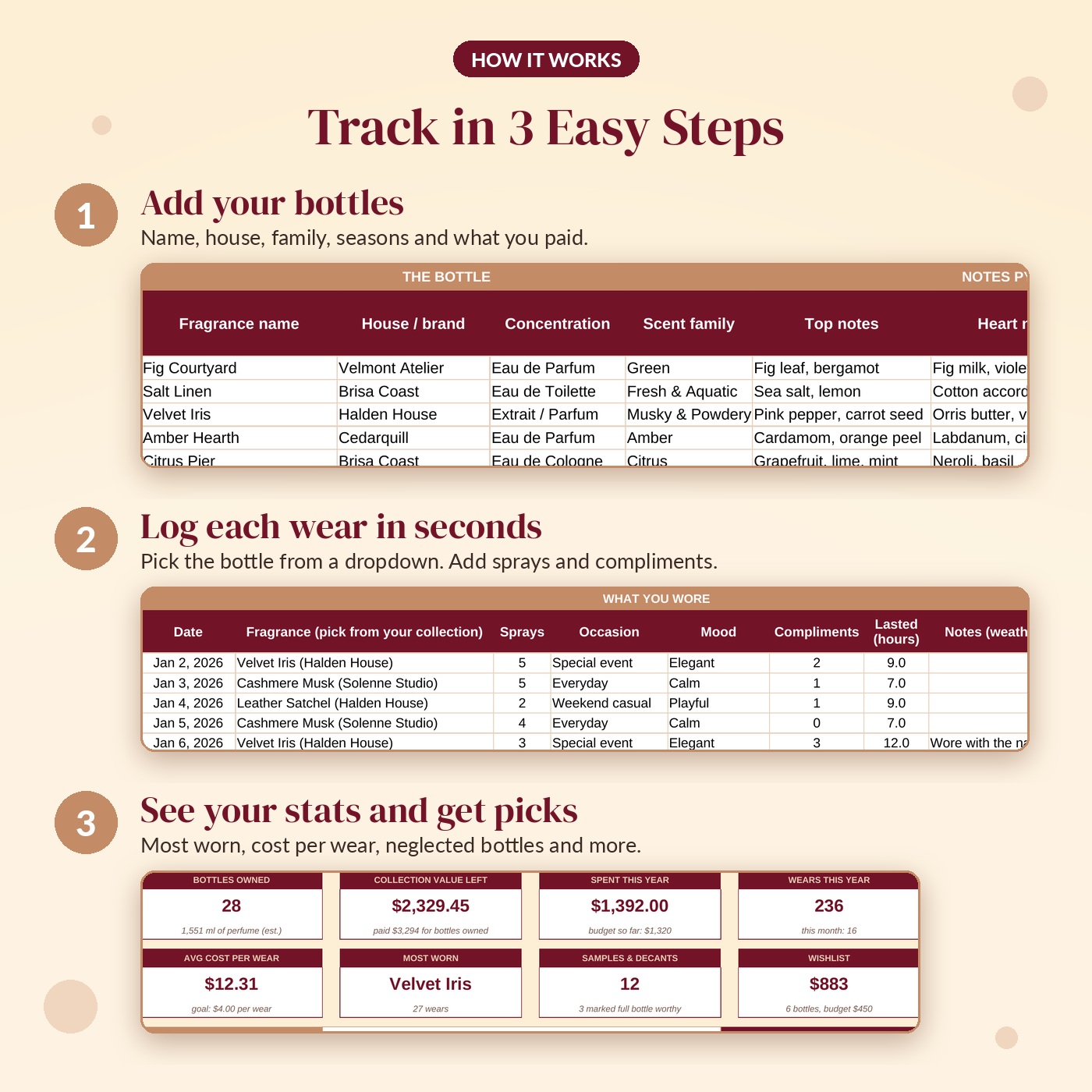
- Keeps a full fragrance library. House, concentration, scent family, top, heart and base notes, seasons, occasions, mood, longevity, projection, your rating, bottle size, fill level and price.
- Logs every wear. Pick the bottle from a dropdown, add sprays and compliments, and the season and scent family fill in for you.
- Works out cost per wear. A bottle that cost 150 and has been worn 30 times comes to 5 a wear. The Cost per Wear tab ranks every bottle against a goal you set.
- Estimates what is left. Logged sprays are taken off the fill level, so you see estimated ml left and wears left before a favorite runs dry.
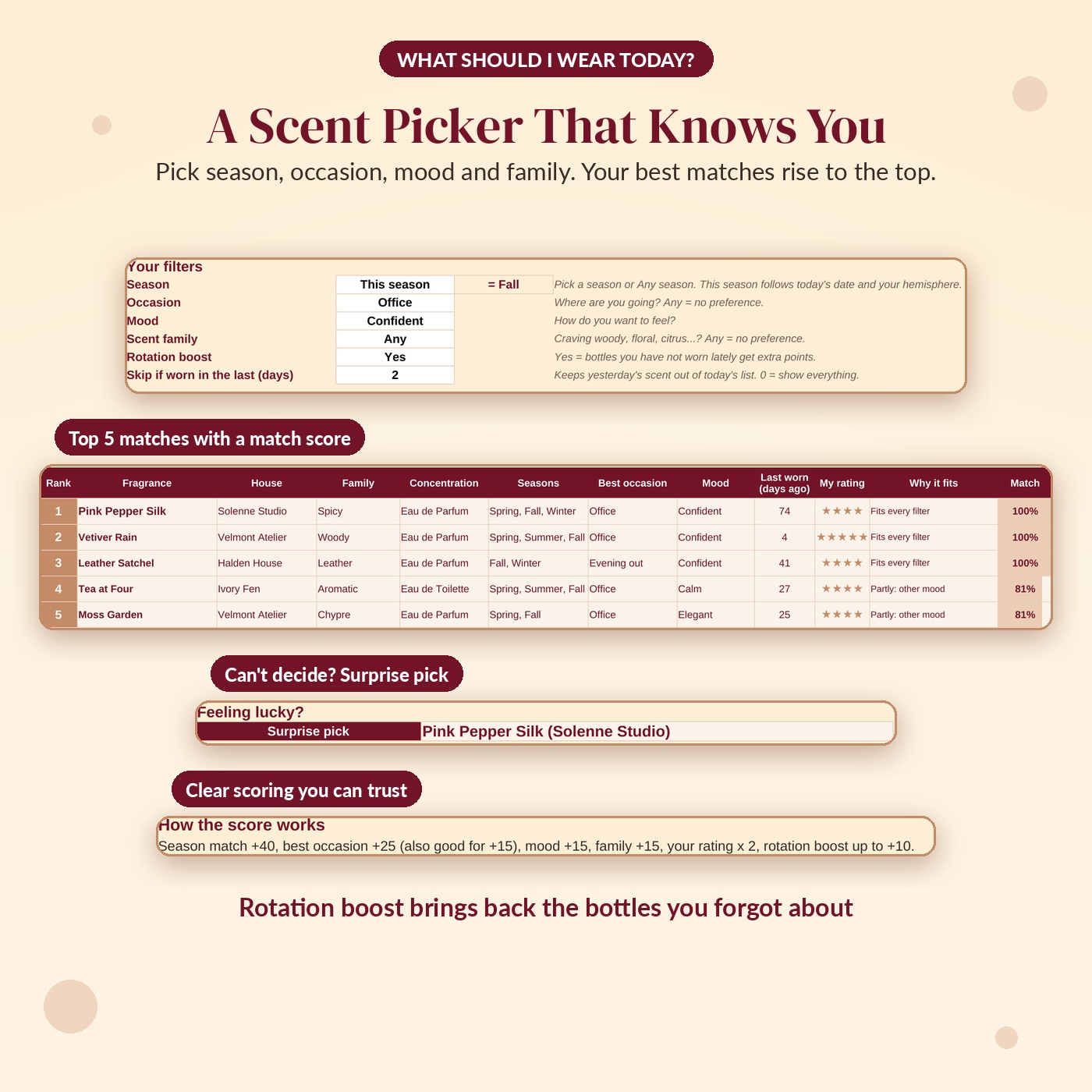
- Suggests what to wear. Choose season, occasion, mood and scent family. The top 5 matches appear with a match score and a plain reason.
Who It Is For
This perfume inventory spreadsheet suits anyone with more than a handful of bottles. The person with 8 fragrances who wears the same one every day will see which bottles they forget. The collector with 60 bottles and a drawer of decants gets one tidy place for all of it. And if you keep blind buying scents that end up on a swap site, the wishlist check will save you money.
Features of the Perfume Collection Tracker
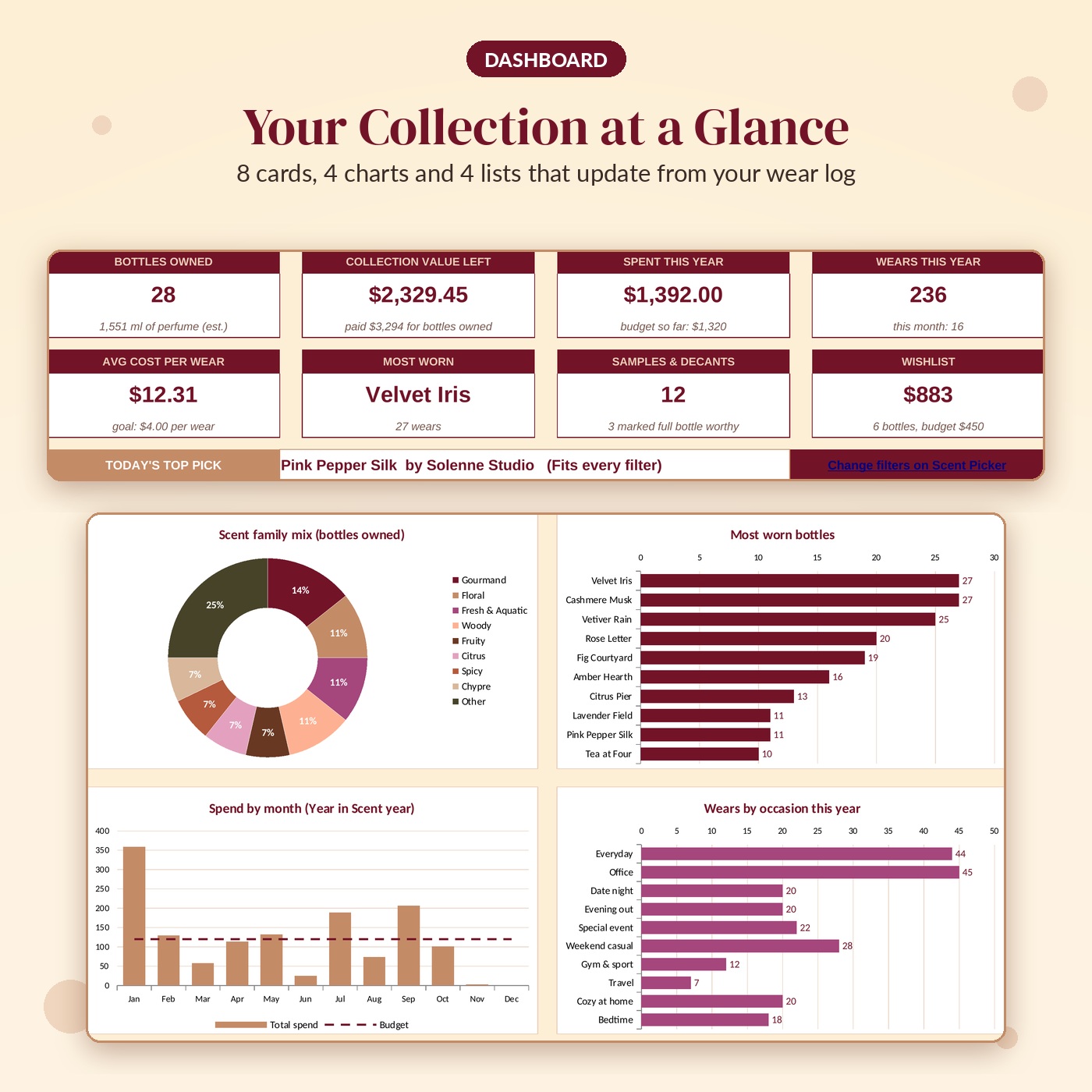
Dashboard
Eight cards show bottles owned, estimated ml of perfume, collection value left, spending this year, wears this year, average cost per wear, your most worn bottle, samples and decants, and your wishlist total. Four charts show your scent family mix, most worn bottles, spend by month against budget and wears by occasion. Four lists rank neglected bottles, bottles running low, best value and most complimented.
Scent Picker: What Should I Wear Today?
Set the season (or let it follow today’s date and your hemisphere), the occasion, a mood and a scent family. Bottles score points for each match plus your rating, and a rotation boost lifts the ones you have not worn in weeks. A Surprise pick chooses at random from the bottles that fit every filter.
Fragrance Library and Wear Log
The Collection tab holds 300 bottles with a status check for each: In rotation, Neglected, Never worn or Running low. The Wear Log holds 2,000 wears, about five years at one a day, and flags rows with a missing date or a bottle that is not in your collection.
Samples and Decants Tracker
Track vials, decants, discovery sets, travel sprays and minis with ml left, cost, times worn and a verdict. The Next step column tells you to wear it again, add it to your wishlist or pass it on, and it compares sample price per ml with the full bottle price per ml.
Wishlist with Blind-Buy Check
Before you buy untested, answer four quick questions: is it similar to one you own, do you love the notes, what do reviews say about longevity, and can you get a sample? The sheet returns Low, Medium or High risk. Budget fit adds up your must-haves first and shows what fits your wishlist budget.
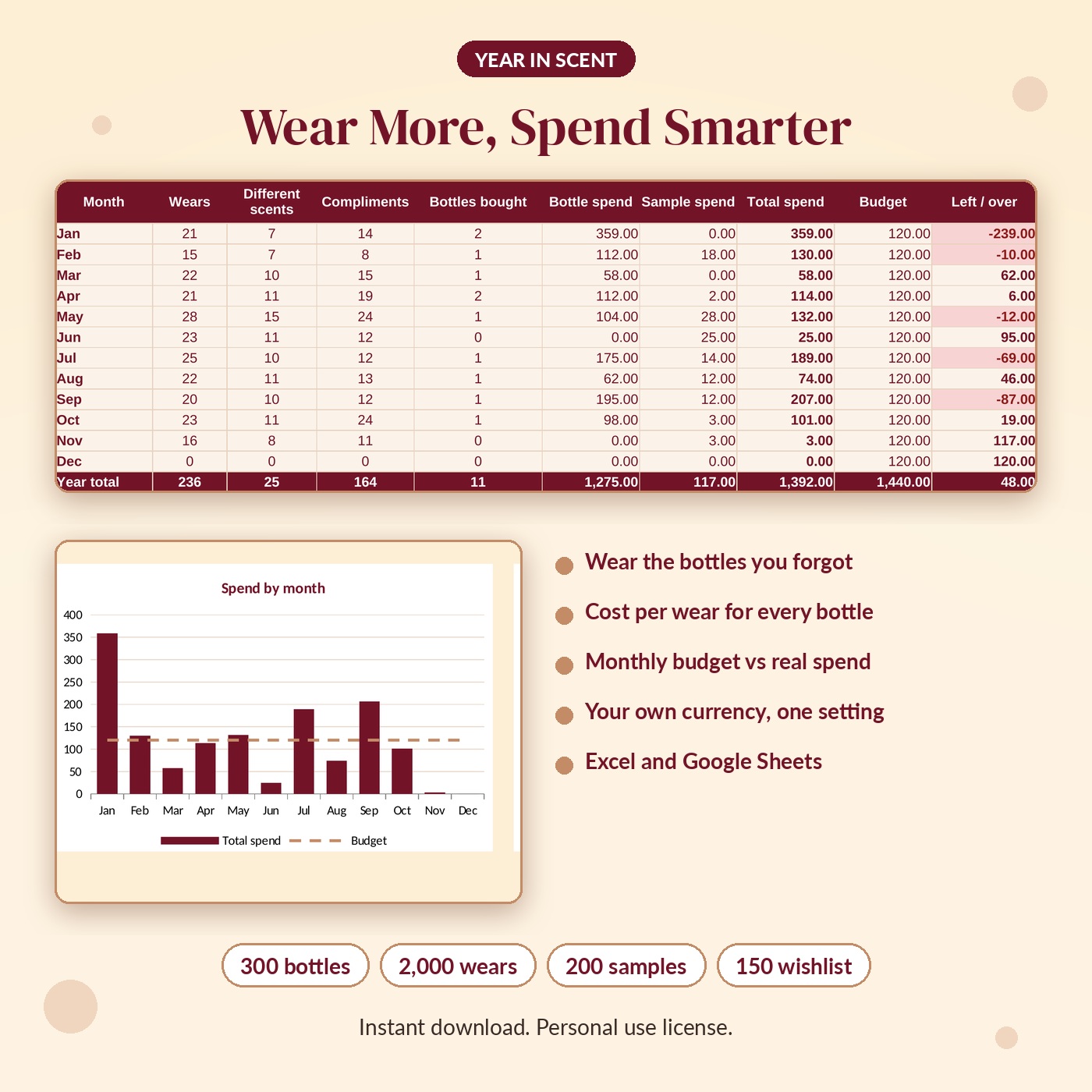
Year in Scent
A month-by-month view of wears, different scents worn, compliments, bottles bought and spend against your monthly fragrance budget, with wears by season and by occasion plus two charts.
What Is Included
- Spritzly Perfume Collection Tracker (.xlsx) with 10 tabs: Start Here, Dashboard, Collection, Wear Log, Scent Picker, Samples & Decants, Wishlist, Cost per Wear, Year in Scent and Settings
- User guide (.docx), 10 pages with screenshots, tips, troubleshooting and FAQ
How It Works
- Open Settings. Type your currency symbol, pick Northern or Southern hemisphere and set your budgets and cost-per-wear goal.
- Add your bottles on the Collection tab. Only the name is required; seasons and best occasion make the picker smarter.
- Log each wear on the Wear Log with the date and the bottle from the dropdown.
- Check the Dashboard and open the Scent Picker whenever you cannot decide.
File Formats and Software Requirements
- One .xlsx workbook that opens in Microsoft Excel 2019, 2021 and Microsoft 365, and in Google Sheets (upload it to Google Drive and open it with Sheets).
- No macros, scripts or add-ons. Excel 2016 and older lack the MAXIFS function used for Last worn.
- In Google Sheets, chart colors may look slightly different and the in-cell progress bars do not show. All formulas and dropdowns use functions Sheets supports.
Customization
Every money value reads from one currency setting, with $ as the default, so the fragrance tracker works in pounds, euros, rand or any other currency. Scent families, concentrations, occasions, moods, where bought and sample types are editable dropdown lists on the Settings tab. Formula cells are locked without a password, so you can still unlock and change anything you like.
Digital Download
This is a digital product. Nothing is shipped. Your files are ready to download right after checkout, and you can download them again from your account. The file ships empty and ready for your own bottles; the screenshots use invented houses and fragrance names.
Ways to Use This Perfume Tracker
- Catalog a collection of 40 bottles in one evening, then see which 10 you actually wear.
- Plan a vacation by filtering for Summer and Travel scents.
- Run a no-buy month and use the Neglected list as your wear challenge.
- Decide whether a decant you keep refilling deserves a full bottle.
- Keep a dated record of what you own and what you paid, handy for an insurance list.
FAQ
Does this perfume collection tracker work in Google Sheets?
Yes. Upload the .xlsx to Google Drive and open it with Google Sheets. Formulas and dropdowns work; chart styling may differ a little.
Can I use it on my phone?
Yes, in the Excel or Google Sheets app. Logging a wear takes a date and one dropdown pick.
Do I need to fill in every column?
No. Only the fragrance name is required. Extra columns unlock more of the picker and the stats.
How is cost per wear calculated?
Price paid divided by the number of wears logged for that bottle.
Can I change the currency?
Yes. Type any symbol in Settings and every money heading and card follows it.
Can I track samples and decants?
Yes. The Samples & Decants tab holds 200 entries with ml left, verdicts and a next step for each.
Can I share the file?
The license is for personal use. Please do not resell or share the file.
Reviews
There are no reviews yet.