

Shoplark: the shop manager app that shows what every sale really earns
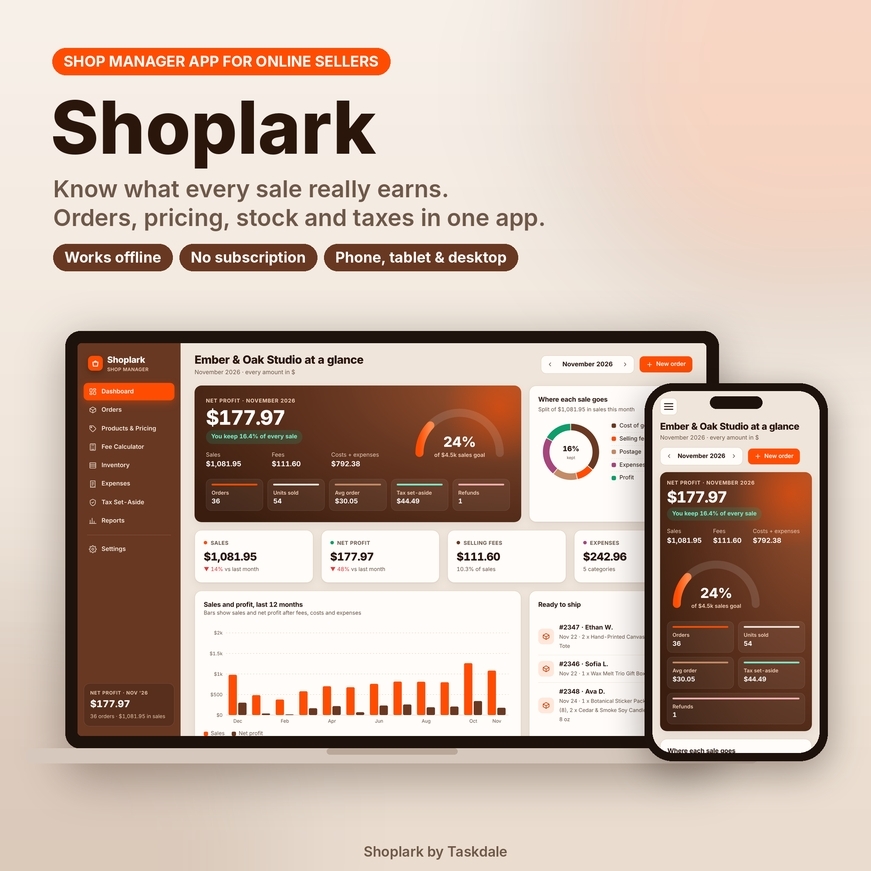
Shoplark is a shop manager app for online sellers and makers. It runs in your web browser from one downloaded file and tracks orders, product costs, marketplace fees, inventory, expenses and tax set-aside in one place. Log a sale and Shoplark takes off the listing fee, transaction fee, payment processing, cost of goods and postage, then shows the profit you actually kept. No subscription, no shop login and no account.
It works for online marketplace sellers, your own website and in-person craft fairs. Everything stays on your device and works offline.
Who this seller profit tracker is for
- Makers who sell candles, jewelry, stickers, prints, totes, cards or other handmade goods.
- Small shops on a craft marketplace that want a clear profit number after fees, not just a sales total.
- Sellers who also sell on their own website or at markets and need separate fee rates for each.
- Side hustlers who want a tax set-aside number before tax season, not after.
Features of the Shoplark online seller shop manager
Profit dashboard
A warm coffee-brown hero card shows net profit for the month, your profit margin and a gauge toward your monthly sales goal. Five tiles show orders, units sold, average order value, tax set-aside and refunds. Below it: a donut showing where each sale goes, KPI cards that compare with last month, a 12-month sales and profit chart, a Ready to ship list, your best sellers and low stock alerts.
Orders with automatic fees and profit
Add an order with one or more items, shipping charged, a discount and the postage you paid. Shoplark estimates every fee from the order’s sales channel, adds the offsite ad fee when you tick it, and shows profit before you save. Type your exact fee from a payment statement to override the estimate. Statuses run from New to Paid, Shipped and Delivered, and Refunded or Cancelled orders drop out of profit and go back into stock. Search, filter and export every order to CSV.
Product cost and pricing calculator per item
Build each product from a materials recipe, such as 0.5 lb of wax, one wick and one jar. Add packaging, other costs and labor minutes at your hourly rate. Each product card shows price, cost, fees, postage, profit and a margin badge in green, amber or red, so underpriced items stand out right away.
Fee and pricing calculator
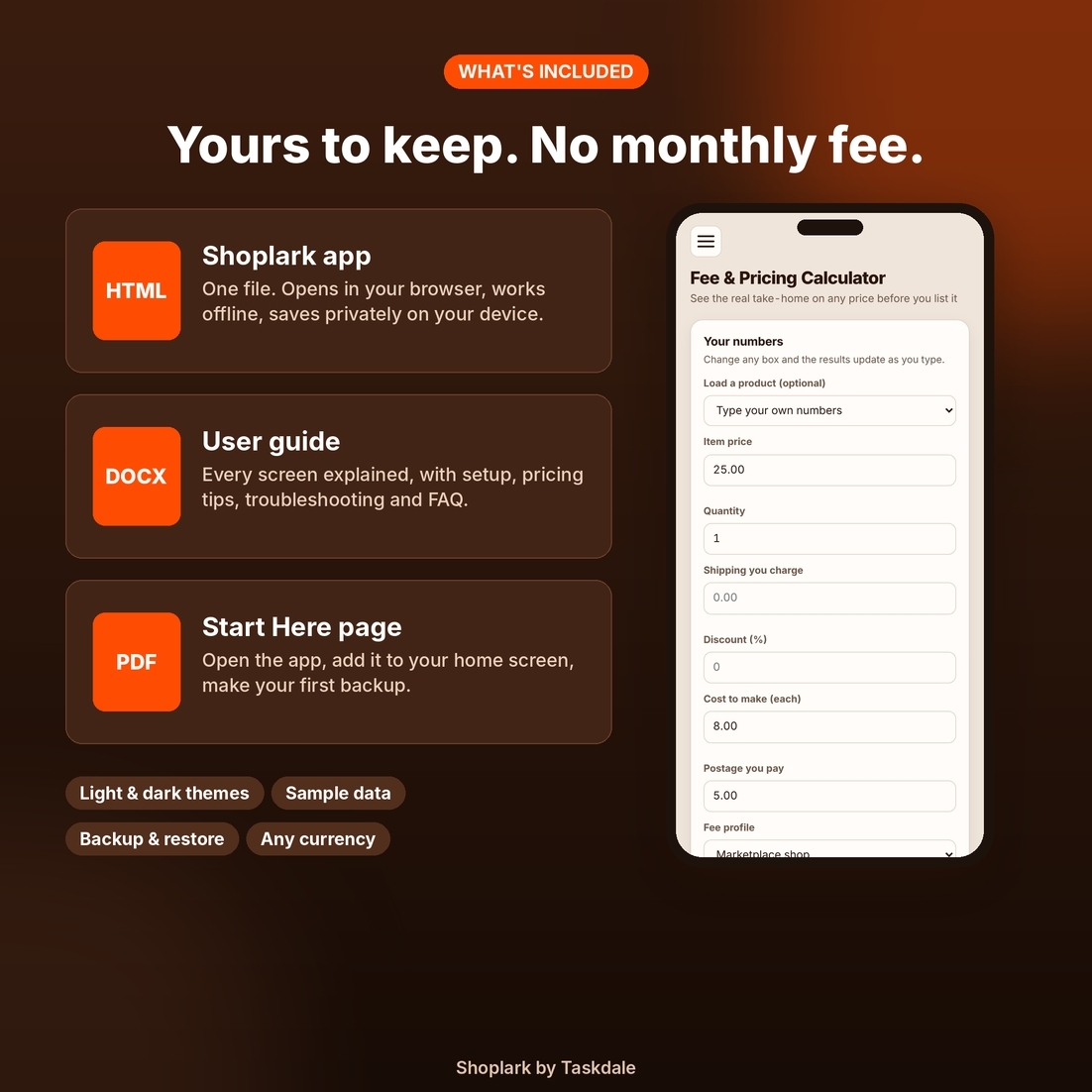
Test any price before you list it. The calculator breaks out listing, transaction, processing and ad fees, then gives your profit, margin and break-even price. Set a target margin and it tells you the price to charge. A price ladder lists the price for 10% to 60% margins. On the default marketplace profile, an item that costs 8.00 to make with 5.00 postage needs about 26.64 to keep 40%.
Inventory and materials tracker
Track finished stock and raw materials side by side, with reorder levels and stock value at cost and at retail. Unit costs can go to fractions of a cent for beads and findings. Restocking averages the unit cost. Make batch adds finished items to stock and uses the materials from the recipe, with a warning if anything would run short.
Expenses
Log ads, software, tools, booth fees and photography in ten categories, with a donut chart for the month and a running total for the year.
Tax set-aside
Set the share of profit to put aside and Shoplark works out the amount for each US estimated tax period, with due dates of Apr 15, Jun 15, Sep 15 and Jan 15. Log each transfer to your tax savings and the gauge shows how much is covered.
Reports
A monthly profit and loss table for the whole year shows item sales, shipping, discounts, fees, cost of goods, postage, expenses and net profit. It sits next to a monthly chart, product performance and sales by channel. Print it or save it as PDF.
Editable fee profiles
Each place you sell gets its own profile: listing fee per item, transaction percentage, processing percentage plus a fixed fee, and an offsite ad percentage. Marketplaces change their fees, so you can update the rates in seconds and every new order uses them.
What is included
- Shoplark-Shop-Manager.html: the app, one self-contained file.
- Shoplark User Guide (DOCX): 13 pages covering setup, every screen, pricing tips, troubleshooting and FAQ.
- Start Here (PDF): a one-page quick start.
You get a ZIP with all three files, plus the app and the guide as separate downloads.
How the shop manager app works
- Download and unzip. Move the HTML file to a folder you keep, such as Documents.
- Double-click it to open it in your browser. Enter your shop name and currency, or explore with a full year of sample data first.
- Check your fee profiles, add materials and products, then log orders and expenses as they happen.
- Export a backup now and then. Import it to restore or to move to another computer.
File format and requirements
- Format: one offline HTML app, a DOCX guide and a PDF quick start.
- Tested in Google Chrome and Microsoft Edge at desktop, tablet and phone sizes. It uses standard web features only, so other modern browsers should run it too.
- iPhone and iPad: Apple’s Files preview cannot run web apps. Open the file in a browser or an HTML viewer app that opens local files.
- No internet connection, account or subscription needed. Data is saved in your browser on your device.
Customize it
Pick any currency or type your own symbol, switch to dark mode, rename fee profiles, add new ones for wholesale or a second marketplace, set your hourly labor rate and choose whether labor counts in product cost. Set a monthly sales goal to turn the dashboard gauge into a goal tracker.
Use cases
- A candle maker finds two scents at 24% margin and uses the price ladder to set a new price.
- A jewelry seller logs a weekend craft fair under a separate fee profile with no marketplace fees.
- A side hustler logs a set-aside every month and has the quarterly estimate ready on Sep 15.
Digital download
This is a digital product. Nothing is shipped. Your files are ready to download right after checkout, with unlimited downloads. Personal use license: use it to run your own shop on your own devices. No resale, sharing or redistribution.
FAQ
Does it connect to my marketplace shop?
No. Nothing connects to any shop or account. You enter orders yourself, which keeps your sales data private.
Are the marketplace fees current?
The starting rates are common examples. Fees change, so check your own marketplace and edit the fee profile in Settings.
Can I track sales from more than one place?
Yes. Add a fee profile for each place you sell and pick it on each order. Reports show sales by channel.
Does it handle inventory for materials?
Yes. Products use materials from your inventory, and making a batch takes those materials out automatically.
Can I use my own currency?
Yes. One currency setting controls every amount. Dollars are the default.
Is this tax advice?
No. The tax set-aside is a planning tool. Ask a tax professional about your own rate.

Reviews
There are no reviews yet.