




Kinetra: the personal trainer client management app you own outright
Kinetra is a personal trainer client management app that runs in your web browser from one downloaded file. It keeps your clients, prepaid session packages, training calendar, workout programs, body measurements and payments in one place. Then it tells you who needs a renewal, who still owes you money and what you earned this month. No subscription, no login, no per-client fee.
Your client data stays on your own device and the app works offline. Open it on a laptop at the studio desk or on a tablet between sessions.
Who this trainer client tracker is for
- Independent and mobile personal trainers with 5 to 50 clients.
- Studio trainers who sell 5, 10 or 20-session packs and lose track of sessions left.
- Online coaches who want programs and check-ins sitting next to billing.
- Bootcamp and small group coaches who take drop-in fees.
- Anyone tired of paying a monthly fee for personal training software they only half use.
Features of the Kinetra personal trainer app
A dashboard that runs your morning
The top panel shows income received this month, the change from last month and a progress bar toward your monthly goal. Two rings show your show-up rate for the last 90 days and how many of this week’s sessions are done. Below that: today’s schedule with one-tap Done buttons, a Needs attention list, a 12-month income chart, your top clients this year, a seven-day strip and sessions left for every active client.
Client profiles with health notes up front
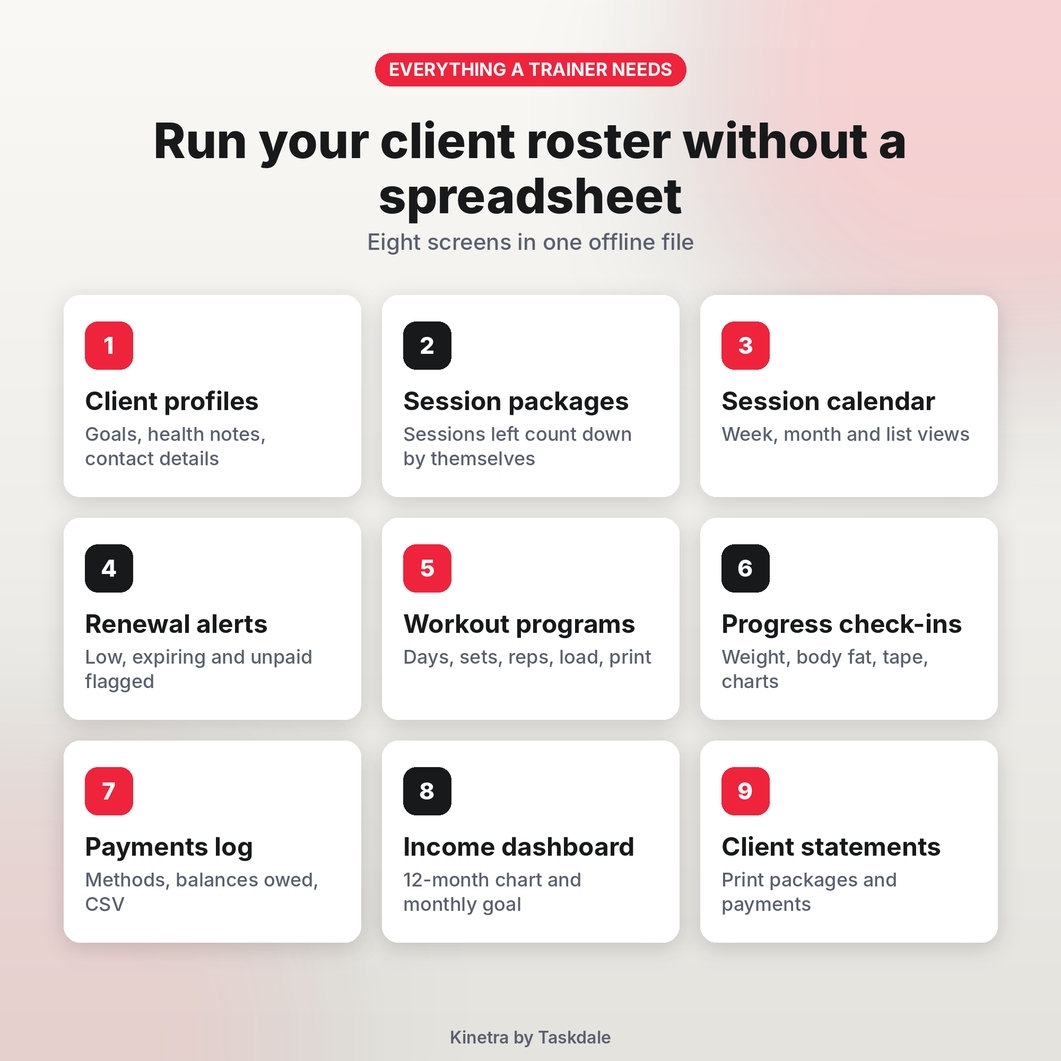
Each client gets a profile with their goal, contact details, status (active, paused or past) and a color for the calendar. Health notes such as “left knee, no deep lunges” sit in an amber tag at the top, so you see them before every session. Tabs hold that client’s packages, session history, programs, progress and payments.
Session package tracker that counts itself
Sell a package from a template (single session, 5, 10 or 20-pack, all editable) and log the payment at the same time. Each package card shows sessions left in big numbers and a punch-card row of circles. Completed sessions, no-shows and late cancels each use one session. Cancellations do not. Kinetra draws from the oldest package that still has sessions and has not expired, and it flags clients at 2 sessions left (you choose the number) so you can sell the renewal before the last workout.
Session calendar with weekly repeats
Week, month and list views. Book a session for one day or repeat it weekly for up to 12 weeks in one go. Mark sessions Completed, No-show, Late cancel or Cancelled, add a session note, and charge a drop-in fee when there is no package. The week view adds up sessions, completed sessions, hours on the floor and the value of the week’s sessions.
Workout program builder
Build programs with training days and exercises, each with sets, reps, load, rest and a coaching cue. The exercise box suggests over 40 common lifts and drills as you type. Print a clean program sheet with a log column for the client, or copy a program to another client and adjust the loads.
Progress check-ins and charts
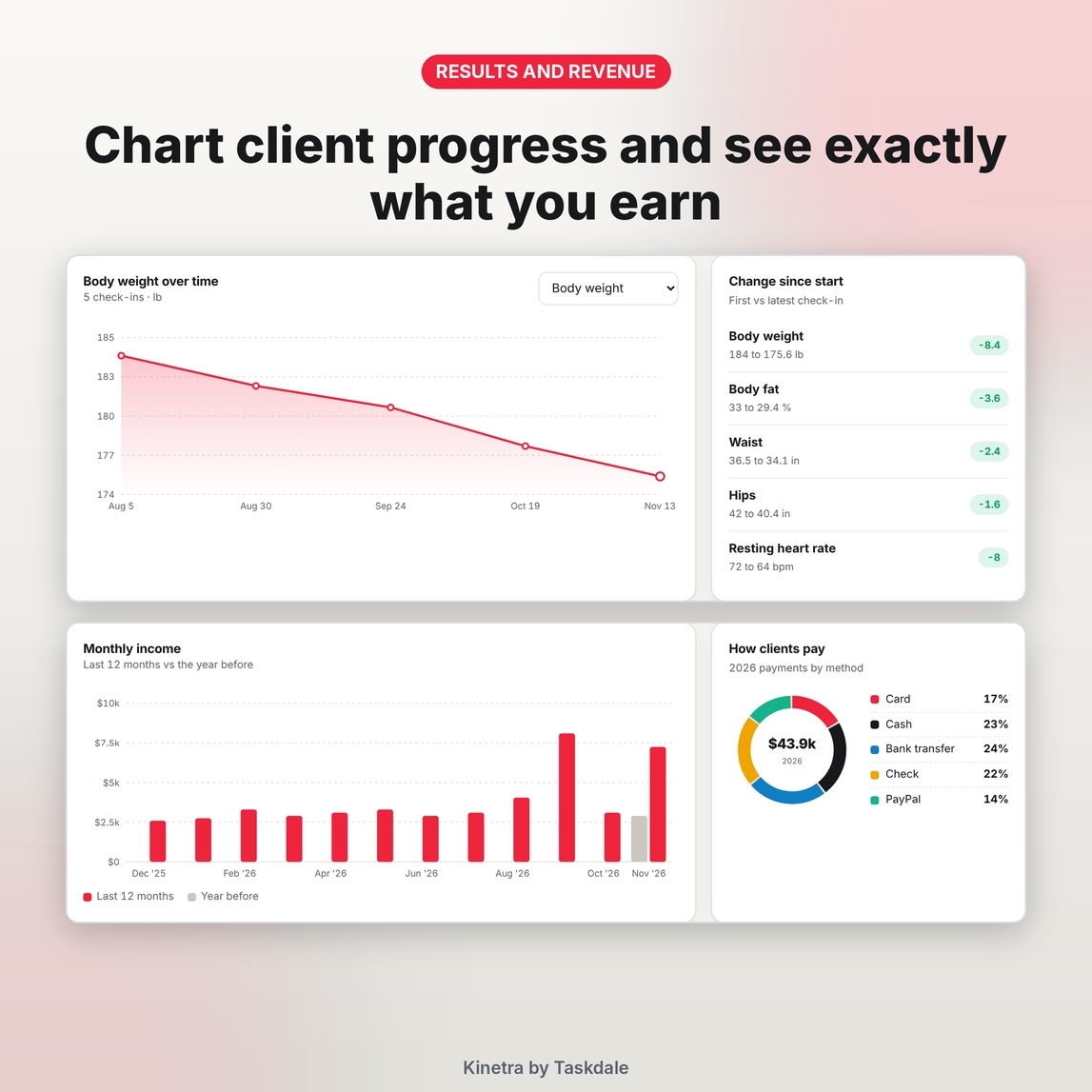
Track body weight, body fat, waist, hips, chest, arm, thigh and resting heart rate in lb and inches or kg and cm. Pick a measurement to chart it over time, and see the change since the first check-in for each one. Clients love seeing the line go the right way.
Payments, balances and an income dashboard
Log payments by card, cash, bank transfer, check, PayPal, Venmo, Zelle or other. Kinetra works out each client’s balance (packages plus drop-ins, minus payments) and lists who owes you. The income screen shows this month, year to date, income per completed session, a 12-month chart against the year before and a payment method donut. Export the payment log to CSV for your bookkeeper, or print a statement for any client.
What is included
- Kinetra-Personal-Trainer-Client-Manager.html: the app, one offline file.
- Kinetra User Guide (DOCX): 16 pages covering setup, every screen, tips, troubleshooting and FAQ.
- Start Here PDF: a one-page quick start with home screen steps.
You get a ZIP with all three files. The app and the guide are also listed as separate downloads.
How the client management app works
- Unzip the download and double-click the HTML file. It opens in your browser.
- Add a client with their goal and any health notes.
- Sell them a package and book their sessions, with a weekly repeat if they train on set days.
- Tap Done after each session. Sessions left, alerts and income update on their own.
Want to look around first? Load the sample data with eight clients, three programs, check-ins and a year of payments.
File format and software requirements
Kinetra is a single HTML file with everything built in. It needs no internet connection, no install and no account. We tested it in Google Chrome and Microsoft Edge at desktop, tablet and phone sizes. It uses standard web features, so other current browsers should work too.
On iPhone and iPad, the Files app preview cannot run web apps. Open the file in a browser or an HTML viewer app that opens local files. On Android, open it in Chrome and add it to your home screen.
Customization
Pick your currency from the list or type any symbol, before or after the amount. Every money value in the app follows that one setting, with $ as the default. Set your business name for printouts, a monthly income goal, your default session length, alert thresholds, package templates, measurement units and a light or dark theme. Export Backup (JSON) moves everything to another device.
Digital download information
This is a digital product and nothing is shipped. Your files are ready to download right after purchase, with unlimited downloads. Personal use license: use it for your own training business on your own devices. Please do not resell or share the files.
Real ways trainers use this client tracker
- Checking on Monday morning who has two sessions left and bringing the renewal up mid-session.
- Settling a “how many sessions do I have left?” question in five seconds with the punch card.
- Printing a four-week program for a client heading out of town.
- Showing a client their waist measurement chart at the 12-week check-in.
FAQ
Is this personal trainer software a subscription?
No. You pay once and keep the file.
Can my clients log in?
No. Kinetra is for the trainer. Print programs or statements to share with clients.
Does it work offline?
Yes. After download everything runs in your browser with no internet.
Where is my client data stored?
In your browser on your own device. There is no server or cloud account. Export a backup each week.
Does it send session reminders?
No. Alerts show inside the app. It does not send texts or emails.
Can I use it on my phone and laptop?
Yes. The layout fits phones, tablets and desktops. Move data between devices with backup export and import.


Reviews
There are no reviews yet.