

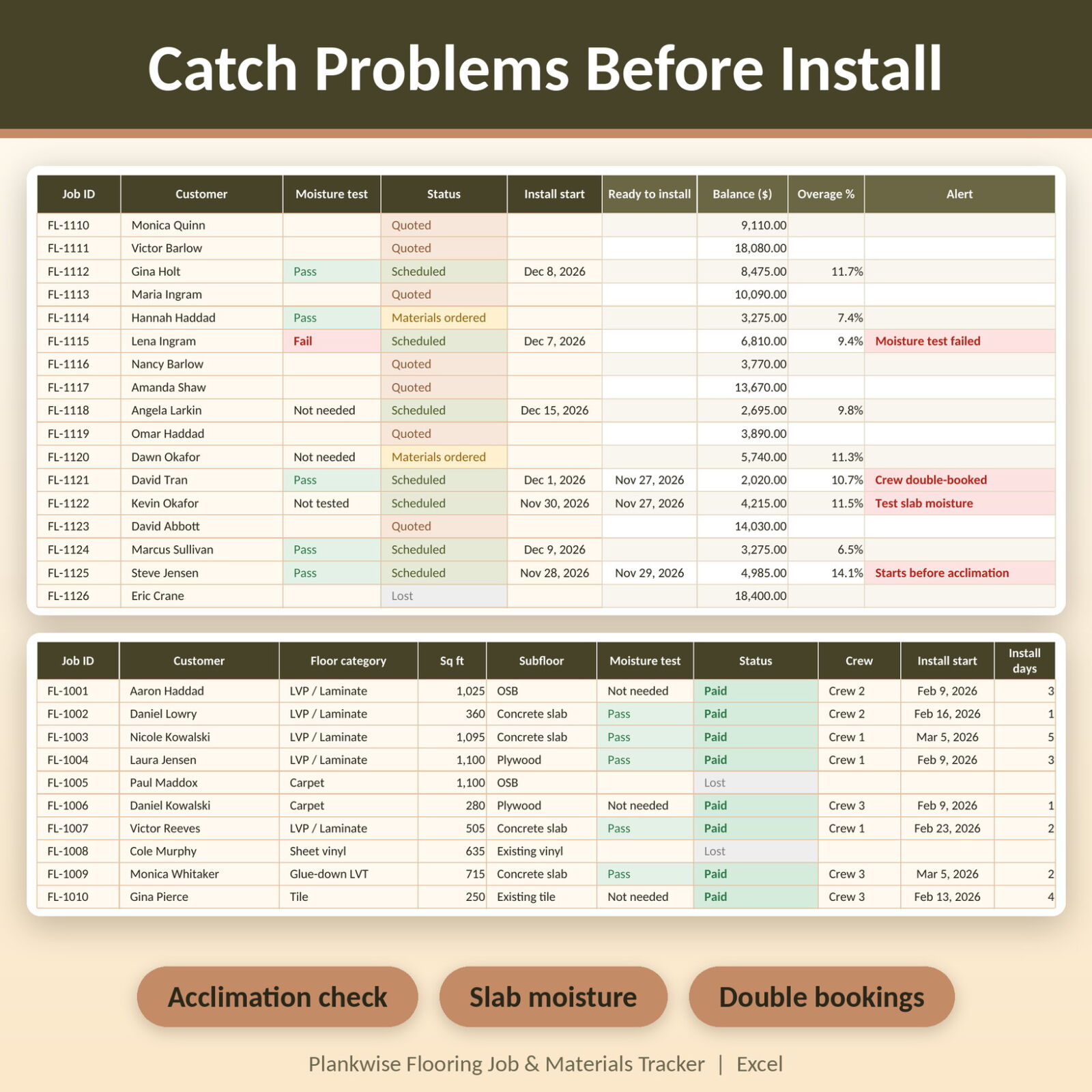


This flooring business spreadsheet runs your whole install business from one Excel file. Every job moves from lead to paid on a single row, the materials you order feed the job’s real cost, your installers’ pay feeds its labor, and every deposit and final payment feeds its balance. Before a crew loads the van, it warns you about the things that cause callbacks: flooring that has not acclimated, a slab with no moisture test, boxes from two dye lots, and a crew booked twice on the same day.
Plankwise is a flooring job tracker spreadsheet built for installers, not a generic contractor template.
What this flooring business spreadsheet does
- Keeps every job in one list. Up to 500 jobs, each with floor category, sq ft, subfloor, moisture test result, crew, delivery date, install dates, contract price and change orders.
- Stops expensive callbacks. Nine automatic alerts flag a failed or missing slab test, an install that starts before the ready date, materials that are late, mixed dye lots, double bookings, overdue balances and payment mistakes.
- Shows real material cost. Log every order, return, backorder, dump fee and sub. Each job shows sq ft ordered, overage % and net materials cost.
- Turns install entries into pay. Pay per sq ft, hourly, day rate or flat from one install log, with pay totals for every installer.
- Tracks the money. Deposits, progress payments, finals, change orders and refunds, with balances, overdue accounts, and gross profit and margin on each job once the install starts (final when it is completed).
Who this flooring contractor job costing spreadsheet is for
It fits the owner or office manager of a flooring installation business with 1 to 6 installers or crews and 60 to 400 jobs a year: LVP and laminate, hardwood, tile and carpet. Today you might run on a paper calendar and supplier invoices, and you would rather not pay a monthly fee for software.
Flooring installer job tracker Excel features
Acclimation, moisture and dye lot alerts
Each floor category carries acclimation hours (48 for LVP and laminate, 72 for hardwood by default, and you can change them). Enter the delivery date and the tracker shows the ready-to-install date. If the install is booked earlier, the job turns red. Slab jobs with no moisture test result, or a failed one, turn red too. On the materials sheet, the first flooring order sets the dye lot and any later order with a different run number shows Mixed.
Install schedule with double-booking alerts
A 14-day board shows each crew’s jobs by day. A crew booked on two jobs shows a red “2 jobs!” cell.
Materials and costs, with overage %
Enter quantity, sq ft per box and unit cost. A job of 640 sq ft that ordered 28 boxes net of returns at 23.77 sq ft per box shows 665.56 sq ft ordered and a 4.0% overage. Returns are credited, canceled lines cost nothing and backordered items are counted on the Dashboard.
Flooring installer piece rate pay tracker
The install log pays per sq ft (400 sq ft at 1.25 is 500.00), by the hour, by the day (2 days at 180.00 is 360.00) or by a flat price for a sub. A rate override handles the odd row. Team & Crews shows each person’s pay and pay per sq ft for the year.
Payments, balances and profit dashboard
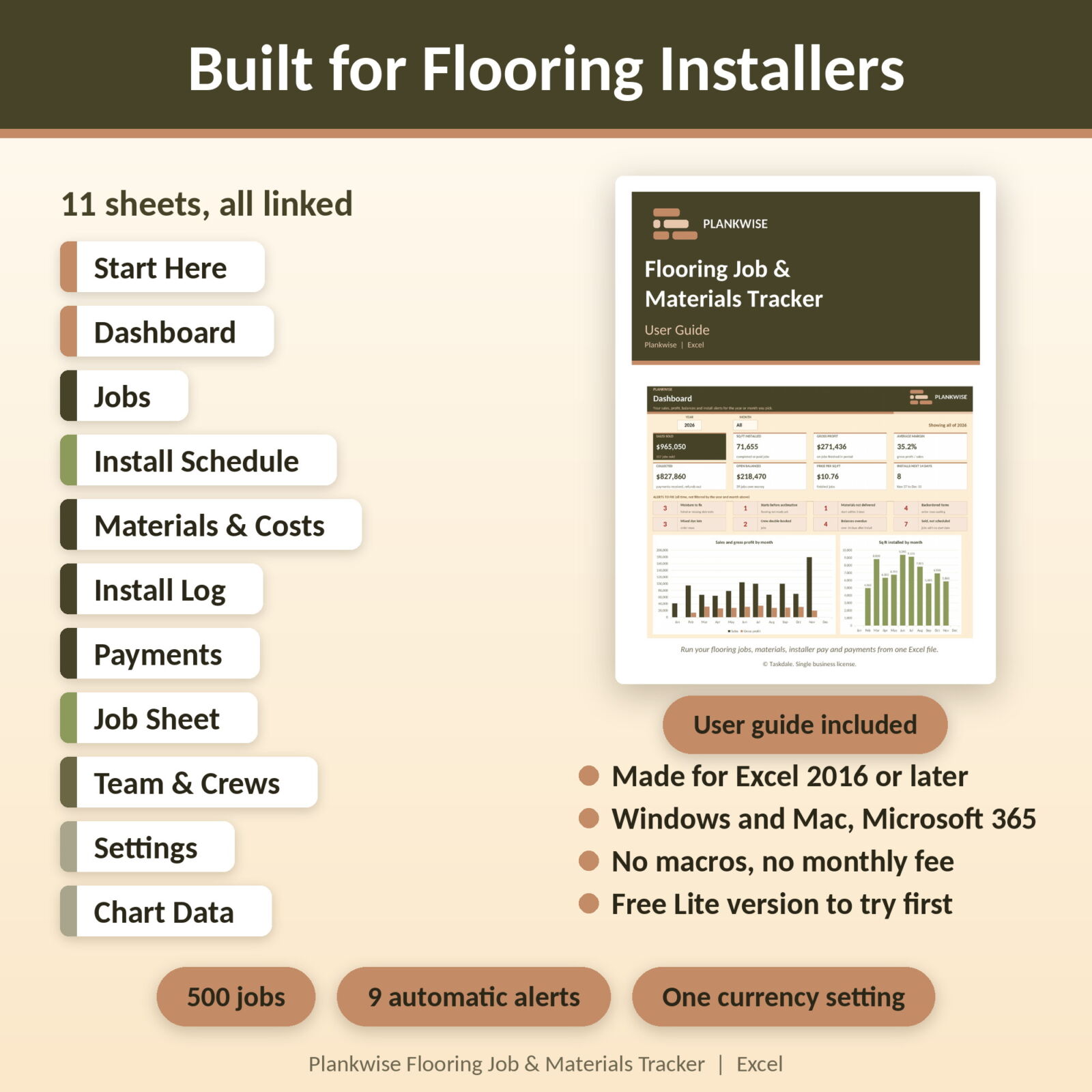
The Dashboard has year and month pickers, 8 KPI tiles (sales, sq ft installed, gross profit, average margin, collected, open balances, price per sq ft, installs in the next 14 days), 8 alert tiles, 5 charts, the next 5 installs and sales by lead source. It is a flooring business profit tracker you can read in a minute.
Printable job sheet
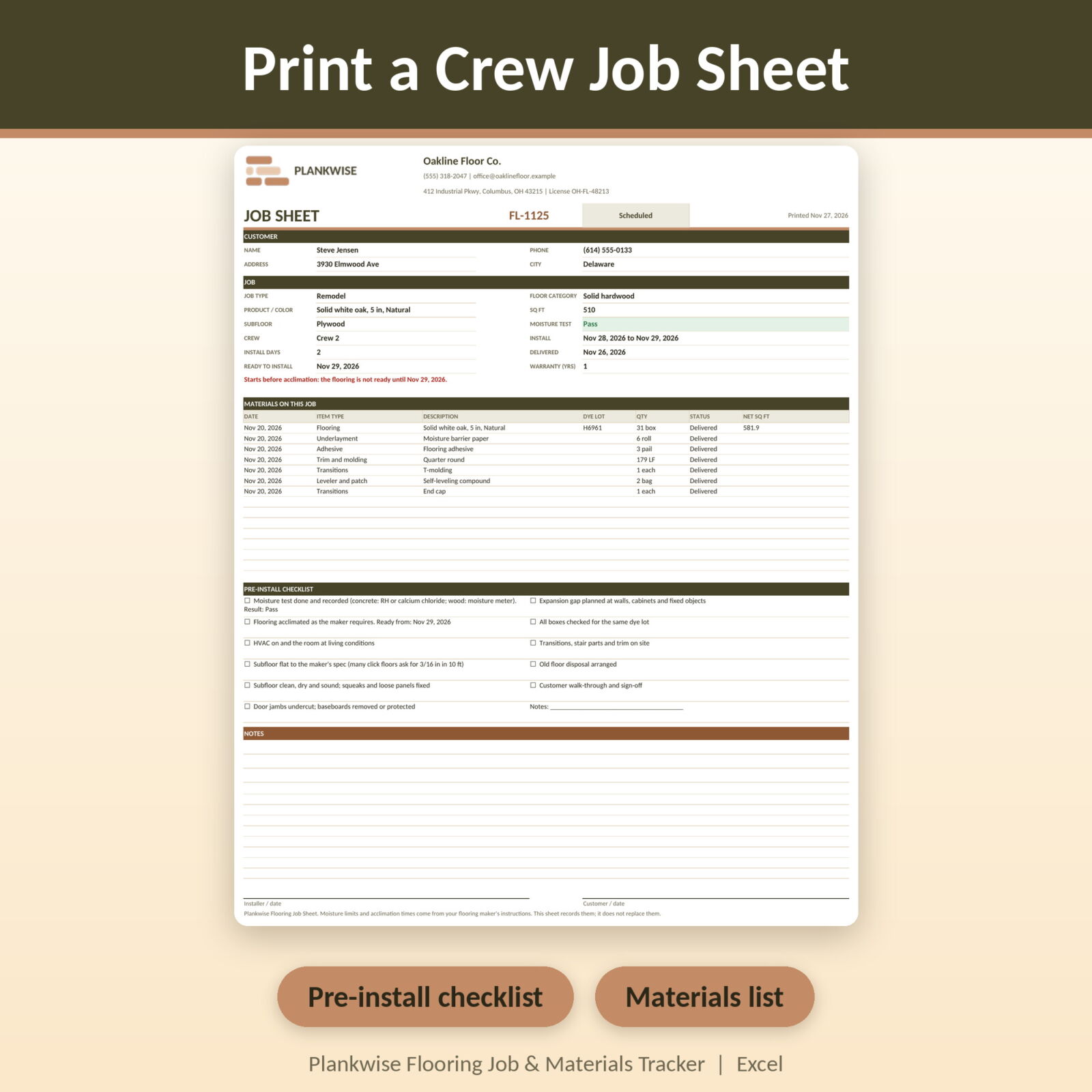
Pick a Job ID and print a one-page work order with the customer, job details, materials list and an eleven-point pre-install checklist. Set Show money on print to No for the crew copy.
What is included
- The Excel workbook with 11 sheets: Start Here, Dashboard, Jobs, Install Schedule, Materials & Costs, Install Log, Payments, Job Sheet, Team & Crews, Settings and Chart Data.
- A DOCX user guide with screenshots, a getting-started path and a troubleshooting section.
- Capacity for 500 jobs, 1,500 material rows, 2,000 install log rows, 1,000 payments, 12 crews and 30 people.
How it works
- Set your currency and business name on Settings.
- Add your crews and installers with their pay types.
- Add a job with a unique Job ID, then log its materials, install days and payments.
- Check the Install Schedule and fix any red cell.
- Read the Dashboard and work down the red alert tiles.
A flooring materials tracker template works only if it is quick to use. A new job takes about a minute, and most columns fill in on their own.
File format and software
You receive a standard .xlsx file with no macros. It is made for Microsoft Excel 2016 or later, Excel for Microsoft 365 and Excel for Mac. It has not been tested in Google Sheets or Numbers. Formulas are locked with no password; cream cells are yours. Filters work on every table; to sort a whole table, unprotect the sheet first (Review, Unprotect Sheet, no password).
Customization
One currency setting drives every money heading and tile. You can edit the lead sources, job types, suppliers, item types, units, crews, acclimation hours, overdue days and warranty years. Add your business name, phone and license number and they print on the job sheet.
Real situations it handles
- A two-crew LVP installer juggling 15 jobs a month.
- A hardwood installer who needs boxes to acclimate for 72 hours before the first plank.
- A tile setter who must not start on a slab with no moisture test.
- An owner who pays installers per sq ft and helpers by the day.
- An office manager chasing final payments after the punch list.
Frequently asked questions
Does it work on a Mac?
It is made for Microsoft Excel 2016 or later, including Excel for Mac and Excel for Microsoft 365.
Does it work in Google Sheets?
It is not tested in Google Sheets. It is made for Excel.
How many jobs can it hold?
500 jobs, with 1,500 material rows, 2,000 install log rows and 1,000 payments.
Can I pay installers per square foot?
Yes. The install log pays per sq ft, hourly, by the day or a flat amount, and you can override the rate on any row.
Does it track dye lots?
Yes. Enter the run number from the box label. Boxes of the same floor with different lots on one job show Mixed.
Can I change the currency?
Yes. Type your symbol in one Settings cell and every money heading follows.
Is there a monthly fee?
No. It is a one-time download.
Can I print a work order?
Yes. The Job Sheet prints on one US Letter page.
License
Single business license: use it to run your own flooring business. Do not resell, share or redistribute it. © Taskdale. Moisture limits and acclimation times come from your flooring maker’s instructions; this tracker records them and does not replace them. Pay totals are a record, not payroll or tax advice.
Reviews
There are no reviews yet.