




Flooring Estimate Calculator for Excel: Rooms, Boxes and a Printable Quote
This flooring estimate calculator turns a tape-measure walk-through into the boxes to order and a price you can hand to the homeowner the same day. Enter each room once, pick a floor and a layout, and the workbook works out net square feet, waste, whole boxes, setting materials, labor, tax and your quote total. Plankwise is made for Microsoft Excel 2016 or later on Windows and Mac, with no macros and no monthly fee.
Who it is for
It is built for owner-operator flooring installers and small crews of one to five, plus handymen and remodelers who quote floors now and then. If you measure a house, quote LVP, laminate, engineered or solid hardwood, tile, carpet and sheet vinyl, and you are tired of a phone calculator and a blank estimate form, this is the quote calculator you can open on the kitchen table.
What you get
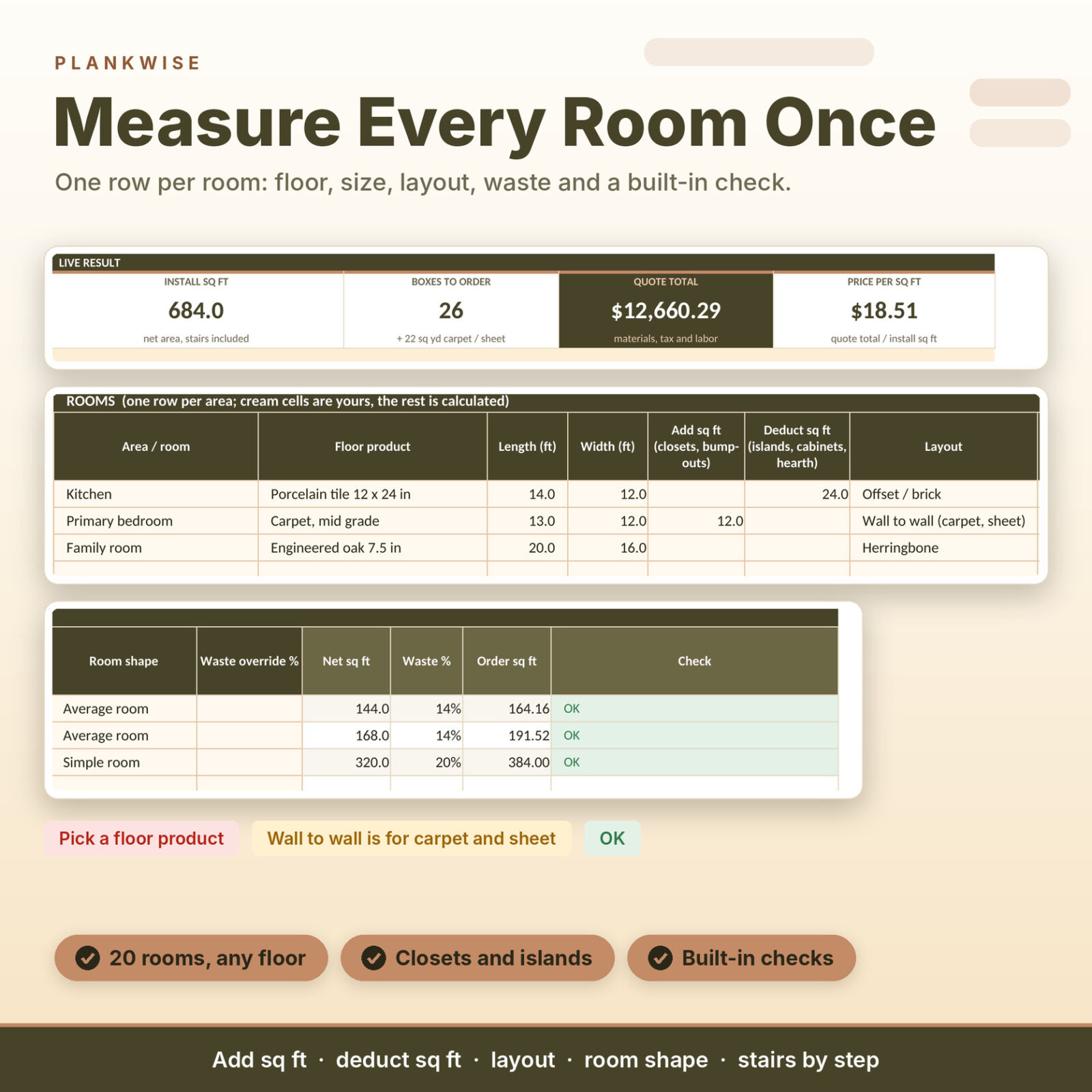
- 20 rooms, any floor: a floor per room, so a tile kitchen, carpet bedrooms and an oak family room share one quote. Add closets, deduct islands and cabinets.
- A flooring waste calculator by layout: straight, offset, diagonal, herringbone, chevron and wall to wall, plus a room shape allowance and a per-room override.
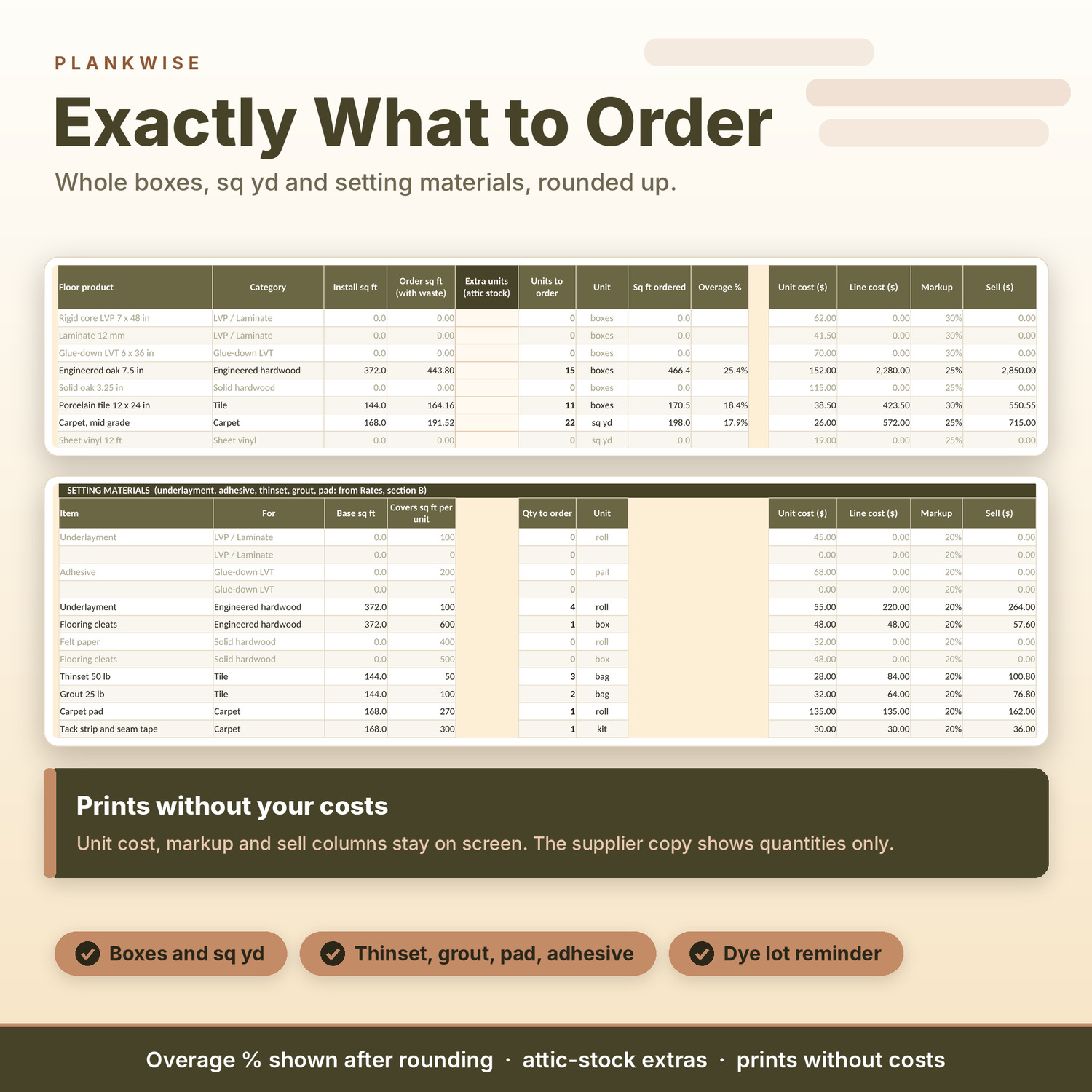
- How many boxes of flooring do I need? The answer is rounded up to whole boxes, square yards for carpet and sheet vinyl, or square feet, with the true overage shown after rounding and an attic-stock column.
- Setting materials: underlayment, adhesive, thinset, grout, carpet pad, felt paper and cleats counted from the coverage you enter, with an off switch for floors that have an attached pad.
- A full price build: material markup, install labor per square foot with pattern adders, removal by old floor type, haul-away loads, prep and self-leveler bags, base shoe, transitions, stairs with nose, furniture and appliance moves, a trip charge, sales tax and a minimum job charge.
- Compare Floors: three floors priced side by side from the same measurements, such as LVP, laminate and engineered oak.
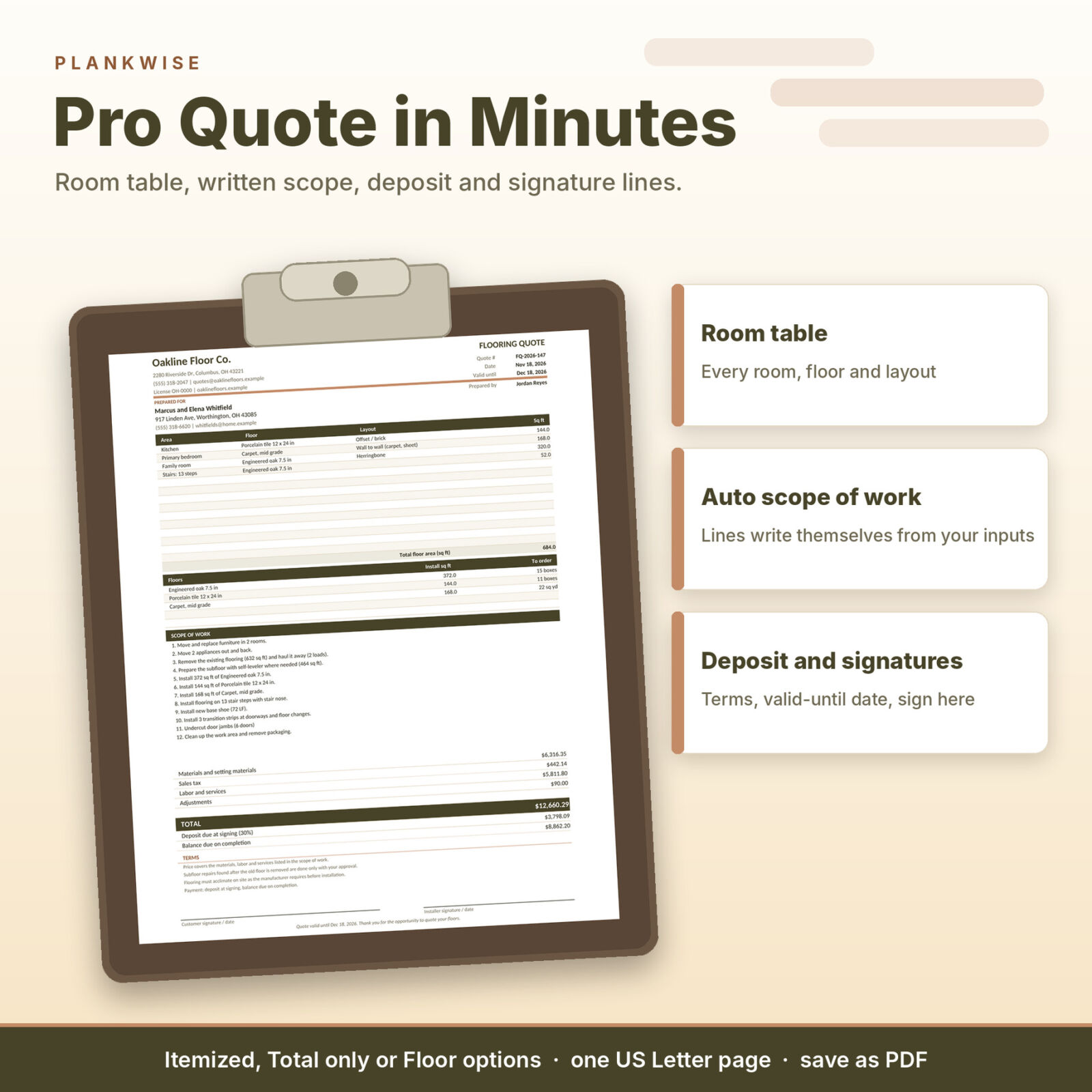
- Printable quote: a one-page customer quote with a room table, a scope of work written from your inputs, deposit, terms and signature lines, in three modes: Itemized, Total only or Floor options.
- Supplier order list: a flooring material takeoff spreadsheet page that prints without your costs.
- Profit check: materials at cost, crew share of labor and gross margin, kept off the printed quote.
- Quote Log: record every quote, mark it Won or Lost, and see win rate, average won price per square foot and follow-ups due.
How it works
Start on the Start Here sheet, which lists ten steps. Type your floors and rates once on the Rates sheet, then measure a job. On the Rooms sheet, one row holds a room: floor, length, width, closets to add, islands to deduct, layout, room shape, old floor to remove, prep, furniture, base shoe and transitions. A Check column flags anything unfinished, such as a room with no floor or deductions larger than the area.
Here is a real example from the guide. A living room (18 x 15), a hallway (22 x 3.5) and a dining room (12 x 11) in rigid core LVP come to 479 square feet. With waste by layout and room shape the order is 536.15 square feet. At 23.77 square feet per box that is 22.56 boxes, so the workbook orders 23 boxes, which is 546.71 square feet and a 14.1 percent overage. Base shoe comes to 21 pieces and the job needs 3 transition strips.
Made for how installers really price
Most flooring estimate template Excel files take one total square footage and one product. Plankwise keeps the details that change the price: herringbone adds labor per square foot, a cut-up room needs more material, carpet is sold by the square yard, tile needs thinset and grout, and stairs are priced by the step with their own nose and waste. Self-leveler bags are counted from the square feet that need it, and removal and haul-away follow the old floor type.
Flooring installer price per square foot calculator
The Pricing sheet shows your quote total, the price per square foot, the deposit and the balance. Set your own labor rates, markup and minimum job charge on the Rates sheet, and the workbook shows your gross margin before you send the price.
Tile and carpet estimate calculator, LVP and hardwood too
Use it as an LVP flooring estimate spreadsheet for whole-house jobs, as a tile and carpet estimate calculator for a kitchen and bedrooms, or as a hardwood quote tool with cleats and felt paper.
Files and software
- Plankwise-Flooring-Quote-Calculator.xlsx, an Excel workbook with nine sheets: Start Here, Rooms, Takeoff, Pricing, Compare Floors, Quote, Quote Log, Rates and Settings.
- Plankwise-Flooring-Quote-Calculator-User-Guide.docx, a step-by-step guide with a worked example and FAQ.
- Made for Microsoft Excel 2016 or later, Excel for Microsoft 365 and Excel for Mac. Google Sheets and Numbers are not supported.
- Instant digital download. No macros, no subscription.
Customize it
One currency setting drives every money value, with $ as the default. Formulas are locked with no password, so you can see how each number is made, and only the cream input cells are open. Change floors, coverage, layout waste, removal and prep rates, stairs, tax, deposit, minimum charge and the five quote terms.
Use cases
- Quoting a whole-house LVP job from a walk-through with a tape measure.
- Pricing a tile kitchen and carpet bedrooms in one quote.
- Showing a homeowner LVP, laminate and engineered oak at the kitchen table.
- Sending the supplier an order list without your costs.
Frequently asked questions
How do I calculate how many boxes of flooring I need?
Divide the order square feet (net area plus waste) by the square feet per box and round up. The Takeoff sheet does this for every floor and shows the overage after rounding.
How much waste should I add for herringbone?
The default is 20 percent for herringbone, plus a room shape allowance. Both are editable, and you can override the waste for a single room.
Does it work on a Mac?
It is made for Microsoft Excel 2016 or later on Windows and Mac, including Microsoft 365. It uses standard Excel functions and no macros.
Does it work in Google Sheets?
Google Sheets is not supported and not tested. Open the workbook in Excel.
Can I quote carpet by the square yard?
Yes. Set Sold by to Sq yd for the floor and the Takeoff shows square yards.
Can I add my own floors and prices?
Yes. The price book has 15 slots, eight filled in as examples.
Can I change the currency?
Yes. Type any symbol on the Settings sheet and every money label and quote amount follows it.
Is it a subscription?
No. You pay once and use it for your own jobs. Single business license, no resale or sharing.
Estimates only. Check carton coverage, setting material coverage and the manufacturer installation instructions. Sales tax rules on flooring jobs differ by state.
Reviews
There are no reviews yet.