



Fence Contractor Spreadsheet for Jobs, Crews, 811 Locates and Profit
Picketwise is a fence contractor spreadsheet that follows every job from the first call to the last payment. One Excel file holds your fence jobs, the dig clearance for each one (property line, HOA, permit and 811 ticket), a 14-day crew board, labor cost, materials, deposits, warranty callbacks and the profit on every install. No monthly fee, no login, no macros.
It is built for the owner or office manager of a residential fence company with one to five crews. If your schedule lives on a whiteboard and your 811 tickets live in a text thread, this is the next step up.
What the fence company job tracker does
- Keeps every job in one list. Material, style, height, linear feet, walk and drive gates, old fence removal, crew, install dates, contract price, change orders, deposit and warranty.
- Clears each job to dig. A Site Prep sheet checks HOA approval, permit, property line, your 811 ticket, marks on site and private lines, then shows one status: Ready to dig.
- Shows where each crew is for 14 days. Feet planned per day, and a red flag when a crew is booked on two jobs at once.
- Turns crew time into labor cost. Hourly with overtime, day rate, or per foot plus per gate for piece-rate installers.
- Tracks materials by order status. Ordered, backordered or delivered, with expected dates.
- Logs payments and callbacks. Deposit required versus received, and warranty calls charged against the original job and crew.
Main benefits
- Crews never show up before the legal dig date or after an 811 ticket has expired.
- No install waits on a forgotten HOA approval or a backordered double drive gate.
- Deposits are collected before you order materials, because the alert tells you who has not paid.
- You see real labor cost for hourly, day-rate and piece-rate crews, with a burden percentage for payroll taxes and insurance.
- Callbacks count against profit, so you can see which crew or material keeps coming back.
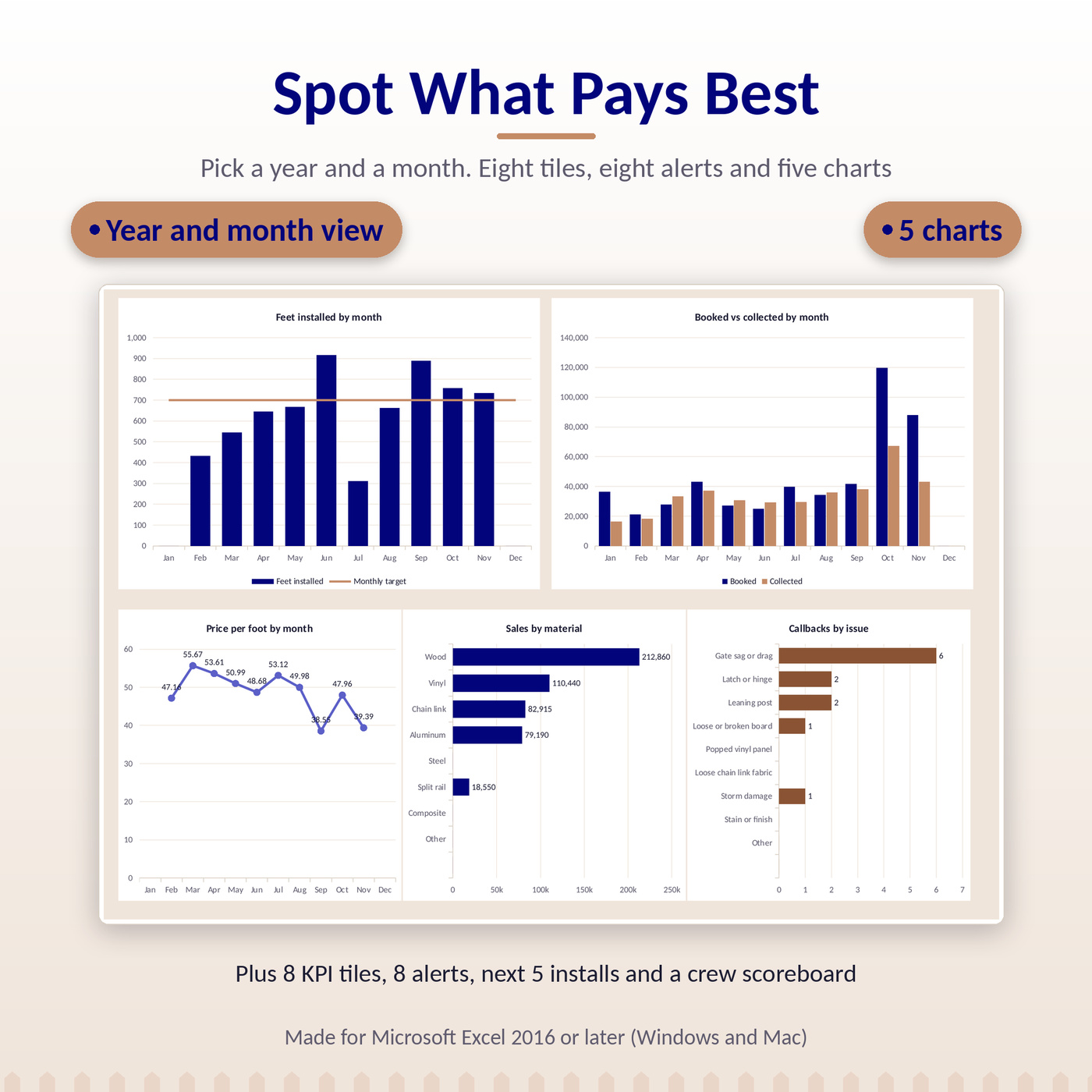
- You learn whether vinyl, wood, chain link or aluminum earns more per foot.
Features
Fence job tracking
The Jobs sheet holds up to 500 jobs. Each row calculates total contract, materials, labor, callbacks, total cost, gross profit, margin, collected, balance, deposit status, price per foot, profit per foot, install end date, prep status, materials status, warranty end date and pay status. Profit appears once a job is in progress and has costs logged, so an empty job never shows a fake 90 percent margin.
811 locate ticket tracker
Type the date you requested the ticket. Picketwise works out the legal dig date and the ticket expiry from your state’s wait time and ticket life, which you set once. You get alerts for tickets expiring in the next 7 days and for installs that start before the ticket is good. It tracks your own ticket: it does not request locates, and you should always follow your state’s 811 rules.
Fence crew schedule template
The Install Board shows the next 14 days for up to 12 crews. Weekdays show every job on site. Weekends show only jobs that start that day. A row below the board adds up feet planned per day and turns orange above your daily capacity.
Fence job costing spreadsheet
The Crew Log takes one row per person per day. Materials & Costs takes every purchase with category, supplier and order status. Payments records deposits, progress, final and change order payments. Callbacks records warranty calls with coverage, warranty check and net cost.
Fence contractor profit tracker
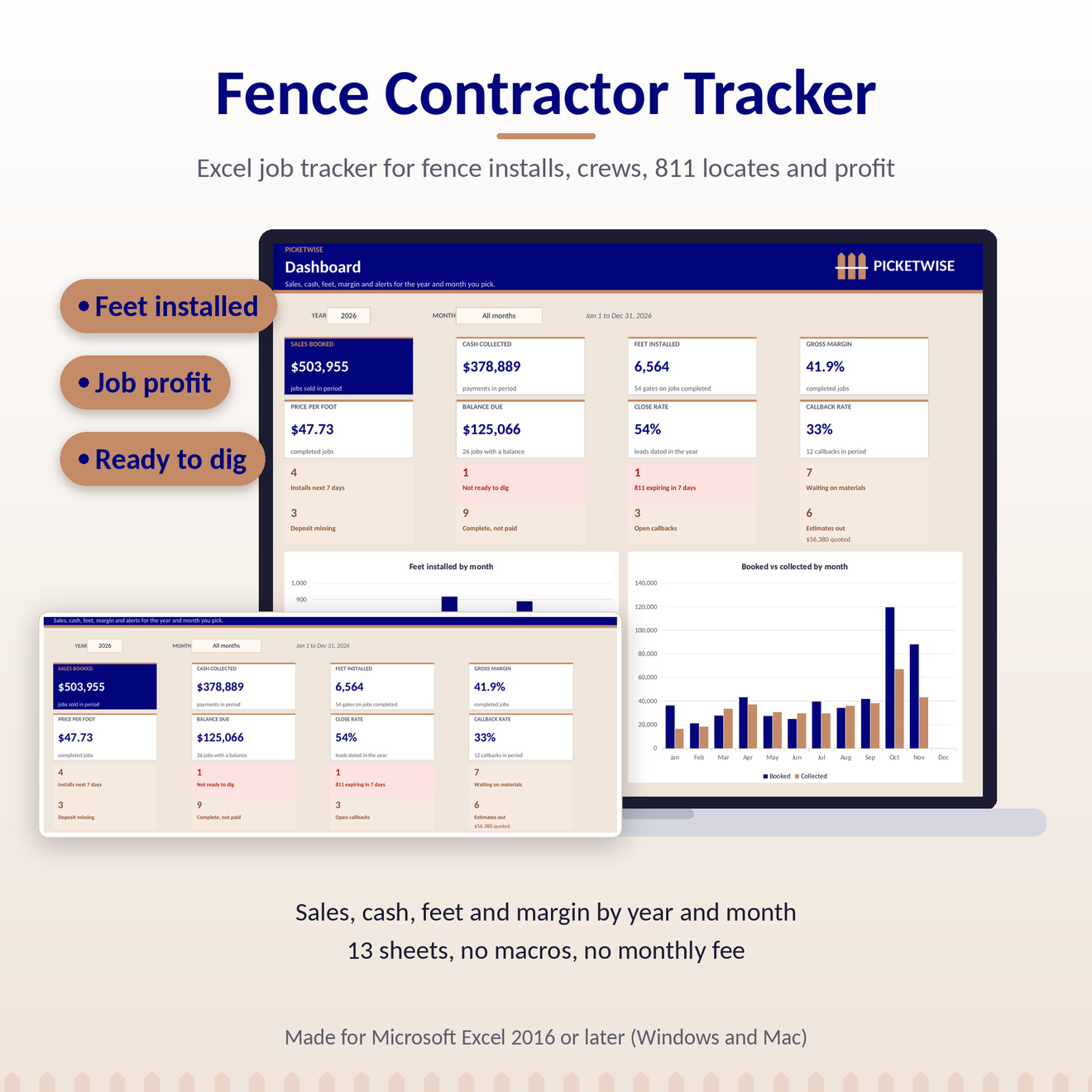
The Dashboard has a year selector and a month selector, 8 KPI tiles, 8 alerts, 5 charts, the next 5 installs and a crew scoreboard. A one-page Job Report prints the facts, site prep, money, costs, labor, payments and callbacks for any job.
What is included
- Picketwise-Fence-Job-and-Install-Tracker.xlsx with 13 sheets: Start Here, Dashboard, Jobs, Site Prep, Install Board, Crew Log, Materials & Costs, Payments, Callbacks, Job Report, Crew & Team, Settings and Chart Data.
- A DOCX user guide with screenshots, worked examples and troubleshooting.
- Capacity for 500 jobs, 500 Site Prep rows, 3,000 crew log rows, 2,000 cost rows, 1,000 payments and 500 callbacks.
How it works
- Set your currency, burden percentage, deposit percentage, targets, 811 wait and ticket life on Settings.
- Add your crews and people, with a pay type and rate for each.
- Add a job on Jobs, then a row for it on Site Prep.
- Check the Install Board and the Dashboard alerts each morning.
- Log crew time, materials and payments as the job runs.
- Print a Job Report when the job is done.
File format and software
An .xlsx workbook made for Microsoft Excel 2016 or later (Windows and Mac), including Excel for Microsoft 365. It uses ordinary formulas and no macros. It was not tested in Google Sheets or Numbers. The guide is a .docx file you can open in Word or any word processor.
Customizing
Type over the example lists for lead sources, materials, styles, crew tasks, cost categories, suppliers and callback issues. Change the target margin, default deposit, monthly feet target and daily feet capacity. One currency cell changes every money header and tile. Formula cells are locked with no password, and filters work with the sheets protected.
Digital download
You get the files as an instant download after purchase. This fence contractor spreadsheet is a single Excel file plus a guide. Nothing is shipped. A free Picketwise Lite version is available so you can try the pre-dig checklist first.
Use cases
- A spring week with eight installs and two HOA approvals still pending.
- A backordered double drive gate holding up an aluminum job.
- Paying a piece-rate crew by the foot and per gate.
- Seeing that vinyl earns more per foot than chain link.
- A homeowner calling about a sagging gate that is still under warranty.
Frequently asked questions
Does it work on a Mac?
It is made for Microsoft Excel 2016 or later on Windows and Mac. No macros to enable.
Does it work in Google Sheets?
It was not tested there. It is made for Excel.
How do I track 811 locate tickets?
Add the request date on Site Prep. The legal dig date and expiry are calculated, and the Prep status tells you when the job is clear.
Can I pay installers by the foot?
Yes. Mark the person as Per LF, enter a rate per foot and a rate per gate, then log the feet and gates they installed.
How do I track deposits?
Each job shows the deposit required, the deposit received and a status. A dashboard alert counts jobs still waiting on a deposit.
Can I change the currency?
Yes. One cell on Settings sets the symbol for every money value.
How many jobs does it hold?
500 jobs, with room for 3,000 crew log rows. Start a new file each year if you pass the limit.
Is it a subscription?
No. It is a one-time purchase.
License
Single business license. Use it in your own fence business. Do not resell, share or upload the file. Not accounting, tax, payroll or legal advice. © Taskdale.

Reviews
There are no reviews yet.