Your dog asleep on the sofa with one ear flipped inside out. The cat that sits in the laundry basket every Sunday. These are the pictures already filling your phone, and any one of them can become a coloring page your family will fight over.
Converting a pet picture to a coloring page is not hard, but a few choices decide whether you end up with clean outlines or a gray, muddy mess. The photo you pick matters most. Then the method. Then a bit of tidying before you print.
Below are the best tips for converting a pet picture to a coloring page, whether you trace by hand on a sunny window or use a free photo editor. You will also find ideas for using the finished page, from birthday cards to a gentle keepsake for a pet who has passed.
Quick picks: pet and photo-friendly coloring sets
| Product | Best for | Price | Link |
|---|---|---|---|
| Marquee Me Personalized Name Coloring Pages | Includes a photo to coloring page guide | $4.99 | View |
| Oddball Pets Printable Coloring Book | Funny made-up pets while you work on your own | $3.99 | View |
| Friendship Fun Coloring Book | Kids, puppies and friendly scenes | $2.99 | View |
| Pretend Play Coloring Book | Vet visit and zoo keeper scenes | $2.99 | View |
Tip 1: Pick the right photo first
A great coloring page starts with a great source photo. Not a pretty one. A clear one. Scroll through your camera roll with these in mind.
- Sharp focus on the face. If the eyes are blurry, the outline will be too. Zoom in on your phone and check.
- Even light. Soft daylight from a window works best. Harsh flash flattens fur, and deep shadows turn into big black blobs.
- A plain background. A pet on a plain blanket or lawn is far easier to convert than a pet on a patterned rug next to a stack of shoes.
- The pet fills the frame. A tiny cat in the corner of a garden shot will lose all its detail when you crop in.
- A clear outline. Side views and three-quarter views show the shape of the ears, nose and tail. Pets curled into a ball can look like a loaf of bread once converted.
Dark pets need extra care. A black lab in dim light has almost no visible edges. Take a new photo outside on a bright, overcast day, and you will suddenly see the shape of every paw.
Tip 2: Crop and simplify before you convert
Before you trace or filter anything, crop the photo tight around your pet. Leave a little breathing room at the edges, and choose an upright shape if you plan to print on standard paper.
Then think about what to keep. A collar tag, a favorite toy or the edge of a cushion can add charm. A busy kitchen floor will not. Most phone photo apps let you crop and some let you erase the background with one tap. A plain white background makes every later step easier.
If two pets share the photo, consider doing them as two separate pages. Overlapping fur is the hardest thing to turn into clean lines, and kids love having a page each.
Tip 3: Choose your method
There are three main ways to turn a photo into line art. Each one has a place.
Trace it by hand
This gives the cleanest, most charming result, and you need no software at all. Print the photo at the size you want, tape it to a sunny window or a light pad, tape a sheet of plain paper over it, and trace the main shapes with a pencil. Go over the final lines with a black fineliner or felt pen, around 0.5 to 0.8 mm, and erase the pencil.
The trick is to trace less than you see. Outline the head, ears, eyes, nose, mouth, legs and tail. Then add just a few short strokes to suggest fur direction. Twenty fur strokes look better than two hundred.
Use a free photo editor
Free desktop editors such as GIMP have edge-detect and threshold tools that pull lines out of a photo. A common recipe: convert to grayscale, raise the contrast, run an edge-detect filter, invert if needed so lines are black on white, then use threshold to turn every pixel pure black or pure white. Play with the threshold slider until the outline is clear but the fur is not a solid mess.
Use a phone app or online converter
Many apps offer sketch or line art filters, and some online tools convert photos to coloring pages in seconds. They are quick and fun. Results vary a lot by photo, and you will usually need to clean them up. Before uploading family pictures to any site, read what it does with your images, and choose one that does not keep or share them.
If you want a printed walkthrough of these steps, one Taskdale set comes with its own guide.
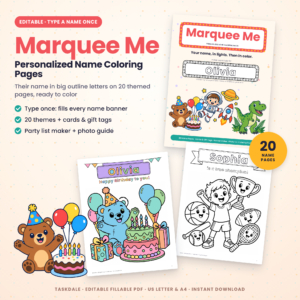
Marquee Me Personalized Name Coloring Pages
Price: $4.99 | Best for: families turning photos into pages
Marquee Me is a fillable PDF that puts a child’s name in hollow outline letters on 20 themed coloring pages, in US Letter and A4. It includes a 7-page bonus guide, From Photo to Coloring Page, plus an offline Name Banner Maker that can print a Your picture page for your own photo line art. Turn your pet photo into an outline, then pair it with a name page for a matching set.
Tip 4: Clean up the lines
A converted photo almost always needs tidying. This step is what separates a page that gets colored from one that gets left on the table.
- Close the gaps. Look for breaks in the outline, especially around ears and paws. Kids with markers will flood right through a gap. Join them with a pen.
- Remove stray specks. Filters leave dots and smudges, especially in the background. Erase them or paint them white.
- Thicken the main outline. Go over the outer edge of the pet with a slightly thicker pen. It makes the shape pop and gives young colorists a clear boundary.
- Thin out the fur. If the filter turned fur into hundreds of tiny lines, erase most of them and keep a few to show direction.
- Keep the eyes simple. Outline the eye, add the pupil, and leave a small white circle for the shine. That little white spot brings the whole face to life.
Practice helps. If your first attempt looks odd, a warm-up on ready-made pet pages shows you how artists simplify fur, paws and faces into clean shapes.
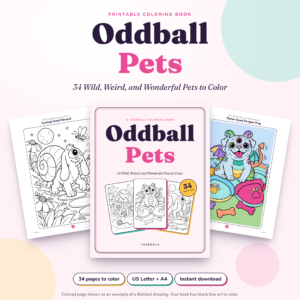
Oddball Pets Printable Coloring Book
Price: $3.99 | Best for: kids and adults who like silly pets
Oddball Pets has 34 full-page drawings of pets nobody could have predicted, such as a three-eyed dragon pug and a jellyfish cat, each with a one-line caption that sets up the joke. It comes as US Letter and A4 PDFs plus a PNG pack for reprinting single pages. Color one beside your own pet page and notice how the artist handles fur and scales with just a few lines.
Tip 5: Match the detail to the colorist
The same photo can become two very different pages. Decide who will color it before you finish the lines.
For young kids, ages 3 to 6
Big shapes, thick outlines, almost no fur detail. Think of it as a cartoon of your pet. Make the head a little bigger than real life and the body simpler. Children this age color with crayons and chunky markers, and they need wide spaces to fill.
For older kids, ages 7 to 12
Add a few fur strokes, the pattern of spots or stripes, and maybe a toy or a bowl in the scene. They will enjoy matching the real colors of their pet, so print a small color copy of the photo to keep beside the page.
For teens and adults
Keep more detail. Fur direction, whiskers, the shape of each toe. Adults often like to shade with colored pencils, so leave large areas open rather than packing them with lines. A light gray outline, printed instead of black, can even disappear under the color for a more painted look.
Tip 6: Print it so it looks clean
A home-made page deserves a good print. Save the final line art as a high-resolution image, ideally 300 DPI at the size you plan to print. A page meant for US Letter paper at that resolution is roughly 2550 x 3300 pixels.
- Print at actual size, in best quality, so the black lines come out solid.
- Use plain printer paper for crayons and pencils, and 65 lb cardstock if the colorist loves markers.
- Print two or three copies. Someone will want to try a second color scheme, and someone else will want one to keep.
- Save the file somewhere safe. A year from now, you can print a fresh copy for a new grandchild.
For a deeper look at building a whole book of your own pet pages, our guide to creating a custom cat coloring book walks through binding and covers too.
Ways to use your pet coloring page
Once you have one good page, the uses keep coming.
- A pet birthday. Print one per guest at a kids’ party and let everyone color the birthday dog. Hang them all in a row.
- Greeting cards. Scale the art down, print two per page on cardstock and fold. Grandparents love a card with the family cat on the front.
- A new pet welcome. When a puppy comes home, coloring its picture helps young kids feel part of the family change.
- A memory page. When a pet dies, coloring their picture can give a child something calm to do with sad feelings. It is a gentle way to talk about a favorite walk or the funny thing they always did. Many families keep that page for years.
- A vet visit warm-up. Color a vet scene before an appointment so the trip feels familiar.
Friendly ready-made scenes are handy alongside your custom pages, so kids have something to color while you finish the outline.
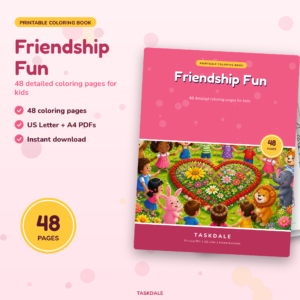
Friendship Fun Coloring Book
Price: $2.99 | Best for: young kids who love pets and friends
Friendship Fun has 48 one-page scenes of kids playing and helping each other, including a sleeping puppy nap, a picnic and a giggle swing, each with a short kind message at the top. The US Letter and A4 PDFs print with crisp, dark lines and only the cover uses color, so pages are easy on ink. Print the puppy page alongside your own pet picture and color them as a pair.
Common mistakes when converting pet photos
- Starting with a dark or blurry photo. No filter can find edges that the camera did not capture.
- Keeping every line. Too much fur detail turns into a gray patch that nobody wants to color.
- Leaving gaps in the outline. Fine for pencils, frustrating for markers.
- Printing at low resolution. Small phone screenshots print with jagged, fuzzy edges.
- Forgetting the background. A plain background is fine, but a simple ground line, a cushion or a ball gives the pet somewhere to be.
If your pet is a cat with a strong personality, you might also enjoy seeing how designers draw cats for coloring. Our roundup of cat coloring pages for adults has both easy and detailed examples to study.
Frequently asked questions
How do I turn a photo of my dog into a coloring page for free?
Tape a printed photo to a sunny window, lay plain paper over it and trace the main shapes with a pencil, then ink them with a black pen. Free photo editors with edge-detect and threshold tools can also do it on a computer.
What kind of pet photo works best for a coloring page?
A sharp, well-lit photo where the pet fills the frame and sits on a plain background. Side and three-quarter views show ears, nose and tail clearly, which makes a better outline.
Why does my converted pet photo look messy?
Usually because the filter picked up every hair and shadow. Raise the contrast, use a threshold setting, then erase most of the fur lines by hand and keep only the outline and a few strokes.
Can kids color a page made from a pet photo?
Yes. For young children, simplify it to big shapes and thick outlines, almost like a cartoon. Older kids can handle spots, stripes and a few fur strokes.
What resolution should a pet coloring page be?
Aim for 300 DPI at your print size. For a full US Letter page that is about 2550 x 3300 pixels. Lower resolution prints with fuzzy, jagged lines.
Your next step
Pick three photos of your pet tonight, crop each one, and choose the sharpest. Trace the outline on a window tomorrow morning, ink it, and print two copies: one for you and one for the smallest person in your house. If you want a printed guide and a page made for your own line art, start with Marquee Me Personalized Name Coloring Pages.