Online receipt generators are quick for one receipt. For the fiftieth, they get tiresome. An editable receipt template on your own computer gives you the same tidy result with your logo on it, keeps every receipt in your own files, and never asks you to sign up or sit through an ad.
This article is for freelancers, makers and small service businesses who are tired of retyping their business details into a website each time a customer pays. You will see what the free generators do well, where an editable template does better, how to set one up in about twenty minutes, and four Taskdale templates that cover different kinds of sellers.
Quick picks: editable receipt templates
| Product | Best for | Price | Link |
|---|---|---|---|
| Ledgerline Business Forms Kit | Word and Excel receipts that match your invoices | $2.99 | View |
| Client Billing Hub Invoice Tracker | Numbered payment receipts tied to invoices | $6.49 | View |
| Maker’s Business Forms Kit | Fillable PDF receipts for craft sellers | $3.00 | View |
| Ledgerline Invoice, Quote & Receipt Kit | Receipts showing change given or balance left | Original price was: $3.00.$1.50Current price is: $1.50. | View |
Why people go looking for a receipt generator alternative
Free receipt generators fill a real need. You land on a page, type a few fields and download a receipt in under two minutes. For a one-time sale of a used bike or a quick receipt while traveling, that is plenty.
The frustration starts with repeat use. The common complaints are about the same across many free web tools:
- Retyping your details every time. Unless you create an account, your name, address and logo vanish when you close the tab.
- Ads, download limits or watermarks. Free tools have to be paid for somehow, and some do it this way.
- Sign-up prompts. Saving receipts or removing branding often means making an account, and sometimes a subscription.
- Your customers’ details on someone else’s site. Names, emails and amounts typed into a service you do not control.
- No running record. Each receipt is a lonely file in your downloads folder. Nothing adds them up.
An editable template fixes most of these at once. Set it up once with your details, keep it on your laptop or in your own cloud folder, and fill in only what changes. If you are still weighing up whether to pay for anything at all, our honest guide to free receipt maker options for small sellers covers the no-cost routes in detail.
Who should stick with a generator
To be fair to the free tools, some people do not need anything more. If you sell something privately twice a year, or you need a single receipt for a one-off job while away from your laptop, a generator is the quickest answer. The switch to a template makes sense once receipts become a weekly task, say five or more a week, or once you need to find an old receipt quickly when a customer asks.
Word, Excel, fillable PDF or Google Sheets?
“Editable” means different things depending on the file type. Pick the one that fits how you sell.
| Format | Does the math? | Keeps a log? | Best for |
|---|---|---|---|
| Word document | No | No | Occasional receipts with lots of description |
| Excel workbook | Yes | Yes, if built in | Regular sellers who want totals and records |
| Fillable PDF | Usually not | No | Typing on a tablet or printing to hand-fill |
| Google Sheets | Yes | Yes, if built in | Working from a phone or sharing with a partner |
Most small sellers end up happiest with a spreadsheet for the numbers and a printable or PDF version for the moment of handing a receipt over. Kits that include both give you that choice without mismatched designs.
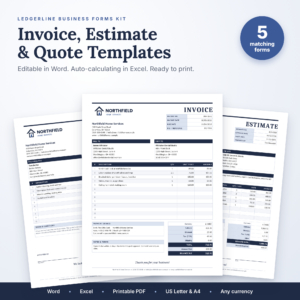
Ledgerline Business Forms Kit
Price: $2.99 | Best for: service businesses wanting matching paperwork
Five matching business forms in a navy and soft blue design: quote, job estimate, invoice, sales receipt and purchase order. The Word versions let you type and go, while the Excel Invoice Maker fills in client details and item prices from dropdowns and works out the totals. The sales receipt shows the payment method and a PAID IN FULL mark, and printable PDFs are included. Add your business details and logo to each form once.
Set up an editable receipt template in 20 minutes
A template only saves time if the set-up is done properly. Give it one focused session.
- Add your fixed details. Business name, address or city, email, phone and website. Add your logo if you have one. Check spelling twice, because this text will appear on hundreds of receipts.
- Choose a numbering style. Something like R-2026-0001. Write the starting number down so you never reuse one.
- Set your tax rate. If you collect sales tax or VAT, enter the rate once. If you do not, delete or hide the tax line so customers are not confused.
- Load your common items. In a spreadsheet template, add your top ten products or services with prices. Each new receipt then becomes a few dropdown picks.
- Add a footer line. Your return policy or a short thank-you. “Thanks for supporting a small studio” is enough.
- Do a test receipt. Fill one in for an imaginary $72.50 sale, save it as a PDF and open it on your phone. If it looks right there, it will look right to customers.
After that, each real receipt takes a minute or two. The first time you send one in under sixty seconds with your logo at the top, it feels very satisfying.
Which kind of receipt do you actually need?
Receipts come in a few flavors, and a good template set covers the ones you use.
Sales receipt
Given at the moment of sale for goods paid in full. Lists items, quantities, prices, tax and payment method. This is the one market sellers and shops use most.
Payment receipt
Given when a client pays an invoice, in full or in part. It points back to the invoice number and shows what is still owed. Freelancers and service businesses use this one.
Deposit receipt
Given when a customer pays up front on a custom order. It shows the order value, the deposit and the balance due on collection.
Here is a quick example. A cake maker takes an order for a two-tier birthday cake at $180 and asks for $60 up front. The deposit receipt reads: order total $180, deposit paid $60 by bank transfer on 3 May, balance $120 due on collection, 17 May. On pickup day, a second receipt shows $120 paid in cash and the order paid in full. Two short documents, and nobody argues about what was agreed.
Cash receipt
Any of the above for a cash payment. It matters more for cash, because there is no bank record to fall back on if there is ever a question.
Payment receipts that link back to invoices
If you invoice clients, a stand-alone receipt template creates double work. You write the invoice in one file, then retype the client, invoice number and amount into a receipt in another. Over a year with 120 invoices, that adds up to hours.
A better setup records the payment once and builds the receipt from it. Say a photographer invoices a client $900 for a family shoot, and the client pays $400 now and $500 next month. Each payment gets its own receipt number, each receipt shows what is still owed, and the invoice status moves from Unpaid to Partly Paid to Paid by itself. The client always knows where they stand. So do you. For more on keeping that loop tight, our invoice tracker spreadsheet guide walks through the set-up.
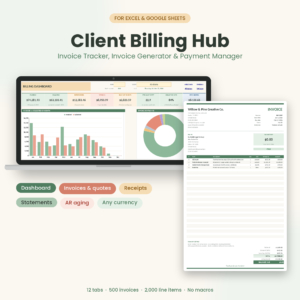
Client Billing Hub Invoice Tracker
Price: $6.49 | Best for: freelancers who take part payments
An invoice tracker and generator for Excel and Google Sheets with no macros or add-ins. It holds up to 500 invoices or quotes, logs full or part payments, moves status from Unpaid to Partly Paid to Paid on its own, and gives each payment a receipt number and a one-page receipt showing what is still owed. Client statements and an aging dashboard come too. Enter your clients and prices once to get started.
Fillable PDF receipts for makers and market stalls
Craft sellers often need something they can type on a tablet at a market or print in a stack for hand-filling. A fillable PDF does both. You tap into each field, type the details, and save or print. No spreadsheet needed at the stall.
The trick is to keep the numbers somewhere central afterward. A seller who writes 18 receipts at a Christmas fair should enter them into an order tracker that evening, while the details are fresh. That way the fair’s takings, the deposits taken and the custom orders still to make all sit in one list.
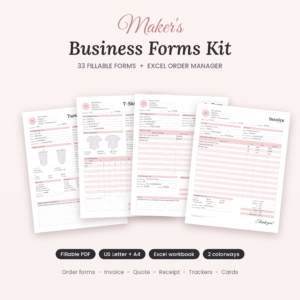
Maker's Business Forms Kit
Price: $3.00 | Best for: handmade sellers at markets and online
Thirty-three printable and fillable PDF forms in US Letter and A4, including a sales receipt, invoice, price quote, custom order and deposit agreement, and order forms for tumblers, apparel, mugs, signs and more. An Excel Order Manager with 13 linked tabs turns orders into invoices and receipts and shows a sales dashboard. Print a few receipts for your next market and log them in Excel afterward.
Making your receipts look like your brand
A receipt is a small thing, but it is often the last thing a customer holds from you. A plain generator receipt says “someone sold me something”. A branded one says “I bought from this shop, and I would again”.
Three simple touches make a difference. First, your logo in the top corner, sized small enough not to crowd the details. Second, one brand color used for the header bar or total line, not five. Third, a short footer with your shop link or social handle, so a happy customer can find you again. That is all. Ten minutes of tweaking, and every receipt for the next year looks like it came from a real business.
Storing and sending receipts the easy way
A template solves the making. Storage solves the finding. Six months from now a customer will email asking for a copy of a receipt from March, and you want that to take thirty seconds, not thirty minutes.
Make one folder per year, and inside it one folder per month. Name each PDF with the receipt number, date and customer, such as “R-2026-0143 2026-03-14 Lopez.pdf”. Sorted by name, the folder then lists every receipt in order. Searching for “Lopez” finds it instantly. Back the folder up to cloud storage you already use, so a lost laptop does not mean lost records.
A five-minute Friday check
Once a week, open your receipt log and do three quick things. Check that the last receipt number matches the last file in the folder, so nothing went missing. Compare the week’s receipt totals with what reached your bank or cash box. Then look for any receipts marked with a balance due and send a friendly nudge. Five minutes, and your records stay trustworthy all year.
When it comes to sending, email a PDF right after payment while the customer is still thinking about you. A short line such as “Thanks for your order, your receipt is attached” is all it needs.
Mistakes to avoid with editable receipt templates
- Overwriting the template. Always save each receipt as a new file or PDF. Keep the master clean.
- Sending editable files to customers. Send a PDF so nothing can be changed by accident.
- Leaving sample text in. “Your Company Name” on a real receipt is a small embarrassment that happens more than you would think.
- Breaking the numbering. Skip one number and your records look patchy. Use the next free number every time.
- Forgetting partial payments. If a balance is still due, the receipt must say so clearly.
Frequently asked questions
What is a good alternative to an online receipt generator?
An editable receipt template in Excel, Word, Google Sheets or fillable PDF. You set your details once, keep receipts in your own files, and avoid ads, sign-ups or download limits.
Can I edit a receipt template in Google Sheets?
Yes, if the template is made for Google Sheets or is a standard spreadsheet that opens there. Check the listing before you buy, since some templates are Excel only.
How do I add my logo to a receipt template?
In Word or Excel, use Insert, then Picture, and place your logo in the header area. Resize it so it sits neatly beside your business name, then save the file as your master template.
Should a receipt show the invoice number?
For payment receipts, yes. Linking the receipt to the invoice number makes it easy for you and your client to match payments, especially when an invoice is paid in parts.
Can I make a receipt on my phone?
Yes. Fillable PDFs can be filled in on most phones and tablets, and Google Sheets templates work in the Sheets app. Larger screens are easier, but a phone is fine for a quick receipt on the go.
Is a PDF receipt as valid as a printed one?
Yes. A PDF receipt carries the same information as a paper one. Many customers prefer it, because it is easy to file and hard to lose.
Your next step
Set aside twenty minutes this week to load your details, numbering and top ten items into one editable template, then send your next receipt from it as a PDF. If you invoice clients and take part payments, the Client Billing Hub Invoice Tracker builds the receipts for you as payments arrive.