Best Budget Planner for Excel: Three Tested Options Compared
A budget planner for Excel works best when you enter your bills and paychecks once and the workbook fills in the rest. For most households, Pocketbloom Annual Budget Spreadsheet is the fullest option. Payday Compass suits anyone budgeting paycheck by paycheck, and Well-Kept Life Planner suits people who want habits and goals alongside money.
Choosing between spreadsheets can feel like a lot of work before you have budgeted a penny. We'll keep it simple: what to check, how these three differ, and how to decide.
- Excel budget planners are spreadsheet workbooks, so you download one file and keep it on your own computer.
- Each of the three planners here includes debt payoff (snowball or avalanche), savings goals and net worth tracking.
- Tab counts range from 15 (Payday Compass) to 28 (Well-Kept Life Planner) to 34 (Pocketbloom).
- All three work with your own currency, and all three come with a user guide.
- Payday Compass also includes a filled sample file, so you can see a working budget before you type anything.
 Pocketbloom Annual Budget Spreadsheet for Excel | Monthly Budget Planner, Bill Tracker, Debt Payoff & Savings Tracker
Table of Contents
Toggle
- What should you look for in an Excel budget planner?
- How do the three planners compare?
- Which Excel budget planner suits which person?
- How do you set up an Excel budget planner?
- What mistakes should you avoid?
- What affects the price of an Excel budget planner?
- How can you decide with confidence?
- Common questions
What should you look for in an Excel budget planner?
A good Excel budget planner is a workbook where one entry feeds every other tab, covers your real pay pattern, and explains itself. Six factors separate a planner you'll keep using from one you abandon by February.
Do the tabs connect to each other?
A connected workbook is one where a figure typed in one place updates everywhere it matters. All three planners here work this way. In Well-Kept Life Planner, for example, adding a bill once puts it on your budget, bill calendar, paycheck plan and dashboard. If a planner makes you retype the same bill in three tabs, mistakes follow.
Do you enter bills and paychecks once?
Single-entry setup means you list each bill and paycheck one time and the workbook spreads them across the year. Pocketbloom does this for its whole annual file, and Payday Compass uses your bills to schedule the full year. The saving is real: a recurring bill is one line, not twelve.
Does it match how you are paid?
Pay-schedule fit decides whether the planner reflects your actual cash. Payday Compass works with any pay schedule and shows what's due before your next payday. Pocketbloom includes a paycheck planner and supports any budget rule, so you can use a method such as percentage splits if you already have one. If your income is irregular, check that the planner lets you adjust each month, not just the whole year.
Does it cover debt and savings?
Debt payoff is a tab that orders your debts and shows how fast they clear. The snowball method pays the smallest balance first. The avalanche method pays the highest interest rate first. Pocketbloom and Well-Kept Life Planner offer both, and Payday Compass includes debt payoff too. Savings goals and net worth sit alongside in all three.
How much do you want beyond money?
Scope is the question of whether you want a pure budget or a wider system. Well-Kept Life Planner adds tasks, routines, habits, weekly planning and a reading log. Pocketbloom adds a no-spend challenge and a money health score. Payday Compass stays focused on cash. More tabs give you more features, but also more to learn.
Is there a guide to get you started?
A user guide is the difference between a spreadsheet and a tool you can use on day one. Pocketbloom has an illustrated guide, Well-Kept Life Planner a 20-page Word guide, and Payday Compass a 15-page guide plus a filled sample file. If you're newer to Excel, that sample is a gentle way in.
How do the three planners compare?
Pocketbloom is the largest and most budget-focused, Well-Kept Life Planner is the broadest, and Payday Compass is the most compact and paycheck-led. The table sets out what the listings actually state.
| Product | Tabs | Main approach | Couples | Extras |
|---|---|---|---|---|
| Pocketbloom Annual Budget Spreadsheet for Excel | Monthly Budget Planner, Bill Tracker, Debt Payoff & Savings Tracker | 34 | Annual budget with 12 monthly budgets | Couples-ready | No-spend challenge, money health score, illustrated guide |
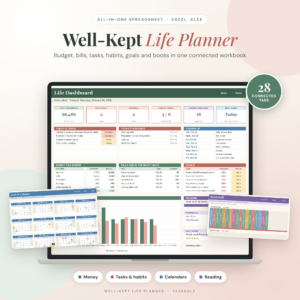 Well-Kept Life Planner Spreadsheet for Excel | All-in-One Budget Planner, Bill Tracker, Debt Payoff, Habit Tracker, Goal Planner, Weekly Planner & Book Tracker | Undated 2026 2027 | 28 | Budget plus habits, goals and weekly planning | Not stated | Undated, 20-page Word guide |
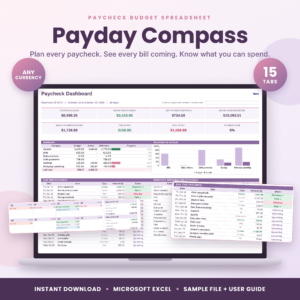 Payday Compass Paycheck Budget Spreadsheet | Biweekly Budget Planner for Excel, Bill Calendar, Debt Payoff & Savings Tracker | 15 | One paycheck at a time | Couples split tab | Filled sample file, 15-page guide |
The main trade-off is breadth against simplicity. Pocketbloom and Well-Kept Life Planner cost more up front than Payday Compass is likely to, though the product cards show the live figures. Payday Compass has the fewest tabs, which makes it the quickest to learn.
Which Excel budget planner suits which person?
Each planner suits a different habit, so match the tool to how you already think about money.
Pocketbloom suits you if you like to plan the whole year, want twelve monthly budgets, and share finances with a partner. It states it is couples-ready and doesn't need Excel 365, which helps if you run an older version of Excel. Its dashboard and money health score give you a quick check on progress.
Well-Kept Life Planner suits you if money is one part of getting organised. If you'd rather keep your bills, weekly to-dos, habits and reading list in one file than juggle several, this is the one. It is undated, so you choose the start month and year.
Payday Compass suits you if your money runs from payday to payday. It tells you what's due before your next payday, flags overdue bills and shows what's left to spend. Its bill calendar has a daily balance, which is useful if timing is your problem and the totals are not.
How do you set up an Excel budget planner?
Setting up an Excel budget planner takes one sitting if you gather your figures first. Follow these steps in order.
- Read the start of the user guide, which tells you which tabs to fill first.
- Collect your last two or three bank statements, so your bills and income are real numbers.
- Enter your paychecks, with dates and amounts.
- Enter each recurring bill once, with its due date.
- Add your debts, with balances and interest rates, and pick snowball or avalanche.
- Set one or two savings goals with target amounts.
- Check the dashboard against your bank balance, then update the file weekly.
Save a spare copy of the blank file before you begin, so you can start again if something goes wrong.
What mistakes should you avoid?
The most common mistake is buying more planner than you'll maintain. A 34-tab workbook only helps if you open it. Be honest about your habits.
- Skipping the sample or guide. Formulas link the tabs, so overwriting them by accident causes errors. Read how each tab works first.
- Entering estimates, not statements. Round guesses make the dashboard look neat and wrong.
- Forgetting irregular bills. Annual insurance, car tax or birthdays can break a month if they're not entered.
- Never reconciling. Compare the planner with your bank balance weekly, or small errors grow.
- Ignoring the debt tab. Choose snowball or avalanche on purpose, not by default.
What affects the price of an Excel budget planner?
The price of an Excel budget planner mostly reflects how much the workbook does and how much support comes with it. Because these are instant downloads, there is no postage or physical stock to pay for.
- Number of tabs and features. A 34-tab annual workbook involves more design than a 15-tab paycheck planner.
- Scope. Adding habits, goals and weekly planning, as Well-Kept Life Planner does, widens what you're buying.
- Guides and samples. Longer guides and filled sample files take time to produce.
- Flexibility. Support for any currency, any budget rule or any pay schedule means more formulas to build and test.
Check the live product cards for current figures, then judge whether you'd use the extra tabs.
How can you decide with confidence?
Use this rule: choose by pay pattern first, then by how much else you want to track. If cash runs tight between paydays, start with Payday Compass. If you plan by the year and share money with a partner, choose Pocketbloom. If you want one file for budget, habits and goals, choose Well-Kept Life Planner.
If you're still undecided, pick the one with the fewest tabs you'd ignore. A planner you open every week beats a bigger one you don't.
Common questions
Do I need Excel 365 to use these planners?
Pocketbloom states that it doesn't need Excel 365. The other two listings don't say either way, so check each product page for version details before you buy. If you use an older copy of Excel, that check is worth doing first.
Can couples share one of these planners?
Pocketbloom is described as couples-ready, and Payday Compass includes a couples split tab. Well-Kept Life Planner doesn't mention couples, so it is better suited to individual use. For a shared file, agree who enters bills and who checks the dashboard.
What is the difference between snowball and avalanche debt payoff?
Snowball pays off your smallest balance first to build momentum. Avalanche pays the debt with the highest interest rate first, which usually costs less in interest overall. Pocketbloom and Well-Kept Life Planner let you choose either, so you can compare both before committing.
Will the Well-Kept Life Planner still work after 2026?
Yes. It is listed as undated for 2026 and 2027, which means you set your own year and start month. You aren't tied to January, so you can begin whenever suits you. Check the product page for any details on later years.
Can I use my own currency?
Yes. Pocketbloom, Well-Kept Life Planner and Payday Compass each state support for any currency. Enter your amounts as normal. If you ever change currency, copy the blank file and start a fresh budget rather than overwriting old figures.