Most budgets do not fail on day one. They fail around the 19th, when a car repair lands, two categories are already blown, and opening the spreadsheet feels like reading a report card. So you stop opening it. By next month it is a file you vaguely remember.
If you want to make a budget you’ll still use next month, the trick is not more discipline. It is a budget built for real life: fewer categories, honest numbers, room for mistakes and an update routine short enough to do while the kettle boils. This guide shows you how to set one up that way, with a worked example, a plan for the lumpy months, and a simple review that keeps month two from going the way of month one.
Quick picks: budget tools that hold up past week three
| Product | Best for | Price | Link |
|---|---|---|---|
| Moneybloom 6-Month Budget Binder | Paper budgeters building a six-month habit | Original price was: $11.99.$8.99Current price is: $8.99. | View |
| Seaglass Annual Budget Spreadsheet for Excel | Excel users who want quick twice-weekly logging | Original price was: $19.99.$9.99Current price is: $9.99. | View |
| Ultimate Annual Budget Spreadsheet | Google Sheets on your phone | $6.00 | View |
Why most budgets are abandoned by the 20th
People quit budgets for the same handful of reasons. None of them are about being bad with money.
- The numbers were wishes. Groceries set at $300 because that sounds sensible, when the last three months averaged $470.
- Too many categories. Thirty-two lines means thirty-two chances to be “wrong” and a long, dull update.
- No room for surprises. One $180 vet visit with no buffer, and the whole plan looks broken.
- Updating takes too long. If logging spending means an hour every Sunday, it will not happen every Sunday.
- Going over feels like failing. So you avoid looking, which makes the next month worse.
Each of these has a fix you can build in from the start. That is the whole idea of this guide. Design the budget for the person you are on a tired Thursday, not the person you plan to become.
If your budgets have a habit of dying early in the year, our piece on why budgets fail by February digs into the same pattern from another angle.
Build from last month, not the perfect month
Your first budget should describe what you already do. Then you nudge it. That order matters more than anything else in this article.
Pull your bank and card statements for the last two or three months. Sort spending into rough groups and find the average for each. If eating out ran $210, $260 and $190, your starting number is about $220. Not $100. You can aim lower next month once you have proof the system works.
It feels backwards. Surely a budget is meant to cut spending? It will. But a plan that starts at reality gets kept, and a kept plan cuts more over six months than an ambitious one abandoned in week two. Small cuts that stick add up. Moving eating out from $220 to $180 is $480 a year, and you will barely feel it.
If you have never pulled statements apart like this, our guide on making a first budget from scratch covers the sorting step slowly.
Use fewer categories than you think
Between 8 and 14 categories is the sweet spot for most households. Enough to see where money goes. Few enough to update in a few minutes.
A short list that covers most homes
- Housing (rent or mortgage, insurance, property costs)
- Utilities and internet
- Phone and subscriptions
- Transport (car payment, fuel, transit)
- Groceries and household supplies
- Eating out and takeout
- Kids and pets
- Health and personal care
- Debt payments
- Savings and sinking funds
- Fun and personal spending
- Buffer
Merge anything small. “Coffee,” “snacks” and “lunch out” can live under eating out. “Haircuts” and “toiletries” fit under personal care. You can always split a category later if you want detail, but you rarely will.
Give your budget room to breathe
A tight budget looks impressive. A loose one survives. Two lines make the difference.
The buffer line
Set aside $75 to $200 each month labeled “buffer” or “oops.” This is for the parking fine, the forgotten school fee, the birthday present you only remembered on Friday. When a surprise shows up, you take it from the buffer and nothing else changes. The plan stays whole. That small sense of control is what keeps you opening the file.
The no-questions fun line
Every adult in the house gets a personal amount, even if it is $40, that they can spend on anything without explaining it. Couples especially benefit here. It takes the sting out of tracking and stops every $6 latte becoming a debate.
Make updates take five minutes, twice a week
The update routine decides whether a budget lives. Long sessions get skipped. Short ones become automatic.
Here is a pattern that works for a lot of people: Wednesday evening and Sunday morning, five minutes each. Open your banking app on one screen and your budget on the other. Log each transaction since last time. Glance at the two or three categories that tend to run hot. Done.
Tie it to something you already do. Dana, a dental receptionist with two kids, logs her spending while the kids brush their teeth on Wednesday night. Four minutes, give or take. She has not missed a week in five months, and she says the thing that changed was not willpower. It was picking a slot that already existed.
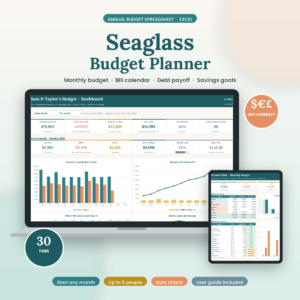
Seaglass Annual Budget Spreadsheet
Price: Original price was: $19.99.$9.99Current price is: $9.99. | Best for: Excel users who log twice a week
Seaglass is a 30-tab annual budget spreadsheet for Excel with a Start Here menu. You set up categories, recurring paychecks and bills once, in about 15 minutes, then log spending a couple of times a week. Tick a bill as paid and the monthly tab, dashboard, bill calendar and account balances update together. It also has a paycheck planner and sinking funds, and couples can tag spending to up to six people.
Plan for the lumpy months with sinking funds
A budget that works in March can fall apart in December. Or August, when school shoes, a family trip and the car registration all arrive together. These costs are not surprises. They are just rare, which makes them easy to forget.
A sinking fund spreads each one across the year. Add up the big yearly costs, divide by twelve, and save that amount every month into a separate pot.
| Yearly cost | Annual amount | Monthly set-aside |
|---|---|---|
| Holiday gifts and food | $720 | $60 |
| Car registration and service | $540 | $45 |
| Back-to-school costs | $360 | $30 |
| Birthdays (family and friends) | $300 | $25 |
| Annual subscriptions and renewals | $240 | $20 |
| Total | $2,160 | $180 |
$180 a month feels like a lot to set aside when it is just sitting there. Then December comes, the gift money is already waiting, and you remember why you did it. That first sinking-fund December is a lovely feeling.

Ultimate Annual Budget Spreadsheet
Price: $6.00 | Best for: phone logging in Google Sheets
The Ultimate Annual Budget Spreadsheet works in Excel, Google Sheets and LibreOffice, and syncs to your phone through the free Google Sheets app. Twelve monthly dashboards show expected versus actual with progress bars, and there are tabs for sinking funds, debt payoff, net worth and a smart calendar of due dates. You fill only the gold cells. Add your sinking funds on day one so the lumpy months are covered.
Paper binder or spreadsheet: which lasts longer?
Both last, if they match how you like to work. The format you enjoy touching is the one you will keep using.
Pick paper if
You like writing things down, you want the budget visible on the counter, or screens at night make you twitchy. Paper also helps people who need to slow down and feel each purchase. Writing “$38 takeout” by hand lands differently than a bank app notification.
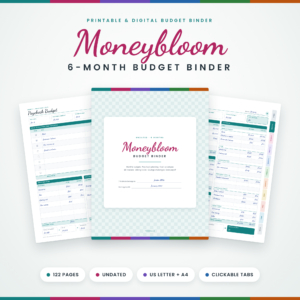
Moneybloom 6-Month Budget Binder
Price: Original price was: $11.99.$8.99Current price is: $8.99. | Best for: paper budgeters paid weekly or biweekly
Moneybloom is a 122-page undated printable budget binder in US Letter and A4, set up for six months. It uses a zero-based monthly budget, then splits the plan across each payday with five paycheck pages per month. You also get bill trackers, cash envelopes, sinking funds, savings challenges and debt payoff trackers, and every page has clickable tabs for tablet use. Print the start pages and month one, and hole-punch them into a binder.
A six-month length is a smart limit. It is long enough to build the habit and short enough that the finish line stays in sight. Reaching the last page is a proper little milestone.
Pick a spreadsheet if
You hate adding up columns, you want charts, or you share the budget with someone who works different hours. A cloud spreadsheet lets both of you log from your phones. One shared file, no “did you write that down?” texts.
Keeping it alive through bad weeks and busy homes
The mid-month rescue
Something will go wrong. A tooth cracks, a tire goes flat, the dryer dies on a Tuesday. This is the exact moment most people give up, because the budget suddenly looks “ruined.” It is not ruined. It just needs a 10-minute rescue.
- Write the hit down first. Log the $260 tire as it is. Do not hide it in another category.
- Use the buffer. That is what it is for. If the buffer covers it, you are done.
- If not, pick two flexible lines to shrink. Eating out and fun money are the usual choices. Cut them for the rest of the month only.
- Leave bills and savings alone if you can. Pausing a savings transfer once is fine. Skipping a bill is not.
- Make a note for next month. If car costs keep surprising you, that line needs a sinking fund.
That is the whole rescue. Ten minutes, and the plan is whole again. The pride of getting through a rough month without abandoning the budget is real, and it makes the next rough month much less scary.
One thing to avoid: starting a brand-new budget after a bad month. A fresh file feels like a clean slate, but it throws away everything you learned. Keep the same file, the same categories and the same habit. Adjust the numbers instead.
Getting everyone in the house on board
A budget run by one person in a house of three or four tends to wobble. The person tracking gets resentful, and everyone else spends without knowing the numbers. A tiny bit of sharing fixes most of that.
Try a five-minute money chat once a week, at the same time as one of your update slots. Share three things: how much is left in groceries, how much is left in fun, and one thing coming up. With kids, keep it to one number they can understand, like “we have $40 left for treats this week.” Children are surprisingly good at helping a budget once they can see it.
For couples, agree on one rule for big purchases. Anything over $100, say, gets a quick text before it happens. No permission needed. Just a heads-up. It saves a lot of awkward conversations at month end.
The month-two review: change three things, not thirty
At the end of month one, sit down for 20 minutes. Compare plan with actual for each category. Then follow one rule: change no more than three numbers.
- Raise anything that was clearly too low. If groceries ran $80 over, raise it by $60 and see how next month goes.
- Trim one category that had slack. If entertainment came in $50 under, drop it by $30.
- Move one thing to savings or debt. Even $25 extra feels good to see.
Why only three? Because rebuilding the whole budget each month is exhausting, and it hides the patterns. Small, steady changes show you what actually works. After three months your categories settle, and the review drops to ten minutes.
Groceries are often the category that needs the most work. Planning meals ahead is the easiest way to steady that line, and our guide to a monthly meal plan you will follow pairs neatly with this kind of budget.
Frequently asked questions
How do I stick to a budget after the first month?
Base it on real past spending, keep it to 8 to 14 categories, add a buffer, and update it for five minutes twice a week. Then change no more than three numbers at each monthly review.
What do I do when I go over budget?
Take the overspend from the buffer or another flexible category that came in under. Then ask whether the number was realistic. If not, raise it next month.
How many budget categories should I have?
Most households do well with 8 to 14. Merge small ones into broader groups, and only split a category if you truly need the detail.
Is it better to budget on paper or in a spreadsheet?
Whichever you enjoy using. Paper suits people who like writing things down. Spreadsheets suit people who want automatic totals or need to share the budget across phones.
How much should I put in a budget buffer?
Between $75 and $200 a month works for most homes. If you use it every month, raise it slightly. If it sits untouched for three months, move some to savings.
Your next step
Download last month’s bank statement tonight and sort it into no more than 12 groups. Write the totals down. That is your starting budget, and it is already more honest than most. Then pick your two weekly update slots and put them in your phone. If paper suits you, the Moneybloom 6-Month Budget Binder gives you six months of pages to build the habit.