Best Business Planner Template: Three Options Compared
The best business planner template depends on how you work. Orchid Business Hub suits owners who want goals, budget and profit in one spreadsheet. Business HQ suits people who plan by hand on a tablet in GoodNotes. DayDeck suits anyone whose main problem is tasks and deadlines rather than finances.
Choosing a planner can feel more complicated than it should, because the options look similar until you start using them. We'll keep this simple: each template below does a different job, and once you know which job you need done, the choice becomes much easier. You can browse all 3 options further down the page.
Key facts at a glance
- A business planner template is a ready-made file that gives you the structure for planning, tracking and reviewing a business, so you fill in details rather than design the layout.
- Orchid Business Hub is a 12-tab spreadsheet for Excel and Google Sheets covering goals, budget, monthly profit and loss, and marketing return.
- Business HQ is a tablet planner of 589 hyperlinked pages for GoodNotes, with a separate Excel workbook for finances.
- DayDeck is an 8-connected-tab task tracker for Excel and Google Sheets that fills your daily, weekly and monthly views from a single task list.
- Spreadsheet templates update automatically as you type, while tablet planners rely on you writing and reviewing by hand.
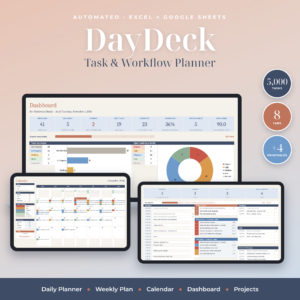 Task Tracker Spreadsheet for Excel & Google Sheets | DayDeck Daily Planner, Weekly Planner, Calendar & Project Dashboard
Table of Contents
Toggle
- What should you look for in a business planner template?
- How do the best business planner templates compare?
- Which business planner template suits which person?
- How do you use a business planner template properly?
- What mistakes should you avoid with a business planner template?
- What affects the price of a business planner template?
- Which business planner template should you choose?
- Common questions
What should you look for in a business planner template?
A good business planner template matches the way you already work and covers the jobs you actually need done. Six factors separate a template you'll use for a year from one you'll abandon in a fortnight.
Software and device
Check where you'll open the file before anything else. Orchid Business Hub and DayDeck work in both Excel and Google Sheets, so they suit a laptop or a browser. Business HQ is built for GoodNotes on a tablet, with printable packs in US Letter and A4 if you prefer paper. A planner you can't open comfortably on your usual device won't get used.
Money tracking
Decide how much of the finances you want inside the planner. Orchid Business Hub logs sales and expenses and updates a dashboard, monthly profit and budget checks by itself. Business HQ includes an Excel workbook that totals income and profit and suggests prices. DayDeck has no finance side, so it needs pairing with something else if money tracking matters to you.
Automatic updating versus manual writing
A spreadsheet template does the sums and refreshes its views when you enter data. A tablet planner gives you pages to write on, which many people find better for thinking but slower for totals. Neither is better in general. Choose the one that fits whether you prefer entering data or writing it out.
Guidance for the blank page
Many people stall because a blank planner gives no hint about what to write. Business HQ puts guided prompts on every page, and all three products come with a step-by-step guide. If you've started planners before and drifted away, prompts and a worked example matter more than extra features.
Flexibility for your situation
Look at whether the template bends to your circumstances. Orchid Business Hub works in any currency and with any fiscal year start, which helps if your tax year doesn't begin in January. Business HQ is undated, so you can start it on any day and not waste pages. DayDeck handles up to 30 projects and 5,000 task rows.
Planning horizon
Think about the timescale you plan on. Orchid Business Hub looks at the year through goals, a one-page business plan and monthly figures. Business HQ adds 366 undated daily pages plus weekly and monthly layouts. DayDeck works at day and week level, with a month calendar and a project dashboard.
How do the best business planner templates compare?
The three templates differ mainly in format, finance features and planning focus, as the table shows.
| Template | Format | Finance tools | Planning focus | Standout detail |
|---|---|---|---|---|
| Task Tracker Spreadsheet for Excel & Google Sheets | DayDeck Daily Planner, Weekly Planner, Calendar & Project Dashboard | Excel and Google Sheets | None | Daily and weekly tasks, projects | Type a task once and every view fills in; overdue flags and workload by person |
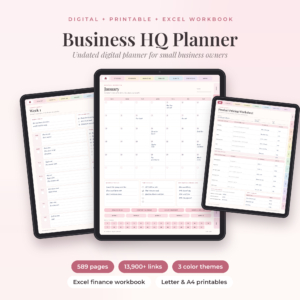 Business HQ Undated Small Business Planner for GoodNotes | Excel Finance Tracker & Printables | GoodNotes tablet pages, Excel workbook, printables | Excel workbook totals income and profit, suggests prices | Whole business, with daily pages | 589 hyperlinked pages, three colour themes, 53 digital stickers |
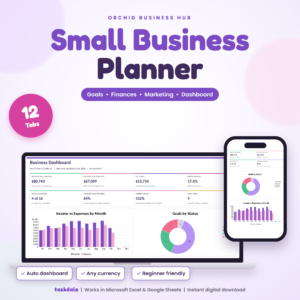 Orchid Business Hub: Small Business Planner Spreadsheet for Excel & Google Sheets, Goals, Budget, P&L and Marketing Dashboard | Excel and Google Sheets | Transactions, monthly P&L, budget, marketing ROI, startup costs | Goals and money | 12 tabs, any currency, any fiscal year start |
Which business planner template suits which person?
Each template suits a different kind of owner, and the easiest way to choose is to name your biggest headache.
Orchid Business Hub suits you if you want to know whether the business is making money. You log sales and expenses, and the dashboard shows profit and budget checks without any formulas on your part. The startup costs tab and pricing calculator also help if you're still launching. It's the closest of the three to a proper business plan with numbers attached.
Business HQ suits you if you think best with a stylus or pen. Your plan, products, pricing, marketing, money and clients sit in one hyperlinked notebook, and the prompts tell you what to write. The Excel finance tracker handles the arithmetic, so you needn't total anything yourself.
DayDeck suits you if the problem is getting things done rather than the business model. You type each task once, and it appears in your daily planner, weekly plan, calendar and dashboard. Smart Focus and overdue flags show what needs attention, and workload by person helps if you run a small team.
How do you use a business planner template properly?
You use a business planner template by setting it up once, entering data in one place and reviewing it on a fixed schedule. Here is a sequence that works for any of the three.
- Save a clean copy before you start, so you can always return to the original layout.
- Read the step-by-step guide that comes with the product, and look at the filled example if one is included.
- Enter your starting information: goals, currency, fiscal year start or first projects.
- Pick one place to record data every day, such as the transactions tab or the task list, and don't duplicate it elsewhere.
- Set a weekly review of 15 to 20 minutes to check overdue items, spending and next steps.
- Do a longer monthly review to compare actual results with your budget or goals, then adjust.
What mistakes should you avoid with a business planner template?
The most common mistake is choosing a template for what it offers rather than what you'll actually do with it. A few others come up again and again.
- Buying a finance tool when you need a task tool. DayDeck won't track profit, and Orchid Business Hub won't manage a team's workload in detail.
- Picking a tablet planner without a tablet habit. If you rarely open GoodNotes, Business HQ's pages will go untouched.
- Entering data in two places. Spreadsheet views update from one source, so adding the same figure elsewhere only creates conflicts.
- Skipping the guide. The step-by-step guides exist because formulas and linked tabs break if you overwrite them.
- Overbuilding. Fill in the basics first. You can add detail once the habit has formed.
What affects the price of a business planner template?
The price of a business planner template depends on how much it contains and how much work it saves you. Costs vary with the number of tabs or pages, the amount of automation and what's bundled in.
A spreadsheet with linked formulas, a dashboard and a pricing calculator takes more effort to build than a simple checklist, and that shows up in the price. Bundles also cost more up front: Business HQ combines tablet pages, printables, stickers, covers and an Excel workbook. Check the live product cards for current prices, then compare what each one includes rather than judging by cost alone.
Which business planner template should you choose?
Choose by the problem you want solved first: Orchid Business Hub for profit and goals, Business HQ for a handwritten all-in-one planner, DayDeck for tasks and deadlines.
A simple decision rule helps. If you can't say whether your business made money last month, start with Orchid Business Hub. If you have the numbers but your plans live in your head, pick Business HQ. If your days feel crowded and things slip, pick DayDeck. You can also combine DayDeck with Orchid Business Hub, since one handles tasks and the other handles money.
Common questions
Can I use these templates in Google Sheets instead of Excel?
Orchid Business Hub and DayDeck both work in Excel and Google Sheets, so you can pick whichever you already use. Business HQ is different: its tablet pages are for GoodNotes, and its finance workbook is described as an Excel file.
Do I need accounting software as well?
A planner template helps you track income, expenses and profit, but it isn't a substitute for formal accounts or tax records. Orchid Business Hub and the Business HQ workbook give you a clear view of performance. Speak to an accountant about what your business must keep.
What does undated mean in a planner?
An undated planner has no fixed calendar dates, so you add them yourself and can begin on any day. Business HQ is undated, with 366 daily pages plus weekly and monthly layouts. Missed days don't leave wasted pages behind.
Can I print these planners?
Business HQ includes printable packs in US Letter and A4, and DayDeck comes with four printables in the same two sizes. Orchid Business Hub is a spreadsheet, so printing depends on your own settings. Paper copies suit people who like to tick off tasks by hand.
Which template should a beginner start with?
Start with the one that answers your most pressing question. For a new owner who needs numbers, Orchid Business Hub has startup costs and a pricing calculator. For someone who needs structure for the week, DayDeck's filled example makes the first session easy. Read the guide first.