Writing a CV is three jobs pretending to be one. You need a layout that behaves, words that show what you have done, and a careful final check so a typo does not undo all the effort. Most people tackle all three at once, late at night, and wonder why it feels so hard.
A CV helper kit splits the work into parts. This guide gives you the whole kit: what to look for in a template, a set of writing prompts for every section of your CV, a proofreading checklist you can work through line by line, and the tricks that catch the errors spellcheck lets slide. It also shows how ready-made kits on Taskdale bundle these pieces together.
Use it for a first CV, a full rewrite or a quick tidy before a new application. Take the parts you need and skip the rest.
Quick picks: ready-made CV helper kits
| Product | Best for | Price | Link |
|---|---|---|---|
| Linen Resume Kit | A 21-page Job Search Playbook and a results strip | $4.70 | View |
| Calla Photo Resume Kit | Separate Word and Google Docs editions with guided text | $4.49 | View |
| Northline Modern Resume Kit | A 22-page writing guide and 1 to 5 page layouts | $7.49 | View |
| Quillmark ATS Resume Kit | A keyword checker and STAR story bank | $7.49 | View |
What goes in a CV helper kit
Think of it like a toolbox for one job. Each piece solves a different problem, and together they take you from a blank page to a CV you are happy to send.
- A template. Solves the layout problem, so you are not dragging text boxes around at midnight.
- Writing prompts. Solve the blank page problem, so you know what to write in each section.
- A proofreading checklist. Solves the mistake problem, so small errors do not cost you an interview.
- Extras. A matching cover letter, a references page and a way to track where you have applied.
You can build this kit yourself from the sections below, or start with a ready-made one and fill the gaps. Either way, having all of it in one folder makes every future application quicker.
Part one: a template that behaves
The template is the base of the kit. A good one disappears into the background. A bad one turns every edit into a fight. When you choose, check for these points.
- Real heading styles. Change one heading and all of them update.
- No floating text boxes. The layout should grow when you add a job, not overlap.
- Guided placeholder text. Sample lines that tell you what to write, not Lorem ipsum.
- An ATS version. A plain single-column copy for online job portals.
- Both paper sizes. A4 for most of the world, US Letter for North America.
- Works where you work. If you use Google Docs, check the template was tested there.
That last point trips people up more than any other. Many Word templates shift when opened in Google Docs, adding a blank page or pushing a sidebar off the edge. Our guide to how to make a resume in Google Docs covers the common fixes.
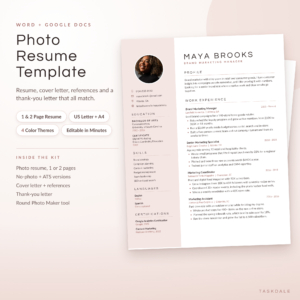
The Calla kit gets around this by shipping separate Word and Google Docs editions, each adjusted so the sidebar fits and no stray page appears.
Calla Photo Resume Kit
Price: $4.49 | Best for: people who edit in Google Docs
Calla includes a 1-page and 2-page resume with a photo, a no-photo version, a plain ATS version, a cover letter, references page and thank-you letter, in four soft colour themes. It comes in separate Word and Google Docs editions, uses real heading styles and has guided placeholder text on every line. The Round Photo Maker crops your picture into a circle in your browser without uploading it anywhere, so try that first.
Part two: prompts for every section
Prompts are questions that pull the right details out of your memory. Work through them with a notebook before you open the template. Answer quickly and roughly. You will tidy later.
Profile prompts
- What is your job title, or the title you want next?
- How many years have you done this kind of work?
- What is the one thing you do better than most people around you?
- What result from the last two years would you most like a stranger to know about?
Experience prompts
- What did you improve, fix or speed up in this job?
- How many people, customers, accounts, sites or products did you handle?
- What did your manager trust you with that others were not given?
- What would have gone wrong if you had not been there?
- Which number did your team track, and how did you move it?
Skills prompts
- Which software do you use every week without thinking?
- Which certificates or licences do you hold, and when do they expire?
- Which languages can you work in, and at what level?
Education and extras prompts
- Which course or qualification is most relevant to the job you want?
- Have you volunteered, coached, mentored or organised anything outside work?
- Is there an award or recognition that a recruiter in your field would recognise?
Twenty minutes with these questions usually produces more usable material than two hours of staring at a template.
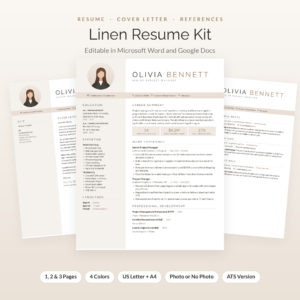
The Linen kit includes a 21-page Job Search Playbook that walks through this kind of thinking, plus a results strip near the top of the CV to show your impact at a glance.
Linen Resume Kit
Price: $4.70 | Best for: people who want a playbook and a polished look
Linen includes 1, 2 and 3 page resumes, a cover letter, references page and thank-you letter, in Sand, Sage, Mist and Blush, with a round photo or monogram header, in US Letter and A4. There is also an ATS resume and cover letter in a single column, a Job Application Tracker for Excel and Google Sheets and a 21-page Job Search Playbook. Fill in the results strip first with your three strongest numbers.
Turning prompt answers into strong lines
Your notes will be messy. That is fine. Here is how to shape them into lines that work on the page.
Start each experience bullet with an action verb, add what you did and finish with the result. Keep it to one or two lines.
- Note: sorted out the stock room, it was a mess, took about a month, now we find stuff way faster.
Line: Reorganised a 600-item stock room in four weeks, cutting average pick time from 6 minutes to under 2. - Note: I am the one everyone asks about Excel.
Line: Built the team’s weekly sales report in Excel and trained five colleagues to update it. - Note: covered for my manager when she was off for 3 months.
Line: Acted as office manager for three months, running a team of seven and the monthly budget.
For the profile, combine your answers into three sentences: who you are, what you are best at with one result, and what you want next.
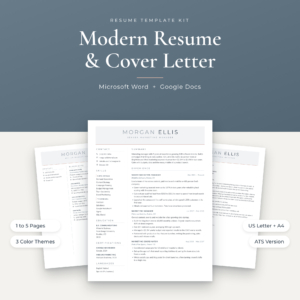
Northline comes with a 22-page guide that goes deeper into this writing step, alongside layouts from one to five pages.
Northline Modern Resume Kit
Price: $7.49 | Best for: people who want detailed writing help
Northline includes two-column resumes from one to five pages, a plain ATS version, a matching cover letter, references page and thank-you letter, in three colour themes and two paper sizes, 54 files in all. Each page is its own block, so editing page three leaves page one alone. Read the bullet-writing pages of the 22-page guide with your prompt notes beside you.
Part three: the proofreading checklist
Print this list or copy it into a note. Tick each item before you send any version of your CV.
Content
- Your name, phone number and email are correct. Ring the number and send a test email if you changed either.
- The profile names the type of role you are applying for.
- Every recent job has at least two bullets with a number, scale or result.
- No bullet starts with Responsible for.
- Nothing is older than about 15 years in full detail.
- Nothing is claimed that you could not explain in an interview.
Consistency
- Dates use one format throughout, such as Mar 2024 or 03/2024, not both.
- Job titles match your LinkedIn profile.
- Tense is consistent: present for your current job, past for earlier ones.
- Bullets either all end with a full stop or none do.
- Spelling follows one standard, UK or US, all the way through.
Formatting
- No stray blank lines or an empty last page.
- Headings look the same on every page.
- Text is at least 10 point and dark enough to print in black and white.
- Page breaks do not split a job title from its first bullet.
Files
- Saved as a PDF unless the employer asks for Word.
- File name includes your name and the role.
- Links in the PDF click through to the right pages.
- Tracked changes accepted and comments deleted before export.
Proofreading tricks that catch what spellcheck misses
Spellcheck will happily accept manger instead of manager, form instead of from and their instead of there. These tricks help your brain stop autocorrecting what you meant to write.
- Read it aloud, slowly. Your ears catch clumsy phrases and missing words your eyes skip.
- Change the font for one read. A new look makes the text unfamiliar, and errors pop out.
- Print it. Mistakes are easier to see on paper than on screen. Use a ruler to go line by line.
- Read the bullets bottom to top. It breaks the flow, so you look at each line on its own.
- Sleep on it. A fresh read the next morning catches things you missed at 11 pm.
- Ask one other person. Give them the checklist above and ask them to mark anything they trip over.
This step is dull. It is also the one that saves you from the slow sinking feeling of spotting a typo in your own name just after you hit send.
Using the whole kit in one evening
If you have a single free evening and an application due, here is how to run the kit from start to finish in about three hours.
- 6:00 pm, prompts (30 minutes). Answer the profile and experience prompts for your last two jobs in rough notes. Do not open the template yet.
- 6:30 pm, lines (45 minutes). Turn the notes into eight to twelve bullets and a three-sentence profile.
- 7:15 pm, break (15 minutes). Step away from the screen. Make tea.
- 7:30 pm, template (45 minutes). Paste your lines into the template as plain text, add education and skills, and fix the length.
- 8:15 pm, checklist (30 minutes). Work through every item in the proofreading list, then read the whole page aloud.
- 8:45 pm, extras (15 minutes). Adapt the matching cover letter and log the application in your tracker.
By nine o’clock you have a finished CV, a letter and a record of where it went. Leave the PDF until the morning, give it one fresh read with your coffee, and then send it with a clear head.
Extras that complete the kit
A CV rarely travels alone. The rest of the kit makes each application faster and more consistent.
- A matching cover letter. Same header, same fonts, so the pair looks planned. Our guide to a cover letter that matches your resume explains how to write it.
- A references page. Ready to send when asked. See our references page guide for who to list and how.
- A thank-you letter. Sent within a day of an interview.
- A tracker. A record of where you applied, which version you sent and when to follow up.
- A keyword check. A quick way to see whether your CV uses the words a job advert asks for.
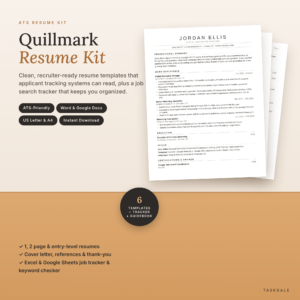
Quillmark pulls several of these extras together, including a keyword checker and a story bank for interview answers.
Quillmark ATS Resume Kit
Price: $7.49 | Best for: people applying through job portals
Quillmark includes one-page, two-page and entry-level resumes in a single-column layout, a cover letter, references page and thank-you letter, each in US Letter and A4. The Job Search Tracker has applications, interviews, a STAR Story Bank and contacts tabs, and the ATS Keyword Checker compares your CV text with keywords from a posting. Paste in your finished CV and run the checker before your first application.
Frequently asked questions
What should be in a CV kit?
A template, writing prompts or guidance, a proofreading checklist, a matching cover letter and references page, and some way to track applications.
How do I proofread my CV properly?
Work through a checklist covering content, consistency, formatting and files, then read it aloud, print it and ask one other person to check it.
What questions help me write my CV?
Ask what you improved, how many people or things you handled, what you were trusted with and which number your team tracked. Those answers become your bullets.
Do I need a separate ATS CV?
It helps if you apply through company job portals. A plain single-column version is easier for screening software to read.
Should I save my CV as PDF or Word?
PDF in most cases, because it keeps the layout fixed. Send Word only when the employer asks for it.
How long does it take to write a CV with a kit?
About three hours for most people: prompts, writing, layout and a full proofread, with a fresh check the next morning.
Your next step
Set a timer for 20 minutes and answer the profile and experience prompts above in rough notes, then print the proofreading checklist and keep it next to your keyboard. When you want the template, playbook and extras in one download, start with the Linen Resume Kit.