Best Dated Digital Planner: 3 Options Compared for 2027
A dated digital planner is a PDF calendar with every date already printed and linked, so you tap between year, month, week and day instead of building pages yourself. Cobalt & Ember suits one focused year, Oat & Ink suits people who also track money and habits, and Hueloom suits anyone who wants colour themes and calendar buttons.
Key facts at a glance
- A dated digital planner works in a PDF annotation app such as GoodNotes or Notability, and you write on it with an Apple Pencil or similar stylus.
- Cobalt & Ember covers 2027 only, while Oat & Ink and Hueloom each offer 2027, 2028 and 2029 editions.
- Oat & Ink and Hueloom both give you buttons or links to Google Calendar, and Hueloom adds Apple Calendar as well.
- All three come with a Monday or Sunday week start, so you pick the layout that matches your week.
- Browse all 3 options below, then use the comparison table to narrow them down.
Choosing a planner can feel like a bigger decision than it should be. Page counts run into the thousands, the descriptions are full of tabs, templates and stickers, and it is hard to tell which features you will use in March and which you will forget by February. We'll go through what matters, compare the three planners shown here, and finish with a simple rule for choosing.
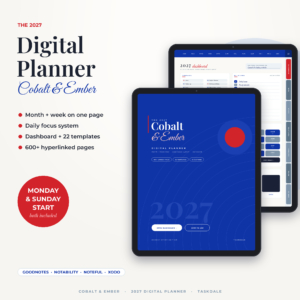 Cobalt & Ember 2027 Digital Planner | Month + Week Hyperlinked GoodNotes & iPad Planner with Dashboard, Daily Focus Pages, 22 Templates & Stickers | Monday & Sunday Start
Table of Contents Toggle
- What should you look for in a dated digital planner?
- How do the best dated digital planners compare?
- Which dated digital planner suits which person?
- How do you set up and use a dated digital planner?
- What mistakes should you avoid when buying a dated digital planner?
- What affects the price of a dated digital planner?
- Which dated digital planner should you choose?
- Common questions
What should you look for in a dated digital planner?
A good dated digital planner has working hyperlinks, a layout that fits your daily habits, and compatibility with the app and device you already own. Everything else is a bonus. These are the factors that decide whether you will still be using it in the autumn.
Hyperlinks and navigation
A hyperlinked planner lets you tap a tab or date to jump straight to the page you want. Without links, a planner with hundreds of pages becomes a long scroll. All three planners here are fully linked, but they organise it differently. Hueloom uses Month, Week and Day tabs, Cobalt & Ember uses 12 section folders and a dashboard, and Oat & Ink links yearly, monthly, weekly and daily pages together.
Dated pages and the years covered
Dated means each page already carries its weekday and date. That saves you setup time, but it also fixes the year. Cobalt & Ember is a 2027 planner. Oat & Ink and Hueloom each list 2027, 2028 and 2029 editions, which helps if you want the same layout next year without relearning anything.
Daily page style
Some people want a gentle prompt, others want a schedule. Cobalt & Ember gives you 365 daily pages built around a Top 3 focus system and an hourly schedule, which suits anyone who finds a long to-do list discouraging. Oat & Ink and Hueloom lean towards flexibility, with daily pages that sit alongside trackers and templates.
Trackers and life-admin pages
If you want your budget, bills, meals and health in the same place as your diary, check the tracker list. Oat & Ink has 40+ trackers covering budget, bills, savings, habits, meals, health, goals and projects. Hueloom offers 3 templates for home, meals, money, fitness and wellness. Cobalt & Ember has monthly money, meal, cleaning and health pages plus 3 templates, which is a lighter set.
Calendar syncing
A digital planner is a PDF, so it cannot sync by itself. What it can do is link out. Oat & Ink puts a Google Calendar link on every daily page. Hueloom has one-tap Google Calendar and Apple Calendar buttons. Cobalt & Ember does not list calendar links in its description, so treat it as a standalone planner.
App and device compatibility
Cobalt & Ember names GoodNotes, Notability, Noteful and Xodo. Oat & Ink names GoodNotes, Notability and other PDF apps. Hueloom names GoodNotes and Notability and mentions iPad and Android tablet use. Check that your annotation app is on the list before you buy.
Appearance and extras
Stickers, covers and colour themes are cosmetic, but they make a planner feel like yours. Hueloom has 6 colour themes including dark mode, 533 stickers and 36 bonus covers. Oat & Ink has 10 cover colours, 157 stickers and 75 printable pages in US Letter and A4. Cobalt & Ember has 151 stickers and 4 covers. Dark mode matters if you plan in the evening.
How do the best dated digital planners compare?
The three planners differ most in years covered, page count and calendar links. The table below sets out what each product's description states, and leaves out anything not supplied.
| Product | Years | Pages | Week start | Calendar links | Extras |
|---|---|---|---|---|---|
| Cobalt & Ember 2027 Digital Planner | Month + Week Hyperlinked GoodNotes & iPad Planner with Dashboard, Daily Focus Pages, 3 Templates & Stickers | Monday & Sunday Start | 2027 | 615 | Monday or Sunday | Not stated | 3 templates, 151 stickers, 4 covers, user guide |
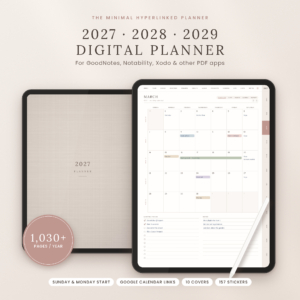 Oat & Ink Digital Planner 2027 2028 2029 | Hyperlinked GoodNotes & iPad Planner, Daily Weekly Monthly, Budget & Habit Tracker, Google Calendar Links | 2027, 2028, 2029 | 1,030+ per year | Sunday or Monday | Google Calendar on every daily page | 40+ trackers, 10 cover colours, 157 stickers, 75 printable pages |
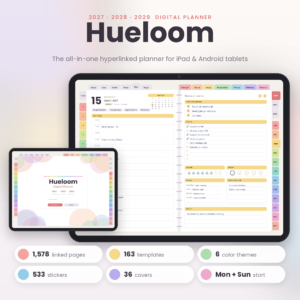 Hueloom Digital Planner 2027 2028 2029 | Hyperlinked GoodNotes & Notability Planner, Dated Daily Weekly Monthly iPad Planner, Dark Mode | 2027, 2028, 2029 | 1,578 | Monday or Sunday | Google Calendar and Apple Calendar | 6 colour themes with dark mode, 3 templates, 533 stickers, 36 covers, user guide |
A bigger page count is not automatically better. More pages means more to scroll past and a larger file to open on an older iPad. Cobalt & Ember is the smallest here, and for some people that is the appeal.
Which dated digital planner suits which person?
Each planner suits a different habit: Cobalt & Ember suits people who plan one day at a time, Oat & Ink suits people who want budgeting and tracking, and Hueloom suits people who want choice and calendar connections.
Cobalt & Ember 2027 Digital Planner suits you if you want your month and week visible together and a daily page that asks for only three priorities. The hourly schedule helps if your day has fixed appointments. It is a sensible first planner because there is less to configure. The limit is that it covers 2027 only and lists no calendar buttons.
Oat & Ink Digital Planner 2027 2028 2029 suits you if household money is part of your planning. Budget, bills and savings pages sit beside habit and meal trackers, and the Google Calendar link on each daily page lets you check appointments without leaving the planner. It suits someone who plans for the long term and likes a calm, structured layout.
Hueloom Digital Planner 2027 2028 2029 suits you if you use both Google and Apple calendars, want dark mode, or like to personalise. With 3 templates, six themes and a large sticker set, it has the most to explore. It also names Android tablet use, which matters if you are not on an iPad.
How do you set up and use a dated digital planner?
You set up a dated digital planner by importing the PDF into your annotation app, choosing a week start, and writing in it with a stylus. It takes about ten minutes the first time.
- Download the PDF to your tablet and open it in GoodNotes, Notability or another supported app.
- Pick the file for your preferred week start, Monday or Sunday, and delete or ignore the other.
- Open the user guide, where supplied, and test the main tabs so you know how to jump between pages.
- Fill in fixed dates first, such as birthdays, appointments and bills.
- Use the daily page each morning for five minutes, then review the week on a set day.
Keep a backup of the original PDF in cloud storage. If you ever want a clean copy, you can import it again.
What mistakes should you avoid when buying a dated digital planner?
The most common mistakes are buying the wrong week start, ignoring app compatibility, and choosing on page count alone. All three are easy to avoid by checking the product description first.
- Choosing the wrong year. Dated pages cannot be changed. Check that the edition you buy matches the year you need.
- Assuming it will sync. A PDF planner links out to calendars but does not update itself. Treat it as a planning page, not a replacement for your phone calendar.
- Buying too much. A planner with 40+ trackers is wasted if you only want a daily page. Start with the layout you will actually open.
- Skipping the app check. Hyperlinks work in PDF apps that support them. Confirm yours is named or is a standard PDF annotation app.
- Never reviewing. A planner you open only on Sundays loses its value. Pick one regular moment to use it.
What affects the price of a dated digital planner?
The price of a dated digital planner depends mainly on how many years are included, how many templates and trackers come with it, and how much bonus material is added. These are digital files, so there is no material or postage cost.
Multi-year editions and large template libraries usually cost more than a single-year planner. Bonus items such as stickers, covers and printable pages add to the package. Because Cobalt & Ember is a single year with a smaller set of extras, it is the cheaper style of product, while Oat & Ink and Hueloom are the fuller bundles. Check the live product cards for current prices, since they can change.
Which dated digital planner should you choose?
Choose Cobalt & Ember if you want a simple, focused year. Choose Oat & Ink if you want budgeting and habit tracking in one place with Google Calendar links. Choose Hueloom if you want dark mode, both calendar buttons and the widest range of templates.
If you are still unsure, ask which of these you would open every day: a Top 3 list, a budget page or a colourful Week tab. Pick the planner built around that page.
Common questions
Can I use a dated digital planner without an Apple Pencil?
Yes. You can type into text boxes in most annotation apps or use your finger, though a stylus is more comfortable for handwriting. A stylus is not required to tap hyperlinks, tabs or calendar buttons.
Does a dated digital planner work on Android?
It can, if your tablet has a PDF annotation app that supports hyperlinks. Hueloom mentions iPad and Android tablet use. The other two name GoodNotes, Notability, Noteful or Xodo, so check your app is supported.
Are the dates fixed, and can I reuse the planner next year?
The dates are fixed, so a 2027 planner cannot be reused for 2028. Oat & Ink and Hueloom each list 2027, 2028 and 2029 editions, which lets you keep one layout for several years.
Is there a difference between Monday and Sunday start?
The only difference is which day the week begins on. Monday start fits most work weeks, while Sunday start suits people who plan on a Sunday. Cobalt & Ember, Oat & Ink and Hueloom all offer both.
Do I need the stickers and covers?
No. Stickers and covers are optional decoration. The links, daily pages and trackers do the real work, so choose on layout first and treat the extras as a pleasant bonus.