


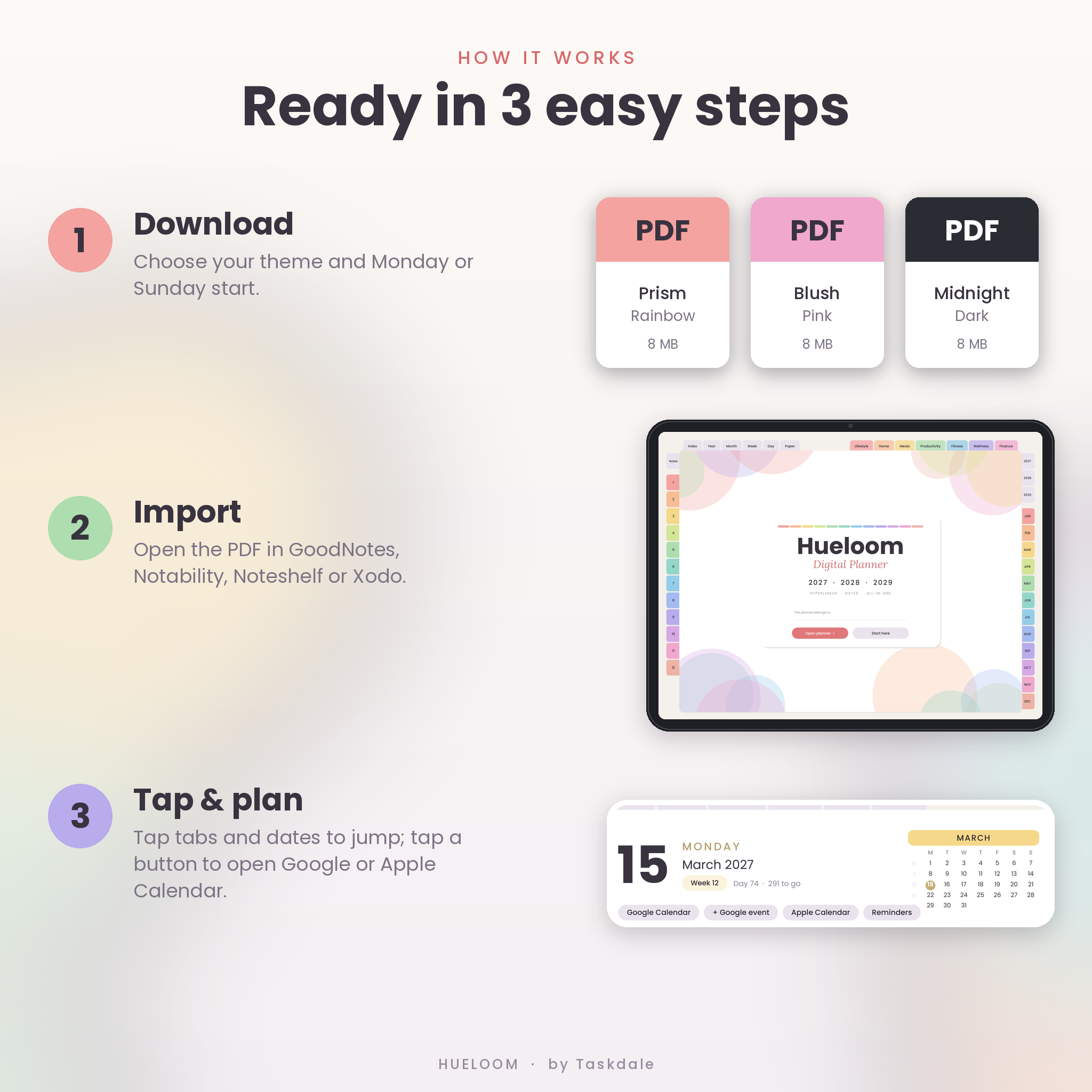


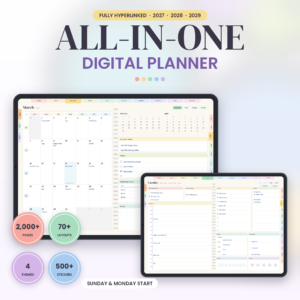
The Hueloom 2027 2028 2029 digital planner is a fully hyperlinked, dated planner for iPad and Android tablets that puts your calendar, goals, habits, home, meals, money and health in one calm, colorful notebook. Every day from January 1, 2027 to December 31, 2029 has its own daily spread, and every tab, date and button is a link, so you can jump from a year overview to a single day in one tap. Use it in GoodNotes, Notability, Noteshelf, Xodo, ZoomNotes or any app that opens hyperlinked PDFs.
A hyperlinked digital planner that does the navigating for you
Most digital planners make you hunt for the right page. Hueloom uses smart tabs: the Month, Week and Day tabs follow the page you are on, so on March 15, 2027 the Week tab opens that exact week and the Month tab opens March 2027. Year tabs and JAN–DEC month tabs sit on the right edge, 12 color-coded notebook tabs sit on the left, and round arrows move you to the previous or next day, week, month or template.
Small buttons on every day, week and month open Google Calendar or Apple Calendar on that exact date, add a new all-day Google event for the day, or open Apple Reminders, so your handwritten plans and your phone calendar stay side by side.
What is included
- 12 planner PDFs: 6 color themes (Prism Rainbow, Blush Pink, Mocha Brown, Lavender Purple, Minimal Sage and Midnight Dark Mode), each in a Monday-start and a Sunday-start version.
- 1,578 hyperlinked pages in every file, about 8 MB each so they open quickly.
- 163 undated templates in 7 collections: Lifestyle, Home, Meals, Productivity, Fitness, Wellness and Finance.
- 36 bonus covers: 12 original designs for each of 2027, 2028 and 2029.
- 533 digital stickers: transparent PNG labels, date numbers, headers, sticky notes, washi tape, page flags, highlighters, icons, mood faces and progress bars.
- A 20-page user guide (DOCX) with setup steps for each app, tips, troubleshooting and FAQs.
Features of the dated 2027–2029 planner
Year, quarter and month planning
- Year at a Glance with linked mini calendars and week numbers
- Vision & Goals page with word of the year, top 3 goals, 8 life areas and a goal action plan
- Important Dates for birthdays and anniversaries, plus a Year in Pixels mood tracker and a Year in Review
- Quarterly planning pages with goals, focus areas and a plan for each month
- Monthly calendar spread with top priorities, goals, to-dos, important dates, birthdays and notes
- Monthly Habits & Mood dashboard: a 15-habit tracker sized to the month, daily mood circles, a monthly budget and a reflection section
Weekly and daily pages
- 158 weekly spreads with a box for every day, quick checkboxes, a weekly focus list and a habit tracker
- 1,096 dated daily spreads with an hourly schedule from 6 AM to 10 PM, top 3 priorities, a to-do list, water and mood trackers, meals, gratitude and notes
163 life templates
- Lifestyle (33): bucket list, gift planner, travel planner, packing list, pet information, reading log, movie and TV trackers and more
- Home (28): master cleaning list, daily to seasonal cleaning schedules, 7 ready-made room deep-clean checklists, a 30-day declutter challenge, chore charts and home and vehicle maintenance logs
- Meals (17): weekly and monthly meal planners, recipe cards, meal prep, an aisle-sorted grocery list and pantry and freezer inventories
- Productivity (29): brain dump, routines, SMART goals, project planner, meeting notes, study tracker, Eisenhower matrix and Pomodoro tracker
- Fitness (15): workout planner and log, gym planner, running log, body measurements, personal records and 30-day challenges
- Wellness (19): habit, mood, sleep and water trackers, self-care menu, medication log, doctor visit notes, and period and cycle trackers
- Finance (22): monthly and paycheck budgets, bill and subscription trackers, a 100-envelope savings challenge, sinking funds, debt snowball, debt thermometer and a net worth tracker
Notebooks and paper
Twelve color-coded notebooks (contents, lined, dot-grid and grid spreads) and a 14-style paper library including lined, dot grid, Cornell notes, storyboard, time blocking and music staff.
Who this digital planner is for
Busy parents running a household, students juggling deadlines, professionals planning their week, and anyone building habits, paying off debt or tracking their health. It is simple enough for a first digital planner and complete enough to replace a stack of apps and notebooks.
Real ways to use it
- Sunday reset: review the month, fill in the week and plan meals and groceries.
- Morning planning: write today’s top 3 and tap the Google Calendar button to check appointments.
- Money check-in: update the monthly budget and color the debt thermometer as balances fall.
- Trip planning: use the Travel Planner, Itinerary and Packing List, then add the dates to your calendar.
Works with your currency
Every money page uses neutral Amount, Budget and Actual columns with a Currency field at the top. Write $, £, €, R or any symbol once and use the planner anywhere in the world.
File formats and requirements
- Format: hyperlinked PDF, landscape 4:3, about 8 MB per planner file
- Works with: GoodNotes, Notability, Noteshelf, ZoomNotes, Xodo and other PDF annotation apps on iPad and Android tablets; it also opens in any PDF reader
- Needs: a tablet and a stylus (or your finger). The calendar buttons need an internet connection; the Apple Calendar and Reminders buttons work on Apple devices
- Stickers: PNG files with transparent backgrounds (ZIP)
- User guide: DOCX (opens in Word, Google Docs or Pages)
How to customize it
Pick your theme and week start, swap in a bonus cover, title your notebooks and duplicate any template as often as you like. Duplicated pages keep their tabs and links.
Instant digital download
This is a digital product; nothing will be shipped. After checkout you can download all files straight away from your order confirmation and your account. Import the PDF you want into your note-taking app and start planning.
Frequently asked questions
Is this digital planner dated?
Yes. Every day, week and month from January 2027 to December 2029 is dated. The 163 templates, notebooks and paper pages are undated so you can reuse them.
Does it work with GoodNotes and Notability?
Yes. It is a standard hyperlinked PDF made for GoodNotes, Notability, Noteshelf, ZoomNotes and Xodo. In GoodNotes, tap links with the pen tool off or in Read Only mode.
Can I use it on an Android tablet?
Yes. Open the PDF in an Android app that supports PDF links, such as Xodo, Noteshelf or ZoomNotes.
Does it sync with Google Calendar or Apple Calendar?
The calendar buttons open Google Calendar or Apple Calendar on the right date and can start a new Google event for that day. They do not sync entries automatically.
Is there a Sunday-start version?
Yes. Every theme comes in Monday-start and Sunday-start files.
Is there a dark mode?
Yes. The Midnight theme is a full dark mode planner that is easy on the eyes at night.
Can I share or resell it?
No. Your purchase is a personal-use license for one person. Please do not share, resell or redistribute the files.
© Taskdale. Personal use only.
Reviews
There are no reviews yet.