A digital business planner is best when it matches your stage. Business HQ Digital Business Planner suits an established small business that wants planning, marketing, clients and money in one tablet file. The Business HQ Undated Small Business Planner for GoodNotes is the lighter version. Business Launch Planner suits anyone still working out costs and prices before opening.
Choosing between them can feel harder than it should, because each listing is packed with page counts, templates and spreadsheet tabs. We'll sort the numbers into what they mean for your working week, so you can pick one with confidence.
Key facts at a glance
- The Business HQ Digital Business Planner is the largest of the three, with 824 hyperlinked pages and more than 3 templates.
- The Business HQ Undated Small Business Planner has 589 hyperlinked pages, including 366 undated daily pages, so you can start in any month.
- Business Launch Planner is a 59-page fillable PDF with a 10-tab Excel Numbers Kit, built for start-up costs, pricing, break-even and cash flow.
- All three come with US Letter and A4 sizes, and the two Business HQ planners add Excel finance trackers.
- Both Business HQ planners are designed for GoodNotes on a tablet, while Business Launch Planner can be typed into, printed or used on a tablet.
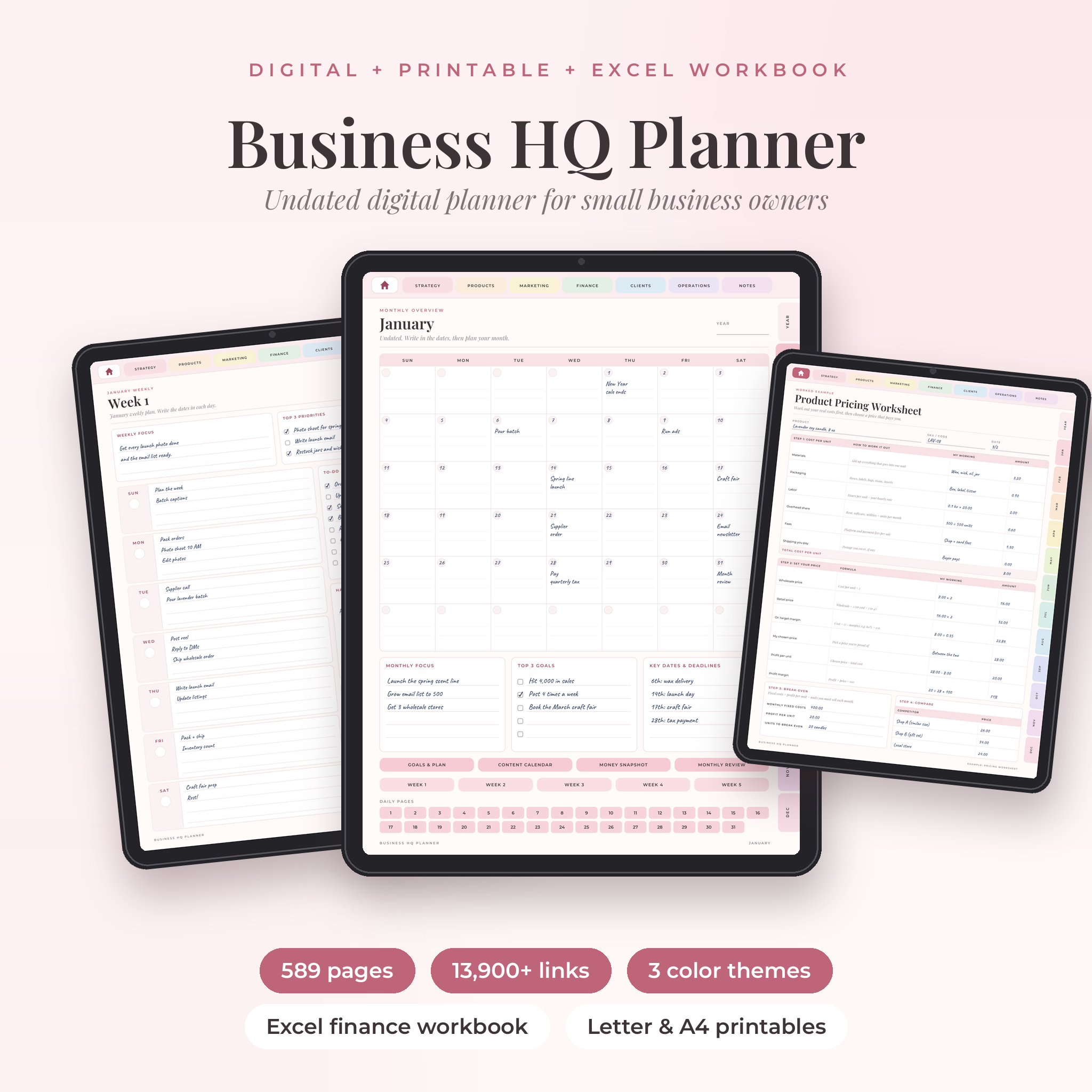 Business HQ Undated Small Business Planner for GoodNotes | Excel Finance Tracker & Printables
Table of Contents (Toggle)
- What should you look for in a digital business planner?
- How do the three planners compare?
- Which digital business planner suits which owner?
- How do you set up and use a digital business planner?
- What mistakes should you avoid when choosing a digital business planner?
- What affects the price of a digital business planner?
- Which digital business planner should you pick today?
- Common questions
What should you look for in a digital business planner?
A good digital business planner covers the whole business, not only your diary. Look for linked navigation, a start date that suits you, a finance tool that does the sums, guided prompts and a format that fits your device. Each of these separates a planner you open daily from one you abandon in week three.
Hyperlinked navigation
Hyperlinked navigation means every tab, index and button jumps straight to the right page. In a file with hundreds of pages, this is the difference between a planner and a very long PDF. Both Business HQ planners are fully hyperlinked, and Business Launch Planner has tabbed navigation across its 59 pages.
An undated layout
An undated planner has no fixed calendar, so you fill in the dates yourself and begin whenever you like. That helps if you are buying in the middle of a quarter, or if you may skip weeks around busy seasons without leaving blank, wasted pages. Both Business HQ planners are undated. The Business HQ Digital Business Planner also lets you choose a Monday or Sunday week start.
Built-in finance tools
A finance tracker is a spreadsheet that adds up your income and costs so you can see profit without doing it by hand. The Business HQ Digital Business Planner includes an Excel tracker that works out profit, margin and goal progress in your own currency. The Undated Small Business Planner has a workbook that totals income and profit and suggests prices. Business Launch Planner goes deepest on money, with 380+ automatic calculations.
Guided prompts and templates
Guided prompts are short questions printed on the page, such as who your customer is or what a product costs to make. They matter most when you are not sure what a business plan should contain. The Undated Small Business Planner puts prompts on every page, and the larger Business HQ planner offers 3 templates across products, marketing, money and clients.
Device and file format
Cheque how you will actually fill the planner in. The two Business HQ planners are made for GoodNotes and iPad, which suits handwriting with a stylus. Business Launch Planner is a fillable PDF, so you can type straight into it, print it or use it on a tablet. For the Excel files, you need a spreadsheet app that opens Excel workbooks.
Printable backups
Printable packs are versions of the pages you can print on a home printer. All three include US Letter and A4 sizes, which matters in the UK, where A4 is the standard paper. That gives you a paper fallback for meetings, or for days when you would rather not look at a screen.
How do the three planners compare?
The three planners differ mainly in size, purpose and finance depth. The two Business HQ planners are year-round operating systems for a running business, while Business Launch Planner is a short, number-focused kit for the planning stage.
| Product | Type | Size | Finance tool | Best for |
|---|---|---|---|---|
| Business HQ Undated Small Business Planner for GoodNotes | Excel Finance Tracker & Printables | Undated tablet planner | 589 hyperlinked pages, three colour themes | Excel workbook totals income and profit and suggests prices | Owners who want a simpler planner with daily pages |
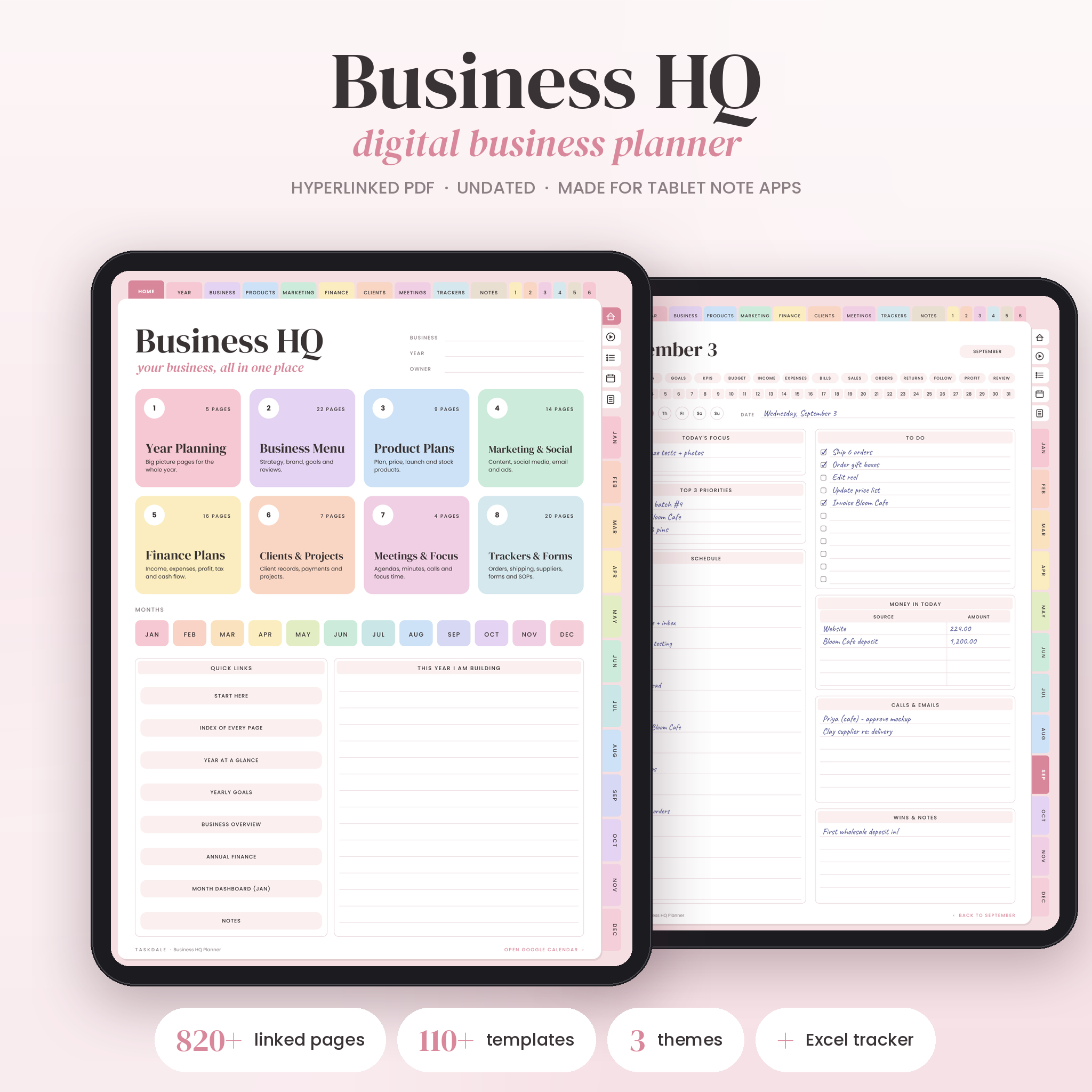 Business HQ Digital Business Planner | Undated Hyperlinked Small Business Planner for GoodNotes & iPad, Excel Finance Tracker, Content & Social Media Planner, Printable | Undated tablet planner | 824 hyperlinked pages, 3 templates, Blush, Sage or Sand | Excel tracker for profit, margin and goal progress in your currency | Established owners who also plan content and social media |
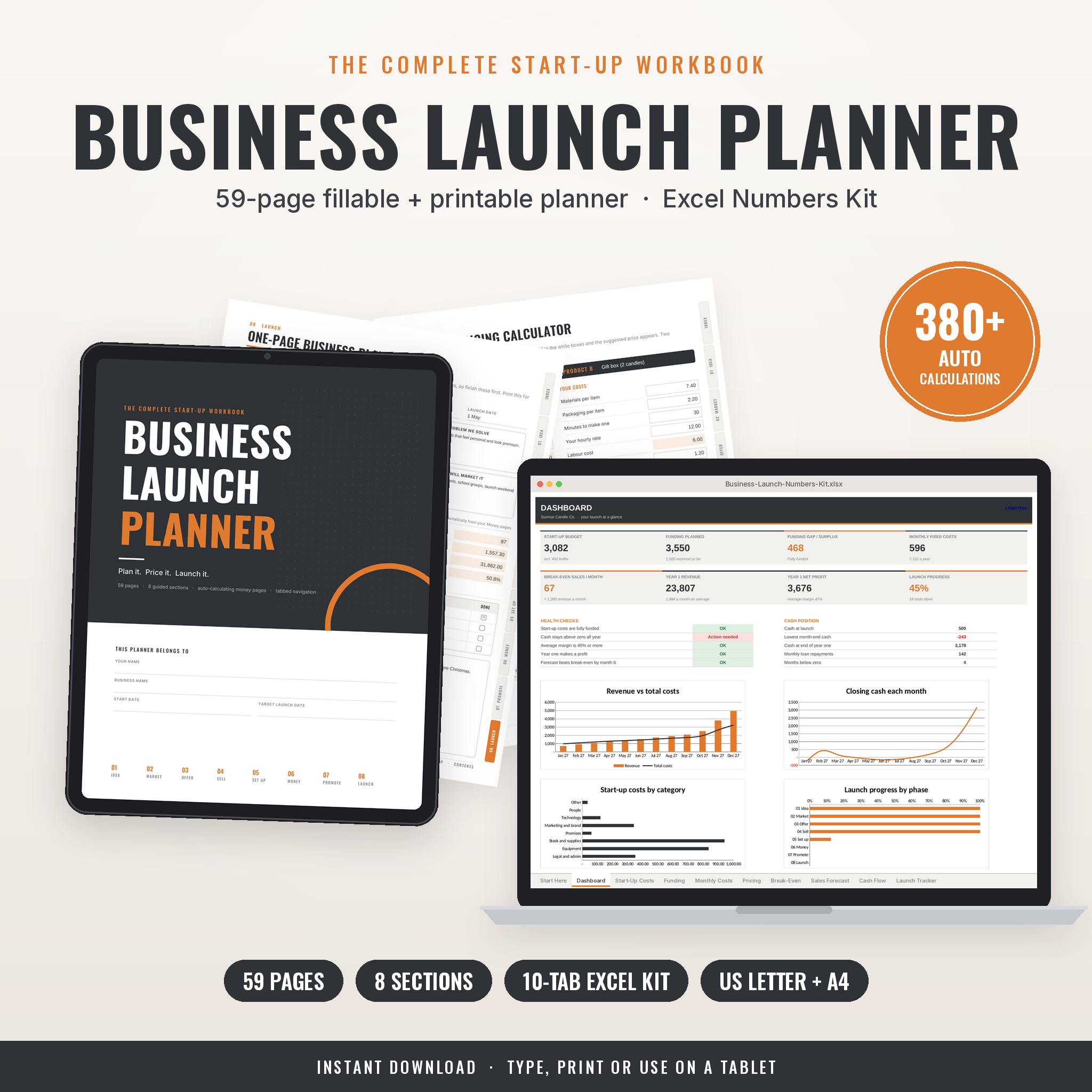 Business Launch Planner: Fillable Startup Planner PDF + Excel Startup Costs, Pricing & Cash Flow Calculator (US Letter & A4) | Fillable PDF plus Excel kit | 59 pages, 10-tab Excel Numbers Kit | 380+ automatic calculations for costs, pricing, break-even, sales and cash flow | People planning a launch |
You can browse all 3 options in the grid on this page, and the table above covers the main differences between the planners we compare here.
Which digital business planner suits which owner?
Each planner suits a different owner. The right match depends on whether your business already trades, how much structure you want, and whether your biggest worry is organisation or money.
Business HQ Digital Business Planner suits the owner who wants one file for everything. With 824 pages, a content and social media planner, and a choice of three colour themes, it rewards someone who plans weekly and likes working by hand on a tablet. It is also the better pick if you sell products or services to repeat clients and want to track them alongside marketing.
Business HQ Undated Small Business Planner for GoodNotes suits the owner who wants the same idea with fewer pages to wade through. At 589 pages it still has 366 undated daily pages plus weekly and monthly layouts, 53 digital stickers and 9 covers. If you are new to planner apps, the step-by-step user guide helps you settle in.
Business Launch Planner suits the person who has an idea but no figures yet. Its tabbed pages walk you through the plan, and the Excel kit handles start-up costs, pricing, break-even, sales and cash flow. It also helps an existing owner who wants to test a new product line before spending money.
How do you set up and use a digital business planner?
Setting up a digital business planner takes under an hour if you follow a fixed order. Start with the big picture, then move to the weekly pages you will use most.
- Download the files and read the user guide first. The Business Launch Planner comes with a 16-page guide, and both Business HQ planners include a step-by-step guide.
- Import the planner into GoodNotes, or open the fillable PDF, and choose your colour theme and week start where offered.
- Fill in the plan and pricing pages before anything else, so your daily pages reflect real goals.
- Open the Excel workbook and enter your current income and costs. Set aside ten minutes each week to update it.
- Use the monthly page to set three priorities, then break them into weekly and daily tasks.
- Review every month. Note what sold, what cost more than expected, and what to change.
What mistakes should you avoid when choosing a digital business planner?
The most common mistake is buying for page count rather than for how you work. A bigger planner is not better if you will never open half of it.
- Ignoring your device. The Business HQ planners are designed for GoodNotes and iPad. If you do not use a tablet, a fillable PDF or the printables may suit you better.
- Skipping the finance tool. A planner without costs and profit leaves you guessing. Cheque how each Excel file works before you commit.
- Choosing a launch tool for a running business, or the reverse. Business Launch Planner is for planning, while the Business HQ planners are for running.
- Not using the printables. US Letter and A4 packs give you a paper backup, so use them for meetings or quiet days.
- Filling everything in on day one. Start with the sections you need this month, and add others as the business grows.
What affects the price of a digital business planner?
The price of a digital business planner depends mainly on how much is in the bundle. The cheaper option is usually the one with fewer pages, fewer templates or less finance depth. Costs rise with extras such as bonus stickers, colour themes, social media planners and spreadsheet kits.
Here, the larger Business HQ Digital Business Planner includes the most templates, a 468-piece sticker book and 12 covers, so it generally costs more up front than the Undated Small Business Planner. Business Launch Planner is priced for its calculators rather than its page count. Since these are instant downloads, there is no postage to add. Cheque the live product cards for the current price of each.
Which digital business planner should you pick today?
Pick by your stage. If your business is already trading and you want planning, marketing and money in one place, choose Business HQ Digital Business Planner. If you want the same approach with a lighter feel, choose the Business HQ Undated Small Business Planner for GoodNotes. If you are still working out costs, pricing and break-even, start with Business Launch Planner.
A simple test: if your biggest question is "what should I do this week?", go for a Business HQ planner. If it is "can this business make money?", go for Business Launch Planner first.
Common questions
Do I need GoodNotes to use these planners?
The two Business HQ planners are made for GoodNotes, and the larger one also mentions iPad. Business Launch Planner is a fillable PDF you can type into, print or use on a tablet. Cheque each listing for the app details before buying.
Can I use a digital planner before my business has any customers?
Yes. Business Launch Planner is made for that stage, with sections for costs, pricing and break-even. The Business HQ planners also include plan and pricing pages, so you can begin there and add client pages once sales start.
Will the finance trackers work in pounds?
The Business HQ Digital Business Planner states that its Excel Finance Tracker works in your own currency, so you can use pounds. The other listings do not specify currency settings, so cheque the product page or user guide.
Can I print the pages instead of using a tablet?
Yes. All three include US Letter and A4 printable versions. A4 is the usual UK paper size, so use that pack if you print at home.
Is a digital planner better than a paper one?
It depends on how you work. A digital planner is searchable, has linked pages and includes calculating spreadsheets, so it suits owners who want their figures and plans together. A paper planner suits people who dislike screens, which is why the printables are useful.