Best Estimated Tax Tracker for Self-Employed Income
The best estimated tax tracker is the one built around how you actually earn. A good tracker turns your real income and expenses into a set-aside figure for each IRS due date. Slatefile suits mixed income, Settlewise suits truckers, CalmCounts suits therapists, and ProfitPetal suits general small businesses.
Estimated tax can feel like a bill that arrives with no warning, because nobody withholds it for you. A tracker takes the guesswork out of it, and we'll walk through how to choose one calmly.
Key facts at a glance
- An estimated tax tracker is a spreadsheet that works out how much of your profit to set aside before each quarterly IRS payment.
- IRS estimated payments are usually due on 15 April, 15 June, 15 September and 15 January, moving to the next business day when a date falls on a weekend or holiday.
- Slatefile is the only one of these four with a safe harbour calculator, which compares your payments against the IRS minimum-payment rules.
- Settlewise and CalmCounts are built for one trade each (trucking and therapy), while Slatefile and ProfitPetal suit most self-employed people.
- CalmCounts works in Google Sheets only and ProfitPetal in Excel only, while Slatefile and Settlewise support both.
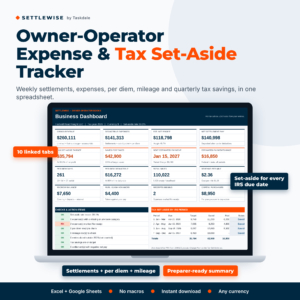 Owner Operator Expense Tracker Spreadsheet & Tax Set-Aside Calculator | Settlewise Trucking Settlement, Per Diem & Mileage Log (Excel & Google Sheets)
 Tax Prep Checklist Spreadsheet | Slatefile Tax Organizer for Excel & Google Sheets with Dashboard, Document Tracker, Mileage Log & Estimated Tax Planner
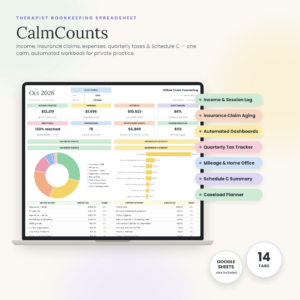
Table of Contents Toggle
- What should you look for in an estimated tax tracker?
- How do the four estimated tax trackers compare?
- Which estimated tax tracker suits which person?
- How do you use an estimated tax tracker through the year?
- What mistakes should you avoid with an estimated tax tracker?
- What affects the price of an estimated tax tracker?
- How should you decide on your estimated tax tracker?
- Common questions
What should you look for in an estimated tax tracker?
A good estimated tax tracker does four jobs: it records income and expenses, calculates profit, turns that profit into a set-aside target, and shows you the due dates. Anything beyond that should earn its place for your kind of work. Here are the factors that separate one tracker from another.
A set-aside figure based on real profit
A tax set-aside is the amount you move out of your spending money towards the next estimated payment. The figure should come from your logged income minus your logged expenses, not from a flat percentage typed in by hand.
All four spreadsheets here calculate it from your records. Settlewise and ProfitPetal both describe a set-aside target or planner, and CalmCounts and Slatefile build it into a quarterly or estimated tax planner.
IRS due dates and safe harbour
Safe harbour is the IRS rule that protects you from an underpayment penalty if you have paid enough during the year. In broad terms, that means a set share of this year's tax or a set share of last year's, with a higher share for higher earners. Check the current figures in IRS Form 1040-ES and Publication 505, or ask your tax preparer.
Slatefile includes a safe-harbour calculator. CalmCounts and Settlewise show the IRS due dates, which stops you missing a payment even if you aren't testing against safe harbour.
Expense categories that match Schedule C
Schedule C is the IRS form where sole traders and single-member LLC owners report business profit or loss. A tracker with Schedule C-style categories means your year-end totals drop straight into the right boxes.
Settlewise, CalmCounts and ProfitPetal all use Schedule C-style lines. Slatefile uses income and deduction logs and gives you a printable summary for your preparer.
Mileage and trade-specific logs
Mileage is the deduction people most often under-record, because it needs a note every trip. Slatefile applies the IRS mileage rates automatically. Settlewise, CalmCounts and ProfitPetal each include a mileage log too.
Trade-specific features matter as well. Settlewise logs per diem days and keeps fuel advances and escrow out of expenses. CalmCounts tracks insurance claim ageing by payer.
The software you already use
Spreadsheet compatibility is a practical filter. If you work on a phone or share files with a bookkeeper, Google Sheets is easier. If you prefer desktop Excel, ProfitPetal is made for it. Slatefile and Settlewise cover both, which makes them the flexible choice.
A clear hand-off at year end
A year-end summary is a single sheet your tax preparer can read without opening six tabs. Settlewise has one, CalmCounts produces a Schedule C summary, ProfitPetal has a printable Profit & Loss, and Slatefile has a printable summary.
How do the four estimated tax trackers compare?
The four trackers differ mainly in software, trade focus and how much tax planning they include. This table sets out what the supplied product details say, without ranking them on anything they don't state.
| Product | Works in | Best suited to | Estimated tax feature | Other standout features |
|---|---|---|---|---|
| Owner Operator Expense Tracker Spreadsheet & Tax Set-Aside Calculator | Settlewise Trucking Settlement, Per Diem & Mileage Log (Excel & Google Sheets) | Excel and Google Sheets | Owner operator truckers | Net profit and set-aside target for each IRS due date | Settlement log, per diem day log, 16-tile dashboard, Word user guide |
| Tax Prep Checklist Spreadsheet | Slatefile Tax Organiser for Excel & Google Sheets with Dashboard, Document Tracker, Mileage Log & Estimated Tax Planner | Excel and Google Sheets | Anyone with several income documents | Estimated tax planner with safe-harbour calculator | 200-row document checklist, overdue alerts, automatic IRS mileage rates |
| Therapist Bookkeeping Spreadsheet | CalmCounts Private Practise Finance Tracker with Insurance Claims, Quarterly Tax Tracker, Mileage & Schedule C | Google Sheets | Google Sheets | Private practise therapists | Quarterly tax planning with IRS due dates | 14 connected tabs, claim ageing by payer, home office method comparison, 12-page guide |
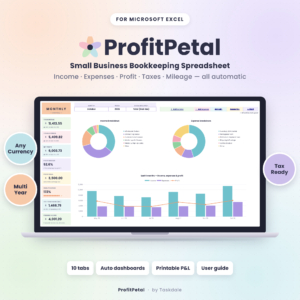 Small Business Bookkeeping Spreadsheet for Excel – Income & Expense Tracker, Profit and Loss, Tax Planner & Mileage Log | ProfitPetal | Excel | General small businesses | Estimated-tax set-aside planner in a Tax Centre | 10 connected tabs, budget vs. actual, sales tax/VAT summary, printable Profit & Loss |
Which estimated tax tracker suits which person?
Each tracker suits a different working life, and picking the one built for yours saves hours of adapting. These are the matches, based on what each product says it does.
Settlewise suits owner operator truckers. Truckers get settlements, not invoices, and fuel advances and escrow aren't real expenses. Settlewise keeps those out of your expense totals, so your profit and set-aside figures aren't understated or overstated. The per diem day log is the other reason to choose it.
Slatefile suits people juggling paperwork. If your tax stress comes from chasing W-2s, 1099s and receipts, the 200-row document checklist and overdue alerts address that directly. The estimated tax planner and safe-harbour calculator sit alongside it, so one file covers both organising and paying.
CalmCounts suits private practise therapists. Insurance payments, claim ageing and client balances are specific to practise finances. If you work in Google Sheets and want quarterly tax planning in the same place, it is the closest fit here. It is also described as beginner friendly.
ProfitPetal suits general small business owners using Excel. If you sell products or services and need profit goals, budget vs. actual and a sales tax/VAT summary, it covers more than tax alone. The set-aside planner sits inside a wider bookkeeping set.
How do you use an estimated tax tracker through the year?
You use an estimated tax tracker by recording income and expenses as they happen, checking the set-aside figure before each due date, and paying from money you've already moved aside. A steady routine matters more than which file you pick.
- Set up the year. Enter your business details, choose your financial year and note last year's tax total if the tracker asks for it.
- Log income weekly. For truckers, that means each settlement. For others, each payment received.
- Log expenses and mileage as you go. Receipts and trip notes are easy at the time and painful three months later.
- Check the set-aside figure monthly. Move that amount into a separate savings account so it isn't spent by accident.
- Review before each due date. Compare the tracker's target with what you've set aside, then make the payment through the IRS channels you normally use.
- Send the year-end summary to your preparer. Print or share the summary sheet and keep the file as your record.
Back up the file regularly. For Google Sheets, make a dated copy each quarter. For Excel, save a separate copy after each payment.
What mistakes should you avoid with an estimated tax tracker?
The commonest mistake is treating the tracker's output as a final tax bill instead of a planning figure. A spreadsheet can only work with what you enter, and your preparer should confirm the rest.
- Logging gross receipts as profit. Always enter expenses too, or the set-aside will be too high.
- Counting non-expenses as expenses. Truckers in particular should keep fuel advances and escrow out of costs, as Settlewise does.
- Skipping mileage until December. Reconstructing a year of trips from memory leads to missed deductions or numbers you can't defend.
- Relying on last year's figure alone. If your income has risen sharply, a prior-year safe harbour may not match what you owe now, so check both with your preparer.
- Spending the set-aside. The money should sit in a separate account until the payment date.
- Overwriting formulas. Type only into the input cells, and keep an untouched copy of the template.
What affects the price of an estimated tax tracker?
The price of an estimated tax tracker depends mainly on how many tabs and automatic calculations it includes, and on how specialised it is for one trade. We haven't quoted figures because the live product cards show the current price.
Broader sets, such as CalmCounts with 14 connected tabs, usually cost more than a narrower tool. Trade-specific files also tend to carry a premium over general ones, because the categories and logs are tailored.
Included support counts too. A written user guide, a sample file or a year-end summary saves you time, and you should weigh that against a cheaper option that leaves you to work things out. A one-off spreadsheet also avoids a subscription, though you should check whether the file is reusable across years. Slatefile, ProfitPetal and CalmCounts each say they are.
How should you decide on your estimated tax tracker?
Choose by trade first, software second and extras last. That order keeps you from paying for features you won't use.
- Trucker with settlements and per diem: Settlewise.
- Therapist in private practise using Google Sheets: CalmCounts.
- Anyone who needs safe harbour checks and document tracking: Slatefile.
- General small business on Excel: ProfitPetal.
You can browse all 4 options in the product grid. Before you buy, check that the software matches your setup, and ask your tax preparer whether they want a particular summary format.
Common questions
How much should I set aside for estimated tax?
There is no single percentage that fits everyone. The right amount depends on your profit, other income, filing status and deductions. A tracker calculates a target from your records, and your tax preparer can confirm whether it suits your situation.
Do these spreadsheets file or pay my taxes for me?
No. They are planning and record-keeping tools. They show what to set aside and when payments fall due, but you still make the IRS payments and file your return yourself or through a preparer.
Can I use these spreadsheets outside the United States?
All four describe themselves as working in any currency. However, the due dates, Schedule C lines and mileage rates follow IRS rules, so they are designed for US taxpayers. Check the product description for any local tax features.
Do I need Excel, or will Google Sheets work?
It depends on the file. CalmCounts is Google Sheets only and ProfitPetal is Excel only. Settlewise and Slatefile both list Excel and Google Sheets, so they suit mixed setups or anyone who might switch.
Will I get instructions with the spreadsheet?
Yes. Settlewise includes a Word user guide, Slatefile a sample file and step-by-step guide, CalmCounts a 12-page user guide, and ProfitPetal an illustrated user guide. If you're new to spreadsheets, start with the guide before entering real figures.