If you keep backyard chickens, you have probably asked yourself the same questions every keeper asks sooner or later: How many eggs am I really getting? Which hens are laying? And what does a dozen of my own eggs actually cost? A simple chicken egg tracker spreadsheet answers all three, and it takes less than a minute a day. In this guide you will learn what to track, how to calculate laying rate and cost per dozen, and how to set up a tracker that keeps working all year. You can also grab our free template and start logging today.
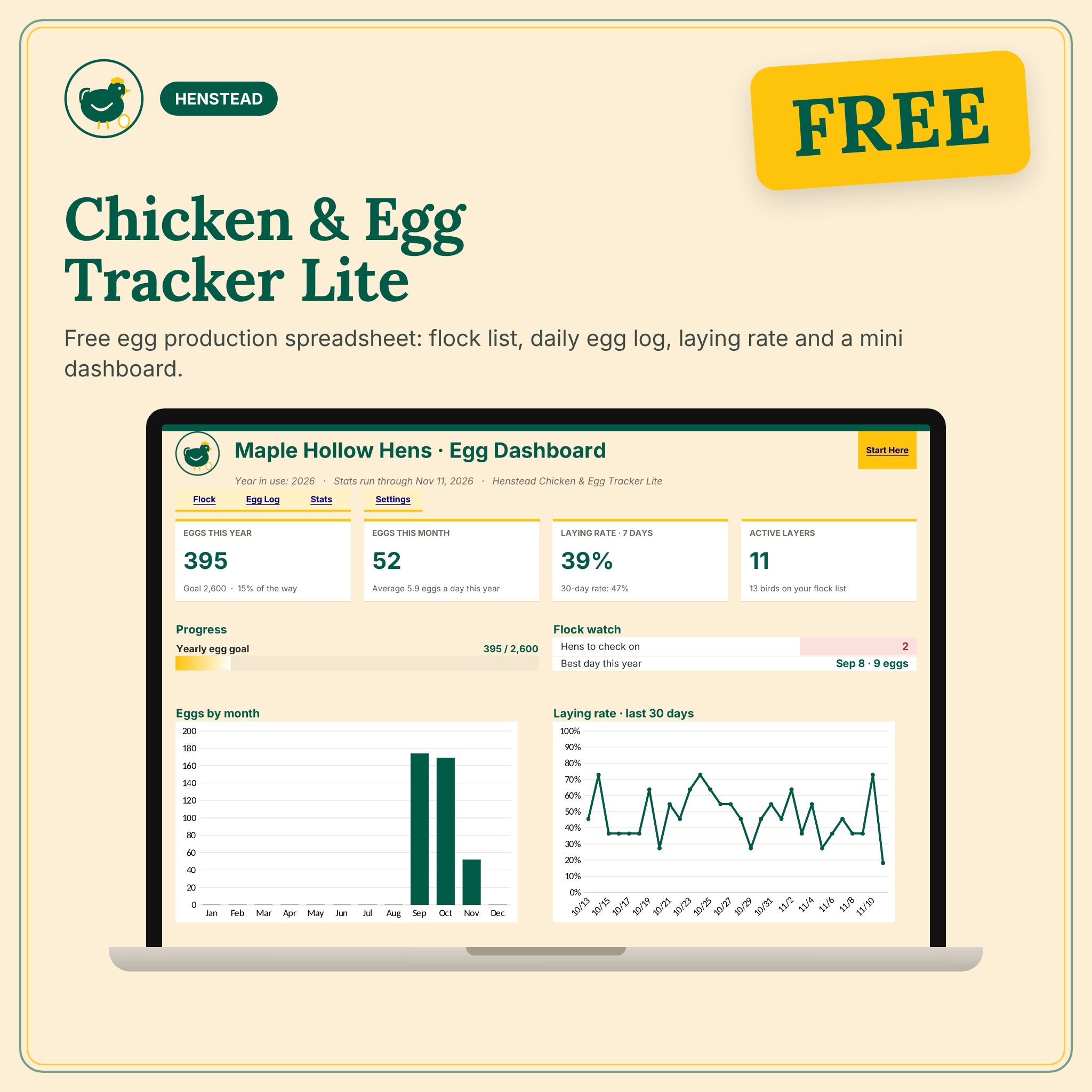
Download the free Henstead Chicken & Egg Tracker Lite. It includes a flock list, a daily egg log, automatic laying rate and a mini dashboard with charts. Downloading needs a free Taskdale account, and free downloads are limited to 3 per day.
Why track eggs at all?
It is easy to feel like your hens are laying “pretty well” until the weather turns or a hen quietly stops. A written record turns that feeling into facts you can act on:
- Spot problems early. A hen that suddenly stops laying may be molting, broody, stressed or unwell. If you log eggs by hen, you notice within days instead of weeks.
- Understand your seasons. Most flocks lay less as days get shorter and pick up again in spring. A year of records shows you your own flock’s pattern, so a slow November doesn’t send you into a panic.
- Know your true costs. Feed, bedding, oyster shell and cartons add up. Tracking them against eggs collected tells you your real cost per dozen and whether selling extras covers the feed bill.
- Price eggs with confidence. Once you know your cost per dozen, you can set a fair price for neighbors and coworkers instead of guessing.
What to put in a chicken egg tracker
You don’t need dozens of columns. A good egg production tracker has a few connected parts.
1. A flock list
One row per bird: name, breed, egg color, hatch date and current status (laying, broody, molting, pullet, retired). Adding a leg band color or a short description helps everyone in the family tell the hens apart. The hatch date lets the spreadsheet work out each bird’s age automatically.
2. A daily egg log
This is the heart of the tracker. Each entry needs a date, a number of eggs and, if you can tell, which hen laid them. If you can’t tell who laid what, log the day’s total for the whole flock. Both approaches work. Optional extras that pay off later: cracked or dirty eggs, egg size and the weather.
3. Automatic stats
Your log becomes useful when it summarizes itself: eggs this week, this month and this year, average eggs per day, and laying rate. Per-hen totals show your best layers and flag the ones that have gone quiet.
4. Costs and sales (optional but eye-opening)
Log feed and supplies as you buy them, and log any eggs you sell. With those two lists, the spreadsheet can show cost per dozen, income and profit.
How to calculate laying rate
Laying rate is the share of your hens that laid on an average day. The formula is simple:
Laying rate = eggs collected ÷ (number of days × number of laying hens)
Example: your 8 hens laid 42 eggs in 7 days. That’s 42 ÷ (7 × 8) = 42 ÷ 56 = 75%. In other words, on an average day, three out of four hens laid an egg.
Two tips make the number more meaningful. First, only count hens of laying age; pullets and retired hens drag the rate down without telling you anything useful. Second, compare like with like: this October against last October tells you far more than October against May.
How to calculate cost per dozen
Add up what you spent over a period and divide by the dozens of usable eggs you collected in that same period.
Cost per dozen = costs ÷ (usable eggs ÷ 12)
Example: you spent $60 on feed, bedding and oyster shell in a month and collected 180 usable eggs (15 dozen). Your cost is $60 ÷ 15 = $4.00 per dozen.
Here’s the part most simple spreadsheets get wrong: keep one-time setup costs separate. A new coop, an incubator or a heated waterer base can make a single month look terrible. Track two numbers instead: a running “feed & care” cost per dozen for everyday costs, and an “all-in” figure that includes everything. The running number is the one to use when you set your egg price.
Setting up your tracker step by step
- Set your basics. Choose your currency, a yearly egg goal and, if you sell eggs, a default price per dozen.
- List your birds. Add every hen with her breed and hatch date. Mark pullets and retired birds so they don’t count toward laying rate.
- Pick a logging habit. Collect and log at the same time each day. Keep the spreadsheet open on your phone or tablet, or jot numbers on a card by the coop and enter them weekly.
- Log costs as you buy. Snap a photo of receipts and enter them on the weekend. Include the bag weight for feed so you can see how much feed each dozen eggs takes.
- Review monthly. Look at the month’s laying rate, your top hens, and your cost per dozen. Write a one-line note about anything unusual: a molt, a heat wave, a new hen.
Free vs full: which tracker do you need?
The free Lite version covers the essentials for egg production. The full Henstead Chicken & Egg Tracker adds money, health, chores and hatching for keepers who want the whole picture.
| Feature | Free Lite | Full Henstead |
|---|---|---|
| Flock records | 15 hens | 60 hens |
| Daily egg log | 400 rows | 5,000 rows |
| Laying rate, monthly and per-hen stats | Yes | Yes, plus weekly stats |
| Dashboard | 4 tiles, 3 charts | 8 tiles, 5 charts, flock watch alerts |
| Feed & supply expenses, cost per dozen | No | Yes |
| Egg sales, customers and profit | No | Yes |
| Health log with egg withdrawal countdown | No | Yes |
| Coop chores checklist with due dates | No | Yes |
| 21-day hatch calendar with lockdown date | No | Yes |
| Seasonal notes, this year vs last year | No | Yes |
| User guide | No | Yes |

Extras that make a big difference
A health log with withdrawal dates
When a hen needs treatment, some products come with an egg withdrawal period: a number of days when eggs shouldn’t be eaten. Writing down the start date and the number of days from the label or your vet, then counting down, takes the guesswork out of when eggs are OK again. The full Henstead tracker does this countdown for you and flags it on the dashboard.
A hatch calendar
Chicken eggs typically take about 21 days to hatch, with “lockdown” (no more turning, higher humidity) for the last few days. A hatch calendar turns your set date into candling days, a lockdown date and a hatch date, and gives you a daily to-do list. Full Henstead includes a countdown for up to 30 batches and works for ducks, geese, turkeys, guinea fowl and quail too, using editable incubation days.
A chore checklist
Waterers, bedding, dust baths, fence checks: these jobs are easy to forget until something goes wrong. A list with “last done” dates and automatic “next due” dates keeps the coop clean without a sticky note on the fridge.
Tips for keeping your tracker going
- Keep it fast. If logging takes more than a minute, you’ll stop. Use dropdowns for hen names and log by whole flock on busy days.
- Don’t delete hens. Mark them retired or rehomed so their history stays in your yearly totals.
- Write notes. A short note like “started molting” or “added a light” explains changes you’ll wonder about next year.
- Compare years. Your second year of data is where the real insight starts.
Frequently asked questions
Is the free chicken egg tracker really free?
Yes. The Henstead Chicken & Egg Tracker Lite is free to download with a free Taskdale account. Free downloads are limited to 3 per day.
Does it work in Google Sheets?
Henstead is an Excel-format .xlsx file for Microsoft Excel, tested in LibreOffice Calc, and built with standard functions that also work when you open it in Google Sheets.
Do I have to log eggs for each hen?
No. You can log the whole flock’s daily total and still get totals, averages and laying rate. Logging by hen adds per-hen stats and top-hen rankings.
Can I upgrade later without losing my data?
Yes. The full version uses the same flock and egg log layout, so you can copy your hens and egg rows straight across.
What does the full version add?
The full Henstead Chicken & Egg Tracker adds feed and supply expenses, cost per dozen, egg sales and customers, profit, a health log with egg withdrawal countdown, coop chores, a 21-day hatch calendar, seasonal notes, a bigger dashboard and a user guide.
Start tracking today
The best time to start an egg log is today, even if it’s the middle of winter. Download the free Henstead Chicken & Egg Tracker Lite to begin, and when you’re ready to track costs, sales, health and hatching in one place, get the full Henstead Chicken & Egg Tracker.