A free college application tracker spreadsheet is the simplest way to stop deadlines, essays and scholarship forms from slipping through the cracks during senior year. Below you can download Scholarloop Lite, a free Excel college application tracker with a built-in scholarship tracker, and learn how to set up a system that actually holds up from August to May.
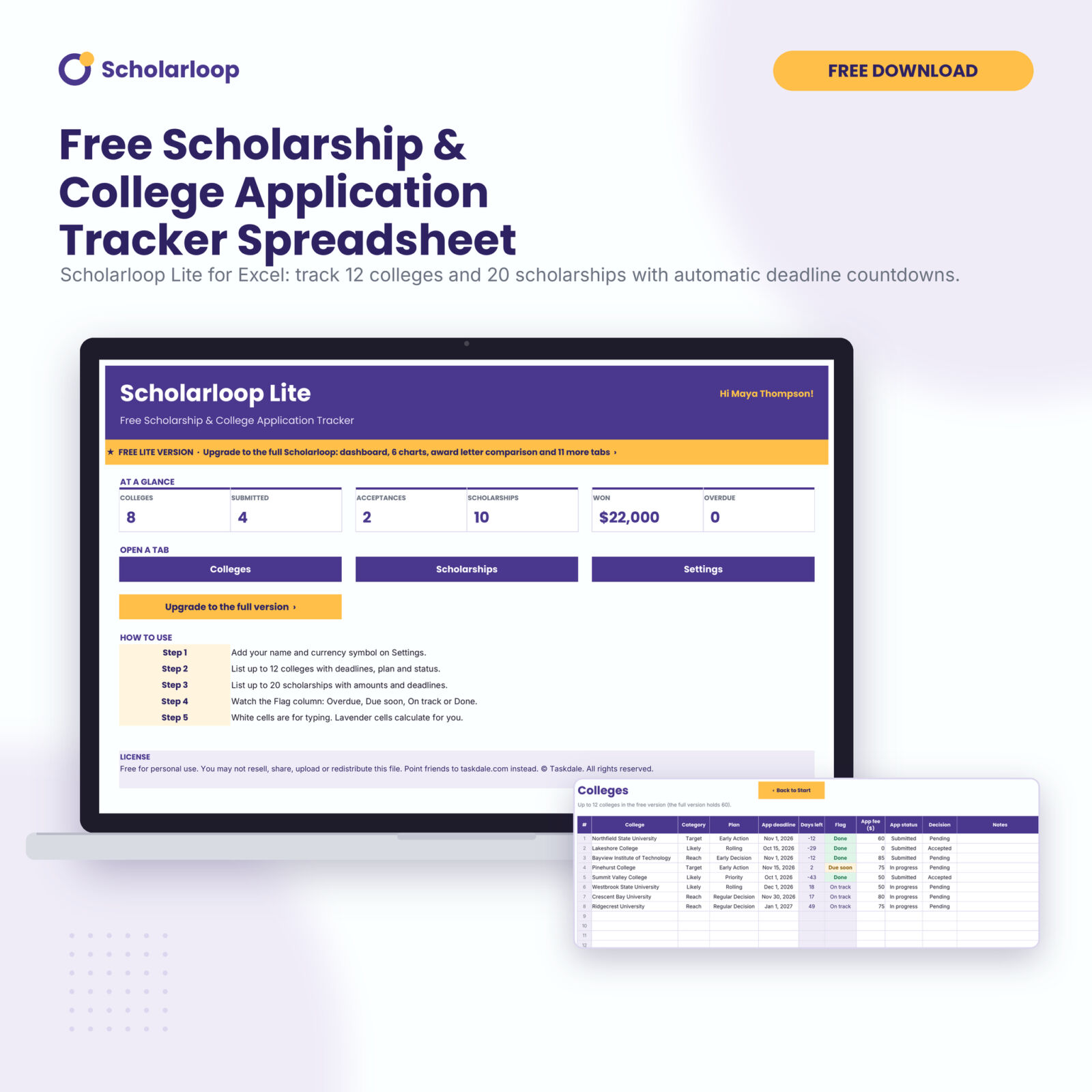
Scholarloop Lite: Free College Application & Scholarship Tracker Spreadsheet
Track 12 colleges and 20 scholarships with automatic deadline countdowns in Excel. Enter your email to get the free download.
Want everything unlocked?
College Application Tracker & Scholarship Tracker Spreadsheet | Scholarloop Excel Template
The free file is a sample. The full version has every page, tab and feature, plus the user guide.
See the full versionThe download is free. You enter your email address to get it, and free downloads are limited to 3 per day.
What is in the free college application tracker?
Scholarloop Lite is a cut-down version of our full tracker, but it is not a toy. It gives you the core of a working system:
- Colleges tab: up to 12 colleges with category (reach, target or likely), application plan, deadline, fee, status and decision.
- Scholarships tab: up to 20 scholarships with amount, deadline, status and the amount you won.
- Automatic countdowns: days left and an Overdue, Due soon, On track or Done flag on every row.
- At a glance summary: colleges, submissions, acceptances, scholarships, money won and overdue items on the Start tab.
- Settings: your name, your currency symbol and how many days count as “due soon”.
It opens in Microsoft Excel, and it also works in Google Sheets and LibreOffice. There are no macros.
Why a spreadsheet beats sticky notes and portal emails
Most students apply to somewhere between 6 and 12 colleges. Each one has its own deadline, its own supplements, its own fee and often its own financial aid date. Add a dozen scholarships and two or three recommendation letters and you are juggling more than 50 dates by October.
College portals only show their own requirements. Your inbox mixes reminders with marketing. A single spreadsheet is the one place where everything sits side by side, sorted by what is due next. It also gives parents and counselors a clear view without a long conversation.
How to set up your college application spreadsheet
1. Build a balanced college list
Start with every college you are seriously considering. Tag each one as a reach, target or likely school. A healthy list usually has a few of each. If every school is a reach, add more targets and likely options before you spend money on fees.
2. Record the plan and the real deadline
Early Decision, Early Action, Restrictive Early Action, Regular Decision and Rolling admission all have different dates and rules. Early Decision is binding. Write the exact deadline from each college’s own website, not from a list online, because dates change from year to year.
3. Track status, not just dates
A date tells you when something is due. A status tells you where you are. Move each college from Not started to In progress to Submitted. When a school is marked Submitted, the tracker stops warning you about it.
4. Add scholarships as soon as you find them
Scholarship deadlines are spread across the whole year, and many local awards close in winter and spring. Enter each one with its amount and deadline the day you find it. Small local awards often have far fewer applicants than national ones, so they are worth tracking even if the amount looks modest.
5. Set your due-soon window
The default is 14 days. During the busy fall months, many students switch it to 21 days so essays and letters get a longer runway.
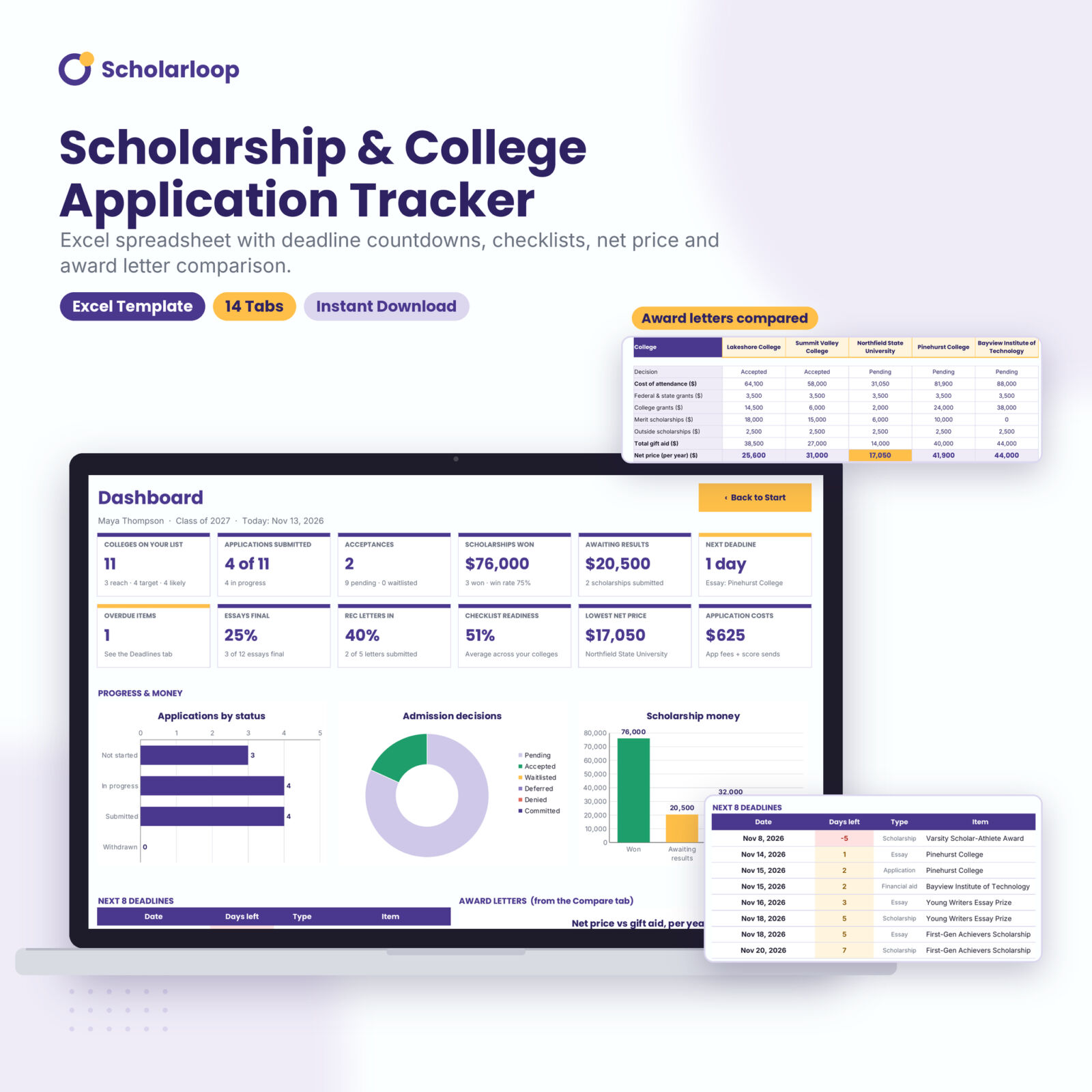
Scholarloop Scholarship & College Application Tracker
Fourteen connected tabs that turn the whole senior year into one dashboard.
- Every deadline from every tab merged and sorted
- Requirements checklist with a readiness score per college
- 200-row scholarship tracker with money won and win rate
What to track for each college
A basic tracker covers the name, deadline and status. A complete one also covers:
- Application platform: Common App, Coalition, the UC application or a school portal.
- Requirements: personal essay, supplements, transcript, test scores, teacher and counselor letters, fees, interviews and portfolios.
- Financial aid dates: FAFSA and CSS Profile priority dates, which are often earlier than you expect.
- Test policy: required, optional or test-blind, and whether the college superscores.
- Costs and aid: cost of attendance, grants, scholarships and loans once the award letter arrives.
The free Lite version covers the first essentials. The full Scholarloop adds a checklist for every college, an essay tracker with word-limit checks, a recommender tracker and a cost and aid sheet.
How to compare financial aid award letters
When acceptances arrive, the sticker price can be misleading. A private college with a high cost of attendance can end up cheaper than a public one after grants. Use this simple order:
- Add up the cost of attendance: tuition and fees, housing, food, books, travel and personal costs.
- Add up gift aid only: grants and scholarships you do not repay.
- Net price = cost of attendance minus gift aid. This is what the year really costs.
- Look at loans separately. Loans and work-study help you pay the net price, but they do not lower it.
- Multiply by four. Costs usually rise each year, so a 4-year estimate is more honest than a single year.
The full Scholarloop does all of this for you, then lines up five award letters side by side and highlights the lowest net price.
A simple senior-year timeline to fill in
Dates vary by college, so always check each school’s site, but most seniors follow a rhythm like this:
- Summer: draft your college list, brainstorm your personal statement and start a scholarship list.
- August and September: open your application accounts, ask teachers for letters and finish a first essay draft.
- October: submit the FAFSA when it opens, complete the CSS Profile where required and send test scores to early schools.
- November: submit Early Decision and Early Action applications and confirm each portal shows your materials as received.
- December and January: finish Regular Decision applications, send thank-you notes and ask your counselor for mid-year reports.
- February to April: keep applying to scholarships, log each decision and enter award letters as they arrive.
- May 1: the common national deadline to commit and pay a deposit. Decline other offers so waitlisted students can move up.
Put each of these dates into your tracker as soon as you know them. The full Scholarloop includes this as a 38-task roadmap with a progress bar.
Tips to keep your tracker useful all year
- Update it once a week on the same day. Ten minutes on a Sunday saves a panic on a Thursday night.
- Ask for recommendation letters at least four weeks before the first deadline, and note the date you asked.
- Mark scholarships you decide not to pursue as Skipped instead of deleting them.
- Keep the file in OneDrive or Google Drive so you can open it from school.
- Never store portal passwords in the spreadsheet.
See what each college will really cost
The full Scholarloop turns award letters into a net price you can compare.
- Net price, out-of-pocket gap and 4-year cost
- Five award letters side by side, best value highlighted
- Estimated monthly loan payment from your borrowing
Frequently asked questions
Is the college application tracker really free?
Yes. Scholarloop Lite is free for personal use. You enter your email address to download it, and free downloads are limited to 3 per day.
Does it work in Google Sheets?
Yes. Upload the file to Google Drive and open it with Google Sheets. It also works in Microsoft Excel and LibreOffice.
Can I track scholarships in the same file?
Yes. The free version has a Scholarships tab with room for 20 scholarships, deadline countdowns and a money-won total.
What does the full version add?
The full Scholarloop tracker adds a dashboard with 12 KPI cards and 6 charts, a merged deadline list, a requirements checklist for every college, essay and recommender trackers, SAT and ACT superscores, a net price calculator, award letter comparison, a weighted fit score, a senior-year roadmap and an illustrated user guide. It holds 60 colleges and 200 scholarships.
Can a counselor use it with students?
The free version is for personal use. The full version’s license lets a counselor or small business use it in its own work with its own students.