A free weight loss tracker spreadsheet is one of the simplest ways to lose weight with a plan instead of guesswork. It tells you how many calories to eat, records every weigh-in and shows whether the trend is really heading down. Apps do some of this, but many lock features behind a subscription and hide the math. A spreadsheet keeps your data private, works offline in Excel and shows you exactly how each number is worked out.
This guide shows you how to work out your calorie target, what to track each week, how to read your progress without being fooled by daily scale swings, and how to set up our free template, Sveltra Lite, in about two minutes.
Download the free weight loss tracker spreadsheet
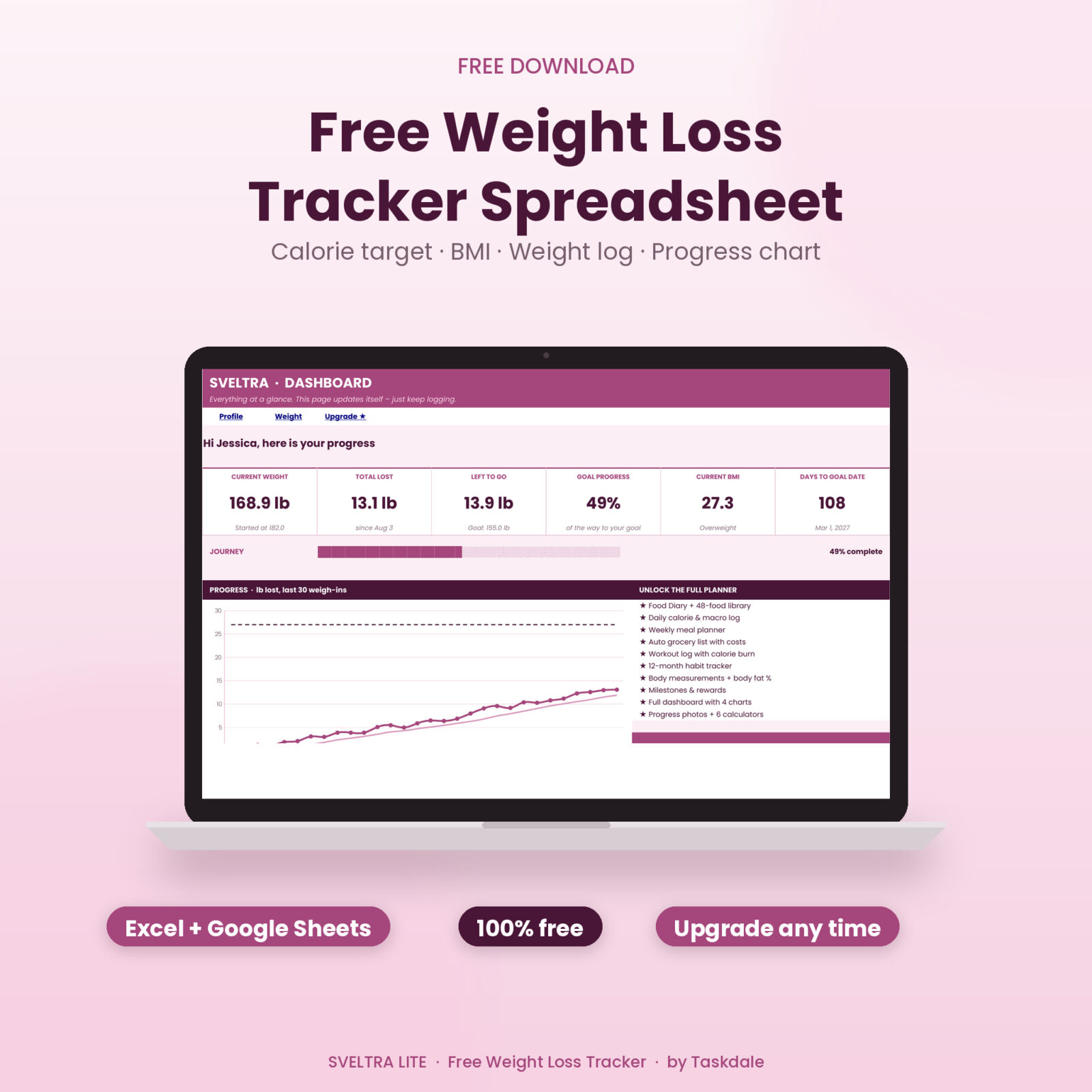
Sveltra Lite works in Microsoft Excel and Google Sheets. It calculates your daily calorie target, macros, BMI and goal pace, logs up to 30 weigh-ins and draws a progress chart on a mini dashboard. Enter your email in the box below and the file downloads straight away.

Sveltra Lite – Free Weight Loss Tracker Spreadsheet (Excel & Google Sheets)
Sveltra Lite is a free weight loss tracker spreadsheet for Excel and Google Sheets. It works out your daily calorie target, macros, BMI and goal pace, and includes a 30-entry weight log with a progress chart and mini dashboard. Enter your email and the download starts right away.

Want everything unlocked?
The free file is a sample. The full version has every page, tab and feature, plus the user guide.
See the full versionWant the complete system? Sveltra Full adds a food diary with a 48-food library, a daily calorie log, a meal planner that writes your grocery list, a workout log with calorie burn, a 12-month habit tracker, body measurements with body fat %, rewards and a full dashboard with four charts.
What a good weight loss tracker should track
You don’t need to track everything to lose weight, but a few numbers make a big difference:
- Body weight, measured the same way each time (morning, after the bathroom, before eating).
- A trend average of your last several weigh-ins, so one salty dinner doesn’t ruin your week.
- Daily calories compared with a target that matches your goal date.
- Protein, which keeps you full and helps protect muscle while you lose fat.
- Activity: workouts, active minutes and steps.
- Body measurements such as waist and hips, which often keep shrinking when the scale stalls.
- Habits like water, sleep and logging meals, which drive everything else.
Sveltra Lite covers the first two and gives you your calorie and protein targets. Sveltra Full tracks all seven in one file.
How to calculate your daily calorie target
Most weight loss calculators use the same three steps, and the free spreadsheet does all of them for you.
1. Resting burn (BMR)
Your basal metabolic rate is the energy your body uses at rest. The Mifflin-St Jeor equation is the most widely used formula:
- Women: 10 × weight (kg) + 6.25 × height (cm) − 5 × age − 161
- Men: 10 × weight (kg) + 6.25 × height (cm) − 5 × age + 5
2. Maintenance calories (TDEE)
Multiply BMR by an activity factor: 1.2 for mostly sitting, 1.375 for 1–3 workouts a week, 1.55 for 3–5, 1.725 for 6–7 and 1.9 for a physical job plus training. The result is roughly what you burn in a day.
3. Your deficit
A pound of body fat holds roughly 3,500 calories (about 7,700 per kilogram). To lose 1 lb a week, eat about 500 calories a day below maintenance. Sveltra works out the deficit from your goal weight and goal date, then never lets the target drop below a safe minimum of 1,200 calories for women or 1,500 for men.
A worked example
A 34-year-old woman who is 5′6″ and 182 lb, lightly active, wants to reach 155 lb in 30 weeks:
- BMR: 10 × 82.6 + 6.25 × 167.6 − 5 × 34 − 161 ≈ 1,542 kcal
- Maintenance: 1,542 × 1.375 ≈ 2,120 kcal
- Pace needed: 27 lb ÷ 30 weeks = 0.9 lb a week → 450 kcal a day
- Daily target: 2,120 − 450 ≈ 1,670 kcal
With a balanced 30/40/30 split, that’s about 125 g protein, 167 g carbs and 56 g fat. Type your own numbers into Sveltra Lite and these figures appear instantly, along with a pace check that warns you if your goal date is too aggressive.

How to set up the free template
- Open the file. Double-click it in Excel, or upload it to Google Drive and choose File › Save as Google Sheets.
- Fill in the Profile tab. Choose pounds or kilograms, then enter your age, sex, height, activity level, start date, start weight, goal weight and goal date. Only type in the white boxes; the pink cells calculate.
- Check your targets. Your daily calories, protein, carbs, fat, BMI and healthy weight range appear on the right.
- Log your weigh-ins. Add each one on the next row of the Weight Log. Change, total lost, BMI and a 7-entry trend fill in.
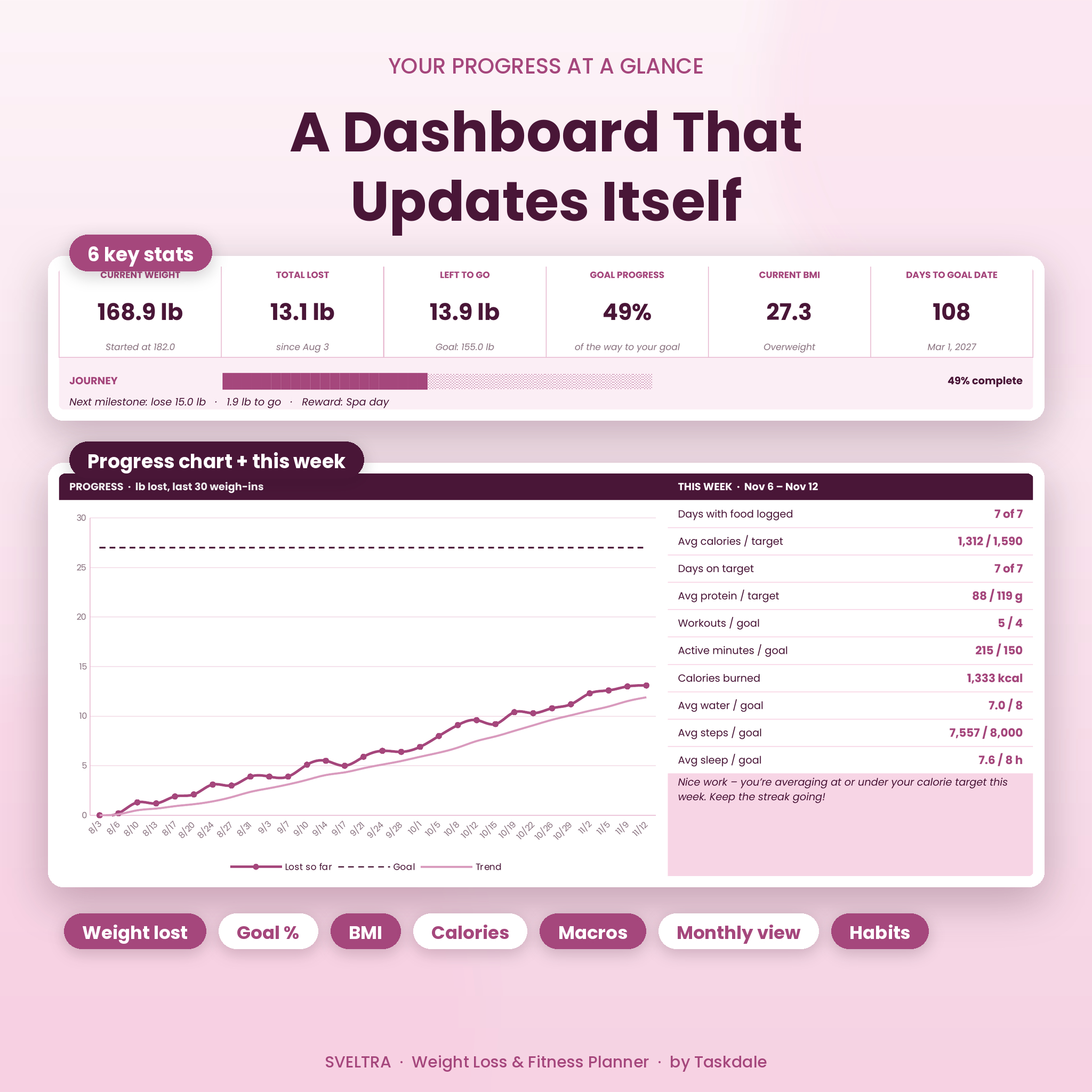
- Open the Dashboard. See current weight, total lost, weight left to go, goal progress, BMI, days to your goal date and your progress chart.
How to read your progress (and not panic)
Daily weight can jump 2–4 lb because of water, salt, carbs, hormones and digestion. That’s why the spreadsheet calculates a trend from your last seven entries. Judge progress by the trend line and by your weekly average change, not by any single morning.
- Trend falling at your planned pace: keep going.
- Trend flat for 2–3 weeks: check portion sizes and weekend eating, or lower your target by 100–150 calories.
- Falling much faster than 1% of body weight a week: eat a little more so the pace is sustainable.
- Scale flat but clothes looser: measure your waist. Sveltra Full tracks nine body measurements and estimates body fat % with the US Navy tape method.
Free vs full: what you get
| Feature | Sveltra Lite (free) | Sveltra Full |
|---|---|---|
| Calorie target, macros, BMI, pace check | ✓ | ✓ |
| Weight log with trend | 30 entries | 365 entries |
| Dashboard | Mini + 1 chart | Full + 4 charts |
| Food diary with 48-food library | – | ✓ |
| Daily log: calories, exercise, water, steps, sleep, mood | – | ✓ |
| Weekly meal planner with costs | – | ✓ |
| Automatic grocery list | – | ✓ |
| Workout plan and log with calorie burn | – | ✓ |
| 12-month habit tracker | – | ✓ |
| Body measurements and body fat % | – | ✓ |
| Milestones, rewards and progress photos | – | ✓ |
| 6 calculators and Word user guide | – | ✓ |
Get Sveltra Full – the complete weight loss tracker spreadsheet › Your Lite numbers carry straight over: copy your profile and weigh-ins into the full version and keep going.
Tips for tracking weight loss in a spreadsheet
- Weigh in at least twice a week at the same time of day. More data gives a smoother trend.
- Log food as you eat, not at night. A food library with your usual meals makes it take seconds. (Sveltra Full includes one with 48 foods ready to go.)
- Plan tomorrow’s meals the evening before, and shop from a list. It’s the easiest way to stay on target.
- Aim for a steady 0.5–1% of body weight a week. Slower loss is easier to keep off.
- Set small milestones with rewards, like new workout gear at 10 lb down.
- Take waist measurements and progress photos every few weeks. They show changes the scale misses.
Frequently asked questions
Is the weight loss tracker spreadsheet really free?
Yes. Enter your email in the download box above and Sveltra Lite downloads right away. There’s nothing to pay and no trial.
Does it work in Google Sheets?
Yes. Upload the .xlsx file to Google Drive and choose File › Save as Google Sheets. The formulas, dropdowns and chart all work.
Can I use kilograms?
Yes. Choose Metric (kg / cm) on the Profile tab and every calculation switches over.
How accurate is the calorie calculator?
The Mifflin-St Jeor formula is a good estimate for most adults, but everyone is a little different. Follow your target for 2–3 weeks, then adjust by 100–150 calories if your trend isn’t moving at the pace you planned.
What does the full version add?
Food and calorie tracking with a ready-made food library, a daily log, a weekly meal planner, an automatic grocery list, a workout log with calorie burn, a 12-month habit tracker, body measurements with body fat %, milestones with rewards, progress photos, six calculators, a full dashboard and an illustrated user guide. See Sveltra Full.
Is this medical advice?
No. The spreadsheet gives general wellness estimates. Talk to a doctor or registered dietitian before big changes to your diet or exercise.
Start today
Download Sveltra Lite above, fill in your profile and log your first weigh-in. When you’re ready to track food, meals, workouts and habits in the same place, upgrade to Sveltra Full.