Sometimes you need a CV tonight. A friend has passed your name to a manager, an advert closes at midnight, or a recruiter has asked for “an up-to-date CV” by the morning. You do not want to install software or learn a new tool. You want a decent template open in your browser in the next two minutes.
Good news: that is entirely possible for free. This guide shows the free online options that let you start editing straight away, walks through finishing and sending a CV within an hour, and covers editing safely on a phone or shared computer. It also explains, honestly, where free templates run short and when a low-cost kit that still edits online is worth it.
It suits anyone in a hurry, anyone without Microsoft Office, and anyone who just prefers working in a browser.
Quick picks: low-cost kits that also edit online
| Product | Best for | Price | Link |
|---|---|---|---|
| Hollis Resume Kit | Opens cleanly in Google Docs, fonts included | $8.99 | View |
| Sloane Resume Kit | A modern one-pager plus a portal version | $4.49 | View |
| Marlowe Resume Kit | A full matching set with a writing playbook | $4.79 | View |
What “edit right away” really means
When people search for a free online CV template they can edit immediately, they usually mean three things. No software to install. No long sign-up or payment step before they can type. And a finished file they can download and send.
The most reliable way to get all three is to use an office app that runs in your browser. You will need an account, such as a Google account or a Microsoft account, but many people already have one through Gmail, Outlook or an Android phone. Once you are signed in, a template opens in seconds and saves as you type.
Some online CV builders also let you start editing without an account. The catch with a few of them comes at the end, when downloading a clean PDF may need a sign-up or a paid plan. That is a fair business model, but it is frustrating if you only discover it at 11pm. Read the terms before you invest an hour of typing.
Free option one: Google Docs templates
Google Docs is the quickest free route for most people. Go to Google Docs, sign in, and look at the template gallery at the top of the start screen. Open the full gallery and you will see a resume section with a handful of designs. Click one and it opens as your own copy, ready to type over.
The designs are simple and clean, which is a good thing. They use fonts Google Docs already has, so nothing shifts. The downside is choice: there are only a few, and because they are so easy to reach, recruiters see them often. A change of accent colour and a few heading tweaks help yours look less familiar.
When you are done, go to File, then Download, then PDF Document. Our step-by-step guide to making a resume in Google Docs covers the formatting controls in more detail, including tab stops for lining up dates.
Free option two: Word for the web
If you prefer Word, Microsoft offers a free browser version of Word with a Microsoft account. Sign in at the Microsoft Office website, open Word, and look for templates when you create a new document. Search for “resume” or “CV” to see the options.
Word for the web handles most CV templates well, though some features from the desktop version are simpler or missing. Templates built with lots of text boxes can behave oddly in the browser. If one looks broken, try another before you start typing. Download as PDF from the File menu when you are finished.
A nice bonus: files you make in Word for the web are saved to OneDrive, so you can open them later on any computer, including a desktop copy of Word if you get one.
Free option three: builders and design apps with free plans
There are many online CV builders and design apps with free plans. They tend to be friendly and visual, with drag-and-drop layouts and lots of designs. For a quick, attractive CV they can work well.
The things to check are practical. Can you download a PDF on the free plan, and is it free of watermarks? Is there a free trial that turns into a paid plan unless you cancel? Can you get your text out later if you leave? And for applications through online portals, does the design keep your text readable, or is it partly made of images and boxes that screening software struggles with? None of this is a reason to avoid builders. It is just worth knowing before you start.
From blank template to sent CV in an hour
Here is a realistic plan for when time is tight. It assumes you have an old CV or a LinkedIn profile to copy from.
Minutes 0 to 5. Open your chosen template and save it with your name in the file title. Minutes 5 to 15. Fill in your name, title line, phone, email and town, and paste in your work history as plain text, job lines and dates only. Minutes 15 to 35. Write three bullets for your latest role and two for the one before, each with an action and a result. This is where the time is best spent. Minutes 35 to 45. Add education and a short skills line, and delete any sections you do not need. Minutes 45 to 50. Write a three-sentence profile now that you know your best points. Minutes 50 to 60. Read it aloud, fix mistakes, download as PDF, open the PDF to check it, and send.
It will not be perfect. It will be clean, honest and on time, which beats a perfect CV that arrives tomorrow. There is a real sense of relief in hitting send at 10:58pm with something you are not embarrassed by.
Making a free template look like yours
Free templates are popular, so a few small changes help yours stand apart. Change the accent colour to one muted shade, such as navy, forest green or deep plum. Rename any odd headings to standard ones like “Work Experience” and “Education”. Delete placeholder sections you do not need rather than leaving them empty. Check every corner of the page, including footers, for leftover sample names and text.
Most of all, write specific bullets. Two CVs in the same template look completely different once one says “Answered customer queries” and the other says “Handled around 70 customer chats a day and kept complaints to a handful a month”. Readers remember the second one, not the template.
Where free online templates run short
For one quick application, a free template is often all you need. For a longer job search, a few gaps tend to appear.
Most free templates come in one length only. When you need a two-page version for a more senior role, you have to rebuild. There is rarely a matching cover letter or references page, so your application ends up in two or three different styles. And there is usually no plain single-column version for online portals, which matters when your CV goes through screening software. Our comparison of free vs paid resume templates goes into what the extra files actually do for you.
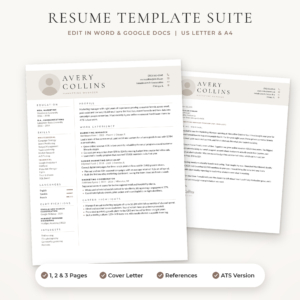
Sloane Resume Kit
Price: $4.49 | Best for: people outgrowing a single free template
Sloane fills those gaps in one set: a 1 page resume with and without a photo, a 2 page resume, a 3 page CV and a single-column ATS resume, plus a matching cover letter and references page. Every file comes in three colours and both US Letter and A4, and it is built on simple tables and real styles so sections move neatly as you edit. The bonus Resume Writing Toolkit has 96 action verbs. Upload the 1 page file to Google Docs and you can be typing within minutes of download.
Low-cost kits that still edit online straight away
A paid kit does not mean giving up the browser. Templates made for both Word and Google Docs can be uploaded to Google Drive and opened in Google Docs right after you download them. In Google Docs, go to File, then Open, then Upload, and choose the .docx file. It opens as an editable document in your browser, just like a gallery template.
The thing to watch is fonts. If a template uses a font Google Docs does not have, it will swap in another and the spacing may shift. Kits that use fonts Google Docs already includes, or that are tested in Google Docs, avoid that problem entirely.
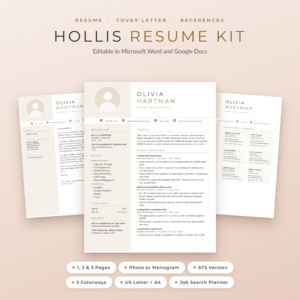
Hollis Resume Kit
Price: $8.99 | Best for: browser editing without font problems
Hollis uses Montserrat and Lato, which Google Docs already has, and the fonts are also built into each Word file, so the layout looks right in either place. You get resumes with a photo or monogram in 1, 2 and 3 pages, an ATS resume, cover letters, a references page and a thank-you letter, in Champagne, Rosewood and Graphite and both US Letter and A4. Each page sits on a simple invisible table, so it opens the same way in Word, Google Docs and LibreOffice. Upload the monogram 1 page file first for a quick start.
Editing on a phone or a shared computer
You can edit a CV on your phone with the Google Docs or Word app. It is fine for small fixes, such as updating a phone number or changing a date. For writing bullets and checking layout, a laptop or desktop screen is much easier, so save the big edits for when you have one.
On a shared or public computer, at a library or job centre, be careful with your details. Sign out of your Google or Microsoft account when you finish, close the browser, and do not save your CV to the computer’s own downloads folder if you can avoid it. If you must download it to attach to an email, delete it afterwards. Your CV holds your phone number, email and work history, and you do not want the next person to find it.
Saving, sharing and sending
Always send a PDF unless the employer asks for Word. A PDF looks the same on every screen and cannot be accidentally edited. Name it clearly, such as “Sam-Okoye-CV.pdf”, so it is easy to find in a busy inbox.
Be careful with share links. Sending someone a Google Docs or OneDrive link with editing rights means they can change your CV, and the link keeps working long after you have moved on. If a recruiter asks for a link rather than an attachment, set it to view only. Otherwise, a PDF attachment is simpler and safer.
Keep your editable version in one place as your master copy. Next time you need a CV, you will be updating, not starting again.
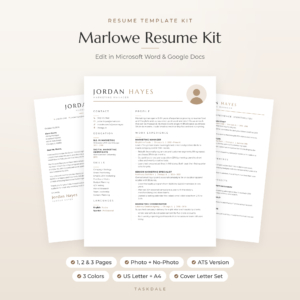
Marlowe Resume Kit
Price: $4.79 | Best for: a full set for a longer job search
Marlowe gives you 1, 2 and 3 page resumes with and without a photo, an ATS resume, and a matching cover letter, references page and thank-you letter, all in Sand, Sage and Slate and both US Letter and A4. Its bonus files include a 10-page Resume Playbook with a profile formula and before-and-after bullets, and a Job Search Tracker for Excel and Google Sheets. Upload the CV and cover letter to Google Drive together, so your whole set is ready to edit online.
Mistakes people make with free online templates
The first is leaving sample text behind, often in a footer or a sidebar. Search the document for the template’s placeholder name before you send. The second is sending an edit link instead of a PDF. The third is forgetting to check the downloaded PDF, which occasionally looks different from the browser version. The fourth is choosing a heavy, image-based design for an online portal application. And the fifth is spending fifty minutes on colours and five on the words. The words get you the interview.
Frequently asked questions
Where can I find a free CV template I can edit online?
Google Docs and Word for the web both have free resume templates you can open and edit in your browser with a free Google or Microsoft account. Online builders with free plans are another option, but check their download terms first.
Can I make a CV without downloading anything?
Yes. Google Docs and Word for the web run entirely in your browser. You only download the finished PDF at the end to attach to applications.
Is Google Docs good for making a CV?
Yes. It is free, saves automatically, works on any computer and exports clean PDFs. Use templates built with fonts Google Docs already has so the layout stays in place.
Can I open a Word CV template in Google Docs?
Yes. Upload the .docx file to Google Drive, or in Google Docs go to File, Open, Upload. Templates sold for both Word and Google Docs are tested to open properly.
How do I download my CV as a PDF from Google Docs?
Go to File, then Download, then PDF Document. Open the PDF afterwards to check that it looks right before you send it.
Is it safe to edit my CV on a library computer?
It can be, if you sign out of your account when finished, close the browser and delete any downloaded copy. Avoid saving your CV to the shared computer.
Your next step
Open Google Docs or Word for the web now, pick a resume template and follow the one-hour plan above. If you would rather start from a fuller set that still edits in your browser, upload the files from the Hollis Resume Kit to Google Drive and begin there.