A fundraising thermometer template is the simplest way to show your school, team or church how close you are to the goal. Below you can download a free one for Excel. It is more than a picture of a thermometer: you log each gift and the thermometer, the totals and the days-left counter update by themselves.


Raiseboard Lite: Free Fundraiser Tracker & Goal Thermometer (Excel)
Enter your email to get the free Excel fundraiser tracker with a live goal thermometer, four KPI cards and a 75-row donation log.

Want everything unlocked?
The free file is a sample. The full version has every page, tab and feature, plus the user guide.
See the full versionThe download needs an email address, and free downloads are limited to 3 per day. The file is called Raiseboard Lite and it opens in Microsoft Excel.
Why a fundraising thermometer works
People give more when they can see progress. A thermometer turns a big, abstract number into something you can watch move. Parents walk past it at pickup, players see it at practice, and the congregation sees it every Sunday. When it reaches the halfway mark, the second half often comes faster, because nobody wants to stop at 60 percent.
The catch is keeping it current. A paper thermometer colored in with a marker is only as accurate as the last volunteer who remembered to update it. A spreadsheet thermometer fixes that. It reads your actual donation log, so the red line is always right.
What is in the free template
- Tracker tab: type your fundraiser name, goal, currency symbol, start date and end date.
- Goal thermometer chart: fills in red as money is logged, with the rest of the goal shown in gray.
- Four KPI cards: raised so far, progress to goal, still to raise and days left.
- Donations tab: 75 rows for the date, donor, amount, payment method and whether a thank-you went out.
- Locked formulas: the calculated cells are protected, so a stray keystroke cannot break the totals.
How to set up your thermometer in five minutes
- Open the file in Excel and click Enable Editing if Excel asks.
- Go to the Tracker tab and type your fundraiser name and organization.
- Enter your currency symbol, your goal and your start and end dates.
- Go to the Donations tab and log each gift with a date and amount.
- Return to the Tracker tab. The thermometer, progress percentage and days left are already up to date.
Want a copy for the bulletin board? Print the Tracker tab. It is set up to fit on one landscape page.
How to pick a goal you can actually hit
A thermometer only motivates if the goal feels reachable. Start with what the money is for, not with a round number.
- Price the need. New playground equipment, a field trip bus, team uniforms, a mission trip. Get real quotes.
- Add your costs. Shirts for the fun run, printing, prizes and card fees all come out of what you raise. If the shirts cost $900, the goal needs to cover them.
- Do the per-person math. Divide the goal by the number of families or players taking part. If 250 families need to raise $15,000, that is $60 each. Ask whether that is realistic for your community.
- Check last year. If you raised $11,000 last year, a 15 to 25 percent stretch is ambitious but believable. Doubling it rarely is.
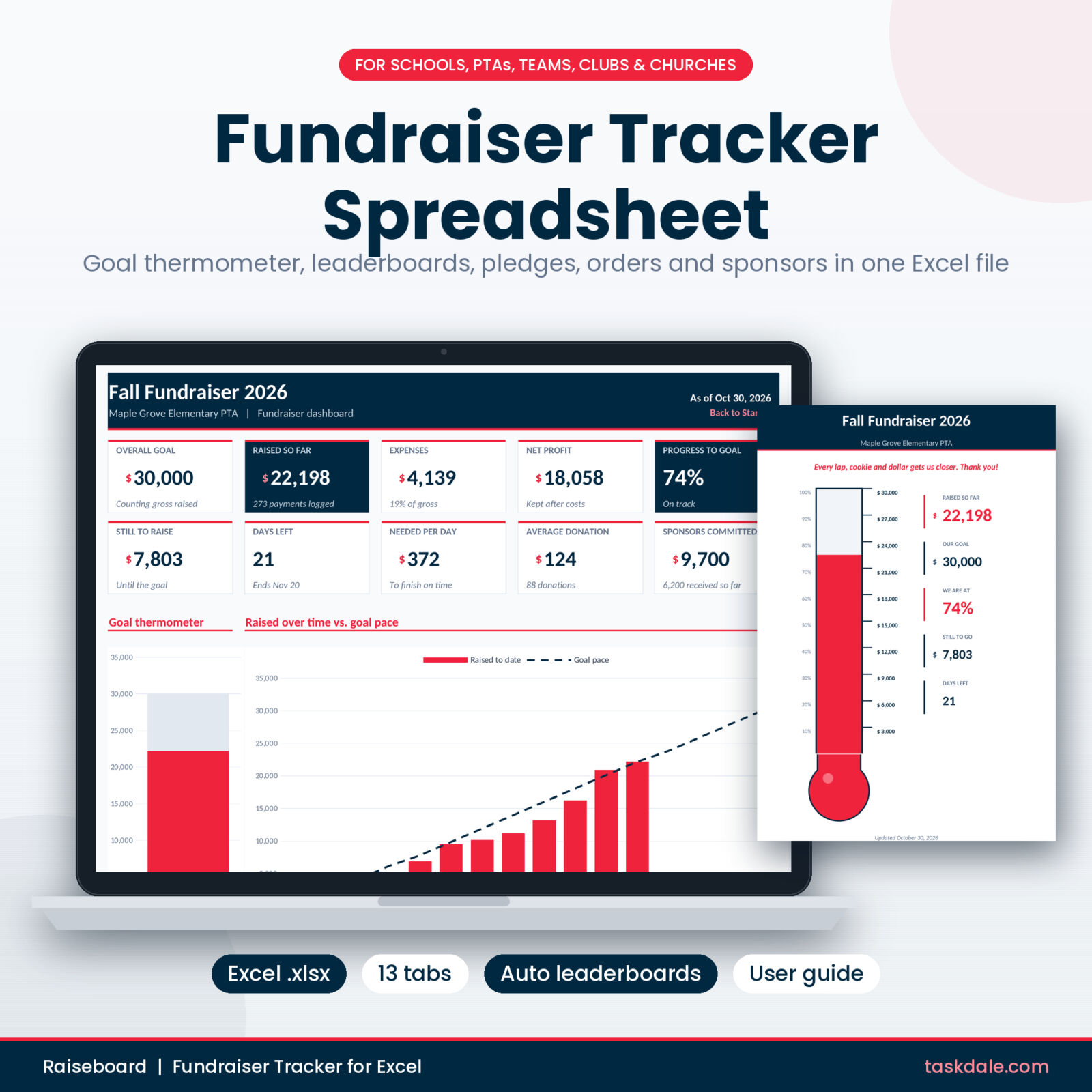
Track every dollar, every way it comes in, with a dashboard that does the math.
- Leaderboards for students, classes and teams
- Fun run pledges, product-sale orders and sponsors
- Thank-you queue and printable goal poster
Tips to fill the thermometer faster
- Update it on a schedule. Weekly updates in the newsletter keep momentum. Say what changed: “We moved from 40 to 55 percent this week.”
- Celebrate milestones. Announce 25, 50 and 75 percent. A small reward at each milestone, like a crazy hair day or a coach taking a pie to the face, gives people a reason to push.
- Run a friendly competition. Classes, grades or teams competing for a pizza party will raise more than one big anonymous pool.
- Ask about matching gifts. Many employers match employee donations. One email to parents can add hundreds of dollars.
- Thank people quickly. Donors who get a thank-you within a few days are far more likely to give again next year. Use the Thank-you sent column so nobody slips through.
- Show the money working. Share a photo of what the money is buying. A goal becomes real when people can picture it.
Where to show your thermometer
A thermometer nobody sees does not raise a cent. Put it where your supporters already look, and update every copy on the same day so the numbers match.
- School office or front hallway: a printed copy at eye level where families wait at pickup.
- Weekly newsletter or class app: paste a screenshot of the Tracker tab with one line about what changed.
- Social media: post the thermometer at each milestone, with a thank-you to the families who got you there.
- Team practice or game day: hold up the printout at the end of practice. Players love seeing their effort move the line.
- Church bulletin and lobby: a small chart in the bulletin and a large printout near the entrance.
One person should own the updates. When the bake sale cash box, the online giving page and the envelope from the front office all go to the same volunteer, the thermometer stays accurate and nobody gets counted twice.
When a single donation list is not enough
The free template is perfect for a simple giving drive. Many school and team fundraisers are not that simple. Money arrives in several shapes, and each one needs tracking in a different way.
Pledge drives
Fun runs and read-a-thons collect pledges like “$2 per lap” or “$25 flat”. You need to know each runner’s laps, work out what each supporter owes, and chase the ones who have not paid. A plain donation list cannot do that math.
Product sales
Cookie dough, popcorn, candles and wreaths come with order forms, quantities per item, a supplier order and unpaid balances. The real number to watch is profit after the supplier invoice, not gross sales.
Business sponsors
Sponsors move through stages: asked, following up, committed, paid. They also expect something back, like a logo on the banner or shirts. Losing track of a promised logo is how you lose a sponsor next year.
Expenses and net profit
A thermometer that shows gross money raised can hide a costly event. Tracking expenses by event shows you what each activity really earned, and which ones are worth the volunteer hours.
Free version vs. the full Raiseboard tracker
- Free (Raiseboard Lite): goal thermometer, 4 KPI cards and a 75-row donation log.
- Full version: a dashboard with 10 KPI cards and 4 charts, including a goal pace line that shows if you are on track.
- A roster for up to 300 students, players or members, with personal goals and progress bars.
- Live leaderboards for the top 10 sellers and up to 30 classes or teams.
- Separate tabs for 1,000 donations, 500 pledges, 500 product-sale orders and 100 sponsors.
- Expenses with volunteer reimbursements, and profit and loss for up to 20 events.
- A thank-you queue that lists everyone not yet thanked, and a printable thermometer poster.
- Labels you can rename in one cell: Student and Class, Player and Team, or Member and Ministry.
Get the complete Raiseboard tracker
Everything in the free version, plus the tabs PTA treasurers and coaches ask for.
- 10 KPI cards and 4 charts on one dashboard
- Event profit and loss with net per volunteer hour
- Room for 300 people and 1,000 donations
Frequently asked questions
Is the fundraising thermometer template really free?
Yes. Enter your email address in the download box above and the file is yours. Free downloads are limited to 3 per day.
Does it work in Google Sheets?
The template is built for Microsoft Excel. Google Sheets can import .xlsx files, but it is not supported, so some buttons and color rules may not work there.
Can I change the currency?
Yes. Type any currency symbol on the Tracker tab and the money labels follow.
Can I print the thermometer?
Yes. The Tracker tab prints on one landscape page with the thermometer chart and the KPI cards. The full version adds a separate letter-size poster designed for hallways and lobbies.
How many donations can I log?
The free version holds 75 donations. The full version holds 1,000 donations plus pledges, orders and sponsors on their own tabs.
What does the full version add?
Leaderboards, a roster, pledge and product-sale tracking, a sponsor pipeline, expenses, event profit and loss, a thank-you queue and a printable poster, all feeding one dashboard. See everything it includes on the Raiseboard Fundraiser Tracker page.