If you look after a parent, a partner or yourself through a long-term condition, you already know how fast the details pile up. There are pill bottles with different schedules, refill dates that sneak up on you, blood pressure readings scribbled on envelopes, and a doctor who asks “When did the dizziness start?” at exactly the moment you can’t remember. A free medication tracker spreadsheet is one of the simplest ways to get all of that out of your head and into one calm, organized place.
This guide explains what a good medication log should include, how to set one up step by step, and the habits that make it actually useful at appointments. You can also download our free template, Tendwell Lite, and start today.
Please note: a medication tracker is for record keeping only. It is not medical advice. Always follow your doctor’s and pharmacist’s instructions, and never start, stop or change a medicine based on a spreadsheet.
Why use a spreadsheet to track medications?
Paper charts work until they don’t. They get lost, they can’t add anything up for you, and two caregivers can’t update the same sheet from different houses. A spreadsheet fixes those problems while staying familiar and private:
- One source of truth. The medicine list, dose checklist and notes live in one file instead of five scraps of paper.
- Automatic math. The sheet can count missed doses, work out the share of doses taken and flag when a refill is due.
- Easy to share. Save the file in OneDrive or Google Drive and every family member sees the same, current record.
- Printable. Hand a clean, current medication list to a new doctor, a pharmacist or a paramedic.
- Private. The information stays in your own file. There is no account or app storing it for you.
What to include in a medication log
The best medication tracker templates capture enough detail to be useful without turning daily logging into a chore. Here is what we recommend.
1. The medication list
Write one row per medicine, vitamin or supplement, copied exactly from the pharmacy label:
- Medication name and strength (for example, Metformin 500 mg)
- Form (tablet, capsule, liquid, inhaler and so on) and the amount per dose
- Times of day: morning, midday, evening and bedtime
- Purpose or condition, so anyone helping understands why it is taken
- Prescriber, pharmacy and Rx number
- Start date and status (active, as needed, paused or stopped)
- Special instructions, such as “with food” or “on an empty stomach”
Keep stopped medicines on the list with a “Stopped” status rather than deleting them. Doctors often ask what was tried before.
2. A daily dose checklist
This is the heart of the tracker. Give each scheduled dose its own column (a twice-daily medicine gets two columns) and each day its own row. Then mark every dose with a simple code:
- Yes: taken on time
- Late: taken, but later than planned
- No: missed
- Skip: held on purpose because the doctor said so
With those four codes the spreadsheet can calculate an adherence percentage, the share of marked doses that were taken. Separating “Skip” from “No” matters: a dose the doctor told you to hold shouldn’t count as a mistake.
3. Refill dates
Running out over a holiday weekend is a common, avoidable problem. For each medicine, note the quantity per fill, the date it was filled and the refills left. Divide the quantity by the doses used per day to get the days of supply, and add that to the fill date to find the run-out date. A good template does this for you and flags anything running out within a week.
4. Health readings and notes
If the person you care for checks blood pressure, blood sugar, weight or temperature, a simple vitals log turns scattered numbers into a trend you can show the doctor. A short symptom journal (what happened, how bad on a 1 to 10 scale, what helped) is just as valuable.
How to set up your free medication tracker in 5 steps
- Gather every bottle. Include vitamins, supplements and over-the-counter medicines. Pharmacists often recommend a full “brown bag” review for exactly this reason.
- Fill in the medication list. Copy each label carefully. If something is unclear, ask the pharmacist rather than guessing.
- Set up the dose columns. Create one column per scheduled dose and label it with the medicine and time, for example “Lisinopril, Morning”.
- Pick a start date and mark daily. Choose a consistent moment, such as right after breakfast and at bedtime, to fill in the checklist.
- Review once a week. Look at the adherence percentage and any patterns. Are evening doses missed more often? Is one medicine regularly late?
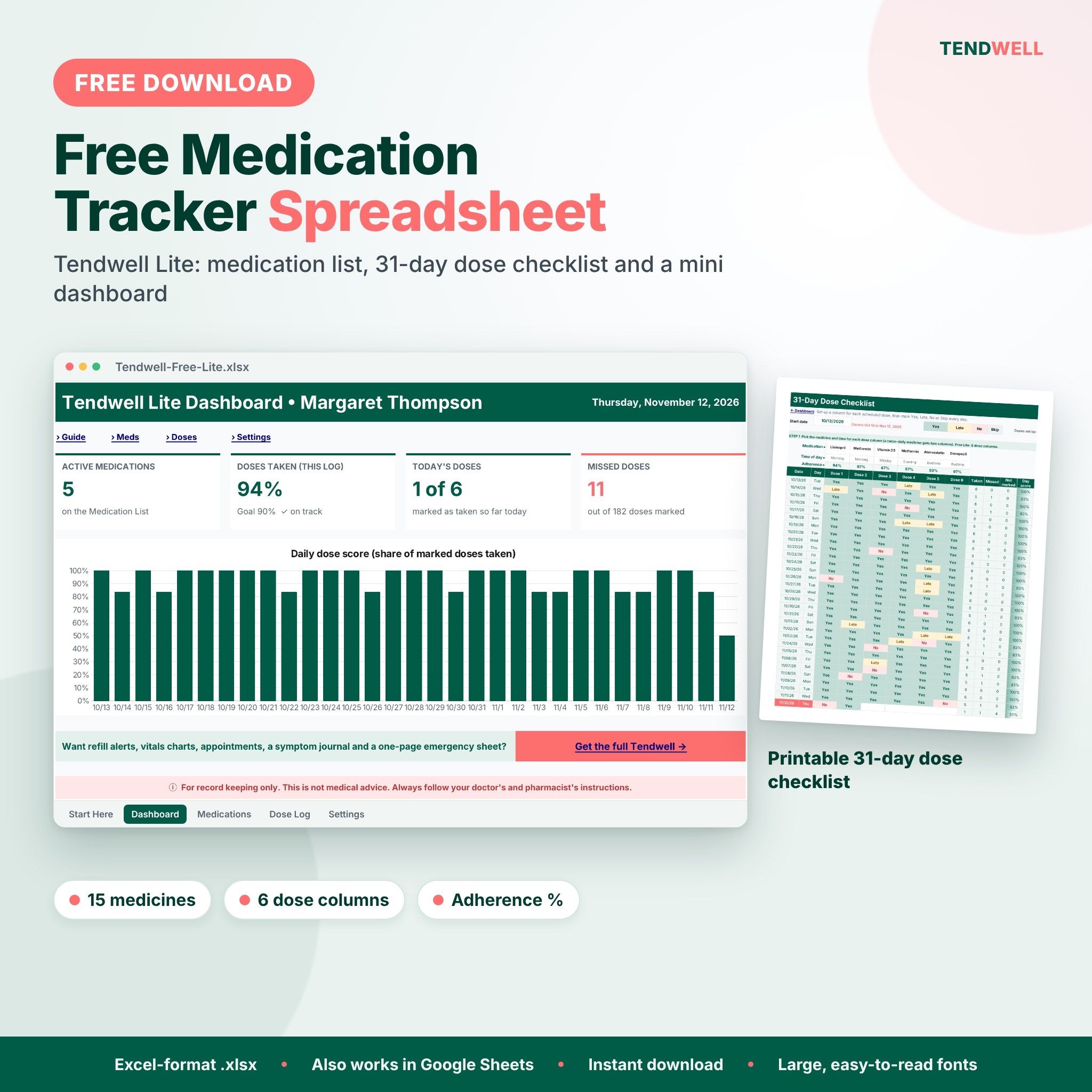
Our free Tendwell Lite medication tracker has all of this built in: a 15-medicine list, a 31-day dose checklist with six dose columns, dropdowns for Yes, Late, No and Skip, and a mini dashboard that shows adherence, today’s doses and missed doses with a daily chart. It uses large, easy-to-read fonts, and the formulas are locked so they can’t be broken by accident.
Tips to make your medication log actually useful
Use alarms for reminders and the sheet for records
A spreadsheet can’t buzz your phone. Use phone alarms or a pill organizer for reminders, and use the tracker as the record of what really happened.
Make it a shared job
If siblings or a home health aide help out, store the file in a shared cloud folder. Agree that whoever gives a dose marks it, so nobody double-doses or assumes someone else did it.
Bring it to every appointment
Print the medication list or open the file on a phone. Showing a month of adherence data and readings makes a 15-minute appointment much more productive. Write your questions down beforehand and the answers afterwards.
Keep an emergency sheet
Paramedics and ER staff need allergies, current medicines, conditions and emergency contacts fast. Keep a one-page summary on the fridge and a copy in the wallet or car, and update it whenever something changes.
Watch the trend, not one number
One high blood pressure reading after a stressful morning isn’t the story. Two weeks of readings are. Charts make trends easier to see and to discuss with the doctor.
Free vs Full: when to upgrade
The free version covers the daily essentials. If you manage many medicines, coordinate several caregivers, or want everything health-related in one file, the full Tendwell Medication Tracker & Caregiver Health Organizer adds a complete toolkit.
| Feature | Tendwell Lite (free) | Tendwell (full) |
|---|---|---|
| Medication list | 15 medicines | 50 medicines |
| Daily dose checklist | 6 doses x 31 days | 16 doses x 366 days |
| Dashboard | 4 tiles + 1 chart | 12 tiles + 4 charts |
| Refill tracker with days of supply and alerts | – | Yes |
| Doctor and appointments log | – | Yes |
| Vitals log (BP, glucose, weight, temperature, oxygen) with charts | – | Yes |
| Symptom journal with chart | – | Yes |
| One-page allergy and emergency info sheet | – | Yes |
| Care team contacts, insurance plans and costs log | – | Yes |
| Printable weekly checklist and user guide | – | Yes |
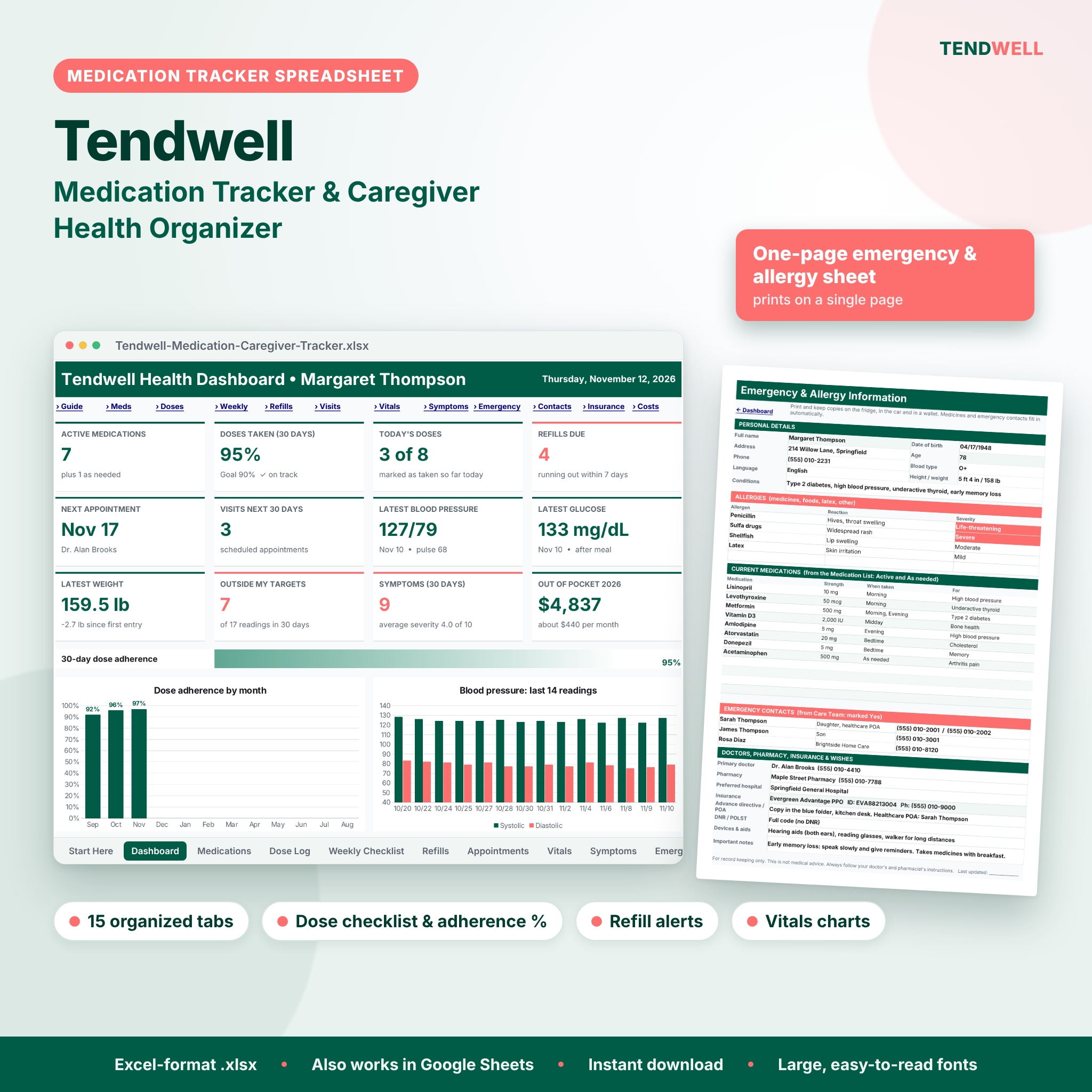
The full version also lets you set your own target ranges (from your doctor) so readings outside them are highlighted, choose your currency and units, and print a one-page emergency sheet that fills in medicines and contacts automatically. See everything included in the full Tendwell organizer.
How to download the free medication tracker
Download the free Tendwell Lite medication tracker. Downloading needs a free Taskdale account, and free downloads are limited to 3 per day. The file is an Excel-format .xlsx for Microsoft Excel; it was tested in LibreOffice Calc and built with standard functions that also work when you open it in Google Sheets.
Frequently asked questions
Is the medication tracker spreadsheet really free?
Yes. Tendwell Lite is free for personal use. You only need a free Taskdale account to download it.
Can I use it in Google Sheets?
Yes. Upload the .xlsx file to Google Drive and open it with Google Sheets. It is built with standard functions that work there.
Does the spreadsheet tell me how much medicine to take?
No. It is a record-keeping tool only and has no dosage calculator. Always follow the instructions from your doctor and pharmacist.
Can I track medicines for more than one person?
Use one copy of the file per person. That keeps each record clean, and each printed list shows only one person’s medicines.
What does adherence percentage mean?
It is the share of marked doses that were taken (on time or late). Doses marked “Skip” because a doctor said to hold them aren’t counted against you.
What do I get if I upgrade?
The full Tendwell organizer adds refill alerts, a full year of dose tracking, appointments, vitals with charts, a symptom journal, an emergency sheet, care team contacts, insurance and costs, plus a step-by-step user guide.
Start simple: download the free tracker, list every medicine this week, and mark doses for a month. You’ll have clearer answers at the next appointment and a lot less to remember.