Best Gender Neutral Baby Shower Games and Invitations
The best gender neutral baby shower is one where the invitation, games and colours work without announcing a sex, so every guest can join in. On this page that means a printable games bundle and two editable digital invitation websites. Between them they cover the invite, the RSVPs and the entertainment.
At a glance
- The Peachy Bump games bundle includes 18 games, 30 unique bingo cards, matching signs, prize tags and answer keys.
- The two invitation websites, Honey Bee and Honeywick Hollow, are shared as a single link, so guests need no app to open them.
- All three products are editable or fillable by you, and none needs a paid account or an app for guests.
- Printables come in US Letter and A4, so they suit home printers in the UK as well as the US.
- The invitation websites cover the invite and RSVPs. The games bundle covers the entertainment. Neither supplies physical decorations or food.
 Baby Shower Games Bundle Printable | 18 Gender Neutral Games, Bingo Cards & Answer Keys | Peachy Bump
Table of Contents
Toggle
- What makes a baby shower genuinely gender neutral?
- What should you look for in gender neutral baby shower products?
- How do the three options compare?
- Who does each option suit?
- How do you set up a digital baby shower?
- What mistakes should you avoid?
- What affects the price?
- Which one should you choose?
- Common questions
Planning a shower can feel like a lot of small decisions, from wording to games to who has replied. We'll take them one at a time, using the 3 options below as the working examples, so you can settle on a plan without second-guessing it.
What makes a baby shower genuinely gender neutral?
A gender neutral baby shower is one where nothing in the design, wording or activities depends on the baby's sex, whether it is unknown or simply private. The easiest test is whether a guest could tell the sex from the invitation, and the answer should be no.
In practise that means soft, shared colours instead of pink and blue. The games bundle uses a blush and mandarin design, and the Honey Bee template uses a honey bee theme with watercolour illustrations. The Honeywick Hollow site uses a teddy bear meadow. Each avoids the usual signals.
Neutral does not have to mean plain. Animals, woodland scenes and warm colours all carry a theme without taking sides, which is why these three suit the idea so well.
What should you look for in gender neutral baby shower products?
Look for neutral artwork, a delivery method your guests can manage, a simple way to collect replies, and an editing tool you can learn in an evening. Those four factors decide whether the planning feels easy or becomes another job.
Palette and artwork
Neutral artwork means colours and imagery that do not point to a sex. Check that the theme runs through every piece, not only the invitation. The Honey Bee template includes matching printables and 22 clip art PNGs, so the look can carry over to signs and cards. The games bundle comes with matching signs and prize tags in the same design.
How guests receive the invitation
A link-based invitation is a web page guests open on their phone, and it suits mixed-age guest lists better than you might expect. Both invitation websites open with a tap on a painted or tap-to-open envelope. Guests need no download.
If some guests prefer paper, both invitation products include matching printables, so you can post a few and send the link to everyone else.
RSVP handling
An RSVP system should send replies to you without you chasing anyone. The Honey Bee template has an RSVP form that sends replies straight to you. Honeywick Hollow lets guests reply by text, WhatsApp or email, and adds a guest and RSVP tracker so you can see who is coming in one place.
If you expect older guests to reply, the choice of reply method matters. A familiar one, such as a text, tends to be answered more readily.
Editing tool and account
Check what you need to sign up for. The Honey Bee template is edited in free Canva, works on a free Canva account and uses free hosting. Honeywick Hollow is edited in its own Invitation Studio, and you download one file and publish it free. A step-by-step guide is included with it.
The games bundle is a fillable PDF. You type the mum-to-be's name once and it fills in on every page, with no app or account needed.
Print formats
Printable files should come in the paper size you own. All three products offer US Letter and A4 versions where printables are included, and the games bundle adds half-sheet versions for saving paper.
Games that suit a mixed guest list
Good shower games work for guests who barely know each other and for relatives of every age. The bundle's 18 games and 30 unique bingo cards mean a large group can play without sharing cards. Answer keys are checked by code, and fillable host keys mean you are not marking by hand.
How do the three options compare?
The three products do different jobs. The games bundle entertains guests on the day, while the two invitation websites handle the invitation and replies beforehand.
| Product | Main job | Delivered as | Reply or tracking tools | Edited in | Extras included |
|---|---|---|---|---|---|
| Baby Shower Games Bundle Printable | 18 Gender Neutral Games, Bingo Cards & Answer Keys | Peachy Bump | Games on the day | Fillable PDF, US Letter, A4 and half-sheet | Answer keys and fillable host keys | Any PDF reader that fills forms | 30 unique bingo cards, signs, prize tags |
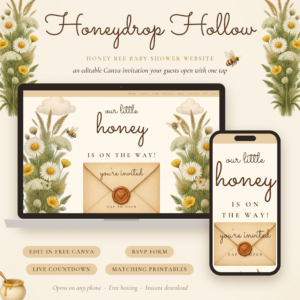 Honey Bee Baby Shower Website Template | Honeydrop Hollow Editable Canva Digital Invitation with RSVP Form, Envelope Opening, Live Countdown & Matching Printables | Invitation and event details | One shared link | RSVP form sends replies to you | Free Canva | 8 pages, 9 sections, matching printables, 22 clip art PNGs |
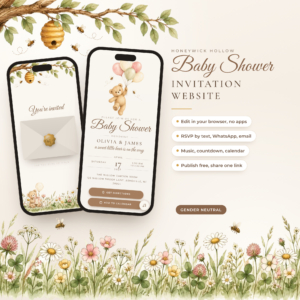 Honeywick Hollow Baby Shower Invitation Website | Interactive Teddy Bear Mobile Invite with RSVP, Countdown, Music and Add to Calendar | Gender Neutral Editable Digital Evite + RSVP Tracker and Printables | Invitation with music and calendar | One published file and link | RSVP by text, WhatsApp or email, plus guest tracker | Invitation Studio | Matching printables, step-by-step guide |
Who does each option suit?
Each product fits a different kind of host, so match it to the job you most want taken off your plate.
The Peachy Bump games bundle suits hosts with a lively guest list and no wish to invent activities. If you have never run a shower, the signs, prize tags and answer keys remove the guesswork. It also suits anyone who wants a single printout day with no technology on the guests' side.
The Honey Bee template suits hosts who already use Canva or want to learn it. The 8 pages and 9 sections let you include a schedule, a map, a registry and a countdown in one place. It fits a shower with a lot of detail to share.
Honeywick Hollow suits hosts who want less setup and more atmosphere. The music box lullaby, the add to calendar feature and the choice of reply method make it friendly for guests of different ages. The included guide helps if you are new to digital invitations.
The two invitation sites do overlap, so most hosts choose one, then add the games bundle.
How do you set up a digital baby shower?
Set up a digital baby shower by writing the details first, editing the invitation, publishing it, sharing the link and printing the games. The order matters because the invitation needs a final date and place.
- Confirm the date, time, address and registry details before you open any template.
- Edit your chosen invitation in Canva or the Invitation Studio, replacing every sample word.
- Publish it free using the steps in the product, then open the link on your own phone to check it.
- Send the link by text, WhatsApp or email, and post a printed version to anyone who prefers paper.
- Print the games bundle once replies settle, using the half-sheet versions if you want to save paper.
- Type the mum-to-be's name into the games file once and let it fill every page.
What mistakes should you avoid?
The most common mistakes are sending the link before checking it, printing too early and forgetting guests who dislike links. Each is easy to avoid.
- Skipping the phone test. Open your published invitation on a phone before sharing it, since guests will almost all do the same.
- Leaving sample text behind. Read every page once for placeholder wording, especially in the schedule and map sections.
- Printing before the guest count is firm. Wait for replies, because the 30 unique bingo cards cover a large group but you may not need all of them.
- Mixing themes. Pairing a teddy bear invitation with a honey bee printable set looks muddled. Pick one theme, or keep the games bundle as the one separate piece.
- Assuming neutral means no decoration. These products cover paper and screen. You will still need to plan the room, food and drink yourself.
What affects the price?
Price depends on what the product does and how much you get with it. A single fillable PDF usually costs less than an interactive invitation website with an RSVP system, music and tracker.
Bundled extras raise the cost: matching printables, clip art and guides all add value. Free tools keep the total down, since Canva and the free hosting used by both websites mean you pay for the template and little else. Live prices are on the product cards.
Which one should you choose?
Choose the Peachy Bump games bundle if your main worry is keeping guests entertained. Choose Honey Bee if you want a detailed event page you edit yourself in Canva. Choose Honeywick Hollow if you want a warm, music-led invitation with simple reply options and a guest tracker.
If your budget allows only one, pick the invitation first, since it sets the tone and gathers replies. Add the games bundle when you know the guest numbers.
Common questions
Do guests need an app or account to open the invitations?
No. Both invitation websites are shared as a single link that opens in a phone browser. Guests tap the envelope and read the details. You, as host, use free Canva for Honey Bee or the Invitation Studio for Honeywick Hollow.
Can I print the invitation instead of sending a link?
Yes. Honey Bee and Honeywick Hollow both include matching printables in US Letter and A4. They suit guests who prefer paper, and you can send a printed card to some guests while sharing the link with the rest.
Are the games suitable for a large group?
The bundle includes 18 games and 30 unique bingo cards, so a good-sized group can play bingo without duplicate cards. Answer keys and fillable host keys are included, which makes checking results quicker for the host.
Do I need to edit every page of the games bundle?
No. You type the mum-to-be's name once and it fills in on every page. The file is a fillable PDF, so you can complete it on screen and print the pages you want.
Can I use more than one product for the same shower?
Yes, and many hosts do. Use one invitation website for the invite and replies, then add the games bundle for the day itself. Avoid using both invitation websites together, as guests would receive two links.