Best Guest List Template: Spreadsheet or Printable PDF?
The best guest list template is the one that matches the size and type of your event. For a wedding with seating, the Petal & Vow Wedding Planner Spreadsheet handles up to 500 guests. For a first birthday, the Smashday spreadsheet separates adults, kids and little ones. For smaller parties, the Merrymap fillable PDF needs no spreadsheet software.
A guest list can feel simple until the replies arrive, someone brings a plus one, and the caterer asks for final numbers. We'll go through what to look for, how the three templates here differ, and how to pick one without overbuying.
Key facts at a glance
- The Petal & Vow spreadsheet holds up to 500 guests and builds an automatic seating chart from your guest list.
- The Smashday spreadsheet counts adults, kids and little ones separately and uses those numbers in its food and cake calculator.
- The Merrymap planner is a 49-page fillable PDF in US Letter and A4, with Colour and Ink Saver editions.
- Both spreadsheets work in Microsoft Excel and Google Sheets, and each comes with a step-by-step user guide.
- Every template here pairs the guest list with a budget, which is where most hosts first feel the pressure.
Table of Contents Toggle
- What should you look for in the best guest list template?
- How do the three guest list templates compare?
- Which guest list template suits which host?
- How do you use a guest list template step by step?
- What mistakes should you avoid with a guest list template?
- What affects the price of a guest list template?
- Which guest list template should you choose?
- Common questions
What should you look for in the best guest list template?
A good guest list template tracks who is invited, who has replied and how many people will actually attend, then feeds that number into your budget and catering. Six features separate a useful one from a plain table of names.
RSVP tracking you can read at a glance
An RSVP tracker is a column or section that records each guest's reply: yes, no or waiting. Without one, you end up scrolling through messages to find out who still owes you an answer. The Smashday spreadsheet and the Petal & Vow spreadsheet both show RSVPs on a dashboard, so you see the position without hunting for it. The Merrymap PDF includes a guest list and RSVP tracker as pages you fill in yourself.
Headcount categories that match your event
Headcount categories decide how accurate your catering numbers are. A first birthday has toddlers who eat little, children who eat some, and adults who eat a full portion. The Smashday spreadsheet keeps separate counts for adults, kids and little ones, which is why its cake calculator can size the cake for your actual crowd. A wedding rarely needs that split, so Petal & Vow focuses on guests and seating instead.
Capacity for your guest numbers
Capacity is the number of names a template can hold before you run out of room. The Petal & Vow spreadsheet supports up to 500 guests, which covers most weddings. For the other two, no limit is stated, so a very large list is worth testing with the user guide or the PDF page layout before you commit.
Spreadsheet or printable PDF?
A spreadsheet recalculates as you type. A fillable PDF is closer to a paper planner you complete on screen or print out. Spreadsheets suit people comfortable with Excel or Google Sheets, and they allow shared access if you use Sheets. The Merrymap PDF suits anyone who prefers pages, tabs to click, and a printout on the fridge.
Links to seating, budget and food
A linked template passes your guest numbers onward, so a change in one place updates the rest. Petal & Vow links guests to an automatic seating chart. Smashday links the headcount to the food and cake calculator. If you only want a list of names, these links are a bonus. If you're catering for a crowd, they save a lot of rechecking.
Guidance and an example to learn from
A user guide matters more than it sounds, especially if spreadsheets aren't your habit. Smashday and Petal & Vow both include a step-by-step user guide, and Petal & Vow adds a filled-in example planner so you can see how the finished thing looks before you enter your own details.
How do the three guest list templates compare?
The three templates differ mainly in event type, format and how far the guest list connects to the rest of the plan. This table lays out what the product details actually say.
| Product | Best for | Format | Guest list features | Extras |
|---|---|---|---|---|
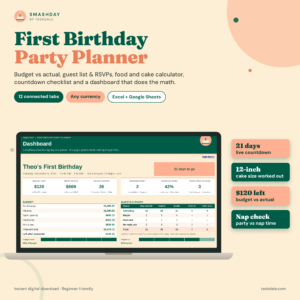 First Birthday Party Planner Spreadsheet | Smashday 1st Birthday Budget, Guest List & Cake Calculator for Excel & Google Sheets | First birthday parties | Excel and Google Sheets | RSVPs, separate counts for adults, kids and little ones | Cake calculator, 52-task checklist, party-day schedule with nap-time check, gift and thank-you trackers |
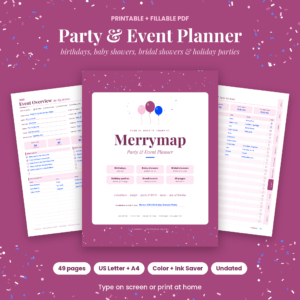 Printable Party Planner & Event Planner PDF, Fillable | Merrymap | Birthdays, baby showers, bridal showers, holiday parties, small events | Fillable PDF, 49 pages, US Letter and A4 | Guest list and RSVP tracker | 8-week countdown, menu and quantity guide, decor, games, day-of timeline |
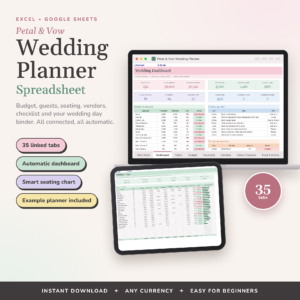 Petal & Vow Wedding Planner Spreadsheet | Excel + Google Sheets Budget, Guest List, Seating Chart & Checklist | Weddings | Excel and Google Sheets, 35 linked tabs | Up to 500 guests, automatic seating chart, RSVPs on a live dashboard | 124 timed tasks, calendar, payment alerts, filled-in example |
Which guest list template suits which host?
Each template suits a different host: Smashday for parents planning a first birthday, Merrymap for varied smaller events, and Petal & Vow for couples planning a full wedding.
Smashday suits parents planning a first birthday. The adult, kids and little ones split reflects who really turns up to these parties. The party-day schedule includes a nap-time check, which is a small detail, but anyone who has hosted a one-year-old will appreciate it. It also works in your own currency, so the budget tracker fits wherever you live.
Merrymap suits people who host often or prefer paper. One PDF covers birthdays, baby showers, bridal showers and holiday parties, so you can reuse the same layout. The 8-week countdown suits events with a reasonable lead time. If you like ticking things off by hand, the Ink Saver edition keeps printing lighter.
Petal & Vow suits couples with a long list and a seating plan. The 500-guest capacity and automatic seating chart do the heavy lifting for larger weddings. With 35 linked tabs, expect to spend an evening learning it, and the example planner and user guide help with that.
How do you use a guest list template step by step?
You use a guest list template by entering every possible guest first, then updating replies as they arrive, and reading the totals before any supplier deadline. Here is a sequence that works for all three products.
- Open the user guide or example first. Spend ten minutes on it. It's quicker than correcting mistakes later.
- Enter every name you might invite. Include partners and children, and put maybes on the list too. Trimming is easier than adding.
- Mark categories. In the Smashday spreadsheet, label adults, kids and little ones. For a wedding, record any dietary needs you've been told.
- Send invitations and log replies the same day. Update the RSVP status as each reply comes in.
- Check totals weekly. Compare confirmed numbers to your venue capacity and your budget.
- Lock the list before supplier deadlines. Caterers and cake makers need a final number, so ask them when it's due and work back from that.
- Use the list afterwards. Smashday has a gift log and thank-you tracker, and Merrymap runs through to the last thank-you card.
What mistakes should you avoid with a guest list template?
The most common mistakes are starting with too few names, not logging replies promptly, and ignoring how the list affects the budget. Each one is easy to prevent.
- Counting only confirmed guests for catering. Waiting for every answer can leave you short of time. Chase late replies and set your own reply-by date ahead of the supplier's.
- Forgetting plus ones and children. A list of "invited households" gives you the wrong total. Count heads, not envelopes.
- Treating the list as separate from the budget. Every extra guest adds to food, drink and sometimes seating. The Smashday and Petal & Vow dashboards show this connection, so check it when the list changes.
- Choosing a spreadsheet when you won't open one. A tool you avoid is worse than a simpler one you use. If Excel puts you off, the Merrymap PDF is the calmer choice.
- Skipping the example. Overwriting formulas by accident is the usual way a spreadsheet breaks. Keep a spare copy before you start.
What affects the price of a guest list template?
The price of a guest list template mostly reflects how much of the event it plans, not how many names it holds. A template that covers only guests costs less than one that also handles budget, vendors, seating and a calendar.
Format plays a part too. A linked, automated spreadsheet with many tabs generally costs more than a printable PDF, because more work sits behind it. The Petal & Vow spreadsheet is the most complete of the three, and the Merrymap PDF is the lighter option for general events. Prices are shown on the product cards, and each is a digital download rather than a physical item, so you're paying for the design and the guidance, not for materials.
Which guest list template should you choose?
Choose by event type first. If you're planning a wedding with seating, pick Petal & Vow. If it's a first birthday, pick Smashday. If you plan several smaller events or prefer printing, pick Merrymap.
Then check one thing: will you be comfortable opening Excel or Google Sheets each week? If yes, either spreadsheet will serve you well. If not, choose the PDF, and keep your guest list updated on the same day each week. You can browse all 3 options below to compare the details side by side.
Common questions
Do these guest list templates work in my currency?
The Smashday spreadsheet has a budget tracker in your own currency, and the Petal & Vow spreadsheet is described as working in any currency. The Merrymap PDF listing doesn't mention currency, so check the product page if that matters to you.
Can I use the Merrymap PDF for a wedding?
The Merrymap planner is described for birthdays, baby showers, bridal showers, holiday parties and small events. A small wedding gathering might fit, but for a seating plan, a large guest list or a long vendor schedule, the Petal & Vow spreadsheet is built for the job.
When should I start my guest list?
Start before you book a venue or caterer. Your rough headcount decides the size of the room, the food order and the budget, so even a first draft with maybes marked is worth having early. You can tidy it as replies arrive.
Should children be counted separately from adults?
Yes, when children eat differently or need their own space. At a first birthday, separate counts for adults, kids and little ones give a more accurate food and cake order. The Smashday spreadsheet is built around that split, so the numbers carry straight through.
Can I print a spreadsheet guest list?
Spreadsheet programs generally let you print a sheet, so you can take a copy to a venue visit. Check the print preview first so columns fit the page. If printing is your main plan, the Merrymap PDF is already laid out for it in US Letter or A4.