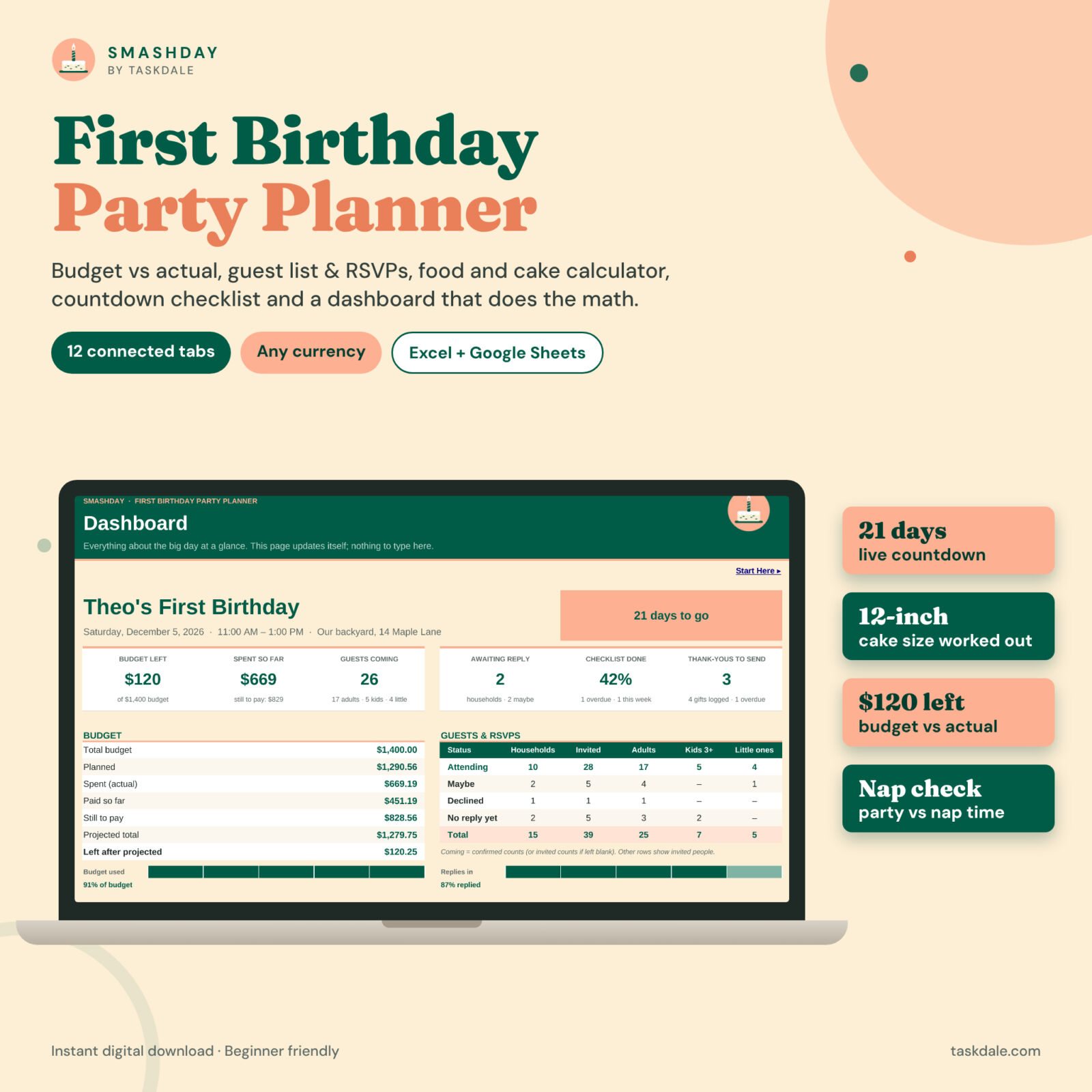
A first birthday party planner that does the math for you
Planning baby’s first birthday should feel exciting, not like a second job. The Smashday first birthday party planner is a connected spreadsheet for Excel and Google Sheets that brings your budget, guest list, RSVPs, food and cake, countdown checklist, vendors and thank-you notes together in one workbook. Type in the white cells and the dashboard updates itself: days to go, money left, how many adults, kids and little ones are coming, which tasks are due this week and which thank-yous are still waiting.
It is built specifically for one-year-old parties, so it understands things a generic event planner does not: high chairs, nap time, a smash cake for the birthday baby, toddler-friendly food and guests who arrive with babies of their own.
Who it is for
- Parents planning a first birthday at home, in the backyard, at a park, venue or restaurant
- Grandparents, aunts and friends hosting a 1st birthday for someone they love
- Anyone who wants a party budget spreadsheet that stays honest about planned vs actual costs
- Busy families who like one place for every detail, from invitations to thank-you cards
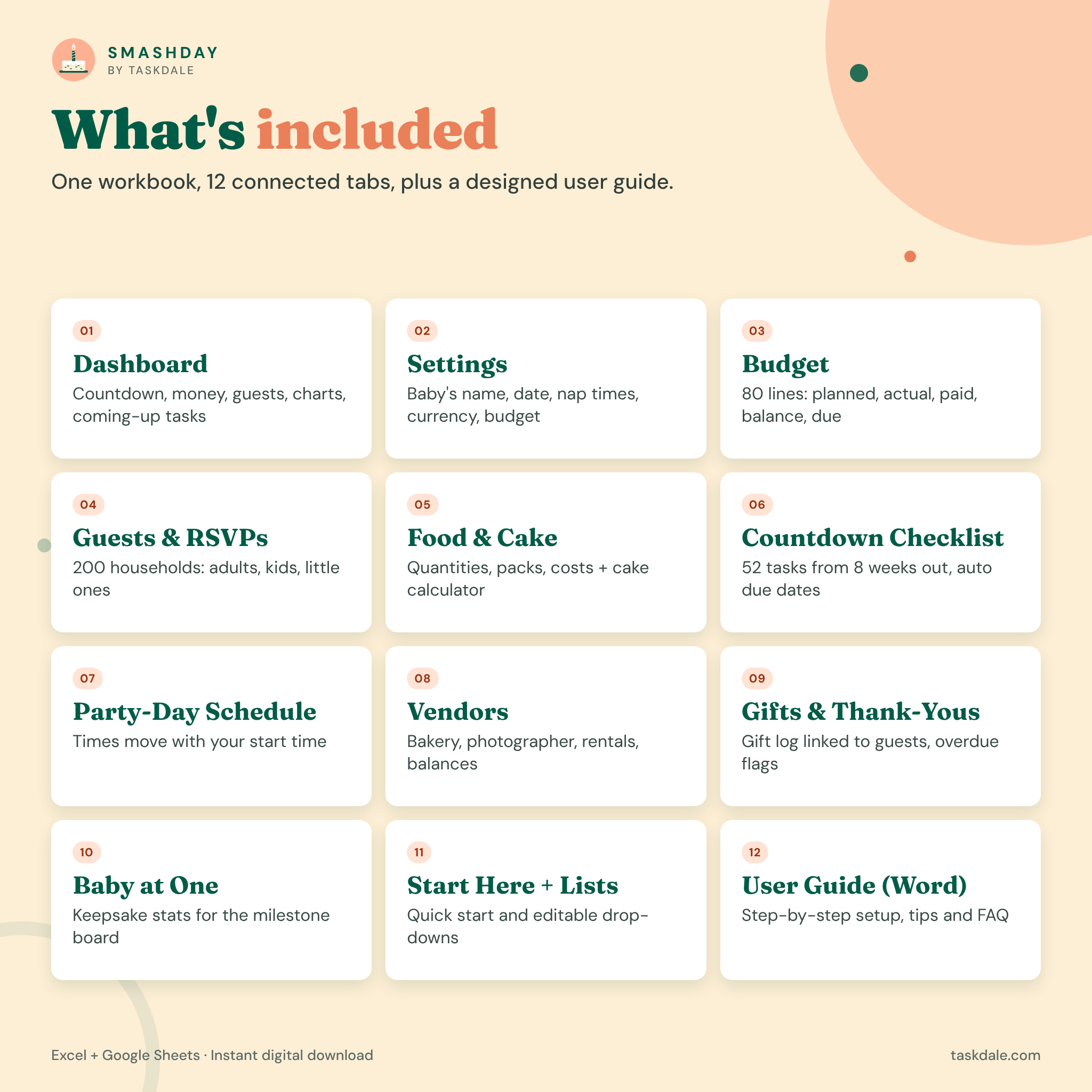
What’s included
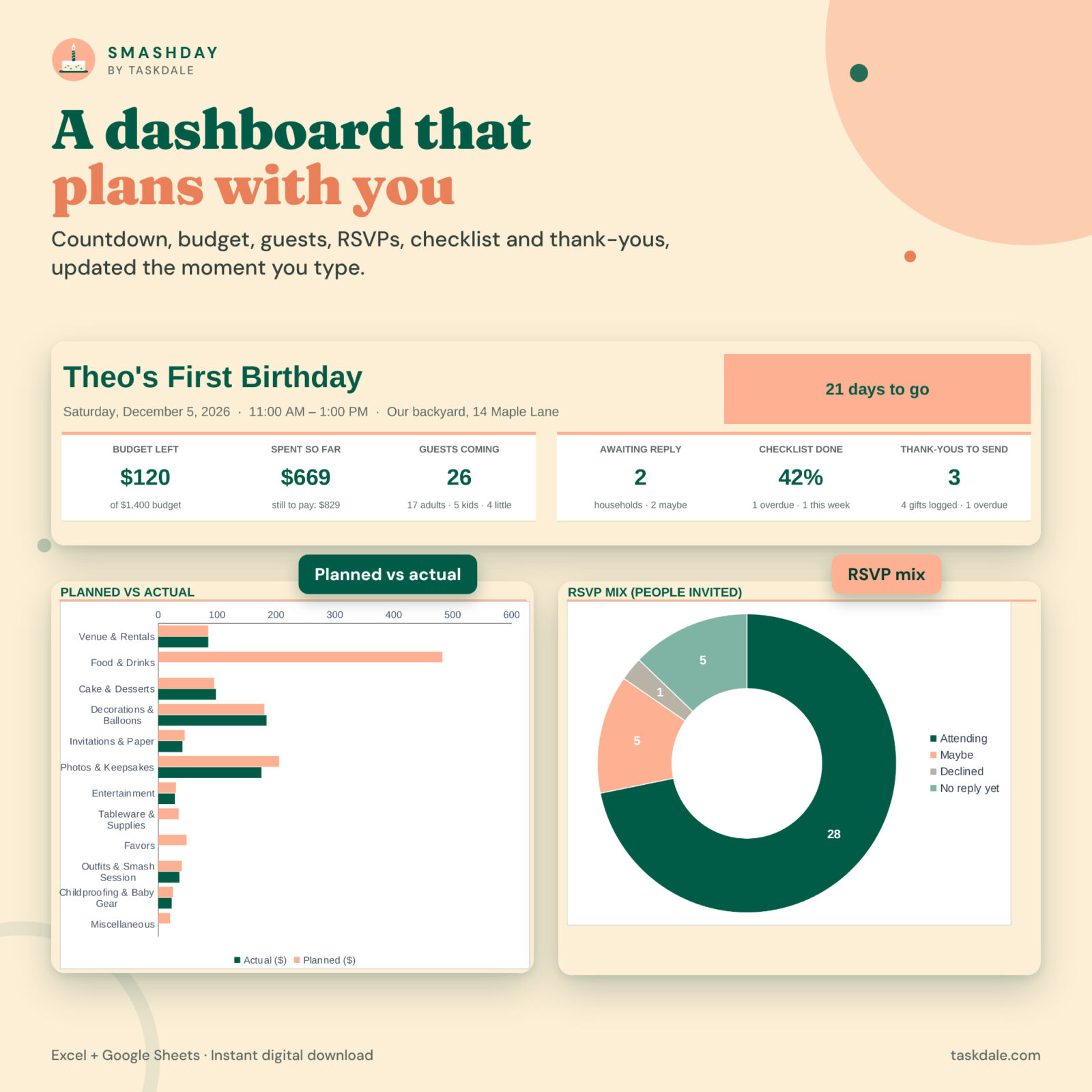
- Dashboard: countdown, budget left, spent so far, guests coming, households awaiting a reply, checklist progress, thank-yous to send, a planned vs actual chart by category, an RSVP mix chart, the next 8 tasks, the recommended cake size and the nap-time check
- Settings: baby’s name and birthday, party date, start time and length, baby’s nap window, currency symbol and position, total budget, and how to count Maybe and not-yet-replied guests
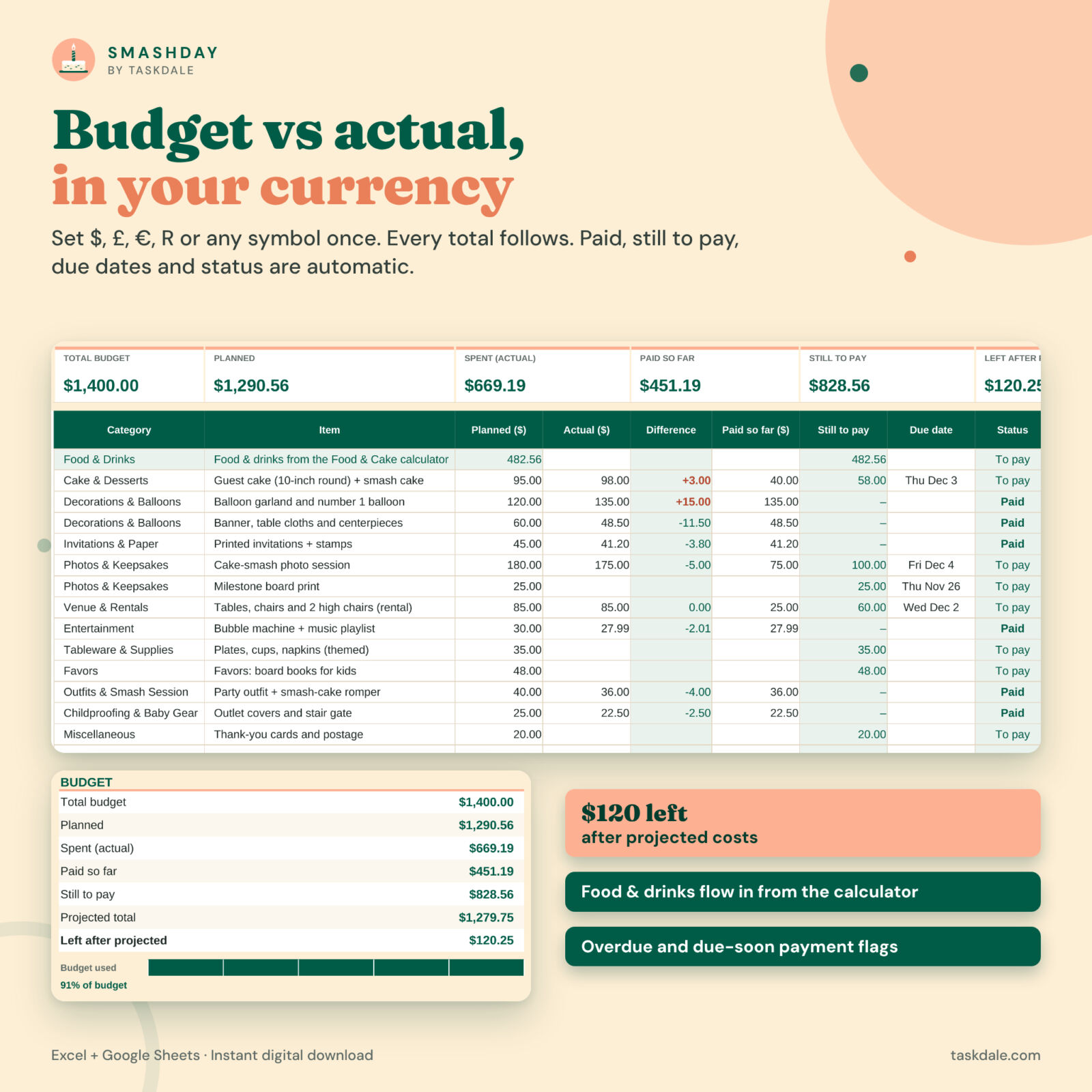
- Budget: 80 lines with category, planned, actual, difference, paid so far, still to pay, due date and an automatic status (Paid, To pay, Due soon, Overdue)
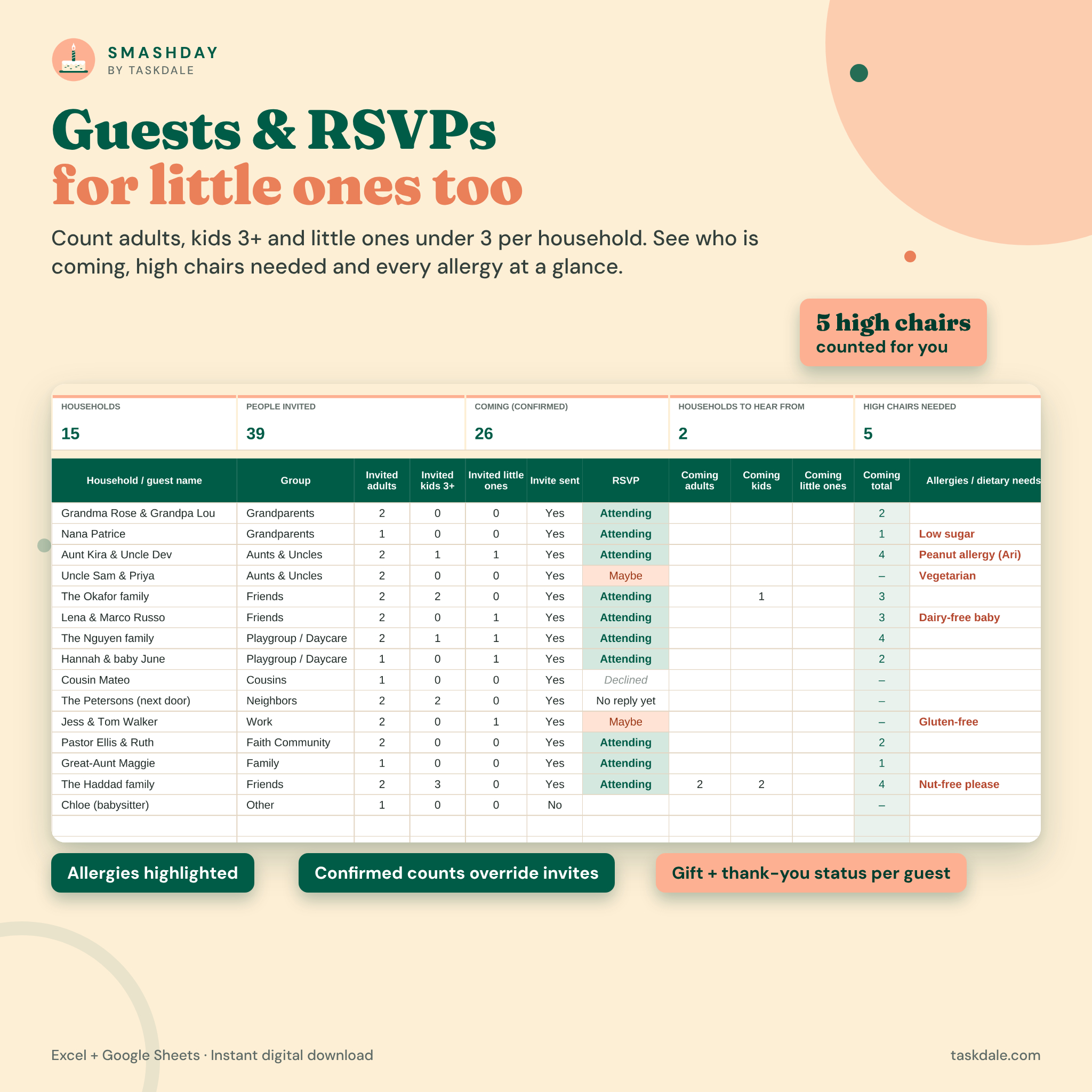
- Guests & RSVPs: 200 households with invited and confirmed adults, kids 3+ and little ones under 3, invite sent, RSVP, allergies and dietary needs, contact details and mailing address
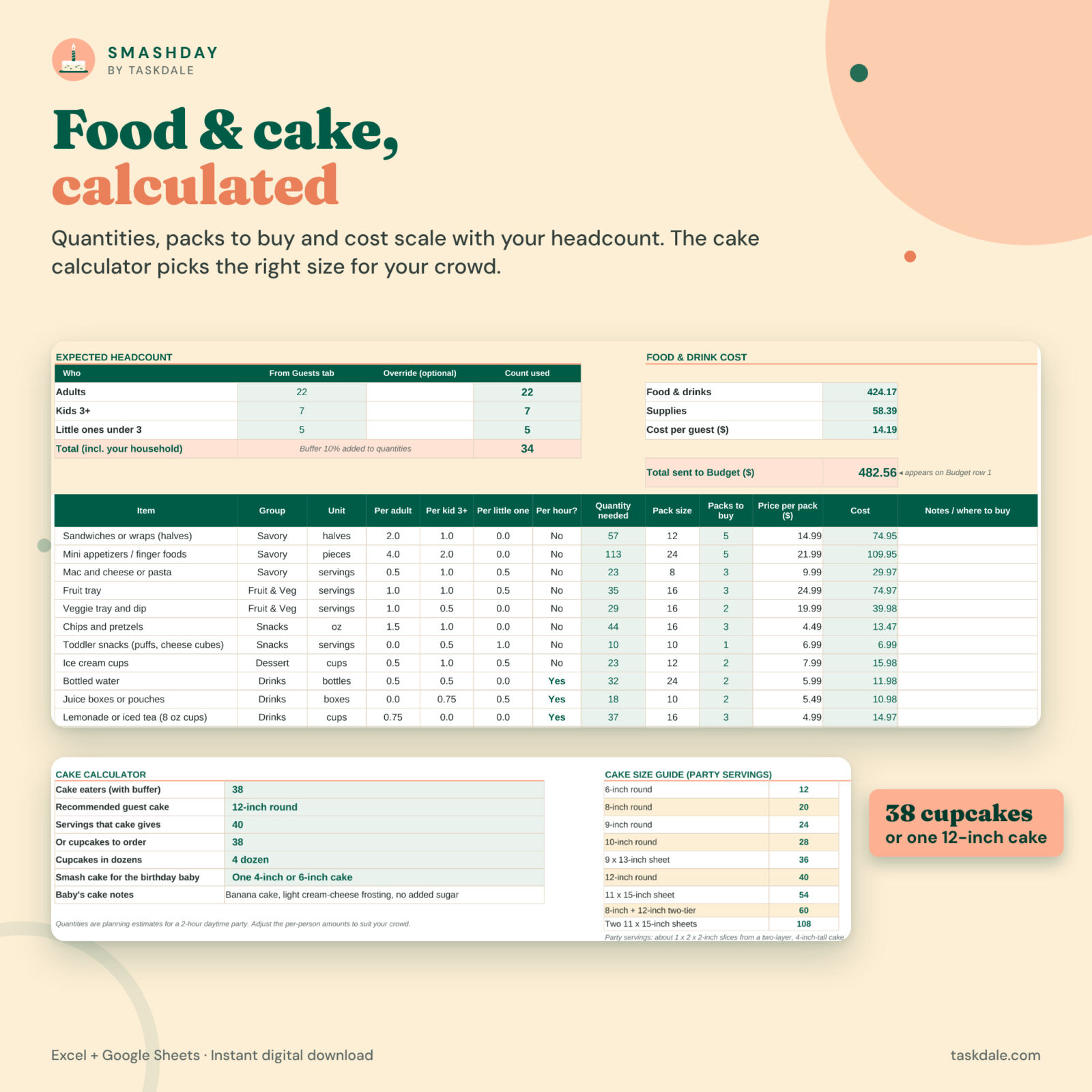
- Food & Cake calculator: 18 ready-made food, drink and supply lines that scale with your expected headcount, packs to buy, cost per item, cost per guest and a cake calculator
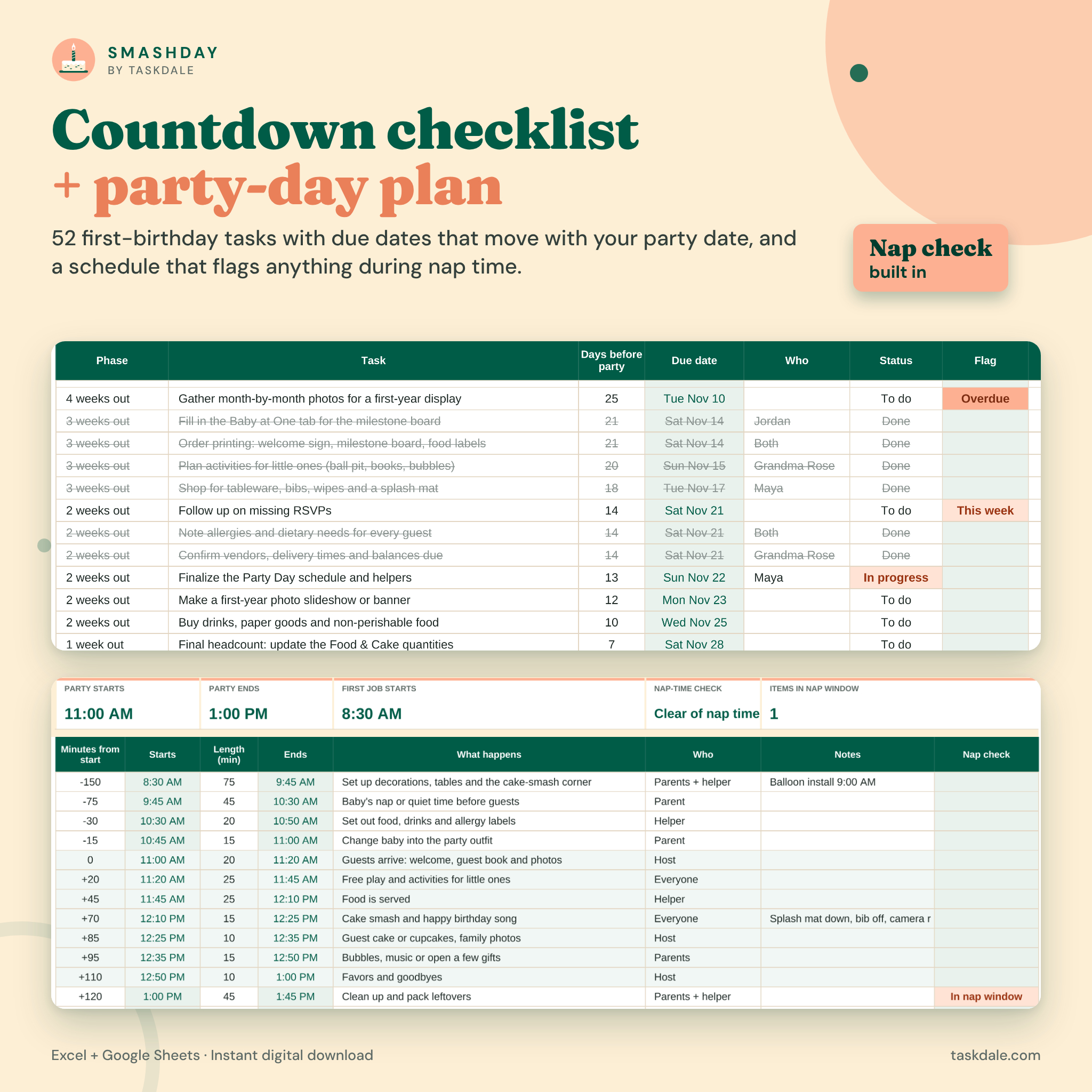
- Countdown checklist: 52 first-birthday tasks from 8 weeks out to after the party, with due dates that move with your party date
- Party-day schedule: a timed plan that updates when you change the start time
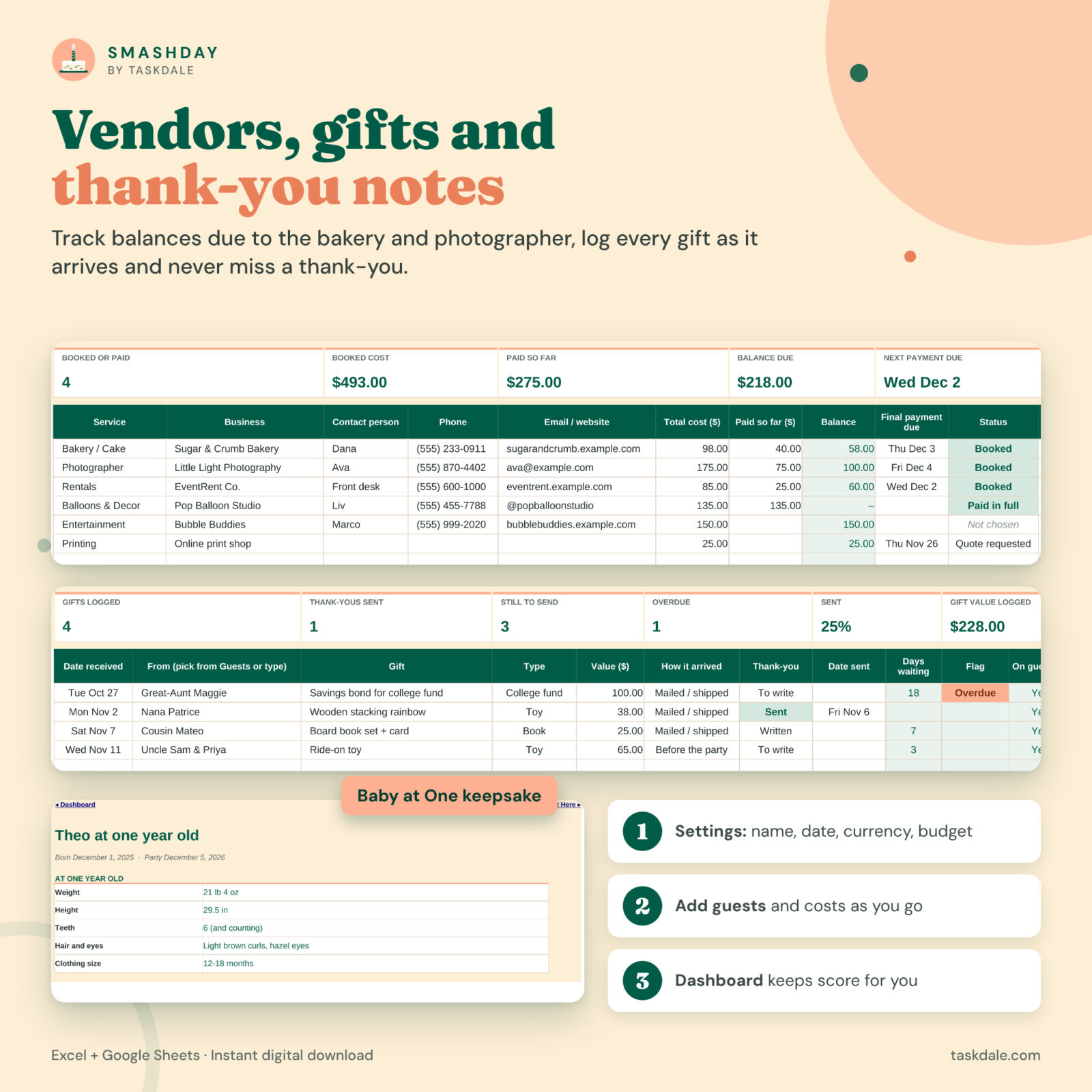
- Vendor tracker: bakery, photographer, rentals, balloons and more, with balances and payment due dates
- Gifts & thank-yous: a gift log linked to the guest list, with thank-you status and overdue reminders
- Baby at One: a printable keepsake page for stats, milestones and favorites
- Start Here and Lists: a quick start, links to every tab and editable drop-down lists
- User guide (Word): setup steps, how every tab works, customizing, tips, troubleshooting and FAQ
Features that make it better than a basic party checklist
Budget vs actual in any currency
Set the currency symbol once ($, £, €, R, A$ or a code like CHF) and choose whether it goes before or after the number. Every total and dashboard tile follows. The budget shows what you planned, what you actually spent, what is paid and what is still due, and “budget left” uses real costs wherever you have them.
Headcount that understands little guests
Count adults, kids 3+ and little ones under 3 separately for every household. Confirmed numbers override invited numbers, Maybe and no-reply guests are counted at the percentage you choose, and the planner tells you how many high chairs you need and which guests have allergies.
Food and cake quantity calculator
Food, drink and supply quantities scale with your headcount and party length, with a buffer you control. Add the price of a pack and the cost flows straight into the budget. The cake calculator recommends the smallest standard cake size that serves your guests, shows the cupcake count in dozens and reminds you to order a small smash cake for the birthday baby.
Nap-time check
Enter baby’s usual nap and the planner warns you if the party overlaps it. The party-day schedule flags any individual item that falls inside the nap window.
Thank-yous you will actually finish
Log gifts as they arrive, pick the giver from your guest list and track each note from To write to Sent. Overdue thank-yous are flagged on the gift log, the guest list and the dashboard.
How it works
- Download the files and open the workbook in Excel, or upload it to Google Drive and open it with Google Sheets.
- Fill in the four peach cells on Settings: baby’s name, party date, currency and budget.
- Add your guests and costs as plans come together.
- Follow the countdown checklist and watch the dashboard keep score.
File formats and software requirements
- One .xlsx workbook (12 tabs) plus a .docx user guide
- Microsoft Excel 2016 or newer, Microsoft 365, Excel for Mac and Excel for the web
- Google Sheets (free with a Google account): upload the file and open it with Google Sheets
- No macros, add-ons or scripts. Not designed for Apple Numbers.
Customization
Rename budget categories, guest groups, checklist phases, vendor services and gift types on the Lists tab and every drop-down updates. Edit or replace any example task, food line or schedule item. Formula cells are locked without a password to protect your math, and you can unprotect a sheet in one click if you want to restyle it. Every tab is set up to print neatly.
Digital download
This is an instant digital download. No physical item is shipped. The workbook arrives as a clean copy ready for your party; the listing images show a filled example so you can see it in action.
Real-life ways to use it
- A backyard brunch for 30 with grandparents, cousins and the playgroup crew
- A small family lunch where you still want to track gifts and send thank-yous on time
- A styled cake-smash party with a photographer, balloon garland and rentals to pay off
- Splitting tasks between parents and grandparents with the Who column on the checklist
- Reusing it for a second birthday, a sibling’s party or a baby’s naming day
First birthday party planner FAQ
Does it work in Google Sheets?
Yes. Upload the .xlsx file to Google Drive and open it with Google Sheets. Formulas, drop-downs, colors and charts carry over.
Can I use my own currency?
Yes. Type your symbol once on the Settings tab and every money total uses it.
How does the cake calculator choose a size?
It counts expected cake eaters, adds your buffer and picks the smallest standard round or sheet cake whose typical party servings cover everyone. It also shows the cupcake alternative.
How many guests can I add?
Up to 200 households, each with separate counts for adults, kids 3+ and little ones under 3.
Is it beginner friendly?
Yes. You only type in white cells, most inputs have drop-downs, and the user guide walks through every tab.
Can I print it?
Yes. Each tab is set to fit the page width, including the one-page Baby at One keepsake.
Can I share the file?
The license is for personal use. You may not resell, share or redistribute the files.
© 2026 Taskdale. Smashday is a Taskdale product. Personal use only.
Reviews
There are no reviews yet.