A good handyman estimate template prices labour, materials, markup and any call-out charge in one place, then prints a quote a customer can accept. For small jobs that also need invoicing, Jobstead suits best. For a free start, choose Bidwright Lite. For larger jobs with change orders, choose the full Bidwright workbook.
Quoting can feel more complicated than the work itself. We'll keep it simple: this guide explains what to look for, how the three templates here differ, and how to match one to the way you actually work.
- A handyman estimate template is a spreadsheet that turns your hours, materials and overheads into a priced quote.
- All three templates on this page run in Excel, and two of them also work in Google Sheets.
- Bidwright Lite is the only free option, and it needs a free Taskdale account with up to 3 downloads per day.
- Jobstead is the only one with a flat-rate Price Book and a trip charge built in.
- The full Bidwright workbook is the only one with change orders, mileage and contingency.
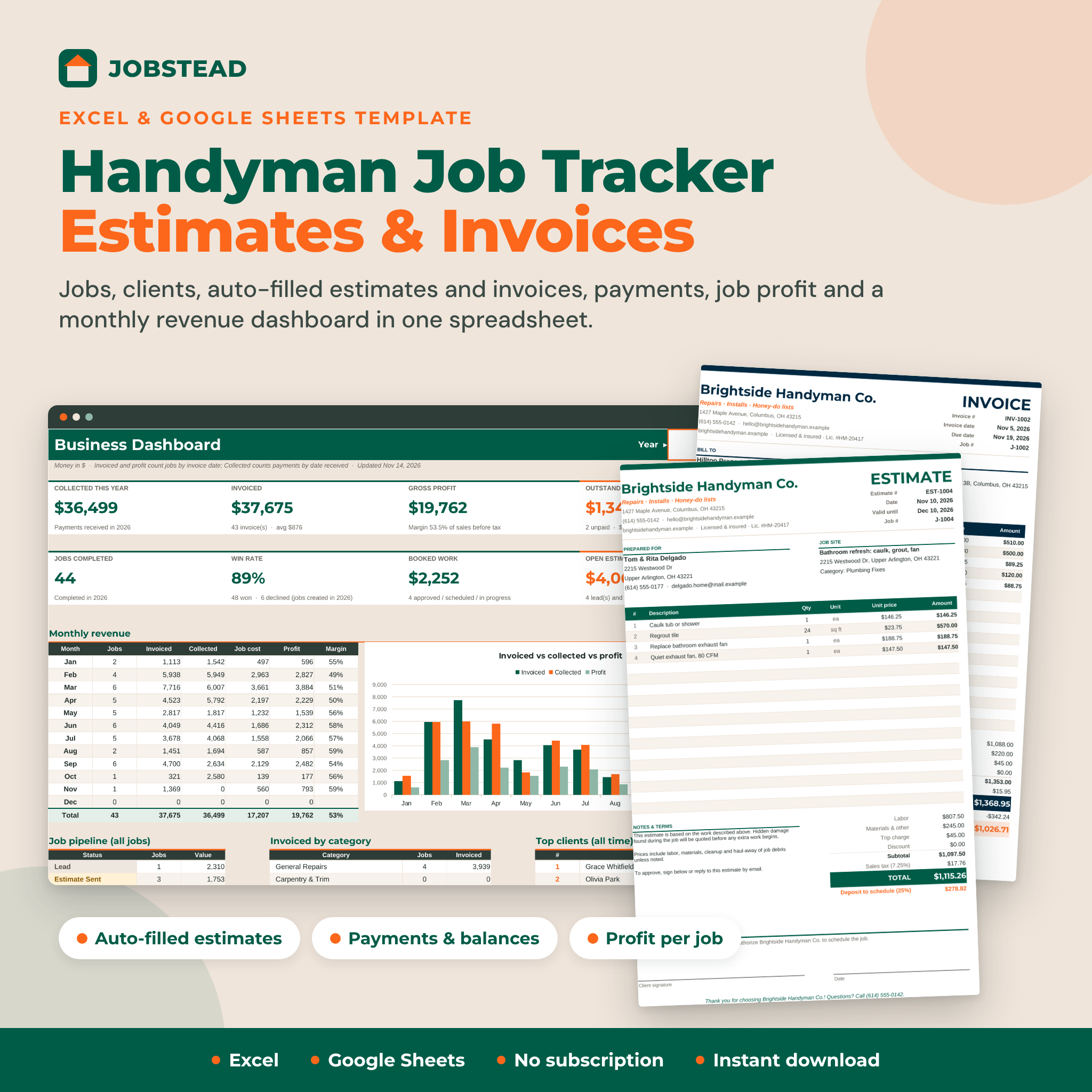 Handyman Job Tracker Spreadsheet with Estimates & Invoices | Jobstead Excel & Google Sheets Template + Profit Dashboard
Table of Contents
Toggle
- What makes the best handyman estimate template?
- How do the three handyman estimate templates compare?
- Which handyman estimate template suits which handyman?
- How do you use a handyman estimate template on a real job?
- What mistakes should you avoid with a handyman estimate template?
- What affects the cost of a handyman estimate template?
- How should you choose the best handyman estimate template for you?
- Common questions
What makes the best handyman estimate template?
The best handyman estimate template is the one that captures every cost you actually carry on a job and produces a quote you'd be happy to hand over. Five factors separate a useful template from a pretty one.
Pricing logic that matches how you charge
Some handymen charge by the hour, some by the task, and many mix both. Jobstead builds estimates from labour hours multiplied by your rate, and it also holds a Price Book of flat-rate tasks, so "hang a door" can be a fixed figure rather than a calculation each time. Bidwright prices from your own price list instead, which suits anyone who buys the same materials repeatedly.
If you only ever charge by the hour, any of the three will do. If you quote fixed prices for common jobs, cheque that the template can store them.
Materials, waste and markup
Materials with markup is the line where small jobs quietly lose money. Look for a template that lets you add a percentage on top of what you pay the merchant, and ideally an allowance for waste, because a tiled splashback or a run of skirting is never bought to the exact centimetre.
Bidwright Lite and the full Bidwright both include waste. Jobstead includes materials with markup. Bidwright Lite adds overhead and sales tax as well, which matters if you're registered for VAT.
A quote the customer can read
A client-ready quote is a printed or PDF page with your branding, a clear scope and a total. Jobstead fills a branded estimate or invoice automatically from the job number. The full Bidwright prints a client-ready quote from the priced job.
Bidwright Lite is a pricing and tracking tool first. Cheque whether you're happy to present its output or whether you'll copy the figures into your own document.
What happens after the customer says yes
Quoting is only half the paperwork. Jobstead tracks each job through a 10-step status pipeline, records payments, shows balance due and flags overdue invoices. The full Bidwright logs change orders, payments, labour, expenses and mileage, then compares budget against actual profit.
If you'd rather keep invoicing in separate software, a quote-focused template is enough.
Where the file will open
Excel is the standard, but plenty of handymen work from a phone or tablet. Jobstead is built for both Excel and Google Sheets. The full Bidwright is an .xlsx file that opens in Google Sheets. Bidwright Lite is supplied as an Excel workbook.
How do the three handyman estimate templates compare?
The three templates differ mainly in how far they go beyond the quote: Bidwright Lite stops at pricing and bid tracking, Jobstead adds invoicing, and the full Bidwright adds detailed job costing.
| Product | Best for | Pricing inputs | After the quote | Format | Cost position |
|---|---|---|---|---|---|
| Handyman Job Tracker Spreadsheet with Estimates & Invoices | Jobstead Excel & Google Sheets Template + Profit Dashboard | Solo handymen who quote and invoice from one file | Labour hours and rate, materials with markup, flat-rate Price Book, trip charge | 10-step status pipeline, payments, balance due, overdue flags, profit per job, monthly revenue dashboard | Excel and Google Sheets | Paid |
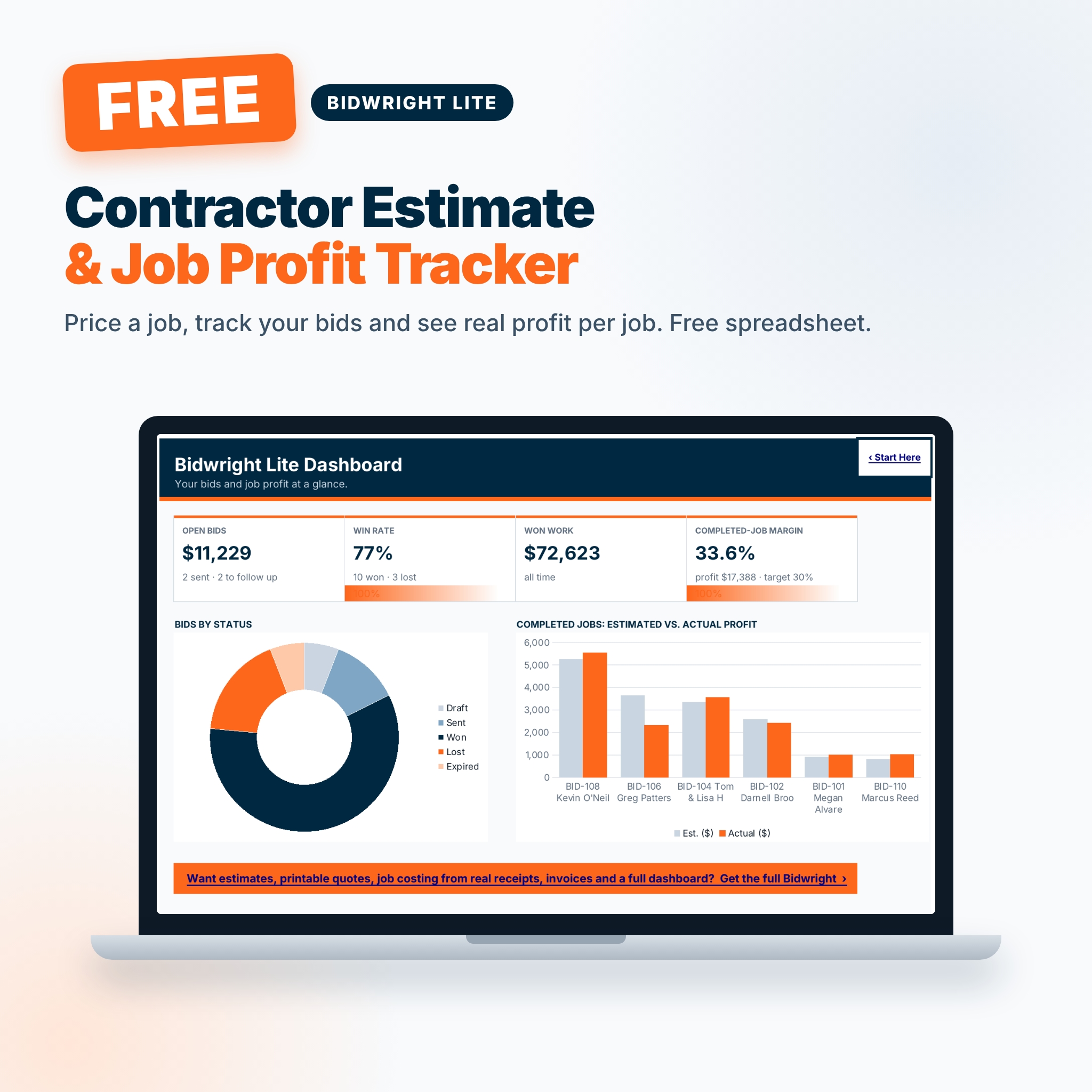 Bidwright Lite – Free Contractor Estimate Template, Bid Tracker & Job Profit Spreadsheet (Excel) | Anyone testing a template before paying | Waste, labour hours, overhead, markup, sales tax | Tracks up to 40 bids with follow-up alerts, compares estimated and actual profit on 20 jobs, small dashboard | Excel | Free, account required |
 Bidwright Contractor Estimate Template & Job Costing Spreadsheet – Bid Tracker, Printable Quote, Change Orders & Invoices (Excel) | Busier handymen taking on bigger, longer jobs | Your own price list, waste, labour, overhead, contingency, markup or margin | Bid and win-rate tracking, change orders, payments, expenses, mileage, budget vs actual dashboard | Excel .xlsx, opens in Google Sheets | Paid, the fullest option |
Browse all 3 options below to see current prices on each card.
Which handyman estimate template suits which handyman?
Each template suits a different stage of a handyman business, so the right pick depends on job size and how much admin you want in one file.
Jobstead suits the one-person operator doing a steady run of small jobs: a leaking tap on Monday, a fitted shelf on Tuesday. The flat-rate Price Book speeds up repeat tasks, the trip charge covers travel to outlying customers, and the profit figure on each job shows which kinds of work are worth taking. If you want one file for quote, invoice and chasing payment, this is the closest fit.
Bidwright Lite suits anyone new to written quotes, or anyone who wants to try a structured template before committing. It covers waste, labour, overhead, markup and sales tax, so the numbers are sound. The bid tracker holds up to 40 bids with follow-up alerts, which helps if quotes tend to go quiet. Remember that it needs a free Taskdale account and allows up to 3 free downloads a day.
Bidwright Contractor Estimate Template & Job Costing Spreadsheet suits handymen who are drifting towards contractor work: a bathroom refit, a kitchen with several trades, a job that changes halfway through. Contingency, change orders and mileage tracking matter once the work runs over several days. It has 15 tabs and a user guide, so expect a short learning curve.
How do you use a handyman estimate template on a real job?
You use a handyman estimate template by entering the scope, pricing each cost line, checking the margin, and only then sending the quote. The steps below work with any of the three.
- Walk the job and note the scope. Write down every task, including the small ones such as making good after a repair.
- Enter your hours. Estimate time per task and add a buffer for access problems or parking.
- List materials with quantities. Add waste where you'll cut or trim, then apply your markup.
- Add overheads and any call-out or trip charge. Fuel, insurance and tool wear are real costs.
- Cheque the profit line. If the margin is lower than you want, change the price before the customer sees it.
- Print or export the quote. Include the scope in plain words so nobody argues later about what was covered.
- Log the result. Mark the job as won or lost, and after the work, enter actual hours and materials.
That last step is where a template starts paying you back. After ten or so jobs, you'll see whether your hour estimates run short, and you can adjust.
What mistakes should you avoid with a handyman estimate template?
The most common mistakes with a handyman estimate template are leaving out unpaid time, skipping markup on materials, and never comparing the estimate with what the job really cost.
- Pricing only the hours on site. Travel, collecting materials and sending the quote all take time. Jobstead's trip charge exists for this reason.
- Charging materials at cost. You carry the risk of wrong sizes, returns and waiting for deliveries. A markup covers that.
- Forgetting waste. A box of tiles or a length of timber rarely goes the whole way. Add an allowance.
- Leaving no room for surprises. Old plaster, rotten joists and hidden pipework are normal. The full Bidwright has a contingency line for this.
- Absorbing changes without a record. A customer asking for "one more thing" is a change order. Write it down and price it, or the job slowly stops being profitable.
- Never reviewing actuals. An estimate you never cheque against reality only repeats the same error.
What affects the cost of a handyman estimate template?
The cost of a handyman estimate template depends mainly on how much of the job it covers, whether it includes invoicing, and how much support material comes with it.
Bidwright Lite is the cheapest route because it is free, with limits on daily downloads and a free account to set up. Jobstead costs more because it combines quoting, invoicing, payment tracking and a profit dashboard. The full Bidwright is the premium option, with 15 tabs, change orders, mileage and a user guide.
Compare cost against what you'd otherwise spend in time. A paid template that saves an hour of paperwork a week can cover its cost quickly, but only if you'll use the extra features. Current prices appear on the product cards.
How should you choose the best handyman estimate template for you?
Choose the template that matches the admin you already do, not the one with the longest feature list.
- If you want to try structured quoting without paying, start with Bidwright Lite.
- If you quote small jobs and also send invoices, choose Jobstead.
- If your jobs run for days, change as they go, or involve other trades, choose the full Bidwright Contractor Estimate Template & Job Costing Spreadsheet.
Pick one, price your next three jobs with it, and compare each estimate with the real outcome before deciding whether to move up.
Common questions
Can I use a handyman estimate template in Google Sheets?
Yes, with two of the three. Jobstead is supplied for both Excel and Google Sheets. The full Bidwright is an .xlsx file that opens in Google Sheets. Bidwright Lite is described as an Excel workbook, so cheque it opens as you need before relying on it.
Is a free estimate template good enough for a handyman?
For many handymen, yes. Bidwright Lite covers waste, labour, overhead, markup and sales tax, and tracks up to 40 bids. Its limits are the number of jobs in the profit comparison, which covers 20, and the lack of invoicing.
Should an estimate include VAT?
If you're VAT-registered, your quote needs to show it clearly. Bidwright Lite has a sales tax input for this. If you aren't registered, leave tax out and make sure your pricing doesn't assume it. Ask an accountant if you're unsure.
What's the difference between an estimate and a quote?
An estimate is your best calculation of the likely price and may change. A quote is a fixed price the customer can accept. Many handymen send a quote for well-defined work and use change orders for extras, which the full Bidwright supports.
Do I need a job costing spreadsheet as well as an estimate template?
Not always. A job costing spreadsheet compares what you planned with what you spent. If you do small jobs, Jobstead's profit per job may be enough. For larger work with expenses and mileage, the full Bidwright's budget vs actual view is more useful.