Best Health Tracker: Which Log Suits Your Needs?
The best health tracker is the one that records the single thing you need to watch and turns it into something you can show a doctor or act on yourself. On this page that means three spreadsheet and printable templates: one for migraines, one for blood pressure and one for weight loss. None of them measures anything for you. They organise what you record.
- The Hushtrace migraine tracker logs pain on a 0-10 scale against 13 possible triggers and prints a one-page doctor summary.
- The Pulsepage blood pressure log sorts each reading into a category and works out morning, evening, weekly and monthly averages.
- The Pound Path weight loss kit is a 17-page printable with challenge boards, a weigh-in log and a habit tracker.
- Every product here comes in print-ready sizes, and the first two are built for hospital or GP appointments.
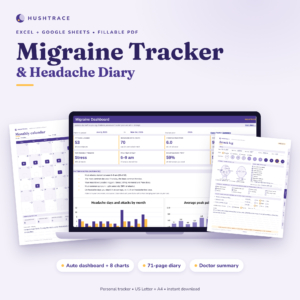 Migraine Tracker Spreadsheet & Fillable Headache Diary | Hushtrace Attack Log, Trigger Patterns + Doctor Summary (Excel, Google Sheets, PDF)
Table of Contents Toggle
- What should you look for in a health tracker?
- How do the three health trackers compare?
- Which health tracker suits which person?
- How do you get the most from a health tracker?
- What mistakes should you avoid?
- What affects the price of a health tracker?
- Which health tracker should you choose?
- Common questions
Choosing a health tracker can feel overwhelming, because the word covers everything from wrist-worn gadgets to paper charts. This is where it helps to start with the question you want answered, whether that is "what sets off my headaches?", "is my blood pressure under control?" or "am I actually losing weight?". We'll walk through each option in plain terms so you can pick with confidence.
What should you look for in a health tracker?
A good health tracker fits one health question, is easy enough to fill in every day, and produces a summary you can understand at a glance. The five factors below decide whether a tracker gets used for months or abandoned after a week.
Does it match the exact thing you need to monitor?
A tracker built for a specific purpose beats a general one. The Hushtrace migraine tracker has fields for pain, symptoms, triggers and whether relief helped, none of which would make sense in a weight log. If you try to bend a general chart to a specific condition, you usually end up missing the details a clinician asks for.
Can it turn entries into patterns?
A pattern is a repeated link between two things, such as poor sleep followed by a headache the next day. Raw numbers rarely show this by eye. The Hushtrace workbook has a dashboard with 8 tiles and 8 charts, and the Pulsepage log draws 4 charts and a colour-coded month view, so the sorting is done for you.
Does it give you something to hand to a doctor?
Appointments are short. A one-page summary lets you show weeks of information in under a minute. Both the Hushtrace and Pulsepage products include a printable doctor summary, and Pulsepage adds visit sheets and a medications page. Pound Path is built for personal motivation, so it suits a self-managed goal rather than a clinical review.
Does the format suit how you actually record things?
Some people are happiest in a spreadsheet, others with a pen. Hushtrace works in Excel and Google Sheets, with a fillable PDF diary for print or screen. Pulsepage offers an Excel tracker plus printable and fillable PDF sheets. Pound Path is a printable kit you colour in. Be honest about which you will pick up each morning.
Does it come in the right size and units?
Paper size and units matter more than they sound. Hushtrace and Pulsepage supply US Letter and A4 versions. Pound Path adds A5, with dotted or no-dots layouts, and works in lbs or kg. In the UK, A4 is the standard printer size, and A5 is handy if you want a smaller notebook-style sheet.
How do the three health trackers compare?
The three trackers differ mainly in what they record, how they present results and who is meant to read them. The table sets out the supplied details side by side.
| Product | What it tracks | Format | What you can share or review | Paper sizes |
|---|---|---|---|---|
| Migraine Tracker Spreadsheet & Fillable Headache Diary | Hushtrace Attack Log, Trigger Patterns + Doctor Summary (Excel, Google Sheets, PDF) | Attacks, pain 0-10, symptoms, 13 triggers, relief | Excel, Google Sheets workbook plus 71-page fillable PDF diary | One-page doctor summary, dashboard with 8 tiles and 8 charts | US Letter, A4 |
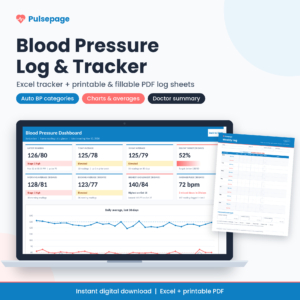 Blood Pressure Log Spreadsheet & Printable BP Tracker | Pulsepage Excel Blood Pressure Chart + Fillable PDF | Blood pressure readings, categories, averages | Excel tracker plus 7 printable pages | One-page summary, 4 charts, medications and visit sheets | US Letter, A4 |
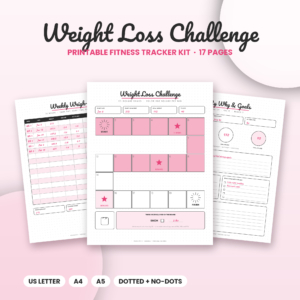 Pound Path Weight Loss Challenge Printable | 17-Page Fitness Tracker Kit with Challenge Boards, Weigh-In Log & Habit Tracker | US Letter, A4 & A5 | Weight, measurements, workouts, habits, food | 17-page printable with DOCX user guide | Progress graph and weigh-in log | US Letter, A4, A5 |
Which health tracker suits which person?
Each tracker suits a different reader, and the right match depends on whether your goal is diagnosis support, ongoing monitoring or motivation.
The Hushtrace migraine tracker suits people trying to spot triggers. If your headaches seem random, the attack log with automatic duration and the 13-trigger checklist gives you evidence over a few weeks. The plain-English pattern notes help if you don't enjoy reading charts. It is also useful for anyone preparing for a neurology or GP discussion.
The Pulsepage blood pressure log suits people who take regular home readings. If you have been asked to record morning and evening readings, this does the arithmetic. It sorts each reading into a category and gives weekly and monthly averages, which is the figure clinicians often want. The 12-week sheet is handy for a longer review period.
The Pound Path kit suits people who need a visible, rewarding routine. You choose a 10, 20, 30 or 50 square board, or the 100-square grid, read your square value off the helper chart and claim a reward at each star. Someone who finds a plain weigh-in log dull may find colouring a board more motivating.
If you are managing a medical condition, any of these can sit alongside professional advice but cannot replace it.
How do you get the most from a health tracker?
A health tracker works best when you record at the same time each day, in the same way, for several weeks. Consistency matters more than detail. Here is a simple routine that suits all three products.
- Pick one format, spreadsheet or print, and stay with it for at least four weeks.
- Choose a fixed moment, such as after breakfast, to make your entry.
- Record the entry straight away, because memory fades quickly, especially for symptoms.
- Keep a short note of anything unusual, such as a poor night's sleep or a missed meal.
- Review the charts once a week, not every day.
- Print the summary a few days before an appointment so you can add questions.
For blood pressure, use the same arm and the same home monitor each time, so your readings are comparable. The Pulsepage log records what you enter; it does not read your blood pressure.
For the migraine diary, fill in the attack log as soon as you can after an episode, while pain levels and likely triggers are fresh. Each product includes a user guide, so read it once before you begin.
What mistakes should you avoid when choosing and using a health tracker?
The most common mistake is choosing a tracker that is more complicated than you will maintain. These are the pitfalls worth knowing.
- Tracking too many things at once. Start with the core fields. You can add more after a fortnight.
- Expecting a template to measure for you. None of these products includes a sensor, monitor or scales. You need your own blood pressure monitor or weighing scales.
- Filling in the log in batches. Entering a week's data on Sunday produces guesses, which makes the patterns unreliable.
- Reading too much into a short run of results. A few days is not a trend. Give it several weeks before drawing conclusions.
- Treating the dashboard as a diagnosis. Pattern notes show links in your own data, not medical conclusions. Take them to a doctor.
- Picking the wrong paper size. If you print at home in the UK, choose the A4 version rather than US Letter, which can scale or crop.
What affects the price of a health tracker?
The price of a health tracker depends mainly on how much it does for you and whether it is a one-off file or a subscription. The products here are digital downloads, so there is no physical item to ship.
A template with a built-in dashboard, charts and automatic calculations costs more to produce than a simple printable page, so the spreadsheet-based Hushtrace and Pulsepage products may cost more up front than a basic log. The number of included formats also plays a part, for example a spreadsheet plus a fillable PDF in two paper sizes. Pound Path is a print-and-colour kit, so its value lies in the variety of pages rather than automatic analysis. Current prices are shown on each product card, so check those before you decide.
By comparison, wearable devices and apps often add ongoing costs such as subscriptions or replacement batteries. A template has no running costs beyond paper and ink if you print.
Which health tracker should you choose for peace of mind?
Choose by the question you need answered. If you want to find out what triggers your headaches, pick the Hushtrace migraine tracker. If you have been asked to monitor your blood pressure at home, pick the Pulsepage log. If you need a motivating way to stick to a weight goal, pick the Pound Path kit.
A simple rule works well: if a doctor will read the results, choose the tracker with a one-page summary. If only you will read them, choose the one you enjoy filling in. Browse all 3 options below and compare them against that rule.
Common questions
Is a spreadsheet health tracker as good as a smartphone app?
A spreadsheet suits people who want full control and no account to set up, since the data stays in your own file. An app may remind you to log entries. If you forget easily, add a phone alarm to your spreadsheet routine.
Can I use Google Sheets instead of Excel?
For the Hushtrace migraine tracker, yes, because it is supplied as both an Excel and Google Sheets workbook. The Pulsepage blood pressure log is described as an Excel tracker, so use Excel for the dashboard and charts, and the PDF sheets if you prefer paper.
How long should I keep a headache diary before seeing a doctor?
There is no fixed rule in the product details, and your doctor may give their own guidance. As a practical guide, a few weeks of entries gives the dashboard enough data to show patterns. Print the one-page summary and bring the fillable diary as a back-up.
Do these trackers work in kilograms and pounds?
Pound Path works in lbs or kg, so you can use whichever you weigh in. The other two products track symptoms and blood pressure readings, so weight units do not apply. Check your scales display the same unit you choose.
Which tracker is best if I only want a paper version?
All three include printable pages. The Pulsepage log provides 7 printable pages, including weekly, monthly and 12-week sheets, and the Hushtrace diary is a 71-page fillable PDF. Pound Path is designed to be printed and coloured in. If paper is your priority, choose by condition.