



A migraine tracker that does the counting for you
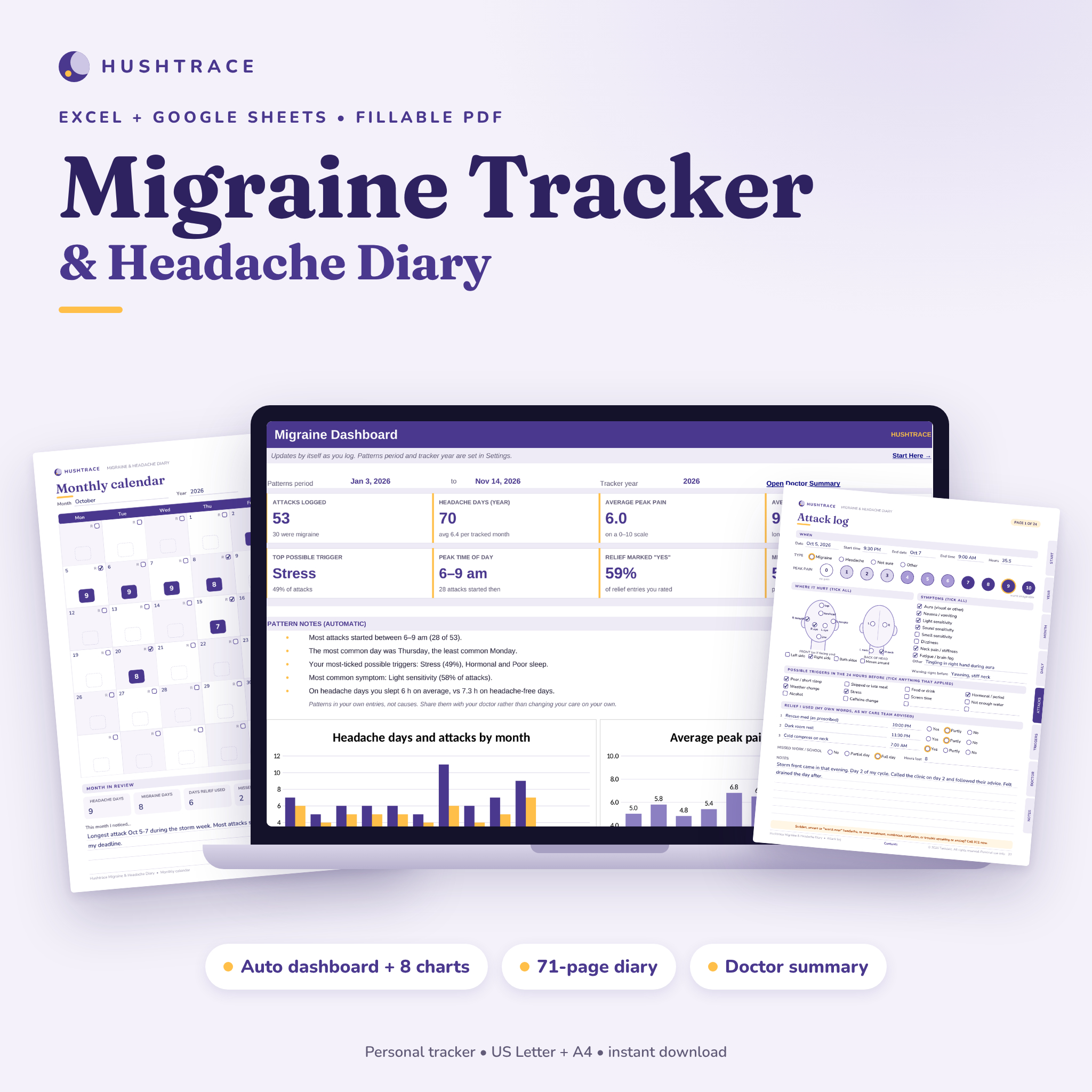
Hushtrace is a migraine tracker and headache diary in two formats. Log each attack in an Excel or Google Sheets workbook and it works out the duration, counts your headache days, ranks your possible triggers and symptoms, and builds a one-page summary to print for your appointment. Prefer pen and paper, or a tablet? The 71-page fillable PDF diary follows the same structure, so you can switch between them.
It is built for people who get migraines or frequent headaches and want an honest, organized record without an app account, ads or subscriptions. Your files stay on your own computer or Drive.
What you get
- Hushtrace Migraine Tracker (.xlsx): 11 tabs for Excel and Google Sheets: Start Here, Dashboard, Attack Log, Daily Check-in, Calendar, Monthly, Patterns, Doctor Summary, Appointments, Settings and Lists.
- Hushtrace Migraine and Headache Diary (PDF): 71 fillable, printable pages in US Letter and A4, with clickable contents and side tabs.
- User guide (.docx): setup for Excel, Google Sheets and Adobe Acrobat Reader, every feature explained, tips, troubleshooting and FAQ.
Headache tracker spreadsheet features
Attack log
- 500 rows: date, start and end time, duration calculated automatically (overnight and multi-day attacks handled)
- Type (migraine, headache, not sure, other), peak pain 0-10 with color coding and main location
- 8 symptoms (aura, nausea or vomiting, light, sound and smell sensitivity, dizziness, neck pain, fatigue or brain fog)
- 13 possible triggers: sleep, skipped meals, food or drink, hormonal, weather, stress, screens, hydration, alcohol, caffeine change and 3 you name yourself
- Two relief entries in your own words, the time, and whether it helped (Yes, Partly, No), plus missed work or school
Dashboard and patterns
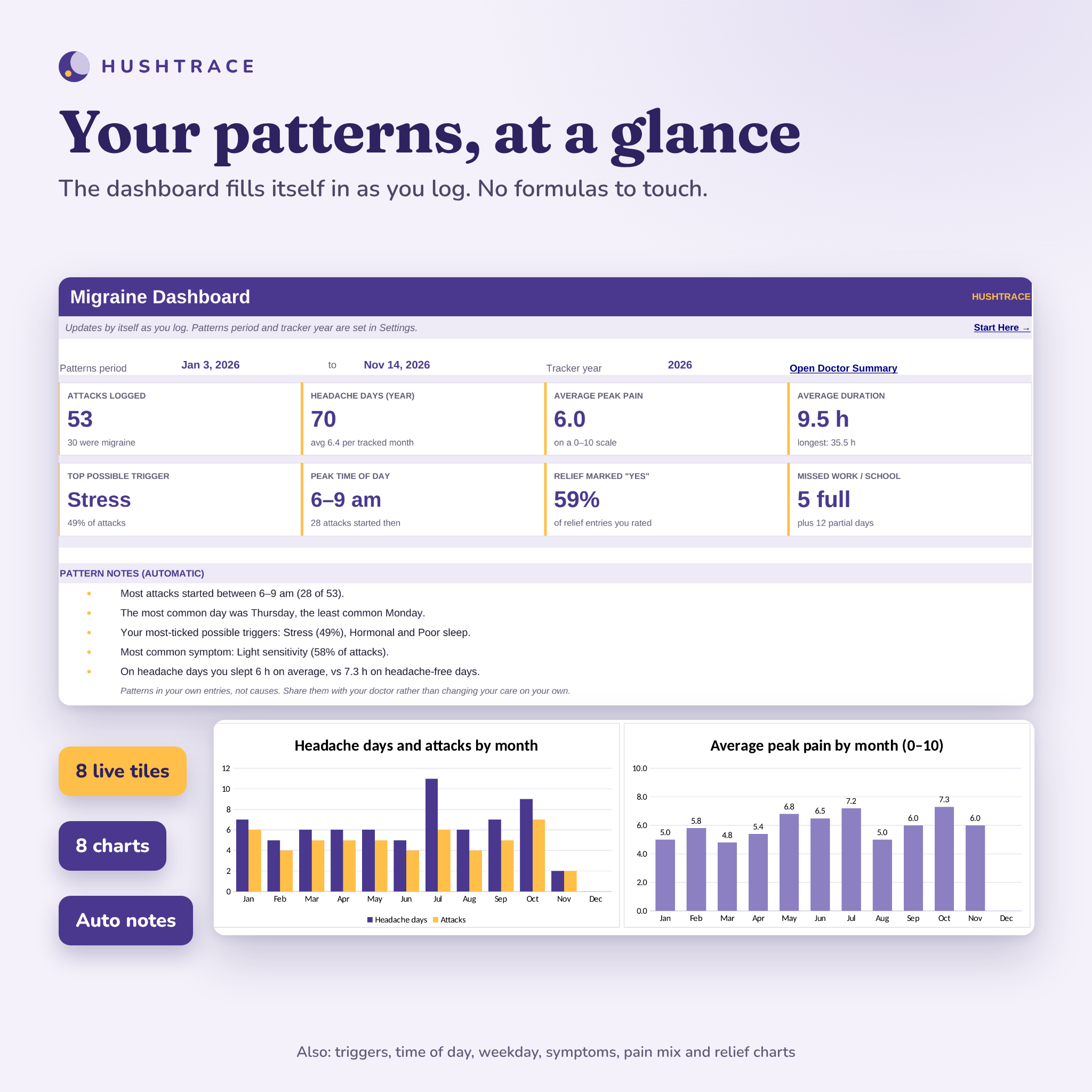
- 8 live tiles: attacks, headache days, average pain, average duration, top possible trigger, peak time of day, relief marked “Yes” and missed days
- Automatic pattern notes in plain English, such as when most attacks start and your most common symptom
- 8 charts: headache days and attacks by month, average pain by month, triggers, time of day, weekday, pain mix, symptoms and relief ratings
- Patterns tab: ranked triggers, symptoms, time of day, weekday, location and type, plus a relief review
- Daily Check-in comparison: sleep, water, caffeine, stress and screen time on headache days vs headache-free days, and the headache rate on period days
Calendar, monthly totals and doctor summary
- Year-at-a-glance heat map: every day an attack touched, shaded by its highest pain, plus a month view
- Monthly table: attacks, migraine attacks, headache days, pain, hours, days relief used, aura and missed days
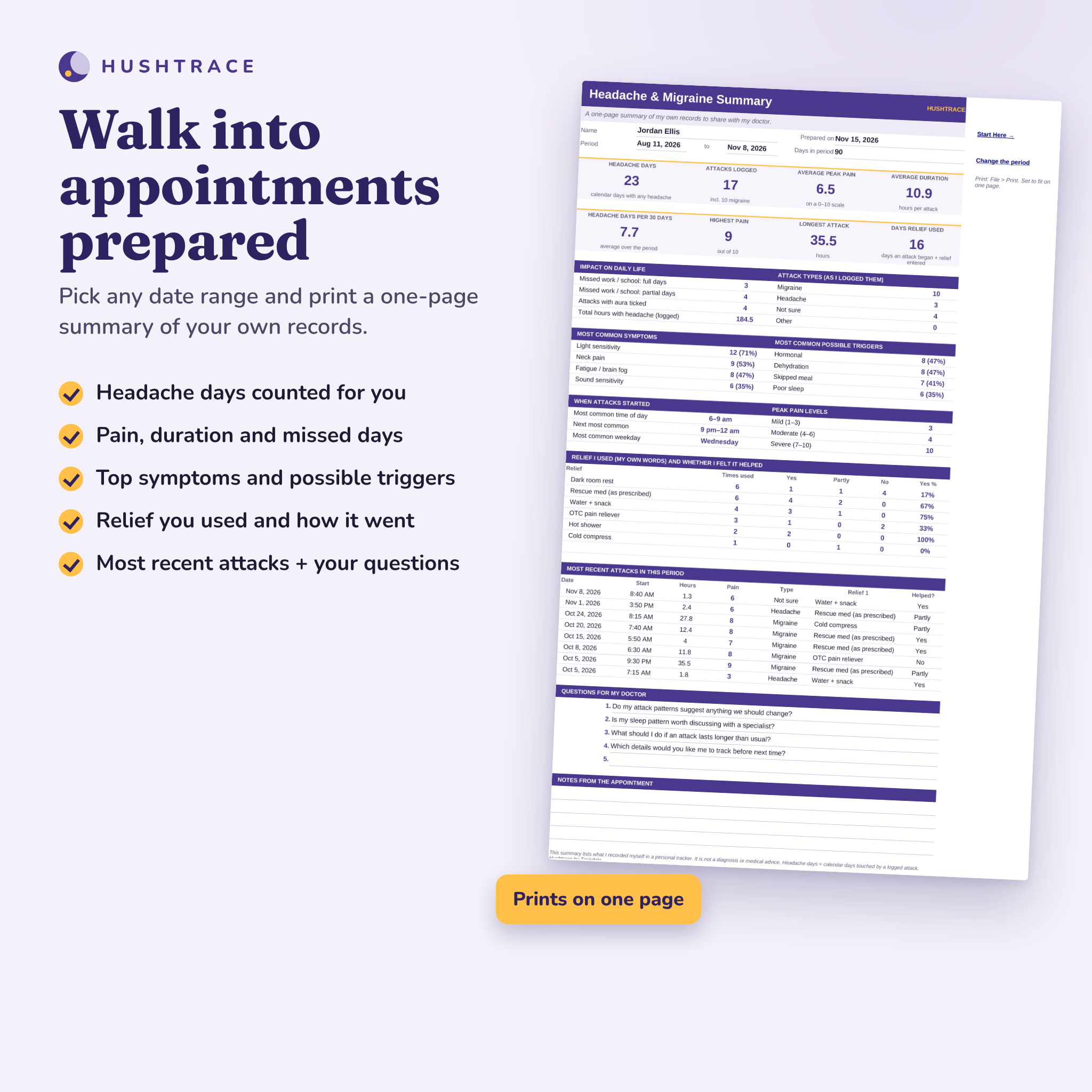
- One-page Doctor Summary for any date range: headache days per 30 days, top symptoms and triggers, relief counts, 8 most recent attacks and your questions
- Appointments log with the plan in your provider’s words and the next visit shown at the top
Fillable headache diary pages
- When to get help now (emergency signs), welcome and pain scale guide, clickable contents
- Headache profile, care team contacts and a relief record in your own words
- Year at a glance and 12 undated monthly calendars with a month review
- 12 weeks of daily logs: sleep, water, caffeine, stress, screens, meals, period, weather
- 24 attack log pages with a front and back head map and a tap-to-select 0-10 pain scale
- 4 trigger checklists, 12 questions for my doctor and 6 appointment summaries
How it works
- Open Settings: add your name, rename three custom triggers and list the relief you use.
- Add a row to the Attack Log whenever a headache starts or ends. A few fields are enough; add detail later.
- Watch the Dashboard, Calendar and Patterns update by themselves.
- Before an appointment, set the date range and print the Doctor Summary, or fill in the diary’s appointment pages.
Who it is for
- Adults with migraine or frequent headaches who want a clear record of headache days
- Anyone preparing for a primary care, neurology or headache specialist visit
- Caregivers keeping a record for a family member, with their agreement
- People who prefer a private file over a tracking app
Real situations where it helps
- Your doctor asks “how many headache days a month?” and you can answer with a number instead of a guess.
- You suspect weather or short sleep plays a part and want to see how often they come before attacks.
- You need a record of missed work or school days.
- You want to note which relief you used and how it went, in your own words, to discuss at your next visit.
File formats and requirements
- XLSX for Microsoft Excel 2016 or newer (Windows and Mac), Excel 365 and Google Sheets (free Google account). Formulas are locked without a password; input cells stay open.
- PDF in US Letter and A4. Fill in on screen in Adobe Acrobat Reader (free) or print at 100%.
- DOCX user guide for Word, Google Docs or Pages.
- No macros, add-ins or internet connection needed. No money values, so there is no currency to set.
Customization
Rename the three custom triggers, build your own relief list, choose the tracker year and pick the date ranges used by the Dashboard and Doctor Summary. In the PDF, every page is undated, so you can start any day and reprint pages as often as you need.
Important
Hushtrace is a personal record-keeping tool. It does not diagnose or treat any condition, it is not medical advice, and it never suggests medicines or doses. If you have a sudden, severe or “worst ever” headache, or a headache with confusion, fainting, a high fever or stiff neck, weakness or numbness on one side, or trouble seeing, speaking or walking, call 911 or your local emergency number. Both files include this guidance.
Digital download
This is an instant digital download. Nothing is shipped. Personal use only (or use within your own business for business templates). You may not resell, share, or redistribute the files. © 2026 Taskdale. All rights reserved.
Migraine tracker FAQ
Does it work in Google Sheets?
Yes. Upload the XLSX to Google Drive and open it with Google Sheets. The workbook uses only functions that Excel and Google Sheets share, with no macros, and its native charts convert. The guide shows the steps.
What counts as a headache day?
Every calendar day touched by a logged attack. An attack from Monday night to Tuesday morning counts as two days.
Will it tell me what my triggers are?
It shows how often each possible trigger came before your attacks. Those are patterns in your records, not proof of a cause, so discuss them with your doctor.
Does it recommend medication?
No. You type the relief you use in your own words. Hushtrace never suggests medicines, doses or treatments.
Can I fill in the diary on an iPad?
Yes, in Adobe Acrobat Reader or another PDF app that supports form fields. You can also import it into a note app and write by hand.
Is the diary dated?
No. Every page is undated, so you can start any month and reuse pages.
How many attacks can I log?
500 in the spreadsheet, across any dates, and 24 attack pages in the PDF (print more any time).
Reviews
There are no reviews yet.