Best Homeschool Planner 2026-2027: Three Options Compared
The best homeschool planner for 2026-2027 depends on how you like to work. Thistlewood suits GoodNotes users, Little Oak Command Centre suits families who want a spreadsheet that does the sums, and Brightwood gives you fillable PDF pages plus an Excel tracker. All three cover attendance, grades and a high school transcript.
Choosing can feel like a lot when you are also choosing curriculum, so this guide keeps it simple. We'll go through what matters, compare the three side by side and give you a rule for deciding.
Key facts at a glance
- Thistlewood has dated months from July 2026 to June 2028, plus 12 undated months, and records for up to four students.
- Little Oak Command Centre is an Excel file for up to 6 children that dates itself for 2026-2027 or any other school year.
- Brightwood has 126 fillable, hyperlinked PDF pages plus an Excel Command Centre that adds up attendance, hours, grades and GPA.
- All three offer US Letter and A4 printing and include a high school transcript.
- Only Thistlewood is built for GoodNotes and Notability, so it is the one to pick if you handwrite on a tablet.
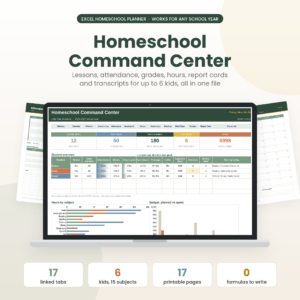
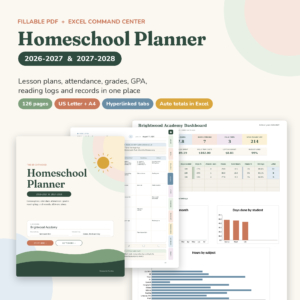
Table of Contents
Toggle
- What should you look for in a homeschool planner for 2026-2027?
- How do the three homeschool planners compare?
- Which homeschool planner suits which family?
- How do you use a homeschool planner through the school year?
- What mistakes should you avoid when choosing a homeschool planner?
- What affects the price of a homeschool planner?
- How do you make the final choice?
- Common questions
What should you look for in a homeschool planner for 2026-2027?
A good 2026-2027 homeschool planner matches the way you actually work, records what your state expects, and covers every child you teach. Six factors sort the options quickly, and you can check each one in a few minutes.
Format: tablet, spreadsheet or printed pages
A homeschool planner is a set of dated pages and trackers that hold your lessons, attendance and grades in one place. The format decides whether you will keep using it by October.
Thistlewood is a hyperlinked file for GoodNotes and Notability, with printable files too. Little Oak is an Excel workbook. Brightwood is a fillable PDF you can type into on screen or print, with an Excel companion.
Number of children
Check the student limit before anything else. Thistlewood holds up to four students. Brightwood's PDF holds four, while its Excel Command Centre goes up to six. Little Oak handles up to six children in one file.
If you teach five, only the spreadsheets cover everyone without a workaround.
Dates that fit the school year
The 2026-2027 label matters because dated pages save you writing in every date. Thistlewood and Brightwood both run from July 2026 to June 2028, so the dated calendars cover two school years. Thistlewood adds 12 undated months for any start date outside that window.
Little Oak dates itself for 2026-2027 or any school year you choose, which suits a year that starts in January or mid-term.
Record keeping: attendance, hours, grades and transcripts
Your records are the part that matters if anyone ever asks to see them. All three include attendance, hours, grades and report cards, and all three include a high school transcript.
Little Oak counts toward 180 days or your state's hours. Brightwood's spreadsheet adds up attendance, hours, grades and GPA for you. Thistlewood provides the record pages, and you fill them in by hand. Check your own state's requirements before relying on any template.
How much the planner calculates for you
A planner either gives you blank pages to complete or fills in totals itself. Little Oak works on a type-it-once basis: you enter each lesson once, and the weekly planner, gradebook, hours tracker and dashboard fill in on their own.
Brightwood calculates in its Excel file only, while its PDF pages are for writing and planning. Thistlewood is mainly a handwritten system.
Layout for daily and weekly planning
Thistlewood uses two-page weekly spreads with a schedule, to-do list, menu and subject grid, and adds book, lesson, unit study, loop schedule, meal and chore pages, plus stickers. Brightwood has 36 weekly lesson plans, daily pages and kid checklists. Little Oak prints 17 pages in Letter and A4 and comes with a 20-page user guide.
A loop schedule, for the record, is a rotating list of subjects you work through in order rather than fixing to set days. Thistlewood is the one that includes it.
How do the three homeschool planners compare?
The three planners differ most in format, student limit and how much they calculate. The table sets out what the product details confirm.
| Product | Format | Students | Dates | Best known for |
|---|---|---|---|---|
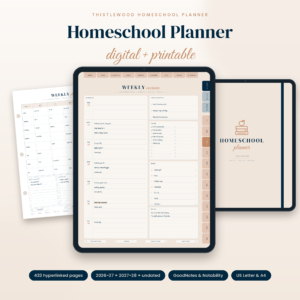 Homeschool Planner 2026-2027 Digital & Printable | Thistlewood Hyperlinked GoodNotes Planner with Lesson Plans, Attendance Tracker, Reading Log & Transcript | US Letter & A4 | Hyperlinked digital file for GoodNotes and Notability, plus printables | Up to 4 | July 2026 to June 2028, plus 12 undated months | Weekly spreads, meal and chore pages, stickers |
| Homeschool Planner Spreadsheet for Excel | Little Oak Command Centre | Excel workbook with 17 printable pages | Up to 6 | Dates itself for 2026-2027 or any school year | Type once and everything fills in |
| Brightwood Homeschool Planner 2026-2027 | Fillable PDF Lesson Planner, Attendance, Grade & GPA Tracker + Excel Command Centre | US Letter & A4 | 126 fillable PDF pages plus Excel | 4 in the PDF, 6 in the spreadsheet | July 2026 to June 2028 | Planning pages and automatic GPA together |
The summary: Thistlewood is the most hands-on, Little Oak is the most automatic, and Brightwood sits between them.
Which homeschool planner suits which family?
Each planner suits a different habit, so match yours rather than hunting for the one with the longest feature list.
Thistlewood suits families who like to write. If you already use GoodNotes or Notability, the hyperlinks let you jump from a monthly view to a week or a record page. The meal and chore pages make it a household planner as much as a school one. It stops at four students, so a larger family would need a second copy or another option.
Little Oak Command Centre suits families who dislike adding up. You type a lesson once, and attendance, hours and grades follow. For a parent who needs a clear tally toward 180 days or a state hours target, that saves real time each week. It suits you only if you are comfortable opening Excel regularly.
Brightwood suits families who want both a planner and a calculator. The fillable PDF gives you lesson plans, daily pages and checklists you can type into or print. The Excel Command Centre then handles the totals. It is a sensible choice if you teach a mix of ages, since the spreadsheet reaches six students.
For a high schooler, all three include a transcript, so the deciding factor is whether you would rather build it by hand or have GPA calculated.
How do you use a homeschool planner through the school year?
A homeschool planner works best when you set it up once in summer and then spend about ten minutes a week keeping it current. Here is a routine that fits any of the three.
- Enter the school year start and end dates, plus any term breaks, before you plan any lessons.
- Add each child's name and the subjects they will study.
- Block out fixed commitments such as co-op days, music lessons and appointments.
- Plan one week in detail, then roughly outline the following three.
- Mark attendance at the end of each school day, not at the end of the week.
- Record grades and hours as work is finished, so nothing piles up.
- Review the month on the last Friday and adjust the next one.
If you print pages, keep a spare copy of the blank record pages. With the spreadsheet, save a dated backup copy each month.
What mistakes should you avoid when choosing a homeschool planner?
The most common mistake is buying for features you will not use. A planner with a dozen tracker pages only helps if you fill them in.
- Ignoring the student limit. Count every child you will teach this year, including any starting next year.
- Choosing digital without checking your app. Thistlewood is made for GoodNotes and Notability. Confirm you have one of them before buying.
- Skipping the paper size. US Letter and A4 are both included, but print a test page first so margins suit your printer.
- Assuming a template meets your state's rules. Hours and days vary, so read your own requirements first.
- Leaving record pages until the end of term. Attendance reconstructed from memory is the weakest record you can keep.
What affects the price of a homeschool planner?
The price of a homeschool planner is shaped by how many students it covers, how much it calculates, and how many separate files you receive. In general, a planner you fill in by hand costs less to produce than one with built-in formulas.
A bundle with a PDF and a spreadsheet, such as Brightwood, includes more files than a single workbook. Longer user guides and extra printable pages also add to what you receive. You are paying once for a digital download rather than for physical paper, so compare the live prices on the product cards against how many children you teach and how much calculating you want done.
How do you make the final choice?
Choose by your working habit. If you handwrite on a tablet, pick Thistlewood. If you want the sums done and have more than four children, pick Little Oak Command Centre. If you want fillable planning pages and automatic GPA together, pick Brightwood.
You can browse all 3 options below, but one honest question settles most cases: will you open this file every school day? Choose the one you answer yes for.
Common questions
Can I start a homeschool planner part-way through the school year? Yes. Little Oak dates itself for any school year you choose, and Thistlewood includes 12 undated months. Either lets you begin mid-year without wasted pages. Brightwood's dated calendars run from July 2026, so you would simply start at the relevant month.
Do I need to print a digital homeschool planner? No. Thistlewood works in GoodNotes and Notability, and Brightwood's PDF can be typed into on screen. All three also offer printable pages in US Letter and A4, so you can mix digital planning with paper for the pages you prefer to write on.
Which planner is best for a high schooler's transcript? All three include a high school transcript. Brightwood and Little Oak also calculate grades and hours in Excel, which helps with GPA. Thistlewood provides transcript and record pages you complete by hand. Choose by whether you want calculation or manual control.
Can one planner cover a large family? It can, up to a point. Little Oak and Brightwood's Excel Command Centre support up to six students, while Thistlewood and Brightwood's PDF stop at four. With more than four children, start with a six-student spreadsheet.
Will these planners count my state's required days or hours? Little Oak counts toward 180 days or your state's hours, and Brightwood's spreadsheet adds up attendance and hours. Requirements differ by state, so check your own rules, then pick the planner whose tracking matches them.