Clients rarely argue about the price you agreed. They argue about the price they do not understand. A discount that seems to vanish, tax added to the wrong number, an hourly rate hidden inside a lump sum. Good invoice pricing puts every step of the math in plain sight, so the total feels obvious.
This guide shows how to lay out rates, discounts and tax on an invoice, in the right order, with worked numbers you can copy. It suits freelancers, service businesses and small product sellers. Along the way you will see which Taskdale spreadsheets work out the pricing and the tax for you, so you stop doing it on a phone calculator.
Quick picks: spreadsheets that handle invoice pricing
| Product | Best for | Price | Link |
|---|---|---|---|
| Clientora Business HQ | Setting hourly and service rates, then invoicing | $49.00 | View |
| Tallyhive Small Business Spreadsheet | Makers pricing products with fees and shipping | $35.99 | View |
| Sorbet Books Bookkeeping Spreadsheet | Tax-added or tax-inclusive pricing in any currency | $17.00 | View |
| Petal & Ledger Small Business Hub | Handmade sellers comparing five pricing methods | $13.99 | View |
The order of the math on an invoice
Most confusion comes from doing the steps in a strange order. Keep to this sequence and your invoices will add up the same way every time:
- Quantity times rate gives each line total.
- Line totals add up to the subtotal.
- Any invoice-wide discount comes off the subtotal.
- Tax is worked out on the discounted amount.
- Shipping or delivery is added.
- That gives the invoice total.
- Deposits or part payments come off, leaving the balance due.
A worked example
A graphic designer bills a local bakery for a small branding job:
| Line | Qty | Rate | Amount |
|---|---|---|---|
| Logo design | 3 hours | $70.00 | $210.00 |
| Logo file pack (flat fee) | 1 | $150.00 | $150.00 |
| Business cards, printed | 200 | $0.35 | $70.00 |
| Subtotal | $430.00 | ||
| Discount, new client 10% | -$43.00 | ||
| Sales tax 7% on $387.00 | $27.09 | ||
| Delivery | $12.00 | ||
| Total | $426.09 | ||
| Deposit received | -$100.00 | ||
| Balance due | $326.09 | ||
Read it top to bottom and nothing jumps. That is the goal. The bakery owner can check every number with a pencil in under a minute, which means she is far more likely to just pay it.
Tax rules differ by place and by product, so treat the 7% here as an example only. Some places tax delivery, some do not, and some services are exempt. Check the rules where you trade.
How to show your rates clearly
Your rate is the heart of every line. Hide it and clients start guessing. Show it and they see value.
Hourly rates
Write the task, the hours and the rate: “Bookkeeping, April, 7.5 hrs at $48”. Use decimals for part hours rather than minutes. “7.5” is clearer than “7 hrs 30 min” and works in a spreadsheet formula.
Flat fees and packages
Write what the package includes, then one price. “Website care plan, April: updates, backups, 1 hour of edits”. The client should not have to remember what “Plan B” means.
Per-unit pricing
For products or countable work, show the unit: “Wedding favors, 120 at $2.40 each”. A per-unit price lets the client check the math and makes reorders easy to quote.
Day rates and minimum charges
If you charge a half-day minimum, say so on the line: “Site visit, half-day minimum, 1 at $220”. A plumber who charges a call-out fee should list it as its own line, not fold it into labor.
Whatever you use, keep the same wording and the same rate for the same work across clients. Changing “Consulting” to “Strategy session” for the same service makes your price list look shaky.
Pricing your work before it lands on the invoice
Rates that look clear on an invoice still need to be right. Plenty of freelancers pick an hourly rate by looking at what others charge, then wonder why money is tight in March.
A quick way to check yours: decide what you want to earn in a year, add your yearly business costs, and divide by the hours you can truly bill. Say you want $50,000, your costs are $8,000, and you can bill about 1,100 hours once you take out admin, holidays and quiet weeks. That is $58,000 divided by 1,100, or about $52.73 an hour. Round up to $55 and you have a rate with a little room in it.
That small sum can be a real eye-opener. It also gives you a number you can defend calmly when a client pushes back.
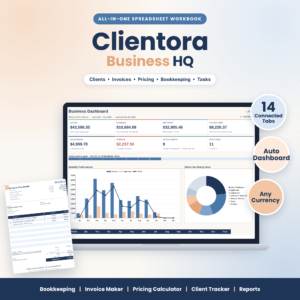
Clientora Business HQ
Price: $49.00 | Best for: freelancers and client-based services
Clientora is one connected .xlsx workbook with an hourly rate calculator, break-even targets and a price builder for up to 40 services that adds costs, overhead, profit margin and sales taxes. Pick a client and a service on an invoice and the price fills in from your Pricing tab, then the Invoice Maker turns it into a print-ready page. Start with the hourly rate calculator, then load your services.
Showing discounts without confusing anyone
A discount is a gift. Make sure the client can see it. Never just lower the rate quietly, because next time you charge full price it looks like a price rise.
Line discount or invoice discount?
Use a line discount when only one item is reduced, such as “Second room, 15% off”. Use an invoice discount when the whole job is reduced, such as a loyalty or bulk discount. Show the original amount, the discount as its own line with a minus sign, and the new figure.
Percentage or fixed amount?
Both work. Write the percentage and the money: “Loyalty discount 10%: -$43.00”. The percentage tells the story, and the dollar figure saves the client a sum.
Early payment discounts
Some businesses offer a small reward for paying fast, such as 2% off if paid within 10 days. Do not take it off the total. Put a note under the balance instead: “Pay by 14 May and take $8.52 off.” On a $426.09 invoice, 2% is $8.52. If they pay in time, record the discount when the money arrives.
Free items
Even a freebie deserves a line. “Extra proof round, complimentary, $0.00” reminds the client that it normally costs something. That makes it easier to charge for it next time.
Showing tax on an invoice the right way
Tax is where most homemade invoices go wrong. There are two common ways to price, and you need to pick one and stick to it.
Tax added on top
You list prices before tax, then add tax at the bottom. A $100 job with 8% sales tax shows $100 subtotal, $8 tax, $108 total. This is common for business-to-business work in many countries.
Tax included in the price
Your prices already include tax, and the invoice shows how much of the total is tax. A $120 item with 20% VAT included is $100 plus $20 of tax. Retail sellers often price this way so the shelf price is the final price.
Details that matter
- Name the tax correctly: sales tax, VAT, GST, HST, whatever applies where you trade.
- Show the rate as well as the amount: “VAT 20%: $20.00”.
- If some items are exempt, mark them, and only tax the rest.
- If you charge two taxes, such as a state and a local rate, give each its own line.
- Add your tax registration number if your local rules require it.
Not registered for sales tax or VAT? Then do not add any. A line that says “No tax charged” can stop a client asking. For planning your own income tax payments, our guide to quarterly estimated taxes explains how much to set aside from each invoice.
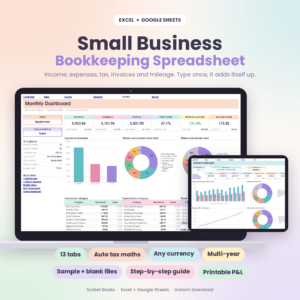
Sorbet Books Bookkeeping Spreadsheet
Price: $17.00 | Best for: beginners who want tax worked out
Sorbet Books is a bright, beginner-friendly bookkeeping workbook with 13 connected tabs for Excel 2010 or newer and Google Sheets. You choose your currency, your tax name (VAT, GST, Sales Tax or HST), your start month, and whether amounts are tax-inclusive or tax-added, and it works out tax, net amounts, invoices and a Profit and Loss report. Open the sample file first to see a worked year, then switch to the blank one.
Product sellers: fees, shipping and rounding
Sellers have extra layers. A candle sold through a marketplace carries listing fees, payment processing fees and sometimes a discount code. None of those belong on the customer’s invoice, but all of them belong in your price.
Take a candle that costs $6.10 to make, including wax, wick, jar, label and your time. If marketplace and payment fees take about 10% of the sale and you want a 40% profit margin, you need to charge more than you might think. Fees and profit together take half of every sale, so the cost has to fit in the other half: $6.10 divided by 0.5 is $12.20. Round up to $12.50 and you are covered. Price it at $9 because that “feels right”, and after fees you clear barely a dollar on each candle.
On the invoice itself, show the item price, quantity and any shipping as a separate line. If you round, round the unit price, not the total, so the math stays honest.

Tallyhive Small Business Spreadsheet
Price: $35.99 | Best for: makers and product sellers
Tallyhive is a 30-tab workbook for Excel and Google Sheets with a pricing calculator for handmade products. It counts materials, labor, equipment wear and packaging, compares five pricing methods, and allows for marketplace, payment and listing fees, discounts and .99 rounding. Orders then flow into invoices, packing slips and your books. Enter one product recipe first and see what price it suggests.
If you sell on several channels, Petal & Ledger is a close cousin with 21 linked tabs, five pricing methods side by side and branded invoices for each order.
Keeping the quote and the invoice in step
An invoice that does not match the quote is the fastest way to start an argument. If you quoted $1,800 and the invoice says $1,960, the client will ask why before they pay a cent. Often there is a good reason. It just has to be on the page.
The simplest habit is to build the invoice from the quote, line for line. Copy the same descriptions, the same rates and the same discount. Then add any extras as new lines at the bottom with a clear label, such as “Additional work agreed 12 May: extra coat on ceiling, 3 hrs at $45”. The client can see the original job, the change and the reason in one glance.
Prices can also drift over time. If you raise your rates in January, send regular clients a short note in December. A line on the first new invoice helps too: “New rate from 1 January: $55 per hour”. No surprises means no awkward phone calls.
If you are unsure which document a job needs at which stage, our explainer on quote vs estimate vs invoice lays out when to send each one and what each should promise.
Pricing mistakes that cost you money
- Tax on the pre-discount amount. In most cases a discount you give reduces the taxable amount. Taxing the full price overcharges the client.
- Rounding every line. Rounding each of 12 lines can drift the total by a few cents. Let the spreadsheet round once, at the end.
- Silent discounts. A rate dropped from $60 to $50 with no explanation becomes the new normal.
- Mixed tax methods. Some lines tax-inclusive, some tax-added. Pick one.
- No currency shown. If you work with clients abroad, write USD, CAD or GBP next to the total.
Fixing these takes one good template and about an hour of setup. For a wider view of keeping these numbers tidy all year, see our pick of the best bookkeeping spreadsheets for small business.
Frequently asked questions
Do you apply a discount before or after tax?
Usually before. Take the discount off the subtotal, then work out tax on the lower amount. Local rules can differ, especially for coupons from third parties, so check what applies where you sell.
How do I show an hourly rate on an invoice?
Put the task in the description, the hours in the quantity column and your hourly rate in the rate column. The line total is hours times rate. Use decimals, such as 2.25 hours, for part hours.
Should my invoice prices include tax?
Either is fine as long as you are consistent and clear. Business clients often prefer prices before tax. Shoppers often prefer a final price. If tax is included, still show how much of the total is tax.
How do I show a free item on an invoice?
List it as a normal line with a zero amount or with a matching discount line. That way the client sees the value they received without paying for it.
Can I charge two different tax rates on one invoice?
Yes. Give each tax its own line with its rate and amount, for example a state rate and a local rate. If some items are taxed at a lower rate or not at all, mark those lines so the client can see which rate applies where.
What is the best way to round prices on an invoice?
Round unit prices when you set them, and let the spreadsheet round the tax and total to the cent once. Avoid rounding each line separately.
Your next step
Take your last invoice and rebuild it in the seven-step order above. If the numbers shift, you have found your problem. Then put the right rates into a workbook that does the math, starting with the hourly rate calculator in Clientora Business HQ.