Most small businesses that send a modest number of invoices a month, get paid mainly by bank transfer and have one person doing the billing do fine with templates and a good spreadsheet. Invoicing software starts to pay off when volume climbs, when most clients pay by card on the spot, or when several people need to bill from different devices.
That is the short version. This guide walks you through the longer one, so you can make the call for your own business with confidence. You will get a side-by-side comparison, five questions that settle the choice, real-world style examples, and a look at the bookkeeping side that both options need. No sales pitch for either camp. Just the trade-offs, laid out plainly.
Quick picks: template systems for small business billing and books
| Product | Best for | Price | Link |
|---|---|---|---|
| Bookkeeping Spreadsheet Dashboard Bundle | Invoice log, bills and cash flow at a glance | $9.00 | View |
| Small Business Finance HQ | Growing firms wanting forecasts and tax planning | $7.99 | View |
| Clarity Books Easy Bookkeeping | Beginners who want invoices and books together | $3.00 | View |
| Small Business Bookkeeping Spreadsheet Bundle | Simple books with an overdue invoice tracker | $3.00 | View |
Software vs templates at a glance
| Factor | Templates and spreadsheets | Invoicing software |
|---|---|---|
| Cost | One-time purchase | Usually a monthly or yearly plan, sometimes with payment fees |
| Setup | An evening | An evening, plus learning the menus |
| Card payments | Paste a payment link from your provider | Often built in |
| Reminders | You send them | Often automatic |
| Several users | Possible with a shared file, but clunky | Usually designed for it |
| Offline use | Yes, on your computer | Depends on the product |
| Where data lives | Your own files | The provider’s servers |
| Custom layout | Change anything | Within the options offered |
Neither column wins outright. The right choice depends on which rows matter most to you.
What invoicing software does well
Good software earns its fee by doing things automatically that you would otherwise do by hand. Fair is fair, so here is the honest list.
- Automatic reminders. The invoice chases itself on day 1, day 7 and day 14 after the due date.
- Online payment. Clients click a button and pay by card. The invoice marks itself paid.
- Recurring invoices. A monthly retainer bills itself on the 1st without you lifting a finger.
- Team access. Three technicians can each create invoices from their phones, and the office sees them all.
- Bank connections. Some tools pull in bank transactions and match payments for you.
If you send 150 invoices a month, those features can save hours every week. That is real value, and for that kind of business the subscription is usually money well spent.
What templates do well
Templates win on simplicity, control and cost over time.
- Nothing to log in to. Open the file, fill it in, send the PDF.
- One payment, then no ongoing fee. Useful when money is tight in the early years.
- Total control. Add a box for a pet’s name, a job site, a lease number. Move the logo. Change the wording.
- Your data, your files. Nothing changes unless you change it.
- Room for other paperwork. Order forms, deposit agreements and change orders in the same style.
The trade is a little more manual work: sending reminders yourself, pasting a payment link, keeping a backup. For a sole trader that is often 15 minutes a week. If you have been weighing a specific app, our article on a Zoho Invoice alternative with no login looks at that trade in more detail.
Five questions that settle it
Answer these honestly. Score one point for software each time you answer “yes”.
- Do you send more than about 50 invoices a month? At high volume, automation saves real hours.
- Do most clients expect to pay by card straight from the invoice? A built-in pay button matters more then.
- Do two or more people create invoices? Shared software avoids clashing files.
- Do you bill the same amount to many clients every month? Recurring billing is a strong software feature.
- Does your accountant want you on specific software? If so, that settles it.
Zero or one point: templates and a spreadsheet will serve you well. Two points: either works, so try templates first since they cost less to start. Three or more: software is probably worth the monthly fee.
This is a rule of thumb, not a law. A business with one “yes” that matters hugely, like an accountant who insists, should follow that one answer.
Four small businesses, four answers
A private tutor with 14 students
One person. About 14 invoices a month. Parents pay by bank transfer. Score: zero. Templates and a spreadsheet are the clear choice. She sets up her invoice once, bills on the 1st, checks payments on the 10th, and spends about 40 minutes a month on billing in total.
A plumbing firm with four vans
Four plumbers, each finishing three to five jobs a day. That is well over 200 invoices a month. Customers pay by card on site. The office needs to see every job. Score: four. Software wins easily here, and the monthly cost is tiny next to the time saved.
An online candle shop selling wholesale
The shop’s online sales are handled by its marketplace. It also sends about 20 wholesale invoices a month to gift shops, mostly on 30-day terms, paid by bank transfer. One owner does the books. Score: zero or one. Templates for the wholesale invoices, plus a bookkeeping spreadsheet that brings marketplace payouts and wholesale income together, fit well.
A cleaning company with two crews
Two crews of two, 40 regular homes, billed monthly. About 40 invoices a month, half paid by bank transfer, half by card. The owner does the billing from the office on the last Friday of the month. Score: one, maybe two. This one sits on the line. Templates would work, with a payment link pasted into each email for the card payers. Software would save perhaps an hour a month on reminders. The owner tries templates for six months, keeps a note of time spent, and decides with real numbers instead of a guess.
Notice that the answer comes from how each business works, not from how big it feels. A busy tutor can be happier with a spreadsheet than a quiet shop that relies on card payments.
Invoicing is only half the job
Whichever way you invoice, you still need books. Income, expenses, profit, tax set-asides, bills coming due. Invoicing software often includes some of this. With templates, you need a spreadsheet to do it.
The good news is that a well-built bookkeeping spreadsheet can include an invoice log too. Your invoices go out from your template, and each one gets a line in the log. When it is paid, it flows into your income. One file, the whole picture.
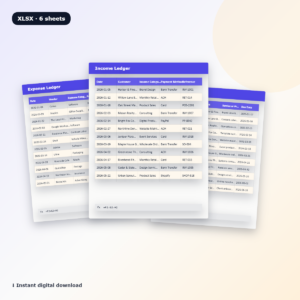
Bookkeeping Spreadsheet Dashboard Bundle
Price: $9.00 | Best for: freelancers and small shop owners
This downloadable spreadsheet system tracks income and expenses, builds monthly profit and loss summaries, shows a cash flow dashboard, keeps an invoice log, monitors bills and recurring payments, and has tax estimate tabs. It is an XLSX file for Microsoft Excel that also works in Google Sheets after upload, with setup instructions included. Start by entering this month’s income and expenses, then add any open invoices to the log.
A daily habit helps the books stay current. Our daily operations checklist for small businesses includes a two-minute money check you can fold into closing time.
A template system that grows with you
One worry about templates is outgrowing them. A plain invoice template, yes, you will outgrow. A connected finance workbook takes you much further. It can flag overdue invoices, forecast cash, plan tax and show a set of dashboards, all without a subscription.
Picture a small design studio with two partners and 25 clients. They send about 30 invoices a month, pay a part-time assistant, and want to know each quarter whether they can afford a new hire. A finance workbook with a cash forecast and budget vs actual answers that question in one sitting.
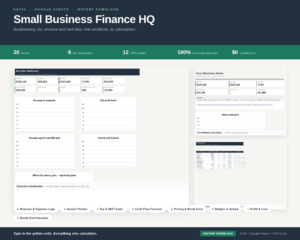
Small Business Finance HQ
Price: $7.99 | Best for: growing firms that want forecasts
Finance HQ is a 20-sheet workbook for Excel and Google Sheets: five sheets for logging, seven that calculate and six dashboards. It covers revenue and expense logs, an invoice tracker where overdue rows turn red, profit and loss, a tax centre for income tax and VAT, pricing and break-even, a cash flow forecast with a lowest-point warning, budget vs actual and a month-end checklist. You type in the yellow cells and leave the rest alone.
If dashboards are what tip you toward software, it is worth seeing what a spreadsheet can show first. Our roundup of the best financial dashboard templates compares a few options.
Starting simple if you are brand new
If you have just started, do not overthink this. You need a clean invoice, a list of who owes you, and a record of money in and out. Pick one beginner-friendly spreadsheet that does all three, use it for six months, and then decide whether anything is missing.
Most new owners find that six months of their own numbers teaches them more than any software comparison. You will know your volume, your clients’ payment habits and how much time billing really takes. Then the choice almost makes itself.
Run a six-month test
Keep a tiny log alongside your billing. Each week, jot down three things: how many invoices you sent, how many minutes billing took, and how many reminders you had to send. That is it. After six months, look at the totals. If billing averages 20 minutes a week, you have your answer: templates are fine. If it has crept to three hours a week and keeps climbing, software will likely pay for itself. The decision then rests on your own facts, which feels a lot better than guessing.
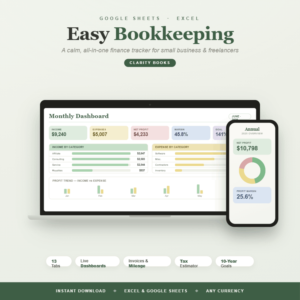
Clarity Books Easy Bookkeeping
Price: $3.00 | Best for: new owners and freelancers
Clarity Books is a 13-tab spreadsheet for Google Sheets and Excel with a Start Here guide, income and expense logs, invoices with automatic Paid, Unpaid and Overdue status, a mileage log, bank and cash balances, monthly and annual dashboards, and an automatic profit and loss, balance sheet, cash flow and tax summary. A step-by-step PDF user guide is included. Set your categories and tax rate first.
Switching later, in either direction
Choosing templates now does not lock you in. Neither does choosing software. People move both ways.
Moving from templates to software is easy if your records are tidy. Export your client list from the spreadsheet, carry on your invoice numbering, and enter any open invoices. Most software can import a client list from a spreadsheet file.
Moving from software to templates means exporting your customers and saving PDFs of past invoices while you still have access. Check your plan’s renewal date so you do not pay for an extra month by accident.
Some businesses end up with a mix, and that is fine. A landscaper might use software for the regular weekly mowing clients who pay by card, and a Word template for the occasional big garden build that needs a detailed quote, a deposit and a custom contract. The rule that keeps a mix tidy is simple: one invoice numbering sequence and one master record of income, whatever tool created each invoice.
Either way, keep your old records for as long as your local tax rules require. That part does not change, whatever tool you use.
Frequently asked questions
Do small businesses need invoicing software?
Not always. Many sole traders and small service businesses do well with invoice templates and a bookkeeping spreadsheet. Software helps most at high volume, with card payments on every invoice, or with several staff billing.
Is an Excel invoice template good enough for a small business?
Yes, for many. An Excel template with automatic totals, a client list and an invoice log handles creating and tracking invoices well. Pair it with a bookkeeping sheet for income, expenses and tax.
What do I lose by using templates instead of software?
Mostly automation: reminders, built-in card payment buttons, recurring billing and team access. You can cover these by hand with a weekly routine and a payment link from your card provider.
Can I use templates and still take card payments?
Yes. Create a payment link with your card provider and add it to the invoice notes or your email. The client pays by card and you mark the invoice paid in your spreadsheet.
Is it safe to keep invoices in a spreadsheet?
It is as safe as your backups. Keep the file in a synced folder or cloud drive you already use, and copy it to a second place each month. Then a lost laptop is an inconvenience, not a disaster.
When should I move from templates to invoicing software?
When billing takes several hours a week, when more than one person needs to invoice, or when most clients want to pay by card instantly. Until then, templates are usually the simpler choice.
Your next step
Run through the five questions above and add up your score. If it lands at zero or one, set up a template system this week and give it six months. A good place to begin is the Bookkeeping Spreadsheet Dashboard Bundle, which keeps your invoice log and your books in one file.