A loop schedule is a list of subjects you work through in rotation, picking up at the next item instead of tying each subject to a fixed day. The best loop schedule planner for most homeschool families is Rhythmboard if you teach several children, Hearthloop if you run a Charlotte Mason morning time, and Thistlewood if you want loops and school records in one file.
Key facts at a glance
- A loop schedule rotates subjects in order, so a missed day shifts nothing and you simply carry on with the next item.
- Rhythmboard covers up to 4 children across 43 printable and fillable pages.
- Hearthloop is built around morning time, with 5 morning menus for ages 3 to 12+.
- Thistlewood is a hyperlinked planner for GoodNotes and Notability, with a loop schedule page and records for up to four students.
- All three are digital products supplied in US Letter and A4, so you print or fill them in yourself.
 Homeschool Command Center Printables & Daily Rhythm Chart | Rhythmboard Fillable Homeschool Schedule for Up to 4 Kids
Table of Contents Toggle
- What is a loop schedule and why do homeschoolers use one?
- What should you look for in a loop schedule planner?
- How do the three loop schedule planners compare?
- Which loop schedule planner suits which family?
- How do you set up and use a loop schedule?
- What mistakes should you avoid with a loop schedule?
- What affects the price of a loop schedule planner?
- Common questions
- How should you make the final choice?
What is a loop schedule and why do homeschoolers use one?
A loop schedule is a rotating list of subjects or activities that you work through in order, then start again from the top. Instead of "history on Tuesday", you have "next in the loop", and you simply pick up where you stopped.
It can feel like a lot to take in at first, but the idea is gentle. Subjects that tend to get squeezed out, such as poetry, art, nature study or composer study, still get regular attention without a guilty backlog. If a day goes sideways, nothing is "missed". The loop waits for you.
Browse all 3 options below, and use the sections that follow to match one to how your household actually runs.
What should you look for in a loop schedule planner?
Look for a planner that shows where you are in the loop, fits the number of children you teach, and works in the format you will actually use. Pretty pages matter less than whether you can find the next item in five seconds.
A clear way to track your place in the loop
The core job of a loop planner is remembering what comes next. That might be a loop tracker with cards you move along, or a loop log where you record what you covered. Rhythmboard offers a subject loop tracker with cards. Hearthloop includes a loop schedule and a loop log. Thistlewood has a loop schedule page inside its wider planner.
Support for the number of children you teach
Cheque how many students the planner handles. Rhythmboard covers up to 4 children with colour-coded assignment checklists and What's Next cards for independent work. Thistlewood keeps records for up to four students. Hearthloop is designed around a shared morning time, with separate menus by age, so it suits a family teaching together.
Print, fill in, or use on a tablet
Decide first whether you want paper on the wall, a binder, or a tablet. Rhythmboard and Hearthloop are printable and fillable, and Hearthloop also comes as editable Word files. Thistlewood is hyperlinked and ready for GoodNotes and Notability, and also has printable files.
Dated or undated pages
Undated pages let you start any week of the year, which suits a loop schedule well, since loops do not follow a calendar. Rhythmboard has undated pages plus 2026-27 and 2027-28 year calendars. Thistlewood has dated months from July 2026 to June 2028, plus 12 undated months, so you can choose either.
Records you may need later
If you must keep attendance, hours, grades or a transcript, look for those pages. Thistlewood includes attendance, hours, grades, a report card and a transcript. The other two focus on daily rhythm and morning time, so you would keep formal records elsewhere.
How do the three loop schedule planners compare?
The three planners differ mainly in focus: Rhythmboard runs the whole school day, Hearthloop runs morning time, and Thistlewood runs the whole school year including records.
| Product | Main focus | Children covered | Format | Loop tools |
|---|---|---|---|---|
| Homeschool Command Centre Printables & Daily Rhythm Chart | Rhythmboard Fillable Homeschool Schedule for Up to 4 Kids | Daily rhythm and wall-based command centre | Up to 4 | 43 printable and fillable pages, US Letter and A4 | Subject loop tracker with cards |
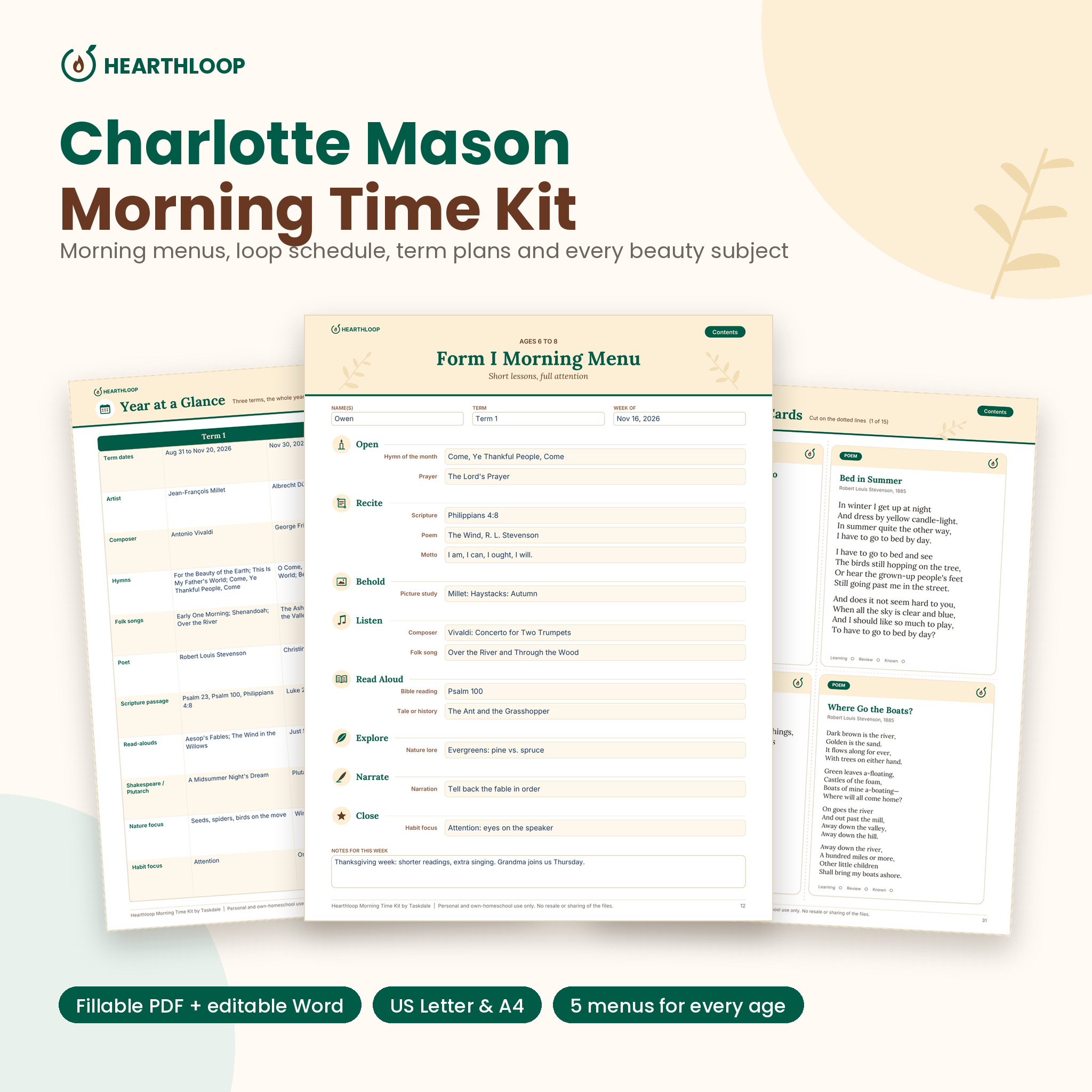 Charlotte Mason Morning Menu & Morning Time Planner | Hearthloop Editable Homeschool Morning Basket Kit | Charlotte Mason morning time | Family, with menus for ages 3 to 12+ | Fillable PDF and editable Word files, US Letter and A4 | Loop schedule and loop log |
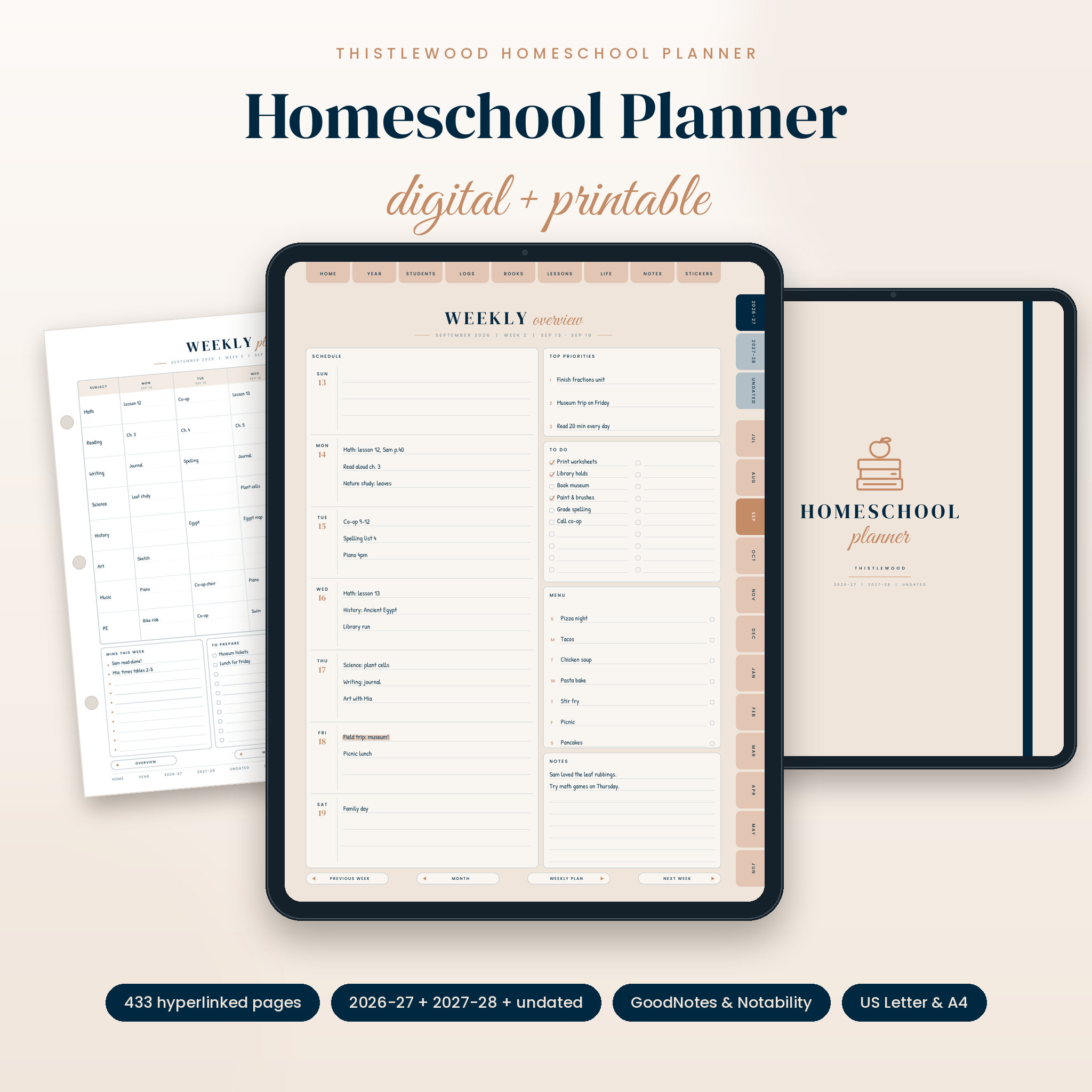 Homeschool Planner 2026-2027 Digital & Printable | Thistlewood Hyperlinked GoodNotes Planner with Lesson Plans, Attendance Tracker, Reading Log & Transcript | US Letter & A4 | Whole-year planning and records | Up to four students | Digital for GoodNotes and Notability, plus printable | Loop schedule page |
Which loop schedule planner suits which family?
Each planner suits a different household, and the right one depends on whether your pain point is the daily routine, the morning time, or the paperwork.
Rhythmboard: for the busy multi-child household
Rhythmboard puts the whole day on the wall. It has a daily rhythm chart, weekly schedule boards, chore charts and What's Next cards, so older children can see what to do without asking you. You type names once on Family Setup and they fill every page. It suits families with two to four children who want independence built into the day.
Hearthloop: for Charlotte Mason morning time
Hearthloop gives you five morning menus, including an All Together family menu, plus a loop schedule, a loop log, a weekly plan and three 12-week term plans. It also adds picture, composer, hymn and nature study pages, 36 narration prompts, 55 memory work cards and a 71-page Book of Centuries. It suits you if morning time is the heart of your day and you want the rotating subjects ready made.
Thistlewood: for planning and record keeping together
Thistlewood holds lesson plans, book and unit study pages, meal and chore pages, and a loop schedule in one linked file. Two-page weekly spreads include a schedule, to-do list, menu and subject grid. It suits you if you use a tablet, need attendance and transcript records, and want loops to sit alongside everything else.
How do you set up and use a loop schedule?
To set up a loop schedule, list your subjects in a fixed order, decide how many items you will do per session, and mark your place after each one. Here is a simple sequence.
- List every subject you want in rotation, such as poetry, art, nature study, composer study and handicrafts.
- Put them in an order that alternates heavy and light items.
- Decide how many loop items fit in one block, often one to three.
- Do the next items, then mark where you stopped on your tracker, card or log.
- Next session, start from that mark, even if days have passed.
- After a term, review the order and swap out items that are not working.
Keep core subjects such as maths and reading outside the loop. Those usually need daily practise, while the loop is best for subjects that benefit from regular but not daily attention.
What mistakes should you avoid with a loop schedule?
The most common mistake is putting too much in the loop, which turns it into a list you never finish. Keep it short enough that you complete a full cycle in roughly one to two weeks.
- Looping daily-practise subjects. Maths facts and early reading need steady repetition, not rotation.
- Skipping the place marker. Without a tracker or log, you forget where you stopped and the loop collapses.
- Setting rigid times on every item. A loop works because it is flexible. Fix the block of time, not each item.
- Ignoring older children's independence. If you teach several ages, give each child a clear What's Next list so you are not the only one who knows the order.
- Choosing the format you admire, not the one you use. A tablet planner is wasted if you reach for a pen, and the reverse is true too.
What affects the price of a loop schedule planner?
The price of a loop schedule planner is mainly affected by how much content it includes, how many years it covers, and how many file formats you get. Larger kits and multi-year planners generally cost more up front than a single-purpose chart.
In this group, Thistlewood spans two school years of dated months and includes records pages, while Hearthloop bundles term plans, study pages and memory cards. Rhythmboard focuses on daily boards. Cheque the live product cards for current prices, and weigh them against the pages you will genuinely use rather than the page count alone.
Common questions
Can a loop schedule work for just one child?
Yes. A loop schedule works for one child and for several. With one child, the loop is simply a shared list of rotating subjects. Any of these planners will work, though Hearthloop and Thistlewood are the simpler fits for a single learner.
What is the difference between a loop schedule and a weekly timetable?
A weekly timetable assigns subjects to set days, so a missed day leaves a gap. A loop schedule assigns an order, not a day, so you resume at the next item. Many families use both: a loose weekly shape with a loop inside it.
How many subjects should be in a loop?
Most families keep a loop to roughly five to eight subjects, so a full cycle finishes in a reasonable time. If a cycle takes more than two weeks, items start to feel forgotten. Trim the list or split it into a morning loop and an afternoon loop.
Do I need a Charlotte Mason approach to use a loop schedule?
No. Loop schedules are popular in Charlotte Mason homes, but the method works with any approach. Hearthloop is built for Charlotte Mason morning time, while Rhythmboard and Thistlewood are general homeschool planners that suit other styles.
Can I use these planners on a tablet?
Thistlewood is made for GoodNotes and Notability, so it is the clear tablet option. Hearthloop includes a fillable PDF and editable Word files, and Rhythmboard is fillable, so those can also be completed on a device if your software supports it.
How should you make the final choice?
Choose by your biggest daily frustration. If it is organising several children through the day, pick Rhythmboard. If it is fitting rich, varied morning learning together, pick Hearthloop. If it is keeping lessons, loops and records in one place, pick Thistlewood.
If you are still unsure, ask which one you would open tomorrow morning without effort. That is usually the one that will last the year.