A $35 late fee feels like a small thing until you realize it happened because the bill was simply forgotten. Not because the money was missing. Because nobody remembered the due date. A monthly budget planner with bill tracker closes that gap. The budget says how much each bill should cost. The tracker says when it is due, whether it has been paid, and what is coming next.
This guide is for anyone juggling more bills than they can hold in their head, which these days is most of us: rent, utilities, phones, insurance, a car loan, three streaming services, a gym, cloud storage and a yearly renewal you forgot existed. You will see how to build a full bill list, put it on a calendar, link it to your monthly budget, handle the bills that do not arrive monthly, and run a short routine that keeps late fees off your statements for good.
Quick picks: budget planners with a bill tracker
| Product | Best for | Price | Link |
|---|---|---|---|
| Pocketbloom Annual Budget Spreadsheet | Excel users who want a bill calendar with status | $24.99 | View |
| Ledgerlark Paycheck Budget Spreadsheet | Seeing which paycheck covers which bill | $22.99 | View |
| Petalwise Budget Planner | Ticking bills off by hand on paper or a tablet | $3.20 | View |
| Ultimate Annual Budget Spreadsheet | A smart calendar in Google Sheets | $6.00 | View |
Why a budget needs a bill tracker
A budget and a bill tracker answer different questions. The budget asks “how much?” The tracker asks “when, and has it gone out yet?” Most households need both, and they work best side by side.
Without the tracker, a perfectly balanced budget can still go wrong. Say your budget shows $1,450 for rent and $210 for utilities, and the money is there. But rent is due on the 1st, your paycheck lands on the 3rd, and the power company charges a $25 fee on the 2nd. The budget was right. The timing was not.
Without the budget, a tracker becomes a list of dates with no sense of whether you can afford them. Put them together and you get the full picture: what is due, when, how much, and whether there is money in the right account on that day.
Step 1: Build a complete bill list
The first job is finding every bill. Not just the ones you remember. Go through the last three months of bank and card statements and write down anything that repeats. People are almost always surprised by how long the list gets.
For each bill, record six things:
- Name. “Electric”, “Car insurance”, “Cloud storage”.
- Amount. Exact if fixed, an average if it varies.
- Due date. The day of the month, or the month for yearly bills.
- How often. Monthly, quarterly, twice a year, yearly.
- How it is paid. Autopay, manual, which card or account.
- Budget category. So it links to the right line on your monthly plan.
A sample bill list for one household
Here is what a typical list looks like for a couple with one child and a car.
| Bill | Amount | Due | How often | Paid by |
|---|---|---|---|---|
| Rent | $1,450 | 1st | Monthly | Manual transfer |
| Electric | $120 avg | 8th | Monthly | Autopay, checking |
| Gas | $55 avg | 8th | Monthly | Autopay, checking |
| Water and trash | $114 | 15th Jan, Apr, Jul, Oct | Quarterly | Manual |
| Internet | $65 | 12th | Monthly | Autopay, Visa |
| Phones | $110 | 18th | Monthly | Autopay, Visa |
| Car loan | $340 | 20th | Monthly | Autopay, checking |
| Car insurance | $720 | March | Twice a year | Manual |
| Renters insurance | $168 | June | Yearly | Visa |
| Daycare | $860 | 1st | Monthly | Manual |
| Streaming (three) | $42 | Various | Monthly | Visa |
| Gym | $45 | 5th | Monthly | Autopay, checking |
| Cloud storage | $100 | September | Yearly | Visa |
| Visa card | Full balance | 25th | Monthly | Autopay, checking |
Fourteen lines. Most households land somewhere between twelve and twenty. Notice how many are not monthly: water quarterly, car insurance twice a year, renters insurance and cloud storage yearly. Those are the ones that cause the nasty surprises.
Step 2: Put every bill on a calendar
A list tells you what you owe. A calendar shows you when the pressure lands. Mark every due date on a monthly calendar and look at the pattern.
In the example above, the 1st is brutal: rent $1,450 and daycare $860 on the same day, $2,310 in total. The middle of the month is quiet. Seeing that cluster is the first step to fixing it. Some options:
- Make sure the paycheck before the 1st is reserved for those two bills.
- Ask whether daycare will accept payment on the 15th instead. Many providers will.
- Move autopay dates for smaller bills away from the 1st so they do not pile on.
Many companies let you choose your due date if you ask. Phone, internet and card providers often allow it online in a couple of minutes. Spreading bills across the month makes the account balance far calmer. Our guide to setting up a bill tracker covers more ways to spread due dates.
Step 3: Link bills to your monthly budget
Every bill on the list should appear somewhere on your monthly budget. Rent goes in Housing. Electric and gas go in Utilities. The car loan goes in Transport or Debt. This sounds obvious, but it is where many budgets quietly fail: a $45 gym membership that is on the bill list but missing from the budget means the budget is $45 out every single month.
The easiest way to keep the two in sync is a planner where the bill list feeds the budget directly. Enter each bill once, and it fills in the right month and the right category automatically. Mark it paid, and the budget’s actual column updates too.

Pocketbloom Annual Budget Spreadsheet
Price: $24.99 | Best for: Excel users juggling many bills
Pocketbloom is an annual budget spreadsheet for Microsoft Excel with 34 connected tabs. Enter your paychecks and bills once and they fill all twelve months, with a bill tracker and calendar showing what is due, paid and overdue, plus monthly budgets, a dashboard with six live charts, savings goals and a debt payoff plan. White boxes show where to type and formulas are protected. Start by entering every bill from your list with its due date and frequency.
The first time you open the calendar and see every bill for the year laid out, with no surprises left, there is a real sense of relief. Things you used to carry in your head are now written down where they belong.
Matching bills to paychecks
If you are paid every two weeks, a monthly view hides a problem. Some months, both paychecks land before the 20th and the late-month bills are fine. Other months, the second paycheck lands on the 28th and the car loan on the 20th has nothing to draw from.
A paycheck view assigns each bill to the paycheck that has to cover it. Paycheck one: rent, daycare. Paycheck two: car loan, phones, internet, Visa. Once that is written down, you know before payday exactly how much of each check is already spoken for, and what is left to spend. That number tends to stop impulse purchases on payday itself.

Ledgerlark Paycheck Budget Spreadsheet
Price: $22.99 | Best for: weekly or biweekly earners with many bills
Ledgerlark is a paycheck and monthly budget spreadsheet for Excel and Google Sheets. Choose weekly, every two weeks, twice a month, monthly, every four weeks or custom paydays, and every pay period of the year is created for you. Pick any paycheck to see each bill due in that window with a live status of Auto-paid, Scheduled, Due or Overdue, planned versus actual spending and what is left. Enter paychecks first, then bills with their due dates.
Handling quarterly and yearly bills
The bills that do not come every month cause more budget blow-ups than anything else. A $720 car insurance bill in March, landing on a normal month’s budget, can wipe out savings or end up on a credit card.
The fix is to treat them as monthly costs anyway. Add up every non-monthly bill for the year and divide by twelve. In the example list:
- Water: $114 x 4 = $456
- Car insurance: $720 x 2 = $1,440
- Renters insurance: $168
- Cloud storage: $100
Total: $2,164 a year, or about $181 a month. Move $181 into a separate “yearly bills” savings pot every month. When each bill arrives, pay it from the pot. Your monthly budget never feels the spike, and the dread of March disappears.
Paper bill tracking for people who like ticking boxes
There is something satisfying about crossing off a bill with a pen. For some people that small act is what makes the system stick. A printed or tablet planner with a monthly bills page, a column for due dates and a box to tick when paid works perfectly well, especially for households with fewer than fifteen bills.
Petalwise Budget Planner
Price: $3.20 | Best for: people who like to tick bills off
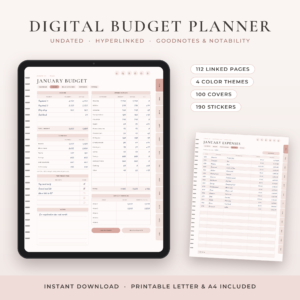
Petalwise is an undated budget planner with 112 hyperlinked pages for GoodNotes, Notability, Noteshelf and Xodo, plus a printable edition in US Letter and A4. Each month has a calendar, a budget page, a bills and savings page, an expenses page and a review, all linked by tabs down the side. Write every bill and its due date on the month’s bills page, mark the dates on the calendar, and tick each one as it goes out.
If you go the paper route, copy the bill list onto each month’s page at the start of the month. It takes five minutes and doubles as a quick check that nothing has changed.
Autopay: helpful, with one catch
Autopay is the single best defense against late fees. Set it up for every fixed bill you can. But it has one catch: it pays whether or not the money is there. An autopay that hits an empty account can bring an overdraft fee on top of a declined payment.
Three habits keep autopay safe:
- Keep a small buffer, even $200, in the account bills come from.
- Check the bill calendar a few days before big autopay dates.
- Look over each autopaid bill once a month. Prices creep up, and a $12 streaming plan quietly becoming $18 is easy to miss.
When a bill slips through anyway
Even with a tracker, life happens. A card expires and the autopay fails, or a paper bill goes to an old address. When you spot a missed bill, act the same day.
- Pay it straight away, or as much as you can.
- Call the company and ask whether the late fee can be waived. If it is a first slip in a long record, many will remove it. A polite two-minute call can save $25 or $35.
- Fix the cause on your tracker: update the card number, change the address, or move the due date.
- Add a reminder two days before the next due date for the next couple of months.
One missed bill is not a disaster. It is a chance to plug the hole that let it through.
A once-a-year subscription check
Once a year, go through your bill list and ask of every subscription and membership: do we still use this? Would we sign up again today? A family that cancels two forgotten streaming services and an unused app subscription can easily save $300 a year without missing anything.
The bill list makes this easy, because every subscription is already written down. Without a list, they hide in card statements for years.
The monthly bill and budget routine
Fifteen minutes at the start of each month keeps the whole system honest.
- Check last month. Was every bill paid? Any late fees? Any amounts higher than expected?
- Update the bill list. New subscriptions, cancelled ones, price changes.
- Look at this month’s calendar. Any non-monthly bills due? Is the yearly bills pot ready to cover them?
- Match bills to paychecks. Make sure the right account has money on each due date.
- Write the budget. With every bill already listed, the fixed part of the budget fills itself in.
For a broader look at monthly budgets that do not need rebuilding each time, see why monthly budget spreadsheets keep needing a rebuild.
Frequently asked questions
What should a bill tracker include?
Each bill’s name, amount, due date, how often it comes, how it is paid, and a box or status to show when it has been paid.
How do I keep track of bills that are not monthly?
List them, add up the yearly total, divide by twelve and save that amount every month in a separate pot. Pay each bill from the pot when it arrives.
Can I change my bill due dates?
Often, yes. Many phone, internet, utility and card companies let you choose a due date if you ask. Spreading bills across the month eases pressure on any one paycheck.
Is autopay a good idea for bills?
Autopay is a strong defense against late fees, as long as you keep a buffer in the paying account and check each bill monthly for price changes.
Should I use a printable or spreadsheet bill tracker?
Printables suit people with fewer bills who like ticking boxes. Spreadsheets suit busier households because bills fill every month automatically and statuses update by date.
Your next step
Pull up your last three months of statements tonight and write down every bill that repeats, with its amount, due date and how often it comes. Then enter that list into the Pocketbloom Annual Budget Spreadsheet and look at your year of due dates on the bill calendar.