The best monthly planner for 2027 depends on where you plan. The Openleaf 2027 Digital Planner suits iPad and GoodNotes users who want tap-through navigation. The Sagewell 2027 Monthly Calendar Printable suits anyone who wants a clean printed month in sizes up to A3. The Tile & Tally Printable Monthly Planner 2027 suits households tracking goals, bills and habits.
Key facts at a glance
- The Openleaf planner is digital only, built for GoodNotes and iPad, with monthly, weekly and 365 daily pages linked by tabs.
- The Sagewell calendar comes as 16 PDFs in US Letter, Ledger, A4 and A3, each with a Sunday or Monday start.
- The Sagewell file covers 14 months, from December 2026 to January 2028, so you can plan the turn of the year.
- The Tile & Tally planner has 36 pages: 12 dated months plus 8 undated pages you can reuse.
- Tile & Tally comes in 8 versions, including full colour or low-ink, and US Letter or A4.
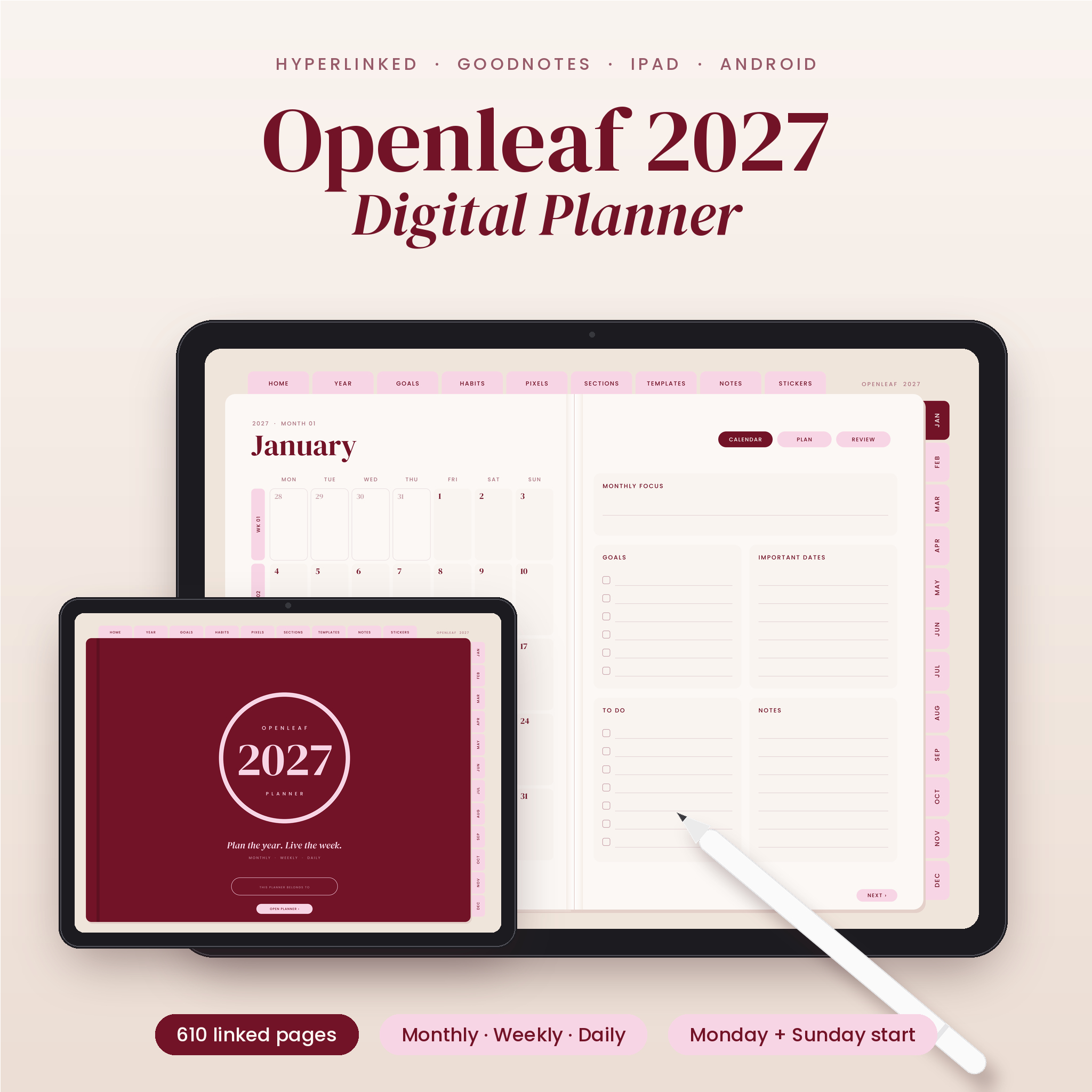 2027 Digital Planner for GoodNotes & iPad | Openleaf Hyperlinked Monthly, Weekly & Daily Planner, Landscape, Monday & Sunday Start, 20 Templates & 140 Stickers
What should you look for in a monthly planner for 2027?
A good monthly planner is one you'll open every week. Four things decide that: how you'll write in it, how big the page is, which day the week starts, and what sits beside the calendar grid. Get those right and the rest is decoration.
Digital or printed
A digital planner is a file you write in on a tablet, usually with a stylus. A printable planner is a PDF you print at home or at a print shop, or fill in on screen. Digital suits people who carry an iPad everywhere and want links between months, weeks and days. Printed suits people who think better on paper and want something stuck on a wall or fridge.
You can mix the two. The Sagewell and Tile & Tally files are fillable, so you can type into them before printing and still end up with paper.
Page size
Page size decides how much you can write in each date box. A4 is 210 x 297 mm and US Letter is 8.5 x 11 inches, which is the most common choice for a desk or folder. Ledger (11 x 17 inches) and A3 (297 x 420 mm) are roughly double that, which suits a wall or a busy household calendar.
Only Sagewell offers the larger sizes. Tile & Tally stops at US Letter and A4, and Openleaf is sized for a tablet screen in landscape.
Sunday or Monday start
A Monday start matches the working week and most UK calendars. A Sunday start matches US-style calendars and some family routines. All three products here offer both, so pick the one you'd naturally look for first on a printed wall calendar and stick with it all year.
Extras around the calendar
A bare month grid is fine for appointments. If you also want to track bills, habits or goals, you need pages built for that. Tile & Tally includes a plan page with each month, covering goals, to-dos, appointments, bills, habits and a month-end review. Openleaf adds a habit tracker, budget, year in pixels and 10 custom sections. Sagewell's planner edition keeps it lighter, with priorities, goals and notes.
Navigation
Navigation means how quickly you can jump from one month to another. Openleaf uses tabs on every page, so any month, week or day is one tap away. Sagewell has clickable month navigation, and Tile & Tally has month tabs you tap to move between pages. If you'll mostly use a printout, navigation matters less. If you'll live in the file on screen, it matters a lot.
How do the 2027 monthly planners compare?
The three planners differ most on format and page size, so the table puts those first. Read across a row to see what each one gives you.
| Product | Format | Sizes | Week start | What's included | Best for |
|---|---|---|---|---|---|
| 2027 Digital Planner for GoodNotes & iPad | Openleaf Hyperlinked Monthly, Weekly & Daily Planner, Landscape, Monday & Sunday Start, 3 Templates & 140 Stickers | Digital, hyperlinked | Landscape, for iPad | Monday or Sunday | Monthly, weekly and 365 daily pages, Lite file without dailies, 3 templates, 140 stickers, step-by-step guide | Stylus users who want everything in one tablet file |
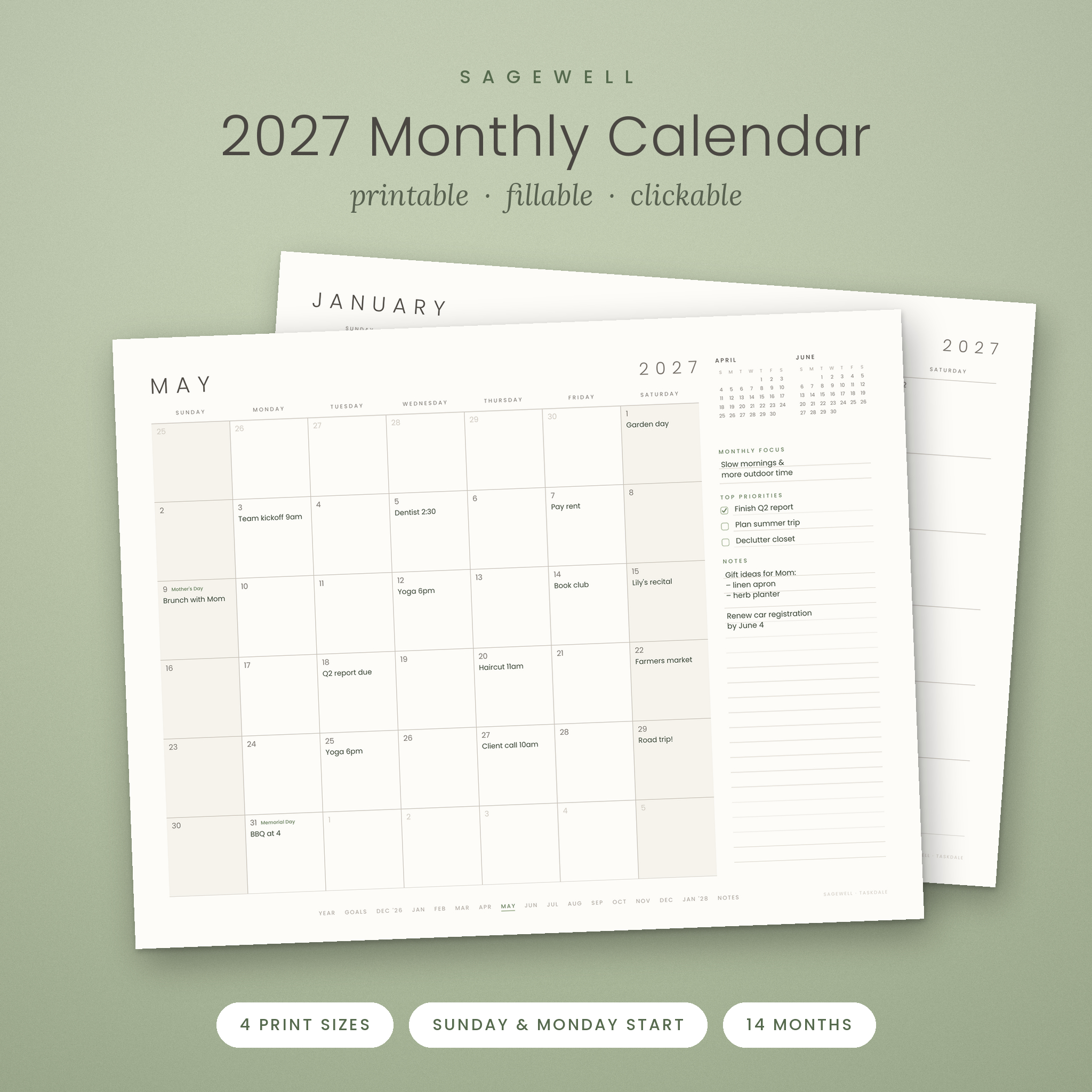 Sagewell 2027 Monthly Calendar Printable – Minimalist Landscape Calendar PDF | Fillable, Hyperlinked, Sunday and Monday Start (Letter, Ledger, A4, A3) | Printable PDF, fillable | Letter, Ledger, A4, A3 | Monday or Sunday | 16 PDFs, wall-calendar and planner editions, 14 months from December 2026 | Clean, large-format monthly pages |
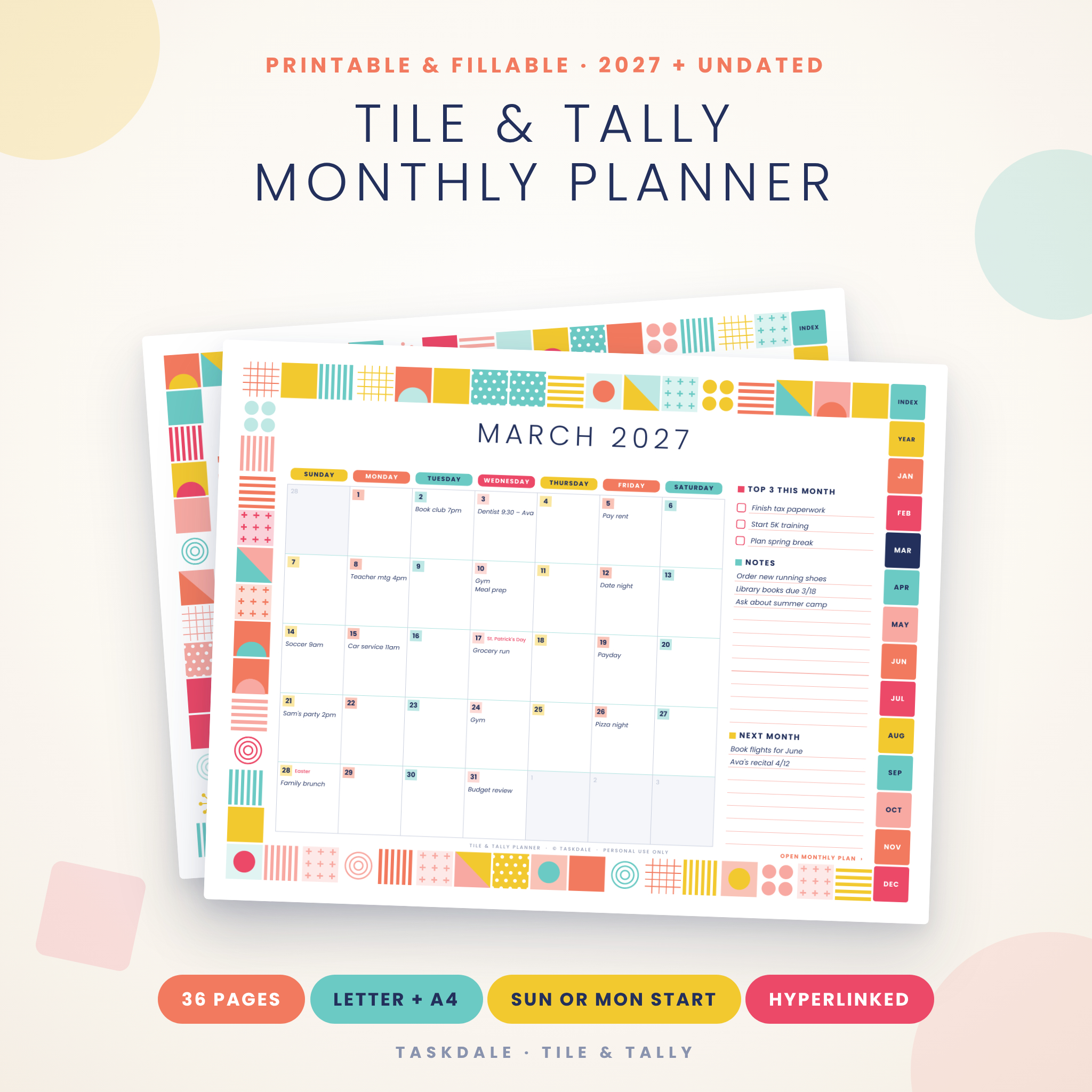 Tile & Tally Printable Monthly Planner 2027 | Fillable PDF Calendar, Habit Tracker, Budget & Family Planner | US Letter & A4 | Printable PDF, fillable | US Letter, A4 | Monday or Sunday | 12 dated months, 8 undated pages, 8 versions, user guide | Households planning goals, bills and habits |
Who does each monthly planner suit?
Each of the three planners suits a different kind of planner. The right one is usually obvious once you know whether you plan on a screen, on a wall or at a kitchen table.
Openleaf suits you if you already use an iPad with GoodNotes. The month view sits alongside weekly pages (horizontal and hourly) and 365 daily pages, so you can start with a month and drill down into a day. If you only want the month and week views, the Lite file leaves out the dailies. The 140 stickers and 3 templates are there for people who like a styled planner, and the step-by-step guide helps if you haven't used a hyperlinked planner before.
Sagewell suits you if you want a calm, uncluttered month and the choice of how big to print it. The classic wall-calendar edition is plain. The planner edition adds priorities, goals and notes, plus US holidays. If you're in the UK, that holiday list won't match your bank holidays, so choose the wall-calendar edition or write in your own dates.
Tile & Tally suits you if one page of dates isn't enough. Each of the 12 dated months comes with a plan page, and the 8 undated pages cover a calendar, appointment tracker, budget, family planner, goal plan, to-do list and notes. Because the undated pages can be reused, you can print extra copies when a month gets busy. The low-ink version helps if you print at home regularly.
How do you use a printable or digital monthly planner?
You use a monthly planner by setting it up once, then reviewing it at a fixed time each week. The setup is quick. The habit is what makes it work.
- Choose your week start and page size, then open the matching file.
- Add fixed dates first: birthdays, holidays, renewals and recurring appointments.
- Add deadlines and bill dates next, so you can see where the month gets tight.
- Pencil in flexible tasks last, in the gaps that remain.
- Review the month once a week, at the same time, and move anything unfinished.
For the printable files, type in recurring items on screen before you print, so you don't rewrite them twelve times. Tile & Tally's files can be filled in using Adobe Reader or Chrome. Print a single month at a time if you expect plans to change.
For Openleaf, read the step-by-step guide first. Hyperlinked planners work best when you use the tabs rather than swiping through pages.
What mistakes should you avoid when choosing a 2027 planner?
The most common mistake is buying for the person you'd like to be rather than the planner you actually are. Most of the others are about size, format and start day.
- Choosing a format you won't use. If you never write on your iPad, a digital planner will sit unopened. If you hate printing, a printable file becomes a chore.
- Picking the wrong size. A4 is easy to print at home. Ledger and A3 usually need a print shop, since most home printers only take up to A4.
- Ignoring the week start. A Sunday-start grid is awkward if your week runs Monday to Friday, and you'll feel it every day.
- Overbuying features. A budget page and habit tracker only help if you'll fill them in. Start with the calendar and add pages as you need them.
- Assuming holidays match your country. The Sagewell planner edition lists US holidays, which will differ from UK dates.
- Forgetting the compatibility cheque. Openleaf is described for GoodNotes and iPad, so confirm your app and device before you buy.
What affects the price of a monthly planner?
The price of a monthly planner mostly reflects how many files, pages and page variations you get. A digital planner with hyperlinked daily pages, templates and stickers costs more up front than a single printable calendar. Prices are shown on the product cards, so cheque there for current figures.
Printable planners also have a running cost, because you pay for paper and ink each time you print. That's why the low-ink version of the Tile & Tally planner is worth considering if you print every month. Larger sizes such as A3 add print-shop costs.
A digital planner has no printing cost, but it assumes you already own a suitable tablet and app.
Common questions
Can I use a printable monthly planner on a tablet?
Yes, in principle. The Sagewell and Tile & Tally files are fillable PDFs, so you can type into them on screen. Writing with a stylus depends on your PDF app, so test with one month first. The Openleaf planner is the one designed for tablet use.
Why does the Sagewell calendar start in December 2026?
The Sagewell file covers 14 months, from December 2026 to January 2028. That gives you the weeks either side of 2027, so you can plan year-end deadlines and early 2028 commitments without needing a second calendar.
What does undated mean in a planner?
Undated means the page has no printed month or dates, so you fill them in yourself. Tile & Tally includes 8 undated pages, such as a budget and a to-do list. You can print them again whenever you need a fresh one.
What is the Lite file in the Openleaf planner?
The Lite file is a version of the Openleaf planner without the 365 daily pages. It keeps the monthly and weekly pages, so it suits you if you plan by the week and don't want a long file full of daily views.
Should I choose full colour or low-ink?
Choose full colour if the planner will hang on a wall or you like colour-coding. Choose low-ink if you print at home often or simply want to save on ink. Tile & Tally offers both, in US Letter or A4.
Which monthly planner should you pick for 2027?
Pick by how you plan, then by size. Choose Openleaf if you live on an iPad and want a linked planner with months, weeks and days. Choose Sagewell if you want a minimalist printed month, especially in a larger size for a wall. Choose Tile & Tally if you want goals, bills and habits beside every calendar page.
Before you decide, cheque three things: your week start, your page size and whether you'll print or write on screen. Browse all 3 options on this page with those three answers in mind.