An operating budget template for small businesses is a month-by-month plan of the money your business expects to bring in and spend to keep running. Sales on one side. Rent, wages, stock, software, marketing and fees on the other. Profit, or loss, at the bottom. It is the document that tells you, before the month starts, whether the business can afford that new hire, that ad campaign or that slow January.
This guide is for owners of small service businesses, shops, studios and online stores who have been running on gut feel and a bank balance. You will learn what belongs in an operating budget, how to forecast revenue honestly, a full example for a small cleaning business, how fixed and variable costs shape your break-even point, and a simple monthly review. We also cover the step many owners forget: a personal budget for the person who owns the business.
Quick picks: budget templates for business owners
| Product | Best for | Price | Link |
|---|---|---|---|
| Petal & Profit Small Business Finance Planner | A business budget with bookkeeping and tax | $9.99 | View |
| Budget Planner Spreadsheet for Excel and Google Sheets | The owner’s personal budget on uneven pay | $2.00 | View |
| Ultimate Annual Budget Spreadsheet | A full-year personal plan for the owner | $6.00 | View |
What an operating budget covers
An operating budget is about the day-to-day running of the business. It answers one question: in a normal month, does more come in than goes out?
It includes three main blocks:
- Revenue: what you expect to earn from sales, services, subscriptions or retainers.
- Cost of goods or direct costs: what you spend to deliver each sale, like stock, materials, packaging, or subcontractors you pay per job.
- Operating expenses: the costs of being open at all, like rent, wages, software, insurance, marketing, phone, accounting fees and bank charges.
What it usually leaves out is big one-off purchases, like a new van or a $6,000 oven. Those go in a separate capital budget, because they last for years and you pay for them differently. Mixing them into the monthly operating budget makes one month look like a disaster and the rest look fine.
A good operating budget also includes two lines owners often skip: a tax set-aside and the owner’s own pay. Leave them out, and a business can look profitable on paper while the owner is quietly going broke.
The line items to include
Here is a layout that works for most small businesses. Use it as a checklist when you set up a template.
| Section | Typical lines |
|---|---|
| Revenue | Each product or service line, retainers, other income |
| Direct costs | Stock, materials, packaging, shipping, payment processing fees, subcontractors |
| Gross profit | Revenue minus direct costs |
| Fixed operating costs | Rent, salaries, insurance, software subscriptions, phone and internet, loan payments |
| Variable operating costs | Marketing, fuel and mileage, casual staff, repairs, training |
| Owner pay | A planned monthly draw or salary |
| Tax set-aside | A percentage of profit moved to a separate account |
| Net profit | What is left after everything above |
Do not worry if some lines are zero for you. A solo designer has no stock. A bakery has no subcontractors. Delete the lines you do not need and keep the structure.
Forecast revenue without fooling yourself
Revenue is the hardest line to budget, because you do not control it fully. The aim is not a perfect guess. It is a cautious, reasoned one.
If you have a year or more of history
Start with last year’s revenue for each month. Adjust for anything you know has changed: a price rise, a lost client, a new product, a busier location. Keep seasonal swings. If December was double July last year, it probably will be again.
If you are newer
Build revenue from the bottom up. How many customers or jobs can you realistically handle per week? What is the average sale? Multiply, then take 20 to 30 percent off for slow weeks, cancellations and late payers. A new dog groomer who can do 18 dogs a week at $65 might expect $1,170 a week at full capacity, but should budget closer to $850 in the early months.
Either way
Budget on cash you expect to receive, not work you expect to do. If clients pay in 30 days, March’s work is April’s revenue. That gap is where many small businesses get caught. Clear invoices with firm due dates help, and our guide comparing an invoice template in Word, Excel or PDF covers the basics.
A worked example: a small cleaning business
Rina runs a home cleaning business with two part-time cleaners. Here is her operating budget for a typical month.
| Line | Monthly budget |
|---|---|
| Revenue: regular weekly clients | $9,200 |
| Revenue: one-off deep cleans | $1,400 |
| Total revenue | $10,600 |
| Cleaning supplies | $520 |
| Card payment fees | $290 |
| Gross profit | $9,790 |
| Cleaners’ wages and payroll costs | $4,600 |
| Van lease and insurance | $640 |
| Fuel | $380 |
| Business insurance | $160 |
| Booking software and phone | $120 |
| Marketing | $250 |
| Accountant (monthly share) | $100 |
| Owner pay | $2,600 |
| Tax set-aside | $400 |
| Net profit kept in the business | $540 |
Rina’s business makes money, pays her a steady wage and puts $540 a month aside as a buffer. Her tax set-aside here is a rough figure; the right amount depends on her tax situation, so her accountant helps her set it. When she budgets for August, a quieter month, she drops deep-clean revenue to $600 and sees that the month will run a small loss of around $250. That is fine, because the buffer from busier months covers it. The budget turned a scary month into an expected one.
Fixed costs, variable costs and your break-even point
Splitting costs into fixed and variable does more than tidy the template. It tells you the minimum you need to sell each month just to stand still.
Fixed costs stay roughly the same whether you have a busy month or a quiet one: rent, salaries, insurance, software. Variable costs rise and fall with sales: stock, materials, payment fees, shipping.
Here is the simple maths. Work out what share of each sale is left after variable costs. If a candle sells for $30 and the wax, jar, wick, label and fees cost $9, then $21 out of every $30, or 70 percent, is left to cover fixed costs. If fixed costs are $3,500 a month, you need $3,500 divided by 0.70, which is $5,000 in sales, just to break even. Every sale above $5,000 is profit.
Knowing that number is a real comfort. On a slow day, you can check how far you are from break-even instead of guessing. And when someone pitches you a $400 monthly tool, you can see exactly how many extra sales it would need to pay for itself.
What a good template should do for you
You can build an operating budget in a blank spreadsheet. But a template designed for small business saves hours, and it usually ties the budget to your actual bookkeeping, so you see budget versus actual without copying numbers across.
Look for these features:
- Budget versus actual for every expense category, with a clear over or under flag.
- Monthly revenue targets you can set separately for each month, so seasonality is built in.
- A profit and loss summary that updates as you log income and expenses.
- A tax set-aside worked out from profit.
- Invoice tracking so you can see revenue you have earned but not yet received.
- No subscriptions or add-ons, so the file is yours.
One more thing to check before you commit: can you start the year in any month? Many small businesses run a financial year that does not begin in January, and a template locked to a calendar year will fight you every time you report. A fiscal-year start setting saves a lot of fiddly rearranging.
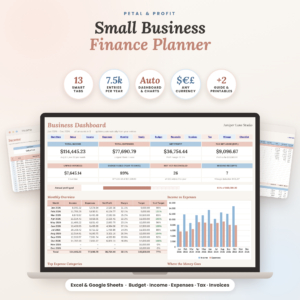
Petal and Profit Small Business Finance Planner
Price: $9.99 | Best for: service businesses, makers and online sellers
Petal and Profit is a 13-tab workbook for Excel and Google Sheets. Setup takes your fiscal-year start month, tax set-aside percentage, profit goal, 12 monthly revenue targets and up to 30 expense categories. The Budget tab shows budget versus actual for every category with On track, Close to limit or Over budget status, and the Yearly Summary builds a 12-month profit and loss. There are also invoice, tax planner and mileage tabs. Enter your monthly revenue targets first.
If you are planning the next full year rather than just next month, our guide on planning next year with an annual budget template walks through the yearly view.
A monthly budget-versus-actual review
An operating budget earns its keep in the review. Block 45 minutes in the first week of each month.
- Finish the books. Log every sale and expense for last month, and match them against the bank.
- Compare revenue with target. Over or under, and why? A lost client, a good promotion, a late payer?
- Scan expense categories. Note any that went over by more than 10 percent.
- Check gross margin. If materials costs have crept up, your prices may need a look.
- Check cash. Unpaid invoices, upcoming tax payments, and how many months of fixed costs you could cover from the buffer.
- Adjust the next three months. Update forecasts with what you now know.
That last step matters. An operating budget is not set in January and forgotten. It is a rolling plan that gets a little sharper every month. By the end of the first year, your forecasts will be far closer to reality, and you will feel the difference in how calmly you make decisions.
Do not forget the owner’s personal budget
The business budget has an owner pay line. The owner then has to live on it. Many small business owners budget the company carefully and run their household on hope, dipping into the business account when the personal one runs short. That blurs the books and makes it hard to tell whether the business is really profitable.
A cleaner approach: pay yourself a fixed amount on a fixed date, as Rina does with her $2,600. Run a separate household budget on that amount. If the business has a great quarter, raise your pay deliberately after you have checked the buffer. If it has a weak one, the buffer covers your pay for a while, and you have time to decide what to change.
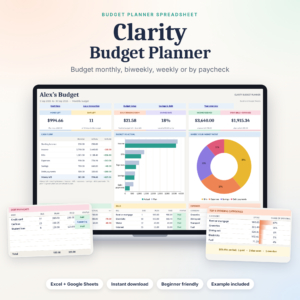
Budget Planner Spreadsheet for Excel and Google Sheets
Price: $2.00 | Best for: business owners budgeting their own pay
This personal budget spreadsheet for Excel and Google Sheets keeps purchases, paychecks and payments on one Transactions sheet. The dashboard shows money left, days left, bills due and goal progress, with a daily spending number. It handles monthly, biweekly, weekly or payday-to-payday budgets, which suits an owner who pays themselves on set dates. Enter your owner draw as the paycheck and plan your household around it.
Mistakes that sink small business budgets
- Budgeting on hoped-for sales. Use realistic, cautious revenue, and treat upside as a bonus.
- Leaving out owner pay. A business that only profits because the owner works for free is not yet profitable.
- Ignoring tax. Set aside a percentage of profit every month, at the rate your accountant suggests.
- Mixing in big purchases. Keep equipment and vehicles in a separate capital plan.
- Forgetting payment timing. Budget on when cash arrives, not when work is done.
- Never reviewing. A budget you do not compare with actual results is just a guess with formatting.
Frequently asked questions
What is included in a small business operating budget?
Revenue, direct costs like stock and materials, fixed operating costs like rent and wages, variable costs like marketing and fuel, owner pay, a tax set-aside and net profit.
How is an operating budget different from a capital budget?
An operating budget covers day-to-day income and running costs. A capital budget covers large, long-lasting purchases like vehicles, equipment or a shop fit-out.
How do I forecast revenue for a new business?
Estimate how many jobs or sales you can handle each week, multiply by your average price, then reduce it by 20 to 30 percent for slow periods and late payments.
How often should a small business review its budget?
Monthly, comparing budget with actual results, and update the next three months each time. A deeper review once a year helps set the next year’s plan.
Should I pay myself a salary from my small business?
A fixed, regular owner draw makes both your business and household budgets easier to run. How you pay yourself for tax purposes depends on your business structure, so check with an accountant.
Build next month’s budget this week
Pull last month’s sales and costs, sort them into the line items above, and set a cautious revenue target for next month. Add owner pay and a tax set-aside before you look at profit. If you want the budget tied to your bookkeeping in one file, start with the Petal and Profit Small Business Finance Planner.