Best Payment Tracker Spreadsheets for Invoices and Debts
The best payment tracker is the one that matches the direction your money moves. If clients owe you, choose an invoice tracker that updates Paid, Partly Paid and Overdue on its own. If you owe lenders, choose a debt payoff planner with a payment log. All four spreadsheets here do one of those jobs well.
Key facts at a glance
- Three of the four trackers on this page record money owed to you, and one (Breakwater) records money you owe.
- Paidmark, PaidPath and Client Billing Hub all update invoice status automatically once you log a payment.
- Client Billing Hub works in both Excel and Google Sheets, while Breakwater works in Google Sheets and LibreOffice Calc.
- PaidPath and Client Billing Hub both say they use no macros, which keeps them simpler to open and trust.
- Prices appear on the product cards, and they track how much each file does rather than how it looks.
Choosing a payment tracker can feel more complicated than it should. Some are built for invoicing, some for paying off loans, and the names overlap. We'll go through what separates them, so you can pick one and get on with it.
 Invoice Template Excel Spreadsheet with Estimates, Receipts & Payment Tracker | Paidmark
 Debt Snowball Spreadsheet | Breakwater Debt Payoff Planner for Google Sheets with Avalanche Calculator, Payment Tracker & Debt-Free Dashboard
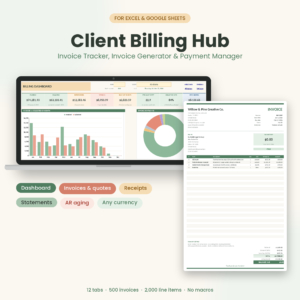
Table of Contents
Toggle
- What should you look for in a payment tracker?
- How do the best payment trackers compare?
- Which payment tracker suits which person?
- How do you use a payment tracker spreadsheet?
- What mistakes should you avoid with a payment tracker?
- What affects the price of a payment tracker?
- Which payment tracker should you pick?
- Common questions
What should you look for in a payment tracker?
A good payment tracker records each payment once, then works out balances, statuses and totals without you retyping anything. A payment tracker is a spreadsheet or app that logs money received or paid and shows what is still outstanding. Seven factors separate the good ones from the merely tidy ones.
Which direction does the money move?
Incoming trackers follow invoices from clients, and outgoing trackers follow debts you are paying down. Paidmark, PaidPath and Client Billing Hub are incoming. Breakwater is outgoing. Mixing the two up is the most common reason someone buys the wrong file, so settle this first.
Does the status update on its own?
An automatic status means the file marks an invoice Paid, Partly Paid or Overdue once you log a payment or the due date passes. Client Billing Hub lists Paid, Partly Paid, Overdue and six more statuses. Paidmark covers paid, partial and overdue. Without this, you end up checking dates by hand, which is how late invoices slip through.
Can it handle partial payments?
A partial payment is any amount received that is less than the invoice total. Clients often pay in two instalments, so a tracker that only understands "paid" or "unpaid" will give you the wrong balance. PaidPath and Client Billing Hub both name partial payments as a feature, and Paidmark shows partial status with a running balance.
Does it work in the spreadsheet app you already use?
Excel files need Excel, and a Google Sheets file needs a Google account. Paidmark and PaidPath are for Excel. Client Billing Hub works in Excel and Google Sheets, which suits anyone who moves between a laptop and a shared drive. Breakwater is built for Google Sheets and also runs in LibreOffice Calc, a free option.
How does it deal with tax, currency and discounts?
Tax handling decides whether an invoice is ready to send or needs correcting. Paidmark applies tax per line and accepts any currency. PaidPath supports 3 taxes. Client Billing Hub offers two named taxes plus discount and shipping. If you sell goods with mixed tax rates, per-line tax is the most flexible.
What reports does it give you?
An ageing report groups unpaid invoices by how long they have been overdue, so you can see which ones need a reminder first. Paidmark and Client Billing Hub both include one, and PaidPath shows money owed by age. Breakwater's equivalent is a debt-free dashboard with a projected finish date.
Is there a guide, and will it print cleanly?
A written guide matters more than most people expect, because a spreadsheet with 12 tabs is easy to break if you are guessing. PaidPath includes a 21-page illustrated guide, Client Billing Hub a 14-page guide, and Breakwater a step-by-step guide. PaidPath prints invoices, quotes and statements in Letter and A4.
How do the best payment trackers compare?
The four trackers differ mainly in who owes the money, which app they run in and how many documents they produce. This table uses only the details supplied for each product.
| Product | Works in | Money direction | Payment handling | Reports and extras |
|---|---|---|---|---|
| Invoice Template Excel Spreadsheet with Estimates, Receipts & Payment Tracker | Paidmark | Excel | Owed to you | Paid, partial and overdue status; auto-updating balances | Ageing report, live dashboard with 5 charts, auto-numbered invoices, estimates, receipts and credit notes |
| Debt Snowball Spreadsheet | Breakwater Debt Payoff Planner for Google Sheets with Avalanche Calculator, Payment Tracker & Debt-Free Dashboard | Google Sheets, LibreOffice Calc | You owe | Payment log, crossed-off months, up to 25 debts | Snowball, Avalanche or custom order, strategy comparison, 100-square debt-free tracker |
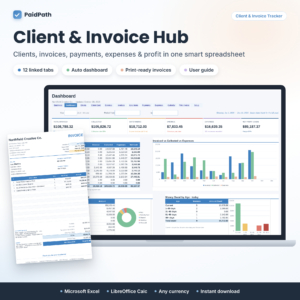 Client Tracker & Invoice Tracker Spreadsheet for Excel | PaidPath Client & Invoice Hub | Payment Tracker, Business Dashboard, Printable Invoice & Expense Log | Excel | Owed to you | Partial payments; one log updates invoice, client balance, calendar and dashboard | 12 tabs, 3 taxes, expense log, statements, Letter and A4, 21-page guide |
| Client Billing Hub Invoice Tracker Spreadsheet | Invoice Generator, Payment Tracker, Receipts, Client Statements & AR Ageing Dashboard for Excel & Google Sheets | Excel, Google Sheets | Owed to you | Paid, Partly Paid, Overdue and 6 more statuses | AR ageing, dashboard with year and client filters, receipts, statements, discount and shipping, 14-page guide |
Which payment tracker suits which person?
Each tracker suits a different working pattern, so match it to how you bill or borrow. These are the plain matches.
- Paidmark suits a freelancer or very small business that wants one clean invoice, estimates, receipts and credit notes in Excel, with a dashboard that shows where the money stands.
- PaidPath suits someone who wants clients, quotes, invoices and expenses in a single linked workbook. Log a payment once and the invoice, client balance and calendar all change.
- Client Billing Hub suits anyone who wants the full billing loop and needs Google Sheets as well as Excel. The year and client filters help if you review your income by customer.
- Breakwater suits a household paying off credit cards, loans or store cards. It builds a month-by-month plan and shows the interest you save against paying minimums only.
If you run a small business and have personal debts, you may genuinely want two files. They solve separate problems, and combining them in one sheet usually makes both harder to read.
How do you use a payment tracker spreadsheet?
You use a payment tracker by entering each transaction once, in the right place, and letting the formulas do the rest. Here is a routine that works for the invoice trackers.
- Save a copy of the file before you start, so you always have a clean original.
- Enter your business details, tax names and currency on the setup sheet.
- Add each client once, then create an invoice with its line items.
- Send the invoice and note the due date.
- When money arrives, log the amount and date in the payment area, even if it is only part of the total.
- Check the dashboard or ageing report once a week and chase anything overdue.
For Breakwater, the routine is shorter. List your debts, choose Snowball or Avalanche from the dropdown, then log each payment and cross off the month. Check the debt-free date each month and see how it moves.
What mistakes should you avoid with a payment tracker?
The biggest mistakes are logging payments in two places and overwriting formulas. A tracker only stays accurate if there is one source of truth.
- Typing over formula cells. Calculated cells hold the logic. If a balance looks wrong, undo your edit rather than fixing the number by hand.
- Skipping partial payments. Rounding a part-payment up to "paid" hides a real balance and breaks the ageing report.
- Choosing the wrong direction. An invoice tracker will not plan a debt payoff, and a debt planner will not send an invoice.
- Ignoring the app. Check whether the file is built for Excel or Google Sheets before you buy. Features can behave differently if you open a file in an app it was not designed for.
- Skipping the guide. The 12-tab and 21-page files reward ten minutes of reading.
- Forgetting backups. Keep a dated copy each month.
What affects the price of a payment tracker?
The price of a payment tracker spreadsheet depends mainly on how many documents and reports it produces. A single-purpose file costs less than a workbook with a dashboard, statements, a calendar and an expense log. Product prices appear on the cards beside this text.
Other factors include the number of tabs, whether a written guide is included, and whether the file supports more than one app. Breakwater is narrower in scope and is aimed at a different need, so compare it on fit rather than on cost. Among the invoice trackers, PaidPath and Client Billing Hub offer the widest feature lists.
Which payment tracker should you pick?
Choose by asking who owes whom, then which app you use. If clients owe you and you use Excel only, pick Paidmark for simple invoicing or PaidPath for a fuller client and expense hub. If you also need Google Sheets, pick Client Billing Hub. If you owe lenders, pick Breakwater.
Before you buy, write down your app, your tax setup and whether you need statements. Browse all 4 options below and tick off the features you actually need.
Common questions
Is a spreadsheet payment tracker enough for a small business?
For a sole trader or a small team with modest invoice volumes, yes. A linked spreadsheet can track invoices, partial payments and overdue status. If you need card payments taken online or bank feeds, a spreadsheet will not do that, and you would need accounting software.
Do these spreadsheets need macros?
PaidPath and Client Billing Hub both state that they use no macros. That means they rely on standard formulas, which tend to open without security warnings. The details supplied for Paidmark and Breakwater do not mention macros either way, so check the product page.
What is the difference between snowball and avalanche?
The snowball method pays the smallest debt first, while the avalanche method pays the highest interest rate first. Breakwater lets you switch between them with one dropdown and shows the interest you save against minimum payments, so you can compare them using your own numbers.
Can I use these trackers in any currency?
Paidmark, PaidPath and Client Billing Hub all say they work in any currency. The supplied details for Breakwater do not mention currency, so check the product page if you need a specific one.
Can I print invoices from the tracker?
Yes, for the invoice trackers. Paidmark prints a one-page invoice, PaidPath produces print-ready invoices, quotes and client statements in Letter and A4, and Client Billing Hub offers print-ready invoices and quotes alongside receipts and statements.