The best printable planner stickers are pre-cropped transparent PNG sets that also come as print-ready sheets, so you can use them on a tablet or on paper. For everyday use, Oatline suits most people. Bloomdrop suits spring planning, and Monthmark suits anyone who wants 2027 dates already printed on the stickers.
- All three sets come as pre-cropped transparent PNGs in a plain finish and an outlined finish.
- Every set includes printable sheets in US Letter and A4, plus a hyperlinked or tabbed sticker book PDF.
- Oatline has the widest everyday toolkit: trackers, checkboxes, headers and date circles in a neutral palette.
- Bloomdrop covers March, April and May with spring and Easter artwork across 10 categories.
- Monthmark is the only set built around 2027 dates, with 34 US holidays and both Sunday-start and Monday-start calendars.
Choosing a sticker set can feel more complicated than it should, because the listings use terms like "pre-cropped", "outlined" and "hyperlinked" without explaining them. We'll go through each one in plain English, then compare the three sets so you can pick with confidence.
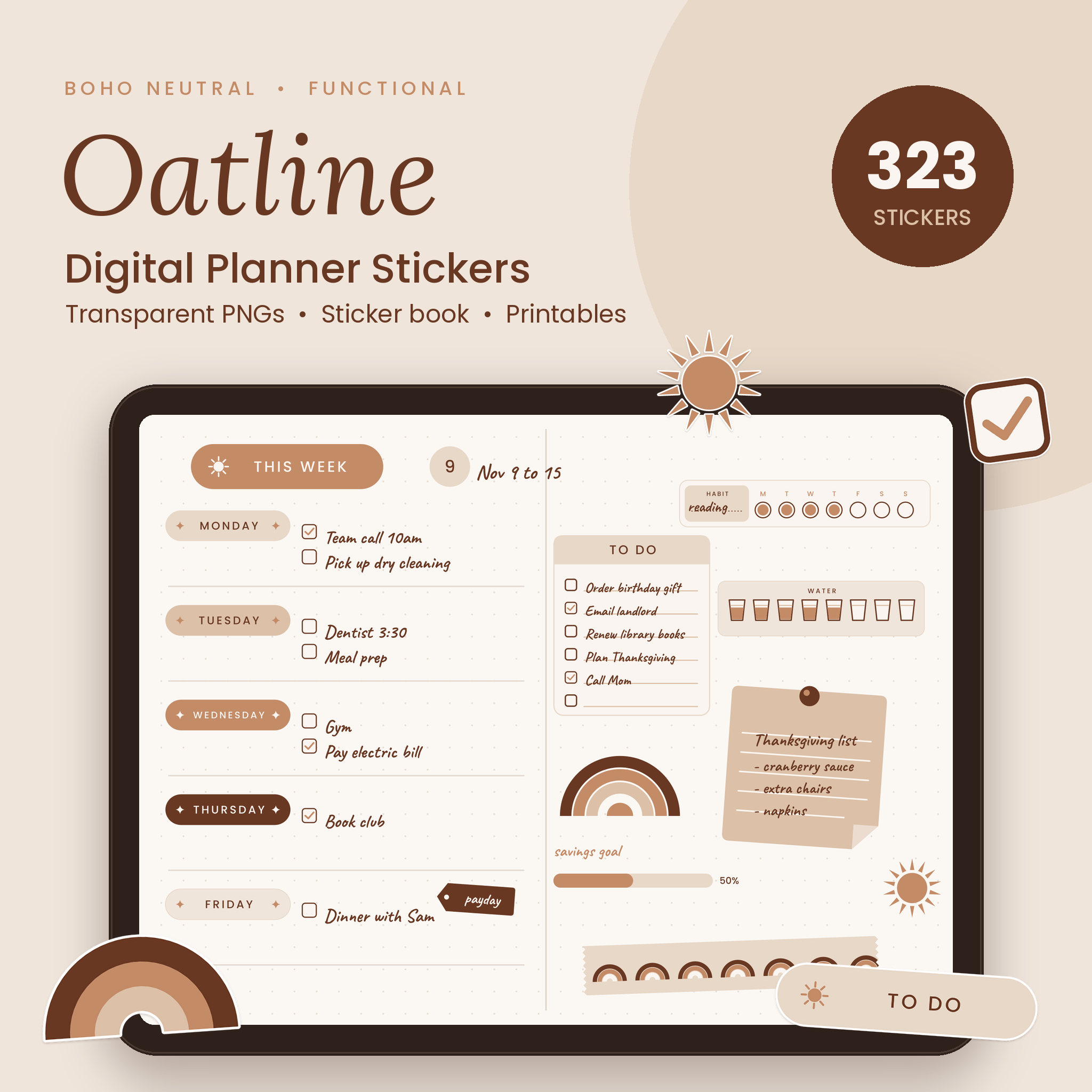 Neutral Digital Planner Stickers, Boho Functional Stickers | Oatline 323 Pre-Cropped Transparent PNGs, Sticker Book & Printable Sheets
Table of Contents
Toggle
- What should you look for in printable planner stickers?
- How do the three printable planner sticker sets compare?
- Which printable planner stickers suit which person?
- How do you print and use planner stickers at home?
- What mistakes should you avoid with printable planner stickers?
- What affects the cost of printable planner stickers?
- Which printable planner stickers should you choose?
- Common questions
What should you look for in printable planner stickers?
Look for five things: how the files are prepared, the finish options, the print sizes, how the stickers are organised, and whether the content matches the way you plan. Each one changes how much time you spend setting up and how useful the set is after a month.
Pre-cropped transparent PNG files
A pre-cropped transparent PNG is an image file with the background already removed and the edges trimmed to the artwork. You can drop it onto a planner page without cutting around it first. All three sets here are prepared this way, which is the main reason they work on both screens and print sheets.
Plain and outlined finishes
A plain sticker is the artwork alone, while a white outline sticker has a thin white border around it, like a real die-cut sticker. The outlined version stays readable on a busy or dark page. Each set offers both, so you can use plain stickers on white pages and outlined ones on coloured backgrounds.
Printable sheet sizes and cut lines
Printable sheets are pages of stickers laid out for your home printer. Oatline, Bloomdrop and Monthmark all supply US Letter and A4, so they suit UK and US paper. Bloomdrop specifically lists cut lines, which helps if you plan to cut by hand or with a cutting machine.
Sticker book and sticker codes
A sticker book is a PDF that lays out every sticker in one place, usually with links so you can jump between categories. Oatline offers a hyperlinked sticker book, Monthmark a tabbed one, and Bloomdrop a hyperlinked PDF with a code for every sticker. Codes matter when a set has 251 or more files and you want to find one quickly.
Date accuracy and week start
Date-ready stickers carry the correct dates, so you don't write them in yourself. Monthmark covers 2027 with date dots 1 to 31, weekday labels and 34 US holidays with verified weekdays. It offers Sunday-start and Monday-start mini calendars, which settles a common frustration. Oatline's date circles are generic, which makes them reusable in any month.
Theme and colour palette
A good palette matches your planner pages, so cheque the colours before the stickers. Oatline uses soft sand, latte, mocha and coffee brown. Bloomdrop leans on florals, butterflies and rain and sun for spring. Monthmark is built for function rather than decoration.
How do the three printable planner sticker sets compare?
The three sets differ mainly in sticker count, date content and theme. Oatline is the all-rounder, Bloomdrop is seasonal, and Monthmark is the date-specific planning set.
| Product | Stickers | Theme | Date content | Printable sheets |
|---|---|---|---|---|
| Neutral Digital Planner Stickers, Boho Functional Stickers | Oatline 323 Pre-Cropped Transparent PNGs, Sticker Book & Printable Sheets | 323 | Neutral boho: sand, latte, mocha, coffee brown | Date circles 1 to 31; mini calendars for December 2026 and all of 2027 | US Letter and A4 |
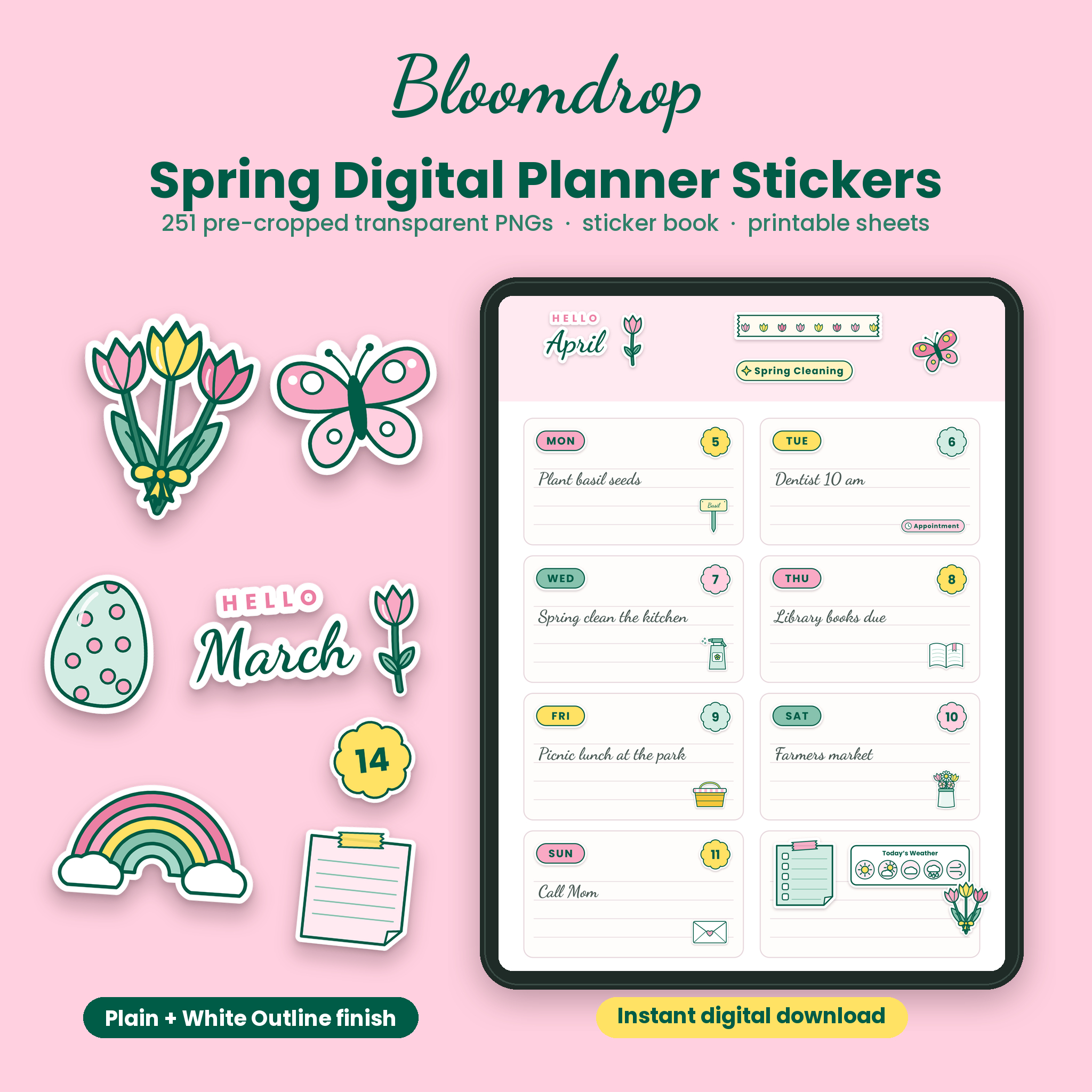 Spring Digital Planner Stickers | Bloomdrop 251 Pre-Cropped Transparent PNG Stickers with Florals, Easter, Month Headers, Date Dots & Printable Sheets | 251 | Spring: florals, butterflies, Easter, garden labels | Month headers and date dots for March, April and May | US Letter and A4, with cut lines |
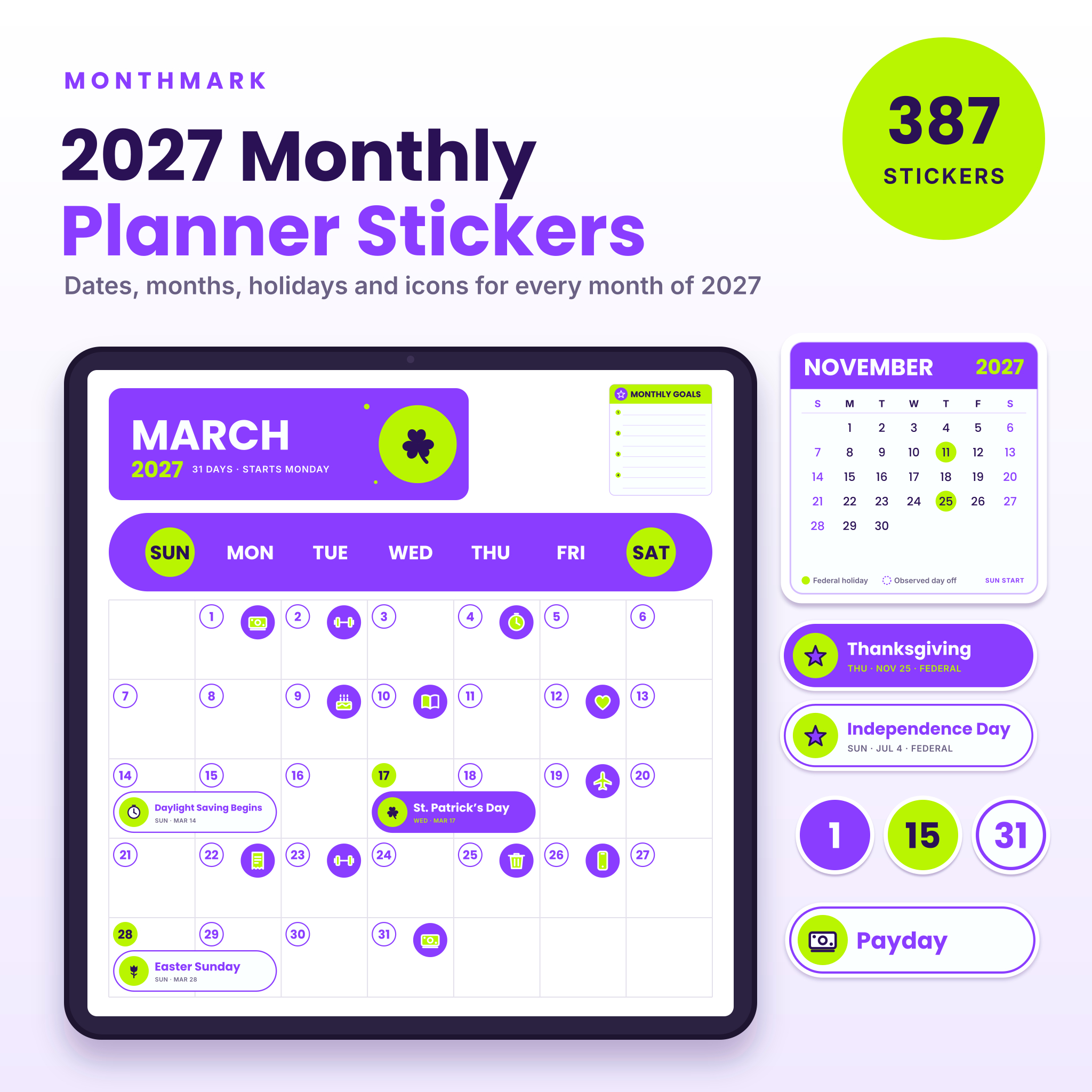 2027 Digital Planner Stickers | Monthmark Monthly Date, Month & US Holiday Stickers, Pre-Cropped Transparent PNG + Sticker Book PDF | 387 (774 files) | Functional date and holiday stickers | Month banners, Sunday-start and Monday-start calendars, date dots 1 to 31, 34 US holidays | US Letter and A4 |
Monthmark's 774 files are the 387 stickers counted twice, once plain and once outlined. The same pairing applies to the other two sets, so compare sticker counts rather than file counts.
Which printable planner stickers suit which person?
Each set suits a different planning habit: Oatline for general daily and weekly planning, Bloomdrop for decorating a spring spread, and Monthmark for filling in a 2027 planner quickly.
Oatline suits you if you want one set that handles most pages. It includes headers, to-do lists, checkboxes, sticky notes, tabs, washi and arrows, plus progress bars, habit trackers and water trackers. The neutral palette sits quietly on most planner covers and pages, and the set's calendars run from December 2026 through 2027.
Bloomdrop suits you if you like a planner that looks different each season. It has 10 categories, including garden labels, word labels, sticky notes and washi, so it's more than decoration. The trade-off is time: it's built for March, April and May, so it will feel narrower in other months.
Monthmark suits you if dates are the slowest part of setting up a planner. The holiday, birthday, appointment and payday icons mean a month page can be set up in minutes. It has period labels and note boxes too. It's less decorative than the other two, and that's deliberate.
How do you print and use planner stickers at home?
To use printable planner stickers, print the sheet at actual size, cut along the lines, and stick them on paper. Or skip printing and import the PNG files into a digital planner app. These steps cover the paper route.
- Open the sheet PDF in your PDF viewer and pick the paper size that matches your printer, A4 or US Letter.
- Set the print scale to 100 per cent or "actual size", not "fit to page", so the stickers keep their intended dimensions.
- Print a test on plain paper first to cheque the colours and the alignment.
- Load printable sticker paper if you want peel-off stickers, or plain paper if you plan to use tape or glue.
- Cut along the lines, or along the outline, with scissors or a craft knife.
- Store spare stickers flat in a folder or envelope, away from damp and strong sunlight.
For tablets, import the transparent PNGs into an app that accepts images, such as GoodNotes, where the sticker book PDF acts as a menu. The outlined versions are easier to see on a patterned page.
What mistakes should you avoid with printable planner stickers?
The most common mistakes are buying for looks rather than use, printing at the wrong scale, and ignoring the week start. Each one is easy to avoid with a quick cheque before you buy or print.
- Choosing by theme alone. A pretty set with no trackers or checkboxes will sit unused by week three. Cheque the functional categories first.
- Printing "fit to page". Stickers shrink or stretch, and the cut lines stop matching.
- Forgetting the week start. A Sunday-start calendar in a Monday-start planner means constant mismatch. Monthmark includes both, so you can choose.
- Buying a seasonal set for year-round use. Bloomdrop is designed for spring, so it won't replace a general set.
- Skipping the test print. Colours on screen and on paper can differ, especially with soft shades like sand and latte.
- Assuming date stickers work in any year. Monthmark's weekdays are verified for 2027 only.
What affects the cost of printable planner stickers?
The cost of printable planner stickers depends on how many stickers a set holds, how specialised the content is, and what formats come with it. Because the stickers are files, there's no postage-weight or stock element in the file price.
A larger set with trackers, calendars and a sticker book costs more than a narrow set. Date-specific content, like Monthmark's verified holidays, takes more preparation than generic artwork, and that shows in the price. Seasonal sets can be cheaper per sticker but have a shorter useful life.
Your own running costs matter too. If you print at home, ink and sticker paper add up, and printing every sheet in colour costs more than printing only the categories you'll use. The live product cards show current prices, so compare them against how many stickers you'll genuinely use.
Which printable planner stickers should you choose?
Choose by the main job you need the stickers to do. If you can only have one set, pick the one that covers most of your weeks.
- Pick Oatline if you want trackers, checkboxes and headers in a calm palette for all-year planning.
- Pick Bloomdrop if you're planning March to May and want spring artwork with cut lines for printing.
- Pick Monthmark if you use a 2027 planner and want the right dates and holidays on the stickers already.
- Pick two sets if you want function and decoration: Oatline or Monthmark for structure, Bloomdrop for the season.
Common questions
Can I use printable planner stickers on a tablet and on paper?
Yes. All three sets are transparent PNG files, so you can import them into a planner app that accepts images. The printable sheets in US Letter and A4 let you print the same stickers for a paper planner.
What is the difference between plain and white outline stickers?
Plain stickers show the artwork alone. White outline stickers add a thin white border, like a die-cut sticker. The border helps the sticker stand out on dark, patterned or busy pages, so many people keep both versions in the same planner.
Do the stickers work in any planner app?
Bloomdrop states that its stickers work in any planner app that accepts images. Oatline and Monthmark are listed for GoodNotes and iPad planners. Because they're standard PNG files, cheque that your own app can import images before you buy.
Do the stickers include a hyperlinked sticker book?
Oatline includes a hyperlinked sticker book, Bloomdrop a hyperlinked PDF with a code for every sticker, and Monthmark a tabbed sticker book PDF. In each case you can find stickers faster than scrolling through hundreds of loose files.
Which set is best if I can't decide?
Start with Oatline if you want a general planning toolkit, or Monthmark if you want dates done for you in 2027. Cheque your planner's week start and the months you plan to cover, then choose the set that matches both.