
An Airbnb host spreadsheet that shows your real profit
Payout reports tell you what landed in the bank. They don’t tell you what the place actually earned after the cleaner, the electric bill and the new set of towels. Staybright does. It is an Airbnb host spreadsheet for Excel and Google Sheets that tracks bookings, occupancy, turnovers, cleaner pay, expenses and profit for up to five short-term rentals.
You type in three things: bookings, cleans and bills. Everything else fills itself in. Fees, payouts, occupancy, average nightly rate, RevPAR, profit per listing, what you owe each cleaner and which check-outs leave you only a few hours to turn the unit.
Who it is for
- Hosts with one to five listings on Airbnb, VRBO, Booking.com or a direct-booking site
- Co-hosts and small managers who keep one file per owner
- Rental arbitrage hosts who want to know if a leased unit really pays
- Anyone who dreads pulling numbers together at tax time
What makes Staybright different
Most short-term rental trackers stop at income and expenses. Staybright also runs the operations side, because that is where hosts lose money and reviews: missed turnovers, unpaid cleaners, running out of toilet paper.
- Occupancy counted night by night. A stay from Jan 30 to Feb 2 adds two nights to January and one to February, and owner stays come off your available nights.
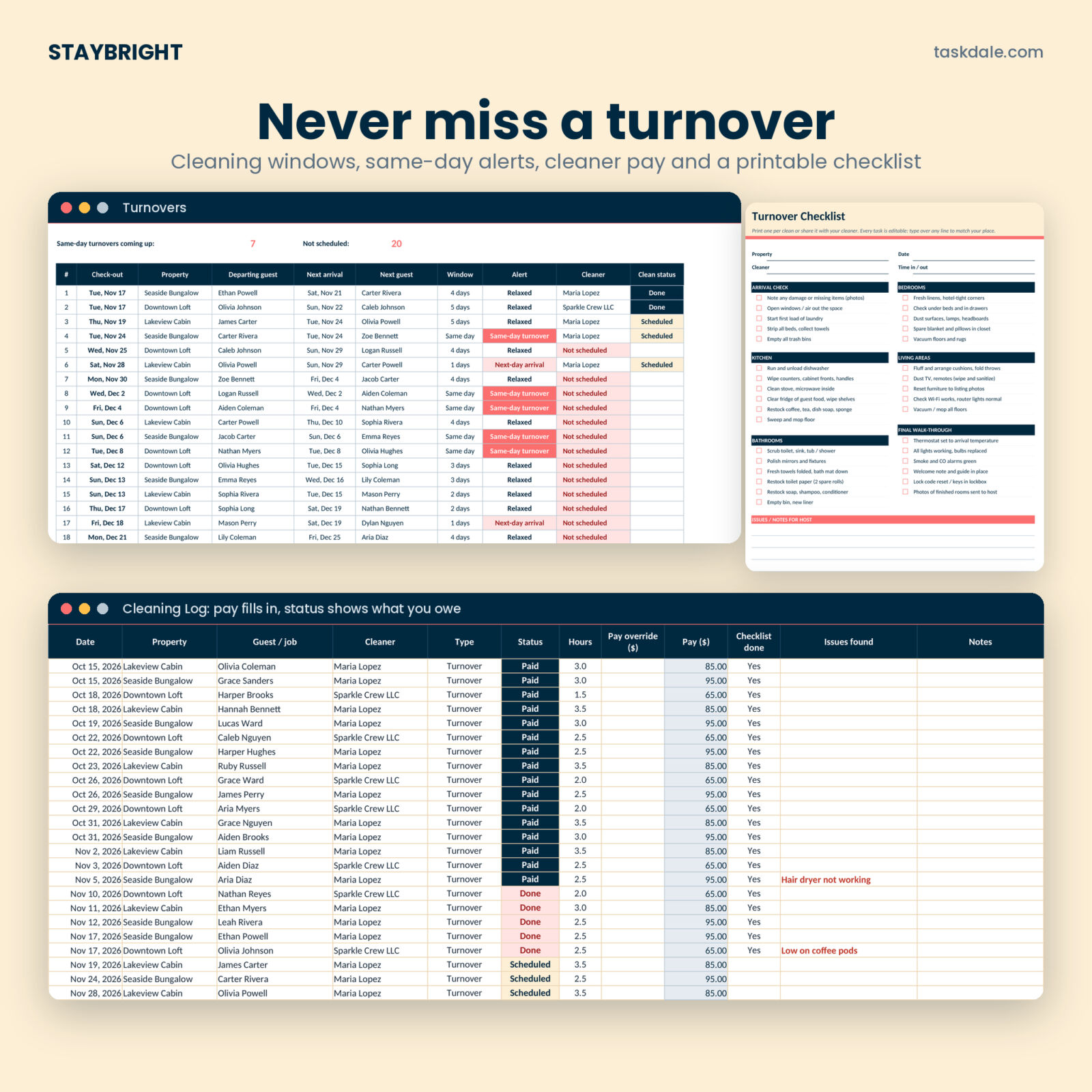
- Turnover planner. Your next 25 check-outs, the next guest arriving at the same place, the cleaning window, and who is booked to clean. Same-day turnovers glow coral.
- Cleaner pay that adds up. Pay fills in from your settings. Mark a clean Done and it shows as owed; mark it Paid and it clears.
- Built-in data checks. If a booking or expense uses a property or category that is not on your lists, the Tax Summary tells you, so nothing drops out of your totals quietly.
Features
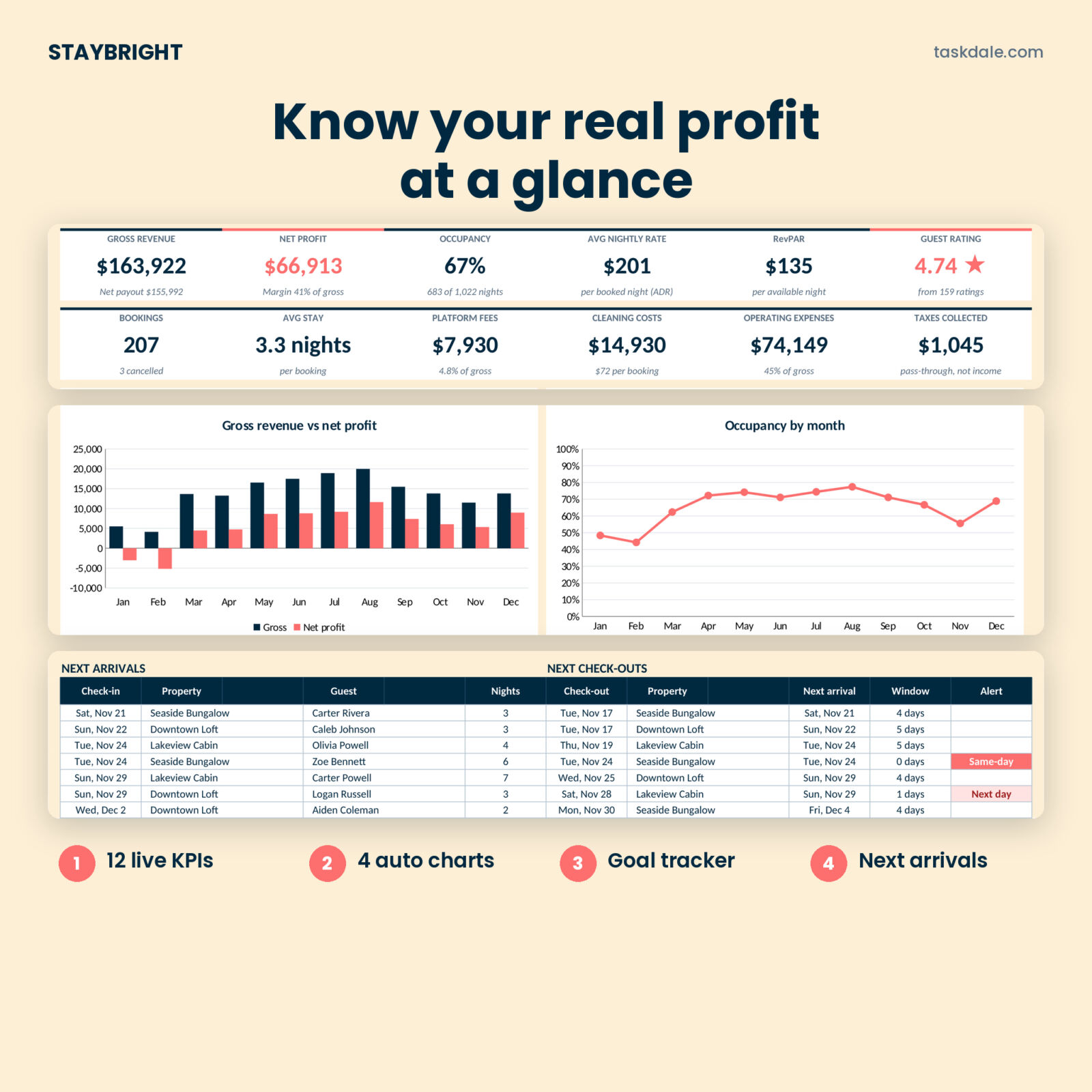
Host dashboard
- 12 KPI cards: gross revenue, net profit, occupancy, average nightly rate (ADR), RevPAR, guest rating, bookings, average stay, platform fees, cleaning costs, operating expenses and lodging taxes collected
- Charts for revenue vs profit, occupancy by month, revenue by channel and profit by property
- Revenue goal progress bar and next arrivals and check-outs
- Filter by one property or all of them
Bookings and calendar
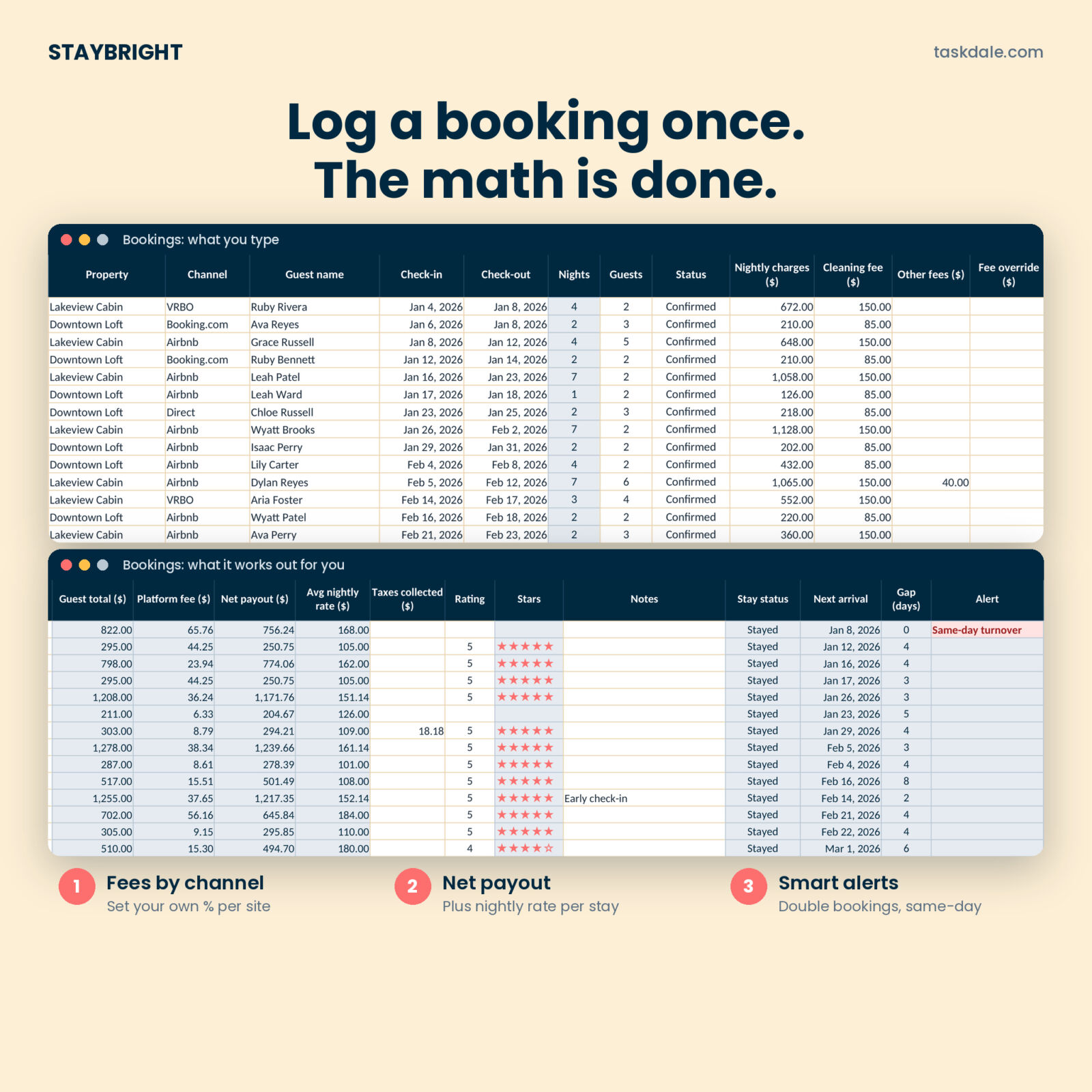
- 500-row booking log with dropdowns for property, channel and status
- Platform fee from your own fee % per channel, with a per-booking override
- Alerts for double bookings, wrong dates, same-day turnovers and next-day arrivals
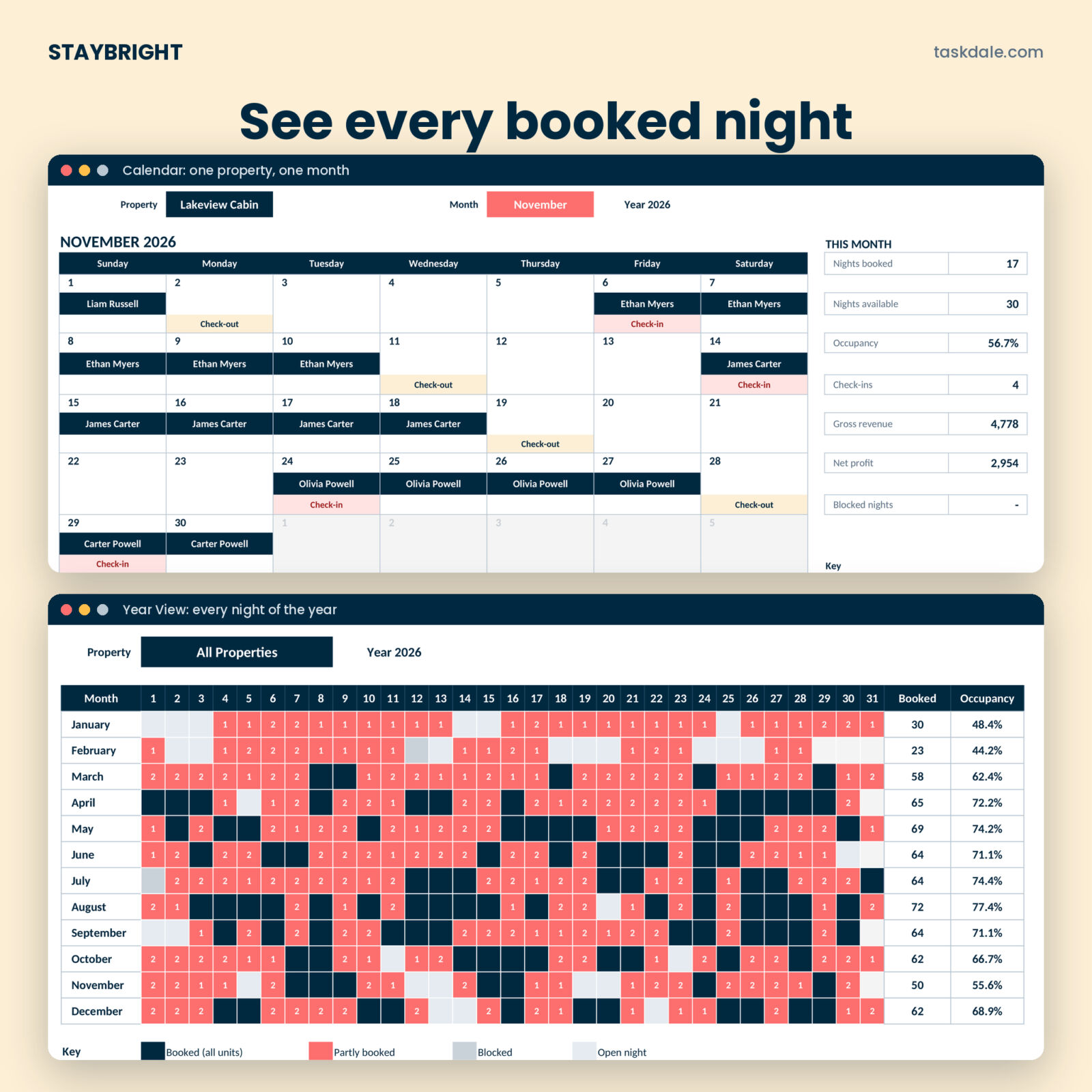
- Monthly booking calendar with guest names, check-ins and check-outs
- Year View heatmap of all 365 nights
Cleaning and operations
- 600-row cleaning log with Scheduled, Done and Paid status
- Cleaner Pay summary with a month-by-month grid and chart
- Supplies tab with par levels and reorder points that build your shopping list
- Maintenance log with priority, status and days open
- Printable, editable turnover cleaning checklist
Money and reports
- 1,000-row expense log with 19 editable categories and a Shared option that splits costs across listings
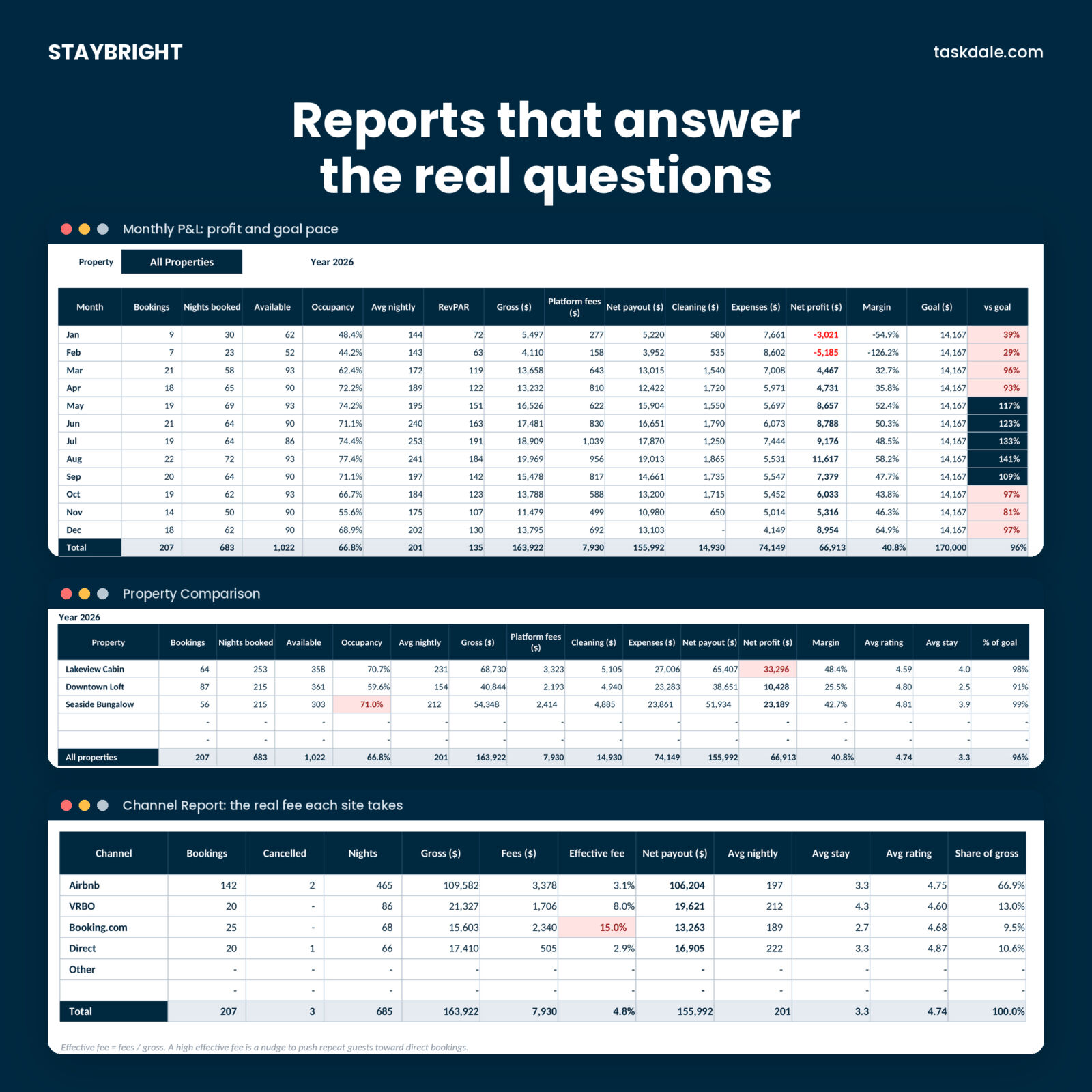
- Monthly P&L with profit margin and pace against your goal
- Property Comparison and Channel Report (see the real fee each booking site takes)
- Tax-Time Summary by property and category, plus nights rented and owner nights
What is included
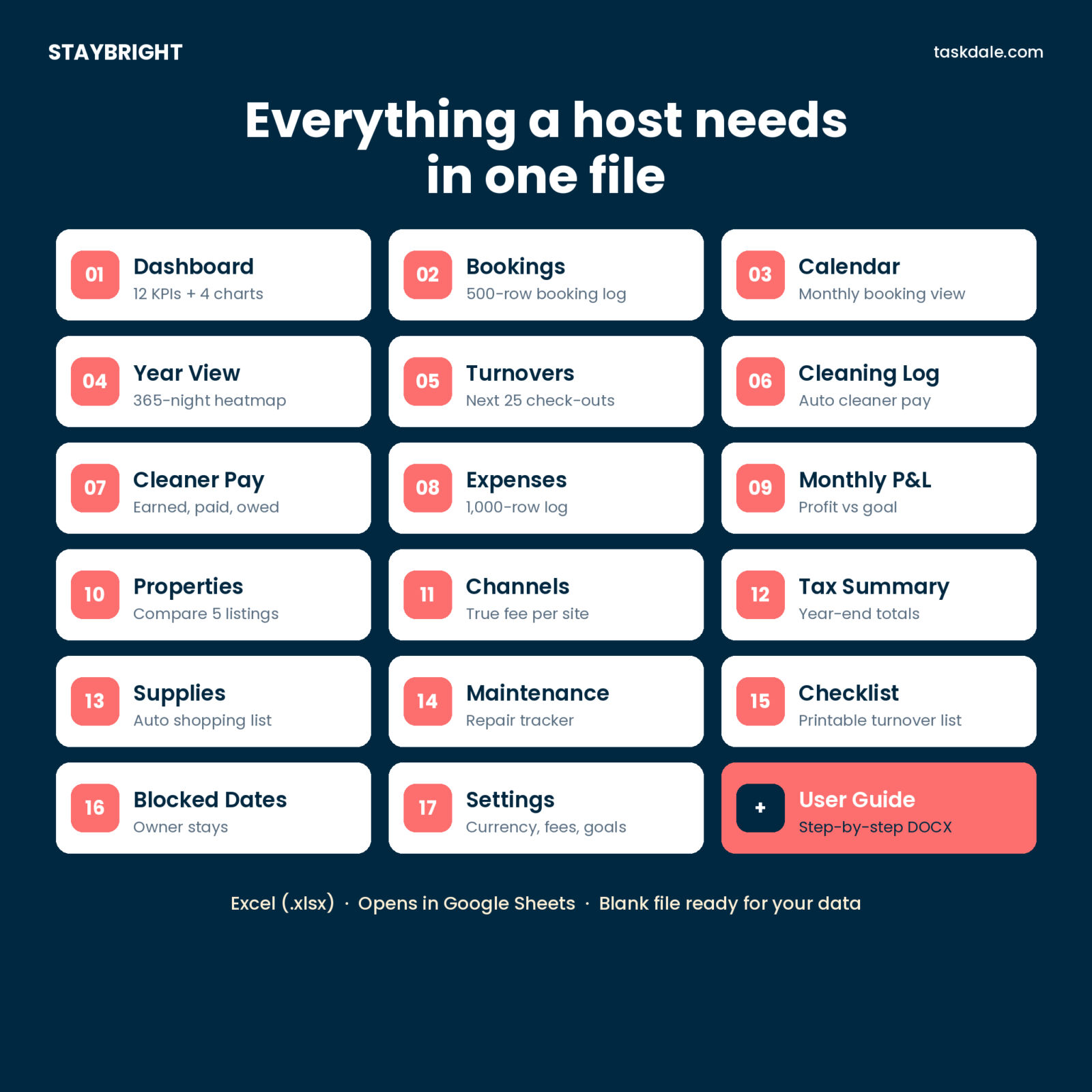
- Staybright STR Host Tracker (.xlsx) with 18 tabs: Start Here, Dashboard, Bookings, Calendar, Year View, Turnovers, Cleaning Log, Cleaner Pay, Expenses, Monthly P&L, Properties, Channels, Tax Summary, Supplies, Maintenance, Checklist, Blocked Dates and Settings
- User Guide (.docx) with setup steps, how every number is worked out, troubleshooting and FAQ
How it works
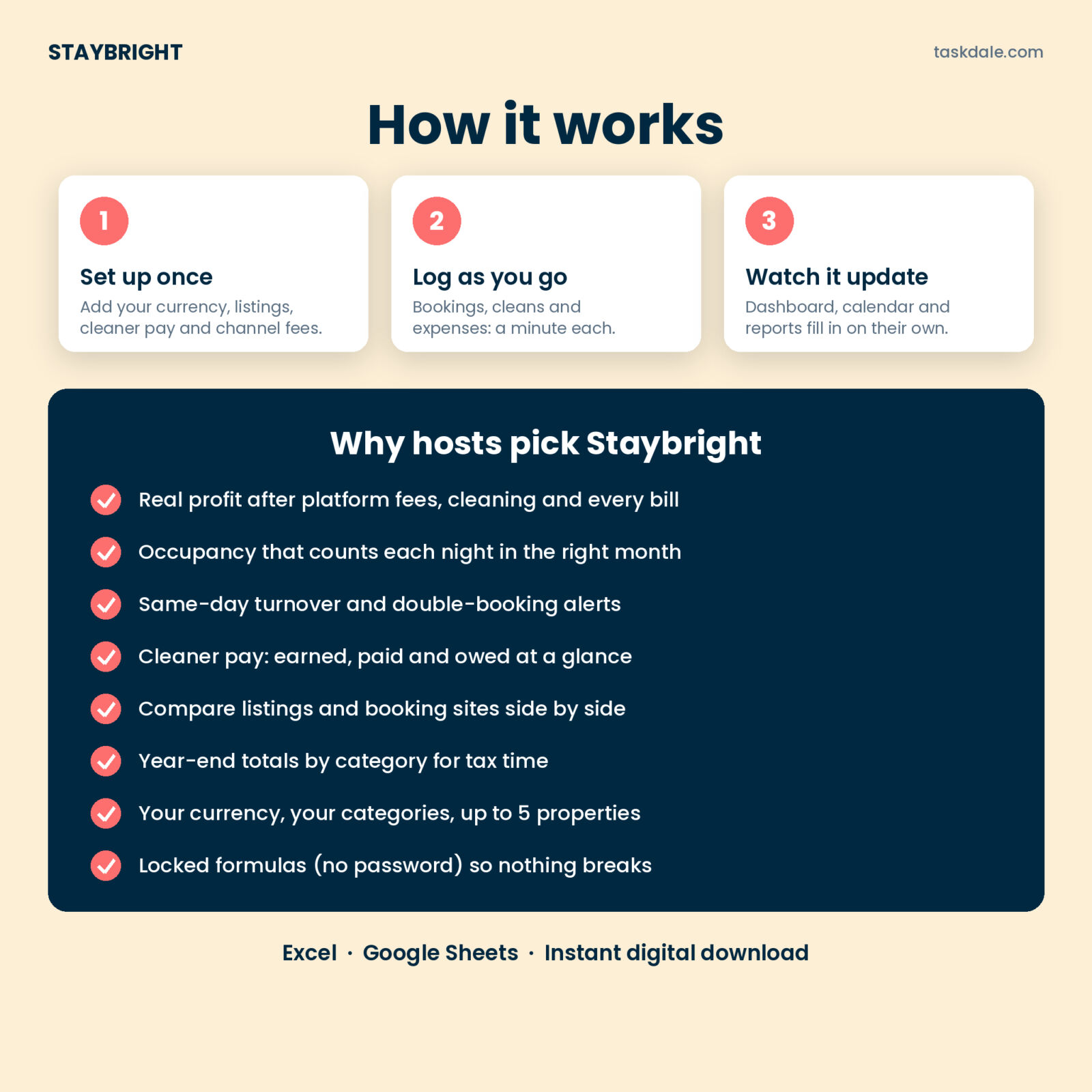
- Set up once. On Settings, add your currency symbol, property names, listing dates, cleaner pay per turnover, revenue goals and channel fees.
- Log as you go. Add each booking, each clean and each bill. About a minute each.
- Read your numbers. The dashboard, calendar, turnover planner and reports update on their own.
File format and software
- Excel workbook (.xlsx). Works in Microsoft Excel 2019, 2021 and Microsoft 365 on Windows and Mac
- Google Sheets: upload the file to Google Drive and open it with Google Sheets
- No macros, no add-ons, no subscription
- Formula cells are locked with no password, so they can’t be overwritten by accident
Customization
Use any currency: type the symbol once on Settings and every money label and KPI follows it. Rename expense categories, payment methods, supply areas, cleaners and channels. Change the tracking year to look back at older years; rows from every year stay in the logs.
Digital download
This is a digital product. Nothing is shipped. Your files are ready to download right after checkout from your order confirmation and your account page.
Real situations where hosts use it
- Checking whether a slow February still covered the mortgage, the lease and the cleaner
- Seeing that one booking site takes a much bigger cut than the others, and pushing repeat guests to book direct
- Spotting a same-day turnover next Saturday and booking the cleaner early
- Paying three cleaners at the end of the month without digging through texts
- Handing the Tax Summary to your preparer instead of a shoebox of payout reports
FAQ
Does this Airbnb spreadsheet work in Google Sheets?
Yes. Upload the .xlsx to Google Drive and open it with Google Sheets. It uses only standard formulas. Charts are redrawn in Sheets’ own style.
Does it connect to my Airbnb account?
No. You enter your bookings yourself, which keeps your data private and the file free of subscriptions.
How many properties can I track?
Up to five listings in one workbook, each with its own results and a combined view.
Can I track VRBO and direct bookings too?
Yes. Airbnb, VRBO, Booking.com, Direct and Other are set up, and you can rename them or add one more.
How are cancellations handled?
Set the status to Cancelled and enter only what you kept. Cancelled nights don’t count toward occupancy.
Does it work on a Mac?
Yes, in Excel for Mac or in Google Sheets in any browser.
Is the Tax Summary tax advice?
No. It organizes your records by property and category so your tax professional has what they need.
License
Personal or single-business use only. Please don’t resell, share or redistribute the files.

Reviews
There are no reviews yet.