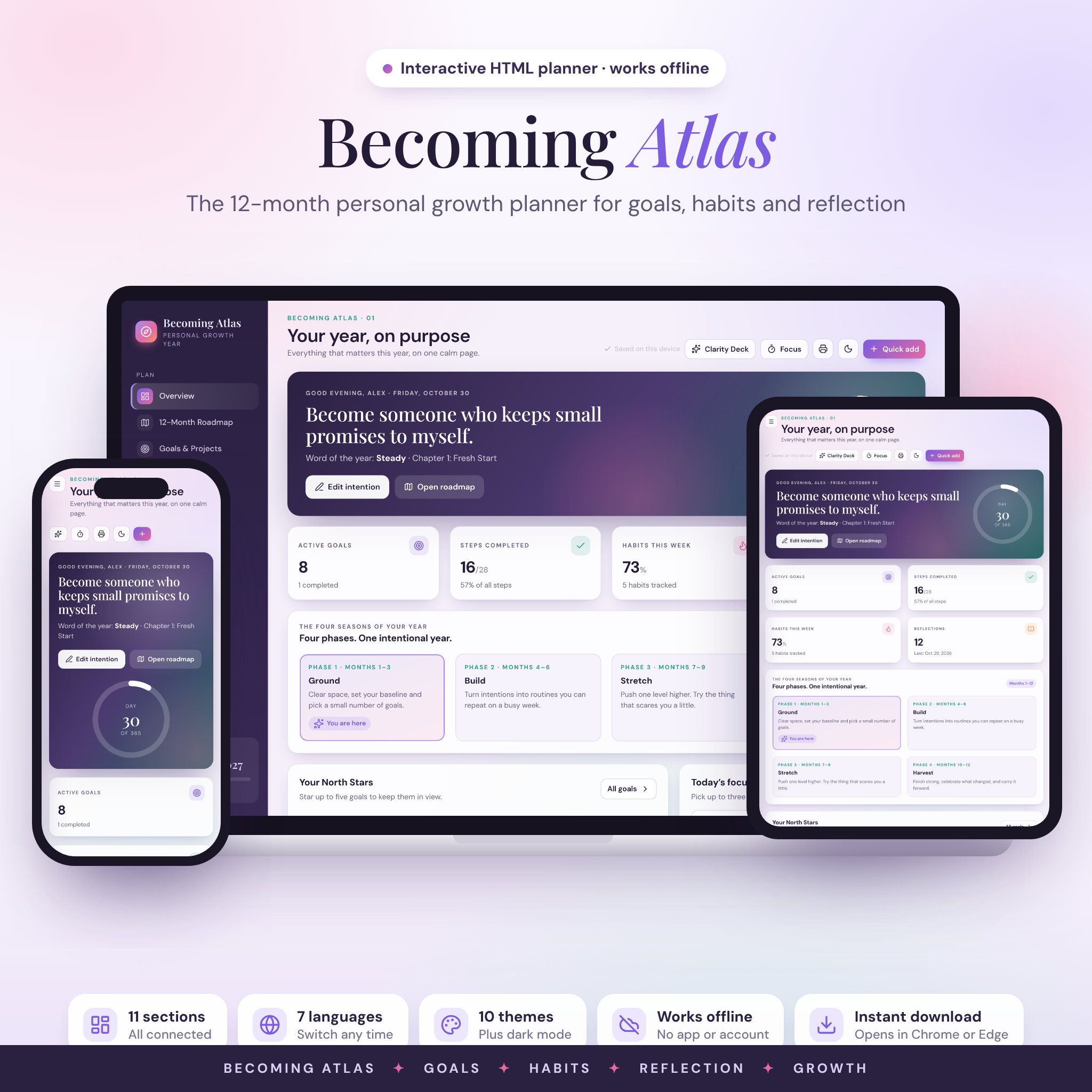



Becoming Atlas is a goal planner and habit tracker that opens right in your web browser. It turns one big year into twelve small chapters, then keeps your goals, daily habits, reflections and weekly reviews connected on one calm dashboard. You tick a step, and the goal’s progress bar moves. You log a habit, and your streak, weekly score and charts update on their own. There’s nothing to install and no account to make.
What this goal planner does for you
Most planners give you pages. This one gives you a system that does the counting. Here is what changes when you use it:
- You always know what to do next. The dashboard suggests your next small step, like breaking a goal into steps or doing this week’s review.
- You see progress without adding it up. Goals, chapters, habits and savings jars all calculate their own percentages.
- Your year has a shape. Four phases (Ground, Build, Stretch, Harvest) and twelve monthly themes stop you from trying to fix everything in January.
- Your data stays private. Everything saves inside your own browser. Nothing gets uploaded.
Who it’s for
It suits anyone starting a fresh chapter: a new year, a birthday, a move, a career change or a reset after a rough season. It works well for beginners because every page explains itself, and you can load example data to see a fully filled-in planner before you start. If you’ve ever given up on a paper planner by March, the weekly review and flexible roadmap are built for you.
What’s included
- Becoming Atlas planner (one interactive HTML file)
- 18-page user guide (Word .docx) with setup steps, a tour of every section, tips, troubleshooting and FAQ
- License and terms (.txt)
11 connected sections
- Overview dashboard: day count and year ring, stat tiles, the four phases, up to five North Star goals, today’s focus list, today’s habits and smart next steps.
- 12-month roadmap: twelve monthly chapters with a theme, intention, milestones, linked goals, a month-end reflection and a star rating.
- Goals and projects: life area, priority, status, target date, a “why it matters” note and step-by-step checklists. Switch between grid, list and board views, and search or filter.
- Daily habit tracker: a weekly tick grid, weekly targets from 1 to 7 days, current and best streaks, and a 12-week heatmap.
- Reflection journal: mood, gratitude, a win, a lesson, what you’re releasing and what you’ll carry forward, plus free writing with a fresh prompt.
- Weekly review: star rating, energy level, four quick questions and a trend chart.
- Wheel of Life: score eight life areas from 1 to 10 and compare your first and latest check-ins on a radar chart.
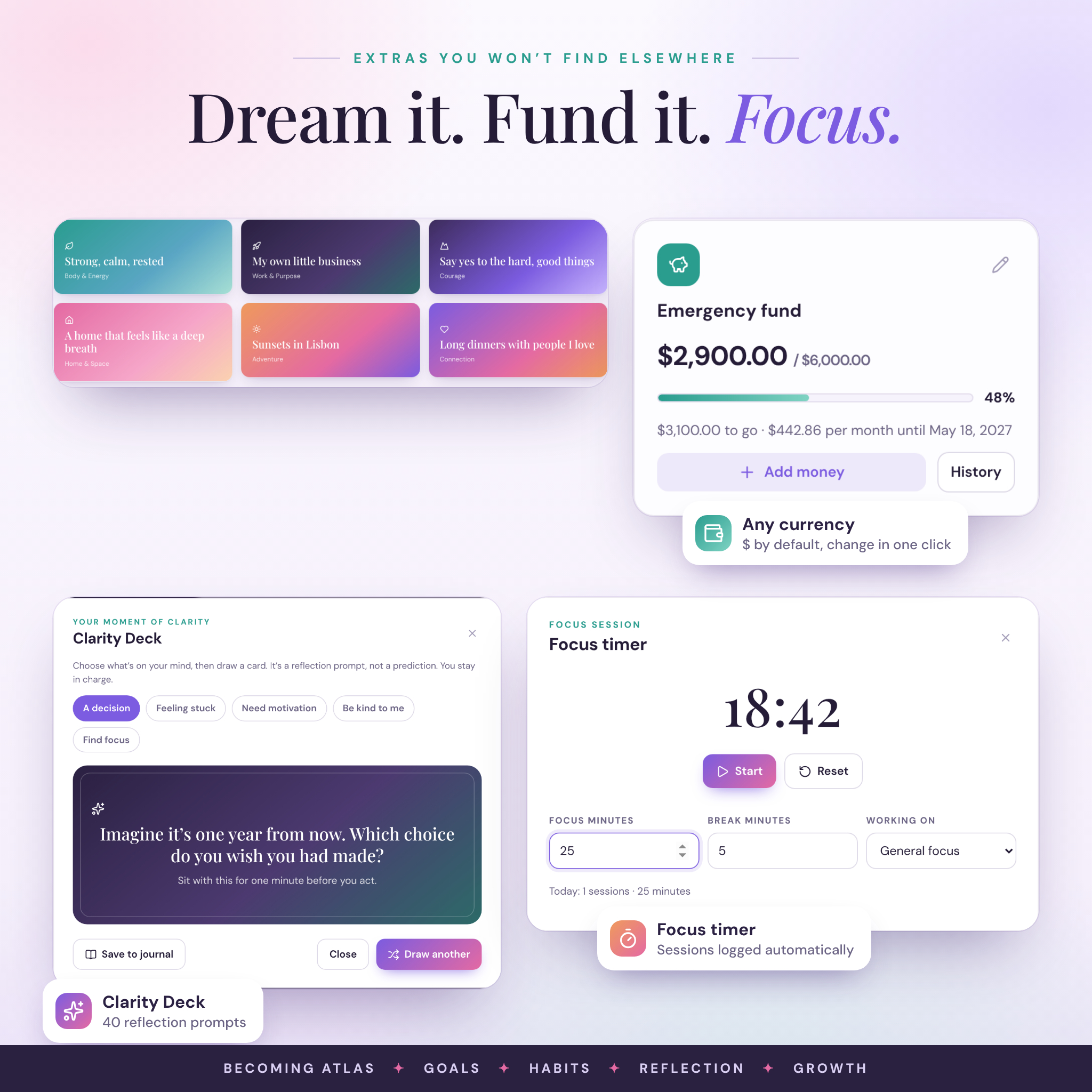
- Vision board: add your own photos (resized for you) or colorful affirmation cards.
- Money goals: savings jars with deposits, withdrawals, progress and the amount you need each month to hit your date.
- Insights: automatic charts for habit score by week, mood trend, goals by life area and chapter progress.
- Settings and backup: name, start date, language, currency, week start, themes, dark mode, backup and restore.
Extras that come with it
- Clarity Deck: 40 reflection prompts in five topics for decisions, feeling stuck, motivation, self-kindness and focus. Save any card to your journal.
- Focus timer: a Pomodoro-style timer that logs your focused minutes against a goal.
- Quick add: one button to add a goal, habit, reflection, review, check-in, savings jar, vision card or task.
- 10 color themes plus dark mode, from Lavender Dusk to Calm Graphite.
- 7 interface languages: English, Spanish, French, German, Italian, Portuguese and Dutch.
How the life planner works
- Download and unzip the file.
- Double-click the HTML file to open it in Google Chrome or Microsoft Edge.
- Add your name, the date your year starts and your intention for the year.
- Add a few goals and habits, then come back each day to tick things off.
- Export a backup from Settings now and then. The planner reminds you when one is due.
File formats and software
- Format: one HTML file, plus a DOCX guide. Delivered as a ZIP.
- Software: a web browser. Tested in Google Chrome and Microsoft Edge on desktop and laptop computers. The layout also adapts to tablet and phone screen sizes.
- Works offline once downloaded. Fonts and icons are built into the file.
- Print any page or save it as a PDF from your browser. Letter and A4 both work.
Customize it
Rename any of the twelve chapters, start your year on any date, choose Monday or Sunday as the first day of the week, and pick your theme and language. Every money value reads from one currency setting, with $ as the default. Choose from the list or type your own symbol, put it before or after the amount, and show or hide cents.
Digital download
This is an instant digital download. No physical item ships. Your planner data is saved in the browser you use, on your device. It doesn’t sync between devices on its own, so use Export backup and Import backup to move it.
Real ways people use it
- A New Year reset: set an intention, score your Wheel of Life, and pick three goals for the first chapter.
- Training for a first 5K, with the run plan as goal steps and a “move 5 days a week” habit.
- Saving for a trip or an emergency fund, with a savings jar that shows the monthly amount needed.
- Starting a side business: launch steps on the board view and focus sessions logged against the goal.
- A Sunday ritual: weekly review, a short journal entry and one priority for the week ahead.
FAQ
Do I need internet access?
No. Once downloaded, the planner works offline.
Is there a subscription?
No. You pay once. There’s no account and no monthly fee.
Can I use it on my phone or iPad?
The layout adapts to phone and tablet screens, but the planner is tested in Chrome and Edge on computers, and that’s where we recommend you use it.
Does it sync between devices?
Not automatically. Export a backup on one device and import it on the other.
Can I start in the middle of the year?
Yes. Pick any start date and all twelve chapters follow it.
Can I use my own currency?
Yes. One setting changes every money value in the planner.
Is this a GoodNotes planner?
No. It’s an interactive HTML planner that runs in your browser, so it calculates progress, streaks and charts for you.
Personal use license. Please don’t share or resell the files. Becoming Atlas is a planning and reflection tool, not medical or financial advice.
Reviews
There are no reviews yet.