



BizBloom Freelance HQ is an all-in-one freelancer business spreadsheet that runs the business side of your work in one connected workbook: clients, projects, tasks, time, invoices, income, expenses, pricing and reports. Type each detail once and every tab updates for you. The live dashboard shows your profit, unpaid invoices, upcoming deadlines and tax set-aside at a glance.
It replaces the pile of separate trackers most freelancers juggle, so you never copy client names between files or rebuild totals at tax time.
What this freelancer business spreadsheet does for you
- Know where you stand every day. The dashboard shows income, expenses, net profit, outstanding and overdue invoices, active clients, billable hours and your progress toward an annual income goal.
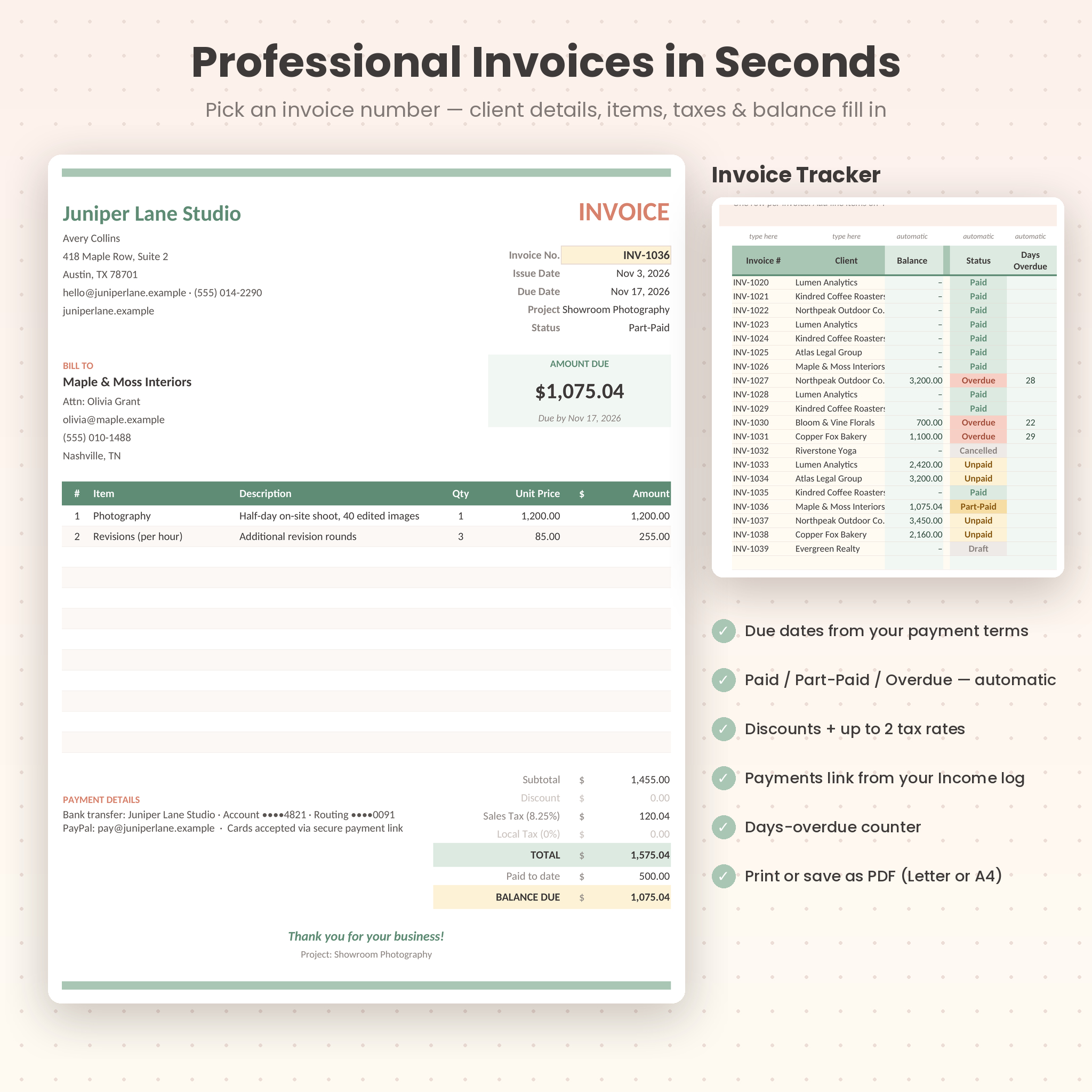
- Get paid faster. Invoices update to Paid, Part-Paid or Overdue on their own and count the days late, and the Dashboard lists the six most urgent ones.
- Send professional invoices in seconds. Choose an invoice number and the print-ready invoice fills in your details, the client’s details, line items, discount, taxes, payments and balance due.
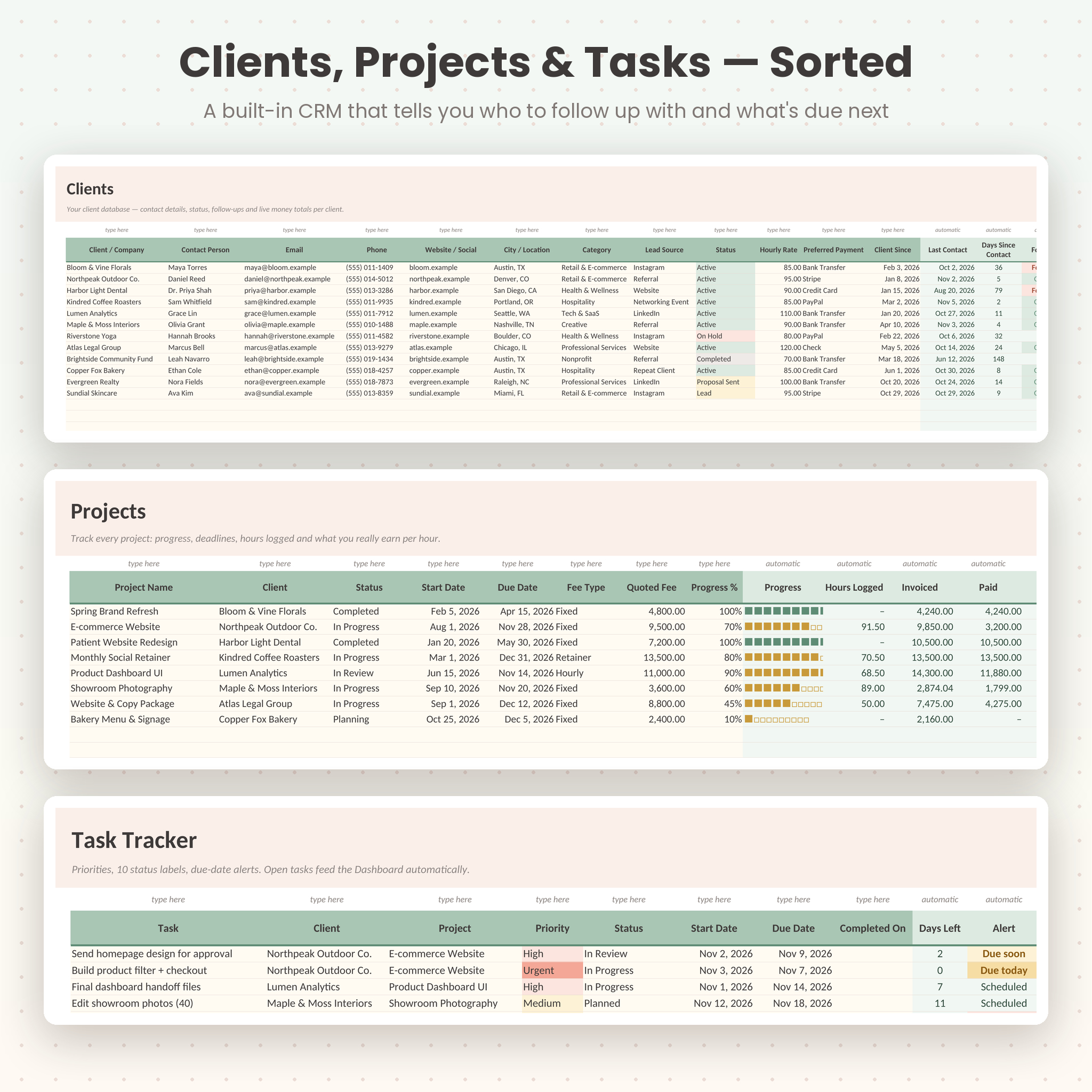
- Stay on top of clients. A built-in client CRM tracks status, contact history and balances, and flags clients you haven’t contacted lately.
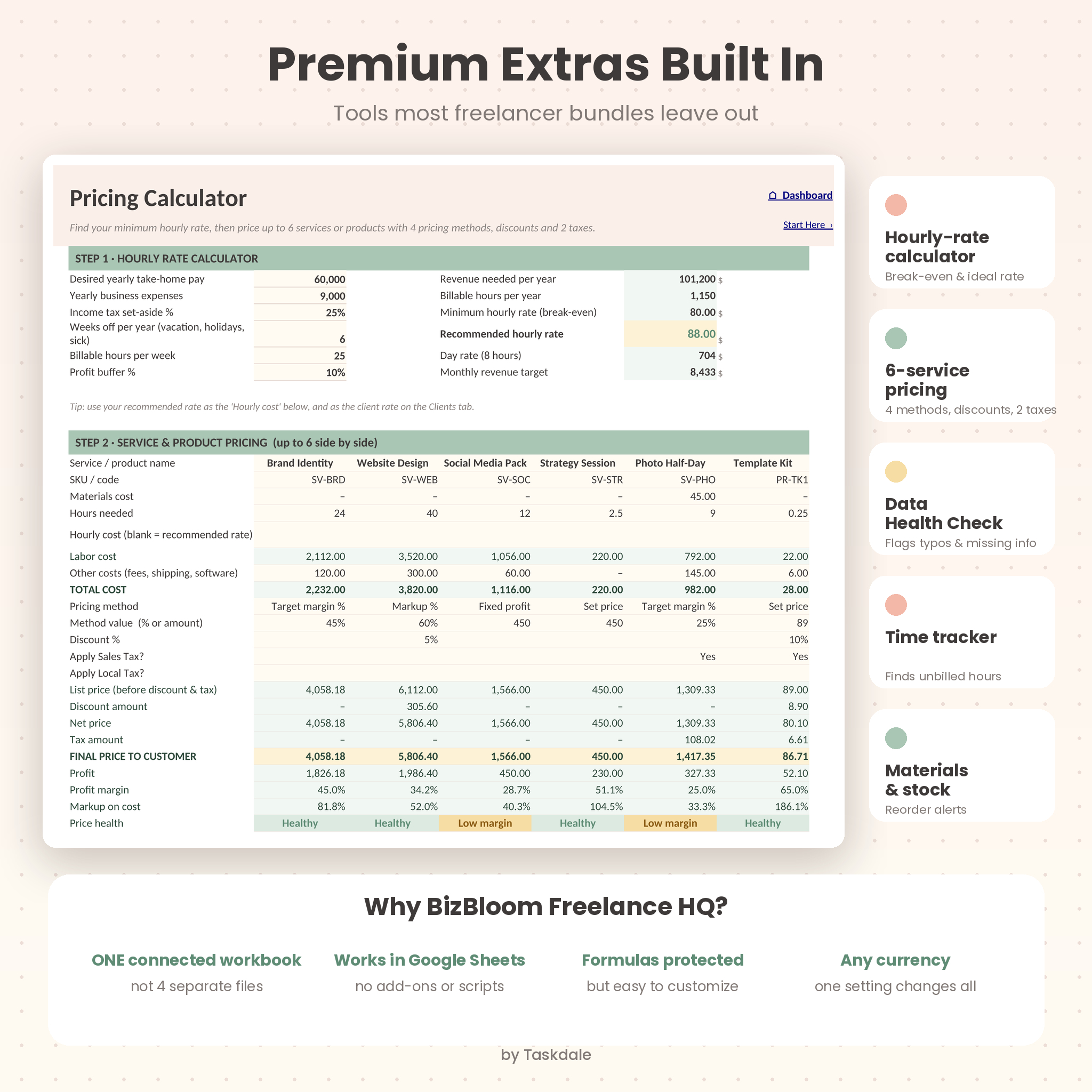
- Price with confidence. An hourly rate calculator works out your break-even and recommended rate, then prices up to six services or products side by side.
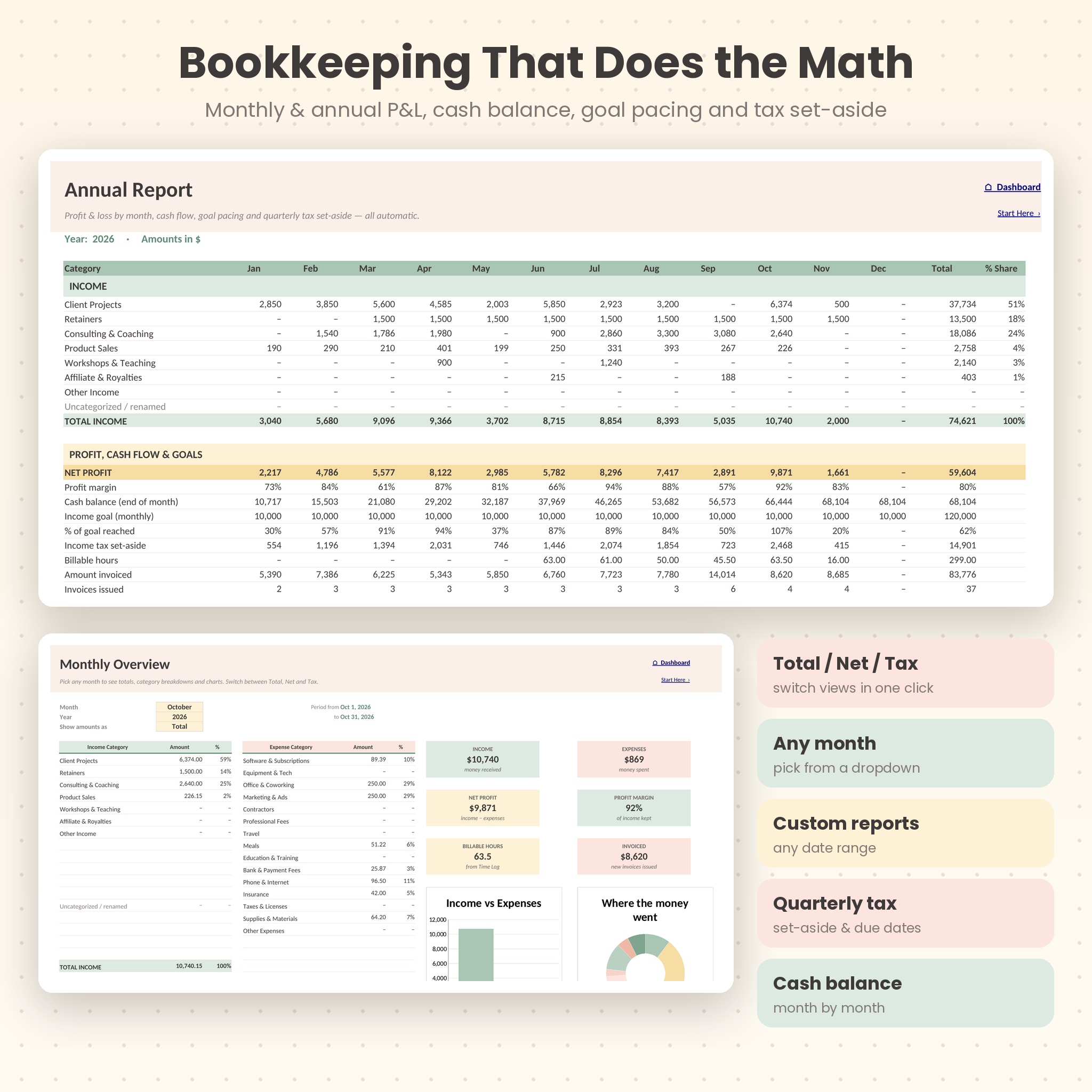
- Be ready for tax time. Monthly and annual profit & loss, tax portions, deductible expenses, missing-receipt reminders and a quarterly income-tax set-aside.
Who it’s for
Freelancers, consultants, coaches, designers, writers, photographers, virtual assistants, social media managers, developers and small service businesses. It also suits makers who sell products alongside services. Beginners are welcome: you type in the cream cells and pick from dropdowns, and the formulas do the rest.
What’s included
- BizBloom Freelance HQ workbook (.xlsx): 18 connected tabs, clean and ready for your data
- Illustrated user guide (DOCX): setup, every tab step by step, customizing, troubleshooting and FAQ
The 18 tabs
- Start Here: 5-minute quick start, clickable tab directory and color legend
- Dashboard: 8 KPI cards, income goal bar, cash-flow and expense charts, unpaid invoices, upcoming tasks, follow-ups, top clients, invoice status and a Data Health Check
- Settings: business profile, currency symbol, two tax rates, payment terms, goals and every dropdown list
- Clients: client CRM with last contact, follow-up flag and totals invoiced, paid and due (200 clients)
- Projects: progress bars, deadlines, hours logged and your effective hourly rate (100 projects)
- Tasks: 4 priority levels, 10 status labels and due-date alerts (500 tasks)
- Comm Log: calls, emails and meetings with next actions and follow-up reminders
- Time Log: start/end or manual hours, billable amounts at each client’s rate, and unbilled-hours alerts
- Invoices and Invoice Items: invoice register with discounts, two taxes, automatic status and days overdue (300 invoices, up to 12 lines each)
- Invoice Maker: printable, branded invoice that fits on one Letter or A4 page
- Income and Expenses: bookkeeping with categories, payment methods, tax portions, deductible and receipt flags (1,000 rows each)
- Monthly View: any month with a Total / Net / Tax switch and charts
- Annual Report: 12-month P&L, cash balance, goal pacing, billable hours and quarterly tax set-aside
- Custom Report: any date range with a tax-time summary and top clients
- Pricing: hourly rate calculator and 6-service pricing with 4 pricing methods
- Materials: supplies and stock levels with reorder alerts and stock value
How it works
- Set up once. Add your business details, currency, taxes, payment terms and income goal on Settings, then edit the category and service lists.
- Add clients and projects. Their names appear in every dropdown.
- Invoice and record money. Add invoices and line items, then log payments and expenses. Link a payment to an invoice number and the invoice updates itself.
- Watch it grow. The Dashboard, Monthly View, Annual Report and Custom Report refresh as you work.
Why choose BizBloom over other freelance templates?
- One connected workbook, not four separate files. Clients, invoices, time and bookkeeping all talk to each other.
- Data Health Check. It flags typos, unknown invoice numbers, duplicate clients, missing receipts and hours you haven’t billed yet.
- Nothing goes missing. If you rename a category, older entries show under “Uncategorized / renamed” instead of silently dropping out of your totals.
- Protected formulas (no password) and input limits that stop typos from breaking your numbers.
- Calm, modern design in soft sage, peach and butter tones that is easy to read every day.
File format and software requirements
- Format: Microsoft Excel workbook (.xlsx) plus a DOCX user guide
- Google Sheets: upload to Google Drive and choose File › Save as Google Sheets. Formulas, dropdowns, charts and colors carry over. Tested in Google Sheets.
- Also tested in LibreOffice Calc
- Standard spreadsheet formulas only: no macros, scripts or add-ons
Customization
Change the currency symbol once and every money value follows, so it works with $, €, £, R, ₦, A$ or any currency. You can rename the two taxes (Sales Tax, VAT, GST), edit up to 12 income categories, 20 expense categories and 20 services, set your payment terms, follow-up days and low-margin warning, and switch the tracking year at any time. Sheets are protected without a password, so you can also change colors and layout.
Instant digital download
This is a digital product and nothing physical will be shipped. Your files are available to download right after purchase. Sample data in the product images is fictional and shown for illustration only.
Real-life ways to use it
- A brand designer tracks three retainers and five one-off projects, invoices from the Invoice Maker and sees which client is 20 days late.
- A consultant logs billable hours each day, spots 12 unbilled hours on the Dashboard and adds them to the month-end invoice.
- A photographer prices a half-day shoot with the Pricing tab, includes sales tax and keeps print supplies stocked with reorder alerts.
FAQ
Do I need Microsoft Excel?
No. You can use it free in Google Sheets by uploading the file to Google Drive and saving it as a Google Sheet. It also opens in LibreOffice Calc.
Can I use my own currency and tax?
Yes. Type any currency symbol on Settings and rename or set two tax rates, or leave them at 0%.
How many clients and invoices can I track?
200 clients, 100 projects, 500 tasks, 300 invoices with 1,000 line items, and 1,000 rows each for income, expenses and time entries.
Can I print or email invoices?
Yes. Choose an invoice number on the Invoice Maker, then print or save it as a PDF and attach it to an email.
Is it beginner friendly?
Yes. Color-coded cells show you where to type, dropdowns keep data tidy, and the illustrated guide walks through every tab.
Can I use it for more than one year?
Yes. Change the tracking year on Settings to view any year, or start a fresh copy each January.
Is this tax or accounting advice?
No. It is an organizing and reporting tool. The tax set-aside is an estimate based on the percentage you choose.
License
© Taskdale. For personal use or use within one business. Please don’t resell, share or redistribute the files, edited or unedited.
Reviews
There are no reviews yet.